Desert Online General Trading LLC
Dubai, United Arab Emirates
Desert Online General Trading LLC
Dubai, United Arab Emirates




🚀 Power-packed mini PC that means business and style.
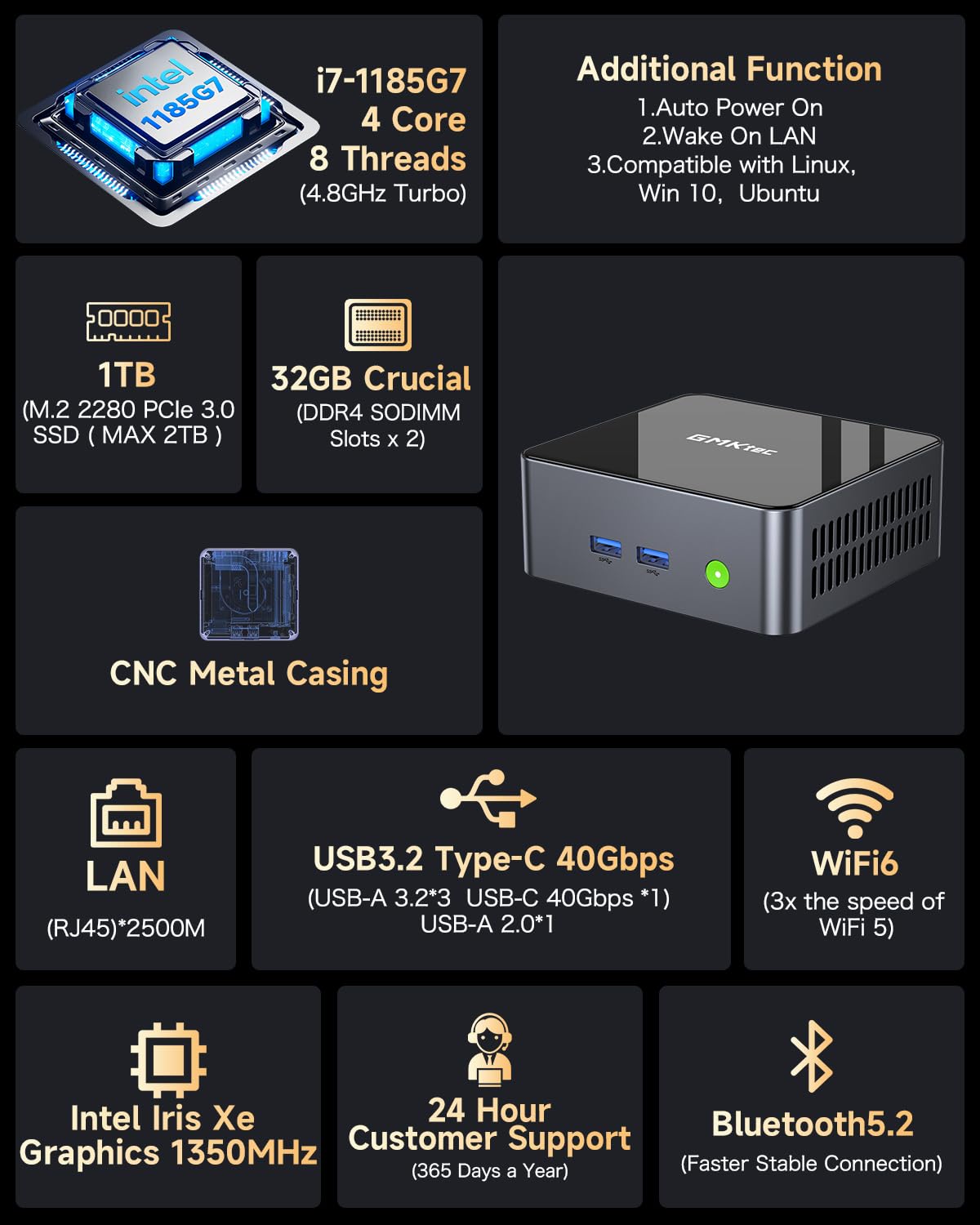
The GMKtec M2 Pro S Mini PC features an 11th Gen Intel Core i7-1185G7 processor clocked up to 4.8 GHz, 32GB DDR4 RAM, and a 1TB NVMe SSD. It supports triple 4K UHD displays, WiFi 6, Bluetooth 5.2, and 2.5Gbps Ethernet for ultra-fast connectivity. Compact and energy-efficient, it’s designed for professionals demanding high performance in a sleek, eco-conscious package.


| Screen Resolution | 4096 x 2304 |
| Max Screen Resolution | 3840 x 2160 pixels |
| Processor | 4.8 GHz core_i7 |
| RAM | 32 GB DDR4 |
| Memory Speed | 4.8 GHz |
| Hard Drive | 1 TB M.2 2280 NVMe(PCIe3.0)/ M.2 2242 SATA |
| Graphics Coprocessor | Intel Iris Xe 1400MHz |
| Chipset Brand | Intel Iris Xe 1400MHz |
| Card Description | Integrated |
| Graphics Card Ram Size | 32 GB |
| Wireless Type | 2.4 GHz Radio Frequency, 5 GHz Radio Frequency, 5.8 GHz Radio Frequency, 802.11ax, Bluetooth |
| Number of USB 2.0 Ports | 2 |
| Number of USB 3.0 Ports | 4 |
| Brand | GMKtec |
| Series | M2Pro S |
| Item model number | M2 Pro |
| Hardware Platform | PC |
| Operating System | 11 Pro |
| Item Weight | 2 pounds |
| Product Dimensions | 5.2 x 4.92 x 2.28 inches |
| Item Dimensions LxWxH | 5.2 x 4.92 x 2.28 inches |
| Color | Black |
| Processor Brand | Intel |
| Number of Processors | 4 |
| Computer Memory Type | DDR4 SDRAM |
| Flash Memory Size | 32 GB |
| Hard Drive Interface | PCIE x 16 |
| Hard Drive Rotational Speed | 7200 RPM |
| Batteries | 1 Lithium Metal batteries required. |
J**N
Outstanding Performance and Resources For a Mini Computer
The media could not be loaded. GMKTEC K9 Mini ComputerBASIC SPECS:Intel Core Ultra 5 125H up to 4.5Ghz 14 Core 18 threads.Intel Arc Graphics Meteor Lake IGPU Enhanced Graphics32GB of DDR 5 5600 Dual channel RAM configured in 2 x 16GB laptop sized modules.(Upgradeable to 96GB)M.2 Lexmar NVMe PCIe 4.0 1Tb SSD drive with heat sink. (Upgradeable to 4Tb in two NVMe slots.)2 x 2.5 Gigabit LAN PortsOne HDMI and one Display Port video outUSB 3.2 10Mbs x 4 (2 in front-2 in back)USB 4.0 Type CMy set up uses a 30 inch Samsung monitor, and an HP 25 inch monitor each 1920 x 1080 60hz.I use this for business, word processing, internet and audio processing of larger files, typically Wav files 90 to 180 minutes long.(600Mb to 1500Mb)as well as VST virtual instruments and music composition.INSTALLED APPS BY ME:1) ATTO (Disk Benchmark Utility)2) CrystalDiskInfo9_3_1 (Disk Benchmark Utility)3) Office 2021 Pro Plus (Excel Word Power Point etc)4) Firefox (Web Browser)5) Nuance PaperPort Professional.14.5.15168.1450 (Scan and Document App)6) Thunderbird (Email Client)7) WinRAR 6.3 x64 (File Compression and Archiving)8) Stardock Fences (Desktop Organizer)9) VLC (Media Player & More)10) Adobe Audition 3 (Audio Multitrack Recording)11) Virtualbox 7.0.18 (I use a Virtual XP 32 Bit to run archaic 16 Bit Apps)12) 7-Zip (File Compression and Archiving)13) Shadow Protect 3.5.0.3570 (Archaic 20 year old backup software)14) Team Viewer (Remote View Other Computers)15) Auto Hotkey (Script writing tool to automate functions in Windows and in other programs)16) jv16 Power Tools (A Suite of Admin Tools for Registry, Uninstalling, File management, Performance Monitoring, and much more)17) Canon MG600 Printer-Scanner18) Scan Utility From Microsoft19) Speedtest (Utility to test internet bandwidth speed)20) Adobe Acrobat Reader21) Coretemp (CPU Temperature Monitor Utility)22) Macromedia Fireworks MX 2004 (Old Graphics Program)23) Macrium Reflect (Modern Current Backup Software)24) Easeus Partition Manager Free Version 18.5.025) Cubase 5.1 (Older MIDI Music composition software)UNBOXING:5in x 5in x 2in (approx.)120W power supply. (A little bulky but still OK...like a typical laptop power supply)Power supply seems to have adequate head room to power all my peripherals (i.e. mouse / keyboard / External Drives etc.)HDMI cable and mounting bracket included.Upgrading is easy...The top cover pries off. Then 4 screws on each corner allows removal of the chassis fan. (Be careful to note the fan has a power cable that can be inadvertently yanked.)This exposes the NVME and RAM slots.SEE Photo #1 / Photo #2 / Photo #3BOOT TIME AFTER ALL INSTALLS:Initially, boot time from pressing power button to fully loading all processes was 19 seconds. 14 sec to desktop fully revealed.This settled into a consistent 17 seconds and 12 seconds to fully revealed desktop.See Video #1 and Photo #4 / Photo #5BIOS:An interesting BIOS feature that I could not figure out to configure was RAM disk.The high performance of this computer and the large amount and speed of RAM would make a RAM disk likely not worth the effort for most people.Researching RAM disk issues on line shows a significant number of computer enthusiasts with this sentiment.The Power Mode parameter in BIOS on the Advanced tab has 3 settings: Quiet / Balance / PerformanceI chose performance.Other BIOS categories are shown in photos.See Photo #6 / Photo #7CPU THERMAL:My CPU temperatures rarely got above 60C to 65C and on a very few occasions into the 70's.Typical idle temperatures are between 35C and 40C.Fan cooling seems to be dynamic so that fan speed ramp up as temperature rises.My chassis fan never ramped up enough for me to even hear it. I had to open the case to confirm it was spinning at a low RPM.See Photo #8NVME DISK BENCHMARK Lexmark 1TB PCIe 4.0 :I did two benchmark tests with ATTO and CRYSTAL DISK utilities.ATTO scores were slightly lower overall but it is safe to say this drive reads at 4.8 - 5 GB/s and reads at 4.3 to 4.5 GB/sec.This is a reasonable exploit of PCIe 4.0 potential.See Photo #9 / Photo #10PRACTICAL TESTS:To give you an idea of just how fast this computer can be:I have a 2TB NVMe drive in an enclosure as an external drive for computer backups. I use Macrium Reflect backup software. On the USB 4.0 Type C port, my Macrium Reflect backup of this computer took 1 minute and 3 sec to create a 53GB backup image. Keep in mind though that the data transfer here is from an NVMe drive to another NVMe drive on a USB 4 port.I also tried opening 15 Excel spreadsheets at once and they all loaded in less than 10 seconds.GRAPHICS:I do no gamimg so I cant say too much but the Display Port supports 4K @ 144Hz so some gaming is definitely possible. There are certainly sufficient computing resources here for gaming though.I streamed 1080p for long periods with absolutely no problems.CONCLUSION:When travelling (which I do frequently) I used to bring a copy of all desktop files with me on an external drive and then work from a laptop where I would migrate email and internet browser profiles to the laptop and then resync everything from laptop back to desktop when I got home but I can now just bring this computer with me and a small monitor. Furthermore, I used to have a desktop in my office and one in the bedroom. Now I just carry the K9 from room to room as needed since I have keyboards and monitors in both places.With the fast NVMe drive and the huge amount of fast RAM I can't find any downside to this machine. Its performance rivals any desktop that I've ever used and it's portability means that I can pack it up and bring it with me anywhere. There are enough USB Ports to cover peripherals like printers, portable optical drives, hard drive docks etc. It is a completely adequate full desktop replacement..... a mini power house. Whether it is audio or video editing, music composition and multitracking, VST instruments, a gazillion internet tabs opened at once, there are adequate resources to do anything I can think of.I can't think of a downside to this computer with regard to performance. You may need USB extenders to provide clearance when using many peripherals because it can get a little crowded with some ports configured close together but it isn't any worse than what you would find in a laptop.This machine shows an impressive performance for a computer of any size.I am very happy with it and do not regret this purchase.
G**.
This Speedy Little Machine is Perfect
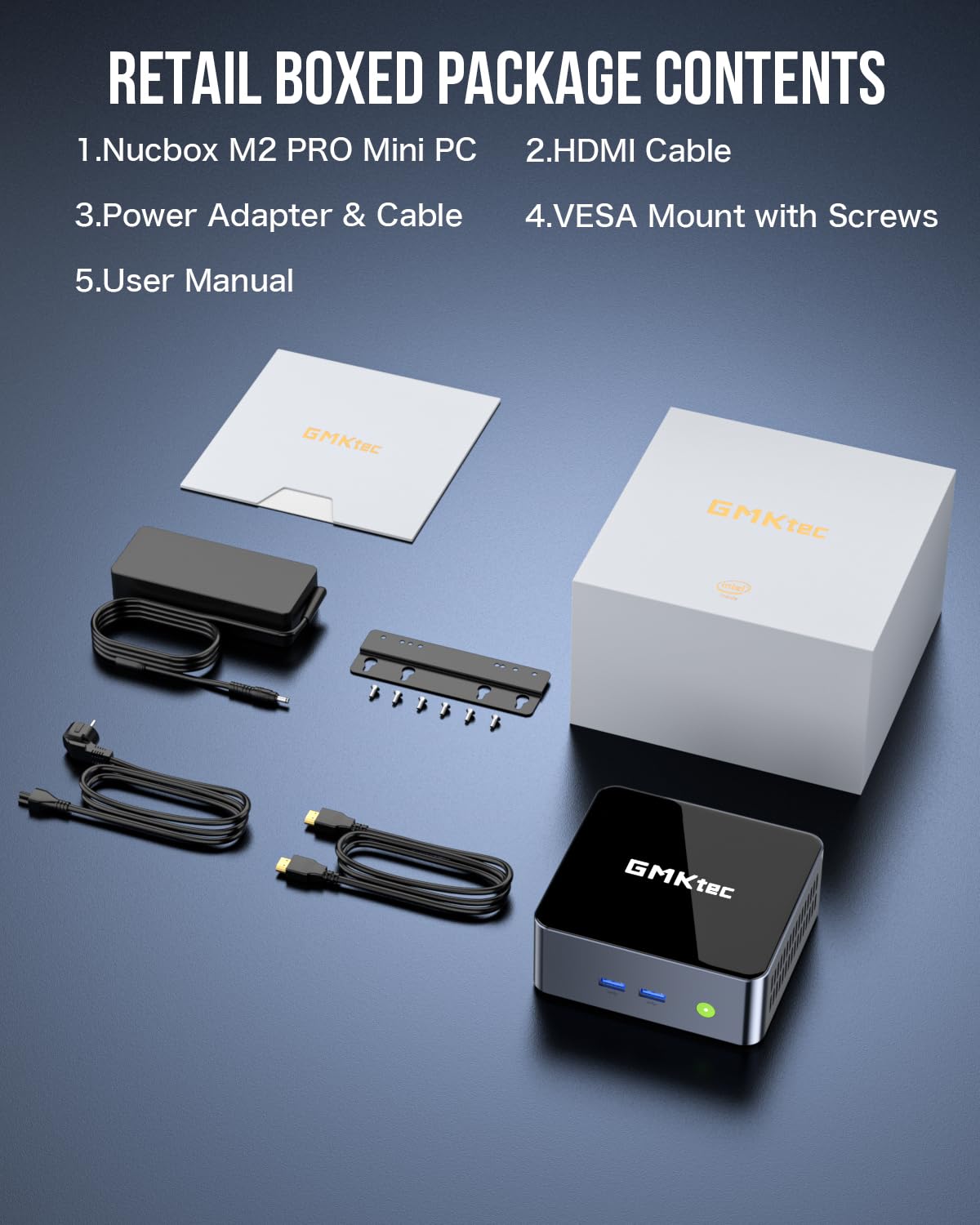
GMKtec found a way to package a powerful machine, with great connectivity, into a cool (literally) and silent little, well-made box. I've been using this as my main computer for about two weeks now (primarily office productivity, software development, and of course some gaming) and these are my initial impressions. TL;DR - This is a great machine, and if you're looking for a mini PC at this price point, you can't go wrong with this.When you unbox the machine, you'll notice how well it's packaged, and that it comes with everything you need, including an HDMI cable and mounting bracket. The device itself is clearly sturdy and well constructed out of a heavy duty aluminum and the venting on the sides and the rear of the machine keep it cool even when under heavy demand. There's plenty of connectivity with USB-A and USB-C, DP and HDMI ports, and 2(!) 2.5gbps(!) ethernet ports.GMKtec built this for speed and they delivered. I ran Geekbench and the results (in the photo) show a single core CPU score of 2198 and a multi core CPU score of 9993. The Intel Ultra 5 processor that's in this shows a standard benchmark of 2026 and 8115, respectively. They've beaten the benchmarks, which put it in line with the i9-11900KF and Ryzen 9 3900XT on the multicore side and i7-12700E on the single-core side. The 32gb of DDR5 memory also helps make this machine feel nimble, with quick loads. The embedded Intel GPU works great for any productivity software and for many games.I also own another older GMKtec machine (which is still running great!), and I bought this one as another one because I was so happy with the first one. I had a question about the BIOS on the first machine and emailed support and quickly received an extremely helpful and detailed response.Whether you're a content creator, office worker, or just a budget-minded consumer, at this price, this little machine can't be beat! If you're on the fence, jump off--you won't regret purchasing this machine.
Trustpilot
1 month ago
4 days ago