

Desert Online General Trading LLC
Dubai, United Arab Emirates
Desert Online General Trading LLC
Dubai, United Arab Emirates

⚡ Dominate every keystroke with speed, style, and stamina.
The Razer BlackWidow Elite Mechanical Gaming Keyboard features ultra-fast Yellow switches with 20% faster actuation, fully customizable Chroma RGB lighting supporting 16.8 million colors, and a durable military-grade metal build rated for 80 million keystrokes. Designed for pro gamers and power users, it includes an ergonomic magnetic wrist rest, dedicated media controls with a digital dial, and USB passthrough for seamless connectivity.

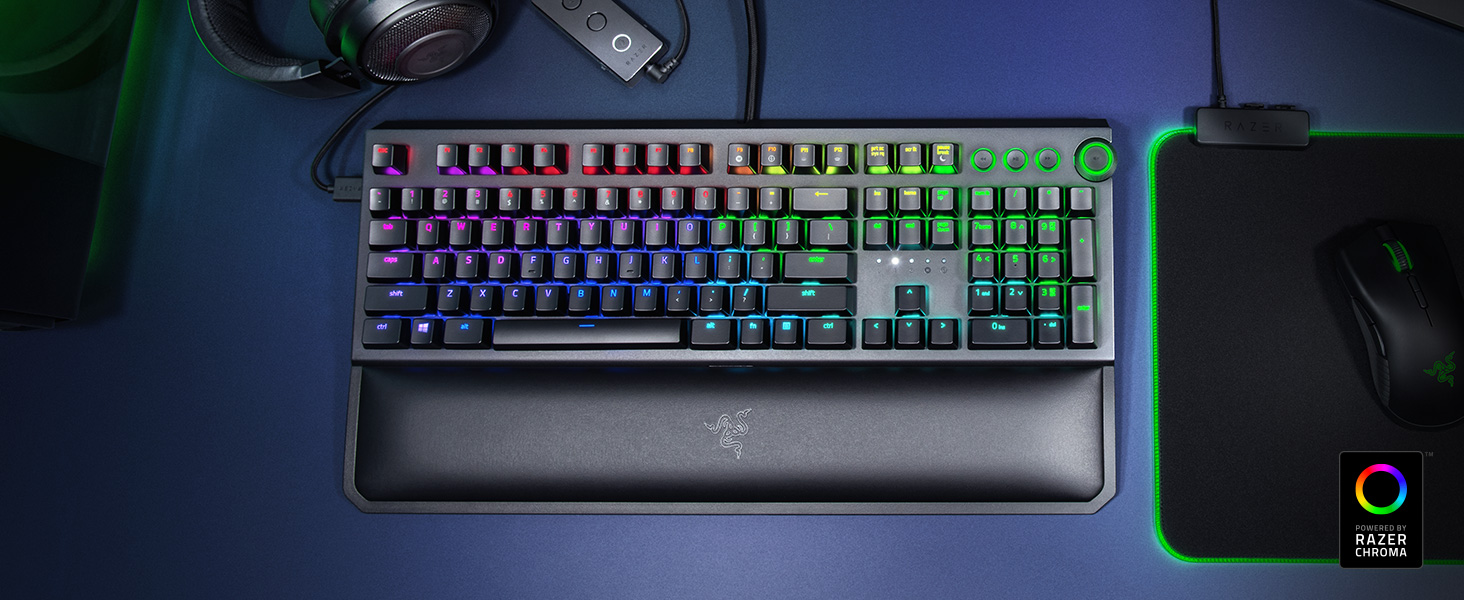


| Number of USB 2.0 Ports | 1 |
| Brand | Razer |
| Series | BlackWidow Elite |
| Item model number | RZ03-02622100-R3U1 |
| Hardware Platform | PC |
| Operating System | Windows 10 |
| Item Weight | 3.73 pounds |
| Product Dimensions | 6.5 x 17.65 x 1.67 inches |
| Item Dimensions LxWxH | 6.5 x 17.65 x 1.67 inches |
| Color | Classic Black |
| Power Source | USB |
| Manufacturer | Razer USA Ltd |
| ASIN | B07K1VXCDR |
| Date First Available | October 16, 2018 |
B**T
Best keyboard I’ve owned.
I have Never owned a mechanical keyboard before this I’ll say I’m glad I spend more and got one, and this one it is extremely nice. The keyboard itself is very comfortable, and the yellow switch version is quiet which is what I wanted there is absolutely no “click” that I was worried about and each button press just feels very confirming even without the resistance of a click. The customizability of this keyboard through the software is exactly what I wanted, you can creat some pretty complicated macros and shortcuts to suit your needs. I’m not crazy about LED but the customizable depth of setting an LED profile is nice, you could spend hours personalizing your keyboard and set Different LED profiles to automatically change in for each game.I couldn’t recommend this keyboard enough, maybe the silent non-clicky yellow switch isn’t for you, you could always get an open mouth obnoxiously loud Switch version, hey whatever you want I’m not here to judge. What I can attest to anybody though is the ergonomics, especially with the magnetic wrist rest, the professional feel to the quality of customizability I was looking for, the heavy and durable feel to the keyboard, those should be enough to really push you into buying this. And for people like myself if you Have never owned a mechanical keyboard before this is worth it.
S**U
A worthy replacement for a previous razer keyboard
I purchased the razer blackwidow elite keyboard with yellow switches, to replace a razer cyanosa membrane keyboard.Upon receiving the keyboard and unboxing it, I was greeted with a keyboard which had two USB connections and a 3.5mm jack. The extra USB connection & 3.5mm jack is for the USB & audio passthrough, which are located on the left side of the keyboard.To setup the keyboard, you will need two free USB ports and a free audio port for the 3.5mm audio connection if you would like to use the audio/USB passthrough as mentioned above.The one feature that I absolutely love are the media controls in the upper right corner. The media controls consist of a previous track, play/pause button, track forward & a combined volume up/down wheel & mute button.I purchased the yellow linear & silent switches, the noise level on these switches are still noisy, but a slightly less "clicky" sound.In addition, the keys are very responsive, if you happen to tap the key and hold it down slightly, it will repeat. This isn't necessarily a con, but something to be aware of, especially if this particular keyboard is your first mechanical keyboard.In other words, it may take some time for you get used to typing on this keyboard, but you will get used to it.This keyboard is customizable. Everything from the keys to the RGB lightning can be customized to your via razer's synapse 3 software.In conclusion, this is a good performing keyboard for the price I paid. I do not regret purchasing it.
T**R
SEE UPDATES! It wasn't the keyboard's fault!
EDITING MY REVIEW!So I thought the D key had quit on me. Turns out Razer Synapse set the D key to a macro for no apparent reason, and even Razer support had no idea that it could have been the issue. I did get a new keyboard, only for the D key to quit working again. Which is how I discovered the auto macro button issue. I've had to fix this issue twice now, but that's an issue with the Razer software, NOT with the keyboard! The keyboard is amazing and I stand firmly by that. The wrist rest is also amazing, way better than any wrist rest I've ever seen or felt before.I loved the keyboard, itself. It's great. But what's NOT great is that the keys quit working shortly after I began using it. I contacted Razer and they're sending me a new one.. not sure why everything from Amazon arrives so defective. If I were you, I'd buy from Razer's website, directly. Great keyboard otherwise though. I particularly love the wrist rest. It's magnetic and comes off extremely easily, if needed. The softest wrist rest I've ever felt. Even my fiance who hates razer products kept boasting about it and wants to get one for himself.
M**H
I love this keyboard
Disclaime: This is my first ever gaming keyboardI knew I wanted a backlit keyboard but didn't know which one to get. After doing some research on which Razer keyboard fit my situation best I decided on the Blackwidow Elite. I know a $100+ keyboard may seem like a crazy idea, but this keyboard is amazing. I purchased the elite with the yellow switches. I wanted a more silent keyboard so the yellow switch was what I went with. I use this keyboard for work but also for gaming. I currently only have a laptop to play games on so I am not the most experienced when it comes to pc gaming, but typing on this thing is so awesome. It's the coolest keyboard I have ever had. I love the customization abilities of the keyboard. I am a big sports fan so being able to customize the color schemes to fit what team colors I am wanting to showcase is super cool. The hand rest is very comfortable and is magnetized. You can move it higher or lower on the bottom of the keyboard to make it the most comfortable for you. If you are going from a typical keyboard like I use at work then this will be a big upgrade. The volume dial is super nice to have. The only complaints I have are that the chord to plug the keyboard into your computer is super thick so if you are trying to hide it, it won't be super easy. The other con is that the play and skip buttons don't light up the icons, only around the buttons. Which is fine, but if they had done that it would have been extra cool. Overall I have no complaints with this keyboard. I love it after the first day and can't wait to figure out how to customize the keyboard with multiple layers!
Trustpilot
3 days ago
1 week ago