
DOWNLOAD THE APP


Customer Services
Copyright © 2025 Desertcart Holdings Limited
DOWNLOAD THE APP

🚀 Elevate your connectivity game with Anker’s sleek 4-port USB hub—because every port counts.
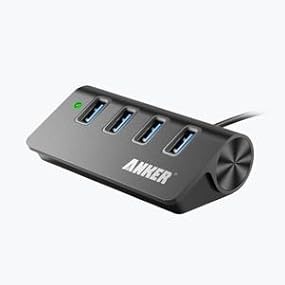
The Anker 4-Port USB 3.0 Hub delivers ultra-fast 5 Gbps data transfer in a durable aluminum unibody chassis. Designed for professionals on the go, it’s compact, portable, and compatible with Mac, Windows, and Linux systems. With included cable and secure mounting strap, it offers a seamless, reliable expansion of your USB ports—perfect for multitasking millennials who demand speed, style, and stability.




| ASIN | B00O0KISQE |
| Best Sellers Rank | #112 in USB Hubs |
| Customer Reviews | 4.6 4.6 out of 5 stars (11,558) |
| Date First Available | September 29, 2014 |
| Is Discontinued By Manufacturer | No |
| Item Weight | 2.88 ounces |
| Item model number | AK-848061075311 |
| Manufacturer | Anker |
| Product Dimensions | 3.35 x 1.77 x 1.06 inches |
A**R
An Awesome Quality Hub For Those Who Need A Few Extra Ports!
I am a fan of Anker products, because it seems like everything I buy from them, is made of quality. I own both a Anker 16,000 MAH battery charger, and an Anker 5-port wall charger, both work great. One of the sad things about my Acer notebook from 2012, is that the company decided to only give me two USB 3.0 ports, the other two are only USB 2.0 ports. They obviously chose to do this for reasons of cost reduction, since USB 3.0 technology was still brand new then. I'm sorry, I have at least 4-USB 3.0 devices, and I'd rather not wear out my only remaining USB 3.0 port in my notebook from repeated installing and removals. Anker makes several different models of USB 3.0 hubs, there is the plastic 4-port hub, the aluminum 4-port hub such as this one, the 7-port hub, and the 13-port hub. I read the reviews for the plastic 4-port hub, and many described overheating issues, so I decided that stepping up to the aluminum hub was the safer option. Also, I like how this hub has its own built in 2 foot USB cable, that way I don't have to use up a port to plug into my notebook, like many other hubs on the market. This unit has some heft to it, about 1-pound, what you receive in weight due to the aluminum construction, you also get excellent heat dissipation. The unit never got hot to the touch, and it was only luke warm on occasion. I also like the fact that the unit comes with hook/loom velcro strips, this made it easy to secure the hub to my desk, so that the wires from cables connected, do not pull it down. I have an older USB 2.0 hub plugged into my notebook as well, and it doesn't have said velcro strips, and even with the use of duct tape, the old hub is still trying to fall behind the desk! My computer is a 2.2GHZ quad core I7 machine with 16GB of RAM, and has a 512GB SSD drive. I am running on a Linux OS that doesn't have the typical bloatware you find slowing down your Windows system's. Any device that I plug into the hub, instantly mounts and pops up on my screen within 1-second. Linux usually comes with a set of basic utilities that is an absolute must for any distribution, one of those utilities is called, "Disks." Once the drive is mounted, all you have to do is go into the Disks utility, select the drive to be benchmarked, then click on the "GEAR" icon, then select benchmark test. For this benchmark test, I chose 2 samples per read/write, and I chose a solid MIB of 1000. I have performed this test several times, it averages between 154 - 155 MB\s for the read speed, and 18.8 - 19 MB\s for the write speed. I am using a super fast Patriot Supersonic XT 16GB flash drive for this test. NOTE: This is a data hub, not a charging device. If you have a phone, tablet, that requires a 2-amp charge, or a 3.5" external hard drive, this hub will not work for you. If you have those types of requirements, you will need to step up to the 7-port hub or better from Anker, that supplies a DC adapter power port, for supplying the required amps. So far I haven't had any issues with this hub, and it has performed as expected. I highly recommend it 5 out of 5! UPDATE: December 5th 2018 Its been over a year since I purchased this USB hub, and I wanted to give you an update on how its doing. Going with the aluminum version was a very smart choice. In all the time I've had this hub, it has never once overheated on me. Its also been very reliable as a hub itself, I've been able to transfer data from my camera's, SSD hard drives, you name it. In November of last year, I purchased a condenser microphone with a phantom amp and stand kit. In order to use it with my notebook however, I needed to buy a USB audio card in order to process the microphone signal, as built in notebook mic ports can't process the 48v phantom power. I am happy to report that this USB hub did a perfect job of supplying an external audio connection capable of processing my audio requirements in USB 3.0. In my humble opinion, if your looking for a little USB hub that can do it all, and be reliable doing it, you can't go wrong with the aluminum 4-port hub. If you need more ports, by all means purchase the 7-port or 13-port hubs from Anker, but if you only need 4-ports, this is the way to go. My rating stays at a solid 5 out of 5 stars.
B**E
Great USB hub compliments MacBook and Thunderbolt Display setup
I purchased this hub for use with my very large desktop display (Apple Thunderbolt 27") and, specifically, with USB drives that I frequently need to attach and detach from my system. This device promised a small and unobtrusive, but attractive solution to the problem of constantly having to reach around to the back of my display to plug devices into the internal USB hub. The hub has performed wonderfully in this regard. The hub is very small and unobtrusive, so it stays out of the way when you need it, and can quickly be called in for connectivity when I want it. It is very hefty and has a solid, "well constructed" feel which makes me want to actually touch and use it (sadly, the tactile experience is lost on so many commercial products, but Anker nails it in this department). Aesthetically, the hub looks quite at home with my various Apple products, with a similar fit and finish. The rubbery pad on the bottom of the hub protects my desk surface, but it is not as effective at holding the hub where I position it on my desk (see more below on this point). Thankfully, the USB cable is long enough to provide flexibility in placement on my desk. As a hub, I've not had a single issue with this hub being able to either accept a USB device (which means to actually mount the device for use), or in powering a device, such as an external USB hard drive (e.g. WD MyPassport USB). It has proven reliable and is used every day without issue. I do have to use both hands to plug and unplug devices (one to hold the hub, the second to hold the USB device), but this is a minor issue. I have only two suggestions for improvement of this hub: 1. Pad and Position: Even though it is hefty, the industrial-strength USB cable exiting the rear of the hub is thick and stiff enough that it tends to exert some "memory", and it tends to pull the hub to where it wants the hub to be, versus where I want the hub to be. A micro-suction pad on the bottom of the hub would anchor the hub in place on my desk so that the hub would not only stay in place, but where I could also plug and unplug USB devices as a one-handed operation. The micro-suction pad would also allow the hub to be easily repositioned if needed, without destroying my desk surface. 2. Status Lights: The hub has a single green LED indicating that it is connected to my master hub. While I appreciate the status, I would prefer a port-by-port status LED arrangement that actually indicates when the device I've plugged-in is connected. This would be similar to the blue LED status lights on my other Anker 7-port USB hub. By providing port-based LED status (blue, please), I can tell when a device has been properly seated and registered. I've got a couple of finicky USB devices that don't always seat well when plugged in... So, all in all, this is an excellent hub that really compliments my Macbook/Thunderbolt Display system, and it has proven to be a reliable and effective solution to my need to frequently connect USB devices without having to reach around the display to do so. While I do have a couple of minor nits with the product, it easily rates as a five-star device. This is my third Anker purchase and review.
S**R
The build quality and functionality of this product is great. It is much smaller than the picture shows and very compact. As soon as I connected it to my laptop, I checked each and every port and confirmed that when connected to a usb 3.0 port, it gives an average speed of about 400 MB/s, which is quite good. Anker are usually of the highest quality. It is more expensive than the other hubs, but I liked its styling and it looks good on my desk. Remember that you won't get full USB 3.0 speed if: - You have connected it to USB 2.0 port on your computer - You are using all 4 port simultaneously to transfer files to your computer.
H**A
INITIAL THOUGHTS Sleek design, well packaged, works as expected. PROS ✓ USB 3.0 -> Fast transfer speeds ✓ USB ports are spaced out effectively -> No issues with multiple USBs not fitting close together ✓ Sleek Design -> Compact and sleek, won't clutter up your workspace ✓ No drivers needed -> Simply plug it in, no secondary steps required ✓ Built-in surge protector -> No need to worry about any data loss ✓ Comes with a strong velcro strip -> Mount the device anywhere on/in your desk to fit your organizational needs CONS ✘ Green light can only be turned off if the device unplugged -> May bother sleep ✘ Only a 2 ft (unadjustable) cable -> Ensure that you measure how much wire you need to avoid any shortage problems ✘ Only 900mA power output (max) -> Not intended for fast charging (no quick charge) ↠ I recommend this wall charger for your Quick Charge needs: Quick Charge 3.0, Anker 18W USB Wall Charger RATINGS Quality★★★★★ [5] Design ★★★★ [4] Reliability ★★★★★ [5] Installation ★★★★★ [5] Delivery ★★★★★ [5] FINAL SCORE ★★★★★ [5] FINAL THOUGHTS Absolutely love this product so far and it exceeded my expectations! ***Highly Recommend
A**H
Working great.
A**R
100% recommend buying this one. I've attached it to my desk and run a USB wireless headset, wireless mouse, wireless keyboard and a headset charging lead through it all at once. No issues with data transfer. Make sure it gets plugged into a USB 3.0 port though.
D**D
Perfect for connecting to the USB 3.0 port on the back of my iMac to avoid having to get up and fuss around the back of the iMac. Little green light tells you that it is connected and USB 3.0 for high speed dumping of images and videos etc onto USB sticks. Works exactly as promised and delivery from USA to Australia was lighting fast. Thanks Amazon.com.au
Trustpilot
2 weeks ago
5 days ago