
DOWNLOAD THE APP


Customer Services
Copyright © 2025 Desertcart Holdings Limited
DOWNLOAD THE APP

🔥 Elevate your game with KOORUI’s curved powerhouse!
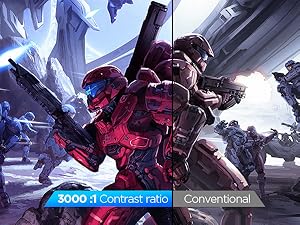
The KOORUI 32" QHD Curved Gaming Monitor features a 1500R curved 2560x1440 display, 170Hz refresh rate, and 1ms response time for ultra-smooth gameplay. With 90% DCI-P3 color gamut and HDR10 support, it delivers vibrant, true-to-life visuals. Ergonomically designed with tilt adjustment and VESA compatibility, plus multiple HDMI and DisplayPort inputs, it’s built for immersive gaming and versatile setups.




| ASIN | B0DWDZZP7Q |
| Adaptive Sync | FreeSync |
| Additional Features | Adaptive Sync, Anti Glare Screen, Curved, Eye Care |
| Aspect Ratio | 16:9 |
| Best Sellers Rank | #27,350 in Electronics ( See Top 100 in Electronics ) #713 in Computer Monitors |
| Brand | KOORUI |
| Brightness | 300 Candela per Square Meter |
| Built-In Media | DP Cable x1, Monitor x1, Power Cord, User Manual x1 |
| Color | Black |
| Color Gamut | 99 |
| Compatible Devices | Desktop, Laptop |
| Connectivity Technology | HDMI |
| Contrast Ratio | QHD Wide 1440p |
| Customer Reviews | 4.3 out of 5 stars 3,459 Reviews |
| Display Resolution Maximum | 2560 x 1440 Pixels |
| Display Technology | LCD |
| Display Type | LCD |
| Hardware Connectivity | DisplayPort, HDMI |
| Has Color Screen | Yes |
| Image Contrast Ratio | QHD Wide 1440p |
| Item Dimensions D x W x H | 9.53"D x 31.4"W x 21.08"H |
| Manufacturer | KOORUI |
| Model Name | KOORUI 31.5 Inch Gaming Monitor 170Hz Computer Monitor QHD 1440P |
| Model Number | 32E6QC |
| Mounting Type | Desk Mount |
| Native Resolution | 2560x1440 |
| Number of Component Outputs | 3 |
| Picture Quality Enhancement Technology | HDR10 |
| Refresh Rate | 170 Hz |
| Resolution | QHD Wide 1440p |
| Response Time | 1 Milliseconds |
| Screen Finish | Matte |
| Screen Size | 32 Inches |
| Screen Surface Description | Matte |
| Shape | Curved |
| Specific Uses For Product | Gaming |
| Total Number of HDMI Ports | 2 |
| Viewing Angle | 178 Degrees |
| Warranty Description | 3 |
| Warranty Type | 3-year warranty service (display screen is backed for 1 year, and other accessories for 3 years) |
A**.
Great bang for buck
Great display for the price, everything works as described. Setup was easy and tool-less. Runs my PS5 and PC at 120Hz+ easily. Colors may be a little inaccurate for professional work but for a casual user like me watching movies and playing games, it's great. Again, for this price: height adjust, good screen, great resolution (unique at 24"), and the amount of ports. Would buy again.
K**M
27E3Q YES, YOU SHOULD BUY IT
I ordered a monitor from Sceptre and received the wrong model. This led me to make a somewhat angry purchase but man did it pay off. Jumping the gun on a 1440p IPS display was so worth it. I am pleased, satisfied, and left wanting nothing more. Pros and cons below. PROS: - Really bright display. This is such a game changer when you constantly deal with dim gaming displays. Typically on a budget monitor you get 250cd/m2 but here you get 400cd/m2!!! The brightness is perfect for gaming, day to day use, brightly lit rooms, etc. - Super Colorful Display: The colors on this screen pop like I've never seen. Everything is perfectly saturated. Nothing seems out of the ordinary. Everything you watch, read, play, will be enjoyed thoroughly guaranteed. - Whites are actually WHITE: As you can see in one of the images I attached, My other monitor (HP 25x) provides yellowish whites while the 27E3Q provides a very natural and expected white. - Not a single dead pixel on my unit! - No annoying branding. One simple and almost invisible "KOORUI" in the center of the frame on the bottom. No extended pieces of plastic either. Just a rectangular unit as you would expect. Unlike the HP 25x which has an annoying chunk of plastic that extends out. This is more nitpicky obviously but it still counts! - OSD (On Screen Display) is very easy to use. Its quick, to the point, no frills or gimmicks, and easy to read. - Really nice stand! Although I used my own dual monitor mount, the stand is high quality, heavy duty, with tons of adjustability. (Rotate, side to side, height) CONS: - From the research I've done, if you leave the overdrive off you won't have a problem but, with it turned on you do experience some ghosting I believe. Haven't tested it myself but this is what I've heard. Not worried about it, I leave it off and thoroughly enjoy gaming. - In all honesty, the only possible thing I can think of (and this is a real nitpick imo) is the edges of the display border. They could be a HAIR thinner. My HP 25x has a slightly thinner border (not the bezel/plastic frame). This monitor would have benefited greatly from a thinner border but I wouldn't worry about it. With all of the benefits (AFFORDABILITY) a border shouldn't even be close to a deal breaker. Overall, amazing monitor. I will be purchasing another one soon!
J**N
Great price for performance monitor
After using this monitor for abt 6 months now this monitor turned out to be great for its price, 1440p gaming, good refresh rate, and matte screen. Right now it's on a mount, but the stock mount that it comes with is very heavy-duty and clean look. No problems whatsoever with it. the only thing would be that it doesn't come with built-in speakers not a huge deal but that's the only downside i could find Everything else is great not cheap material great performance and great price
D**Z
An actually good off-brand monitor!
Koorui doesn't have the same recognition as a big brand like LG or Samsung. However, the monitor seems to be the genuine article here. Physically it feels sturdy and well-built. It is easy to put together and set up, plus it comes with both an HDMI and a DP cable. The monitor controls forgo that annoying "nipple" button a lot of modern monitors use and goes with the tried and true row of buttons. When you bring up the monitor controls, it is easy to read and navigate the options. Software-wise, it just runs off the generic PnP monitor driver. There's no specialized driver or ICC profiles to add, but what you can (and should do) is use your GPU's software to adjust settings. For me it is through the Nvidia Settings panel. Raedon's equivalent probably works the same way. Tweaking the settings is responsive and with just a few minutes time you'll have your games and videos cooking perfect. You want HDR? This does HDR (and does it beautifully). You want Freesync? It does that and is compatible with Nvidia's N-sync software. You want a high refresh rate? It can push up to 240MHz under the right settings. In conclusion, it is surprisingly well made! Good HDR, High refresh rates, all the options you want for 2k resolutions, etc. The only down side is it doesn't have it's own dedicated driver or color profiles, so you do need to tweak the settings, but I don't see it as necessarily bad since your GPU's software should be able to handle that job. All in all, I am impressed with this one.
K**E
Perfect budget monitor
Purchased this thing back in November and it's been amazing ever since. I'm not a pixel peeper or a tech geek, but this is easily the best screen I've ever gamed on. Refresh rate makes gameplay buttery smooth. The 1440 resolution is very crispy as well. No need to pay hundreds of dollars for 'top of the line' performance monitors of you're a casual gamer like myself. Colors are great, gameplay is smooth and it's plenty bright with a decent amount of settings adjustments available as well.
A**O
More than pleased with the monitor !!!!
This review is for the 27" QHD IPS 170hz monitor. PROS: -The price...200 bucks when i bought it a couple of moths ago. -The bightness : its so F bright that u gonna need glasses or your eyes gonna melt , seriously. Yes, it is a pro cause u can still adjust it to be lower. -Decent image Quality Overall. True QHD. -Pretty decent with blacks, and Ghosting is almost non-existant. (at least for me) -Using it with display port cable at 1440p 120hz sometimes 170hz , 0 problems. CONS: "These are stpid considering the price , seriously" -The back Joystick is horrendus, its like an old synchronous shift lever LOL. -Takes 3 LONG seconds pressing the joystick to turn OFF the monitor. (No, u cant change this at all ) I recomend you to just leave it on with a nice screensaver lol . -Color preset from factory is good enought, just get used to it trust me...there is no point trying to change it too much cause the options are not that impactful. CONCLUSION: Im looking to buy another one for my wife at the same price (200) , like I said before the CONS are far from being a dealbreaker for me.
A**R
Scratches Easily
I've been trying to get a new monitor for a few months and bought two different IPS monitors that ended up having dead pixels. I decided to give this one a try since it's VA panel and third times the charm. While I prefer IPS this VA panel does the job pretty well. The brightness is bright like it will catch you off guard. HDR is really solid on the monitor. I managed to get the monitor calibrated to almost match my older LG 27gl850 so the colors are really good. Very little motion blur outside the black smearing issue all VA panels have which the smearing is noticable but not overwhelming. The blacks are really dark compared to what I've been using for years. The viewing angle isn't as good as IPS but it's perfectly fine unless you are looking at it at a sharp angle. There is also much higher chances of having brightness flicker with freesync enabled compared to IPS but you don't really need it as long as you cap your FPS below the refresh rate. Overall I'd say this is a solid monitor for the price. It's not perfect but you have to spend alot more to get much better. Update after about 4 weeks, The screen cover very cheap that if you bump it very lightly it leaves a deep gash on the screen making this a bad investment.
W**E
Computer screen
Works well as an extra screen with my laptop
Trustpilot
5 days ago
3 weeks ago