We remain fully operational. Our teams are working around the clock to ensure your deliveries continue safely.

DOWNLOAD THE APP


Customer Services
Copyright © 2025 Desertcart Holdings Limited
DOWNLOAD THE APP


🎮 Capture Every Frame, Own Every Moment
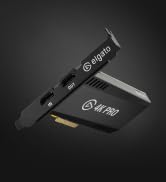
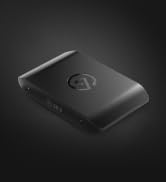
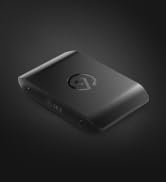
The Elgato 4K Pro Internal Capture Card is a powerhouse designed for professional streamers and content creators, offering 8K60 passthrough and 4K60 HDR10 capture with ultra-low latency. Compatible with PS5, Xbox Series X|S, Nintendo Switch 2, and PC setups, it supports HDMI 2.1 for up to 240fps recording and VRR passthrough for smooth, tear-free gameplay. Perfect for seamless multi-platform streaming across OBS, Twitch, Zoom, and more.





| ASIN | B0CSJPDYDN |
| Are Batteries Included | No |
| Best Sellers Rank | 40,451 in Computers & Accessories ( See Top 100 in Computers & Accessories ) 51 in Internal TV Tuner & Video Capture Cards |
| Brand | Elgato |
| Colour | Black |
| Customer Reviews | 4.2 4.2 out of 5 stars (306) |
| Date First Available | 3 Mar. 2024 |
| Guaranteed software updates until | unknown |
| Item Weight | 110 g |
| Item model number | 20GBK9901 |
| Manufacturer | Corsair |
| Product Dimensions | 5.6 x 12.1 x 1.9 cm; 110 g |
| Series | Elgato Game Capture 4K Pro |
| Tuner Technology | ATSC 3.0 |
W**E
Good
No problem
T**T
Great buy does what it says
Great Product works exactly as i expected, is fast and easy to setup and has super low latency and has never let me down as i stream on 2 pcs its perfect
M**N
Works but poor connection port
The video quality is great and the latency is fine, when it works, and it usually does. But for the price, the connector at the back feels pretty poor quality. If my toe so much as taps the HDMI cable on the floor, the device can lose signal and I have to unplug and re‑plug it to reset. Normally that wouldn’t be a huge issue, but if you’re drawing on a tablet, your whole stream can cut off just from rotating or repositioning the screen. I’m giving it 3 stars because it does work and the capture quality is good, but I’m taking off 2 stars for the inconvenience and the weak connection at the back.
A**R
Had to get slim fit plate
Would be better if if come with both back plates, but had to spend more money on postage than the actual thing cost. The actual 4k pro had a few problems to set up - mainly going from 120 hz to 60 hz, in the end sorted this with an hdmi splitter that will split it in to another resolution as needed. Now it’s all working and all the settings are correct it’s absolutely perfect. Would definitely suggest hdmi splitter with it as you can then by pass the need for a pc to be on too. Seems a lot of money but it’s a new product and what isn’t expensive now days? Is about the best you will get for the moment .
M**N
Simply put - not working.
Used HD60 PRO for years with no issues. This was supposed to be just a simple upgrade. Card is able to capture what is put into Imput, but sends no Output to any display I tried to connect it to. Spent few hours trying to fix it, read whole Elgato Reddit and nothing. Seems like a common issue too that Elgato refuses to acknowledge?
C**S
Don't bother. Buy a 4k60 instead.
This is a terrible capture card. I went back to using my old Elgato 4k60. This one will start to randomly lose signal from a Xbox. Even playing it lower resolutions.
A**R
HDCP Locked
The thing would not even show a capture screen after 12 hours of messing with it i had to give up, Nvidia 4090 with a steel legend x670e MB, HDCP Locked! i tried everything to get this working, i wish it would have worked, i tried everything!
T**S
TERRIBLE RECNTLY WITH NVIDIA FOR SOME REASON!!
'had it through pcspecialist, I've been trying to record recently, but it keeps showing this message all the time and it also keeps crashing my pc and is slow to respond randomly, around 30min to over 1hour long, i contacted them about it but all they said is to rollback nvidia driver which i did but still caused problems, i had all the best hardware(ram and graphics card) and it was doing nothing but sabotage avoid until they actually fixed everything!!
R**W
great for capturing images for my stream
V**.
Très bonne carte de capture ! fonctionne en tout point, je n'ai eu aucun soucis de lag, latence, freeze, artefact etc... supporte bien la 4K, le HDR10, s'installe directement sur la Carte Mère en PCIe La latence est tellement tellement faible, quasi pas du tout, que je ne joue plus sur via l'HDMI, mais directement via le logiciel Elgato ou OBS, et on ne ressent vraiment pas de latence
T**T
As a competitive Splatoon player, I needed a way to broadcast and screenshare gameplay from my Switch without compromising quality or audio. With the 4k Pro, I can bring my gameplay to my pc in full quality! Passthrough provides a lag-free experience, which surprised me since I am very sensitive to slight delays in my inputs; I felt no additional perceivable latency in passthrough. However, there is very noticeable delay when you play through the Utility software (10-30ms); this comes to no surprise though, as the incoming video signal must be re-encoded again before it can be displayed on your pc. If you're playing games that require as little latency as possible, play through passthrough. Installation was very simple: I located the pcie x16 slot on my motherboard (although x4 and x8 also work), unscrewed the chassis bracket, slotted in the capture card, and screwed it in. No additional usb power needed! I installed the 4k Capture Utility beforehand, so it worked instantly, although a slight detection delay can occur, this typically lasts 5-10 seconds before your signal is displayed. No biggie. One of the biggest benefits I've noticed from the 4k Pro is that I can be in a call on Discord with my friends while hearing my game audio through the relay in the capture utility software. Please note that there will be a very slight delay in audio from the Utility (because re-encoding) However, in my experience the delay is acceptable given that it is only the audio that I am sampling through the Utility while playing through passthrough. My estimation on the Utility software delay is around 10-30 milliseconds, which is comparable to playing on an older TV; not ideal for competitive games, but it can be palatable for some in a pinch. Video signal: The signal is very true-to-console as in the raw output of the console itself is being captured. Meaning that contrast and brightness is exactly as your console manufacturer intended. Software: the 4k Pro uses it's respective 4k Capture Utility which is a very simple and useful software. In the suite, you have access to custom video color settings for your gameplay, audio adjustment (including the console microphone if yours has one) a capture library; which houses your recordings and clips, and a fair bit of encoding and bitrate options similar to OBS. Speaking of OBS, it integrates perfectly with it, allowing your captured signal to be displayed easily with your applied settings. OBS isn't entirely necessary however, since you can record and take screenshots in the Utility software. Recordings can be as long as your storage allows! There is also a Flashback mode, which allows you to take clips from your past recordings, this allows easy access to highlights or other cool moments in your gameplay that you'd like to have separate from the entire recording. Please note that flashback has a maximum recording time of 4 hours. Compatibility: The Nintendo Switch works flawlessly with the capture card as previously stated. I assume every other console/PC works the same so long as it outputs via HDMI. I would still scout for other reviews that specify your specific console though. As for motherboard support, this requires a bit of technical know-how as you need to ensure that you have at least one spare PCIe x4, x8, or x16 slot in your motherboard. Please note that the card will not work with a pcie x1 slot as there are too many pins on the capture card. In conclusion, I am very satisfied with my purchase as it solved several headaches I had while trying to voice call with my friends and play Splatoon at the same time. It has great options in the Utility software, works well for beginners, and makes streaming, screensharing, and recording a breeze! 5/5 Stars for me since it fills my needs stupendously! [TL:DR] The 4k Pro is a great capture card for the Nintendo Switch, allowing smooth, crisp gameplay with no delay on the passthrough mode. However, there is a 10-30ms delay if you play through the 4k Capture Utility software. Installation is quite easy! Just make sure you have a spare pcie x4, x8, or x16 slot on your motherboard! It also has flawless OBS and Discord integration! Don't forget to install the 4k Capture Utility software before you install the card to make life way easier!
J**C
No lo hice antes por si elevado precio, pero al probarla debí haberlo hecho antes.
J**S
Ich habe die Elgato 4K Pro jetzt etwa eine Woche im Einsatz und hauptsächlich in 1440p gestreamt – in Kombination mit meiner Intel ARC A770. Die Karte macht genau das, was sie soll, und das absolut zuverlässig. Einbau & Einrichtung: Der Einbau war denkbar einfach: Karte in den PCIe-Slot stecken, System starten – fertig. Sie wurde sofort erkannt, ganz ohne zusätzliche Softwareinstallation. Genau so wünscht man sich das bei hochwertiger Hardware. Für Streamer und Creator mit etwas PC-Erfahrung ist das in wenigen Minuten erledigt. Leistung im Betrieb: Das Bildsignal wird sauber und ohne merkliche Verzögerung verarbeitet. 1440p-Streaming lief in meinen Tests stabil und mit hervorragender Bildqualität – klare Farben, gute Schärfe und kein Frameverlust. Die Zusammenarbeit mit der Intel ARC A770 funktionierte reibungslos, auch bei längeren Streaming-Sessions. Verarbeitung: Die Karte wirkt wertig verarbeitet, das Metallgehäuse ist robust und macht einen langlebigen Eindruck. Auch unter Dauerbelastung bleibt sie angenehm kühl – gute Thermik. Fazit: Wer eine Capture-Karte sucht, die ohne viel Aufwand in ein bestehendes Setup integriert werden kann, ist mit der Elgato 4K Pro bestens beraten. Sie läuft perfekt mit aktueller Hardware wie der ARC A770 und liefert eine Top-Leistung bei 1440p-Streams. Absolute Empfehlung für Content Creator, die auf Qualität und Stabilität setzen.
Trustpilot
3 weeks ago
4 days ago