


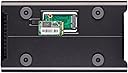
Drobo DRDR5A31 5D 10TB (5 x 2TB WD Red) 5 Bay Desktop DAS
Product ID: 53662831
⚡Thunderbolt & USB 3.0
💾5 x 3.5' SATA HDDs
🔄Hot Swappable Drives
🚀 Elevate Your Data Game!
The Drobo DRDR5A31 5D 10TB is a versatile 5-bay desktop Direct Attached Storage (DAS) solution, featuring support for 5 x 3.5' SATA I/II/III HDDs and 1 x mSATA SSD. With Thunderbolt and USB 3.0 connectivity, it offers high-speed data transfer and the convenience of hot-swappable drives, allowing for easy upgrades and maintenance.
G**G
MMMMMmmmmmmm
I Bought this because my Drobo 2nd Gen was causing problems. I transferred the drives into this unit to save all my valuable data and it worked but £500 is very expensive. It's very slow to transfer data and has been sitting around as a backup drive ever since. I still don't trust Drobo units 100%. Have since bought a Synology 8 bay disk station that is far superior. Sorry Drobo
A**W
Great local storage unit with drive redundancy and solid performance.
I've used Drobo products for quite a number of years now, both professionally and personally. I've owned or managed systems utilising the original Drobo, Drobo Gen2, B800fs, B800i and B1200i. Sometimes I think Drobo products get unfairly criticised by people who don't realise that this isn't a backup solution. This is high-capacity (and these days also high performance) local storage with drive redundancy. Unless you are keeping a backup of your data from the Drobo elsewhere, your data is not truly safe. Neither would it be with any other product.This 5D was a personal purchase to replace a Gen2 unit which has performed faultlessly for many years. Despite the pedestrian performance of the Gen2, it has been more than sufficient to hold a massive library of video, surviving more than one drive failure in the process. The additional drive bay of the 5D made it a more cost-effective solution than replacing the entire disk pack of the Gen2 with 6TB drives; coupled with improved performance and the potential for dual drive redundancy, I'm happy it was the best option.The disk pack from the Gen2 was transferred directly to the 5D with no issues whatsoever. It's imperative to follow the instructions carefully, ensure you're on the latest firmware on each, shut down both units properly and swap the pack in one go with the Drobos powered off. Obviously a little nerve-wracking, but the 5D recognised the drives from the Gen2 and brought the array back online with no difficulties. Once the array appeared to be settled, I added the fifth drive which was incorporated just fine. Success!One caveat to all this is that without rebuilding the array, you can't take advantage of the 64TB thin provisioned storage offered by the 5D. The disk pack moves with the 16TB maximum it was created with in the original Drobo. No problem for new users, but I will have to move all of the data off, recreate the array and move everything back on again. A hassle, but understandable given the way that storage arrays work.I've dropped a star largely because of the Drobo Dashboard software, which I've never really liked. You can use the 5D on a day-to-day basis without firing up Drobo Dashboard, but you will need it for the initial setup. It doesn't always play nicely with remote desktop software and since version 2 they lost the feature I found most useful, which was a nice pie chart in the menu bar which showed you the real-life usage of the array (as your OS will only ever see the thin-provisioned capacity). Some quick access to the storage usage level and a command-line interface which could be queried to get some basic data back would be a real benefit for these units. Better (indeed any) Linux support would be much appreciated.Overall, very happy with the hardware, but would like a bit more functionality and a little less pizzazz on the software side. Also, bargain price from the Amazon Warehouse deal.
P**R
and must say the device was great. the big issue is with the drobo support ...
first, i have had my drobo for over a year, and must say the device was great.the big issue is with the drobo support organisationmy device warranty had expired, so i took out a drobocare warranty, this is approx £100 per year per device...unfortunately i had a problem with my drobo, raised a case, had a replacement approved, then waited, and waited, and waited.i eventually emails the sales dept, who managed to get a replacement sent to me after a week, i thought my woes had ended, till the replacement arrived with no instructions to return the faulty unit.drobo ask you for a deposit when you have a replacement to ensure you return the faulty unit, with no return info, and despite numerous emails, no reply... looks lime I'm getting charged again]the moral of this is, great device till it fails, then the worst service imaginableLatest Update, finally after 11 emails and 2 phone calls to drobo support in the U.S, i received an address to send the unit back to, but no courier label, so still waiting for that...and now to add insult to injury, i received an email from drobo today reminding me to send the faulty unit back...downgraded to 2 stars now, as the device is good, but support deserves zero stars..shipping label etc,
C**N
If speed is what you want then look no further
I have had a pair of the original Drobo (v2) four bay enclosures for three or four years. Both are equipped with four Western Digital 2Tb Caviar Green drives. Both have performed flawlessly since I got them, although connected to my iMac via Firewire 800, they are not the fastest thing on the planet when it comes to transferring large volumes of data. So I have been eagerly anticipating a Thunderbolt equipped Drobo since the interface first became available.I've had the Drobo 5D for about a month now. I set it up with five Western Digital 3Tb Caviar Red drives plus a Crucial 256Gb m4 mSATA SSD in the dedicated slot in the underside of the 5D's chassis. Total cost was about £1,450 including VAT. That sounds like quite a lot, but a Pegasus Promise R6 with six 2Tb drives will set you back another £500 and it doesn't have the benefit of an SSD accelerator.The 5D comes with a Thunderbolt cable which I used to connect it to my iMac. It took just a few minutes to set it up using the Drobo Dashboard software. Although I already had the latest version of the Dashboard software needed for my existing Drobos, I had to download a further update before it would recognise the new 5D. As my data is all backed up elsewhere, I opted for single rather than dual drive redundancy. Formatted capacity available for data is 10.89Tb.So how fast is it at transferring large amounts of data as compared to the original Drobo? I copied a folder containing 3,087 RAW image files, all between 20Mb and 40Mb in size, totalling 86.47Gb, from my iMac's built-in 256Gb SSD to the 5D. It took just 10 minutes and 35 seconds. I then copied the same folder to one of my original Drobos. It took 55 minutes. So the 5D was approximately five times faster than the original Drobo at handling a largish real world file transfer.I then used the Blackmagic Disk Speed Test (free from the App Store) to do a few comparisons: -iMac built-in SSD - Read 215MB/s Write 185MB/siMac built-in 1Tb HDD - Read 125MB/s Write 125MB/sDrobo (v2) Firewire 800 - Read 35MB/s Write 35MB/sDrobo 5D Thunderbolt - Read 320MB/s Write 235MB/sI don't suppose the Blackmagic software is the most sophisticated around, but it was all I had access to and I'm sure it gives a pretty good idea as to relative performance.So in theory the 5D is even faster than the built-in SSD supplied with the iMac. If this is true then it has to be down to the speed of the Thunderbolt interface and the effect of the 5D's built-in mSATA SSD. The mSATA SSD takes the strain of a big data transfer and then, at leisure, transfers the data to the 5D's five built-in HDDs. Well, that's exactly what it's designed to do and the end result is nothing short of amazing; the Drobo 5D is an absolutely brilliantly designed product!A month later I'm still very happy; the 5D seems to be just as fast with around 5Tb of data on it.My advice is to just buy it!PS Don't forget the Drobo 5D also comes with a USB 3 interface and cable for anyone not having access to Thunderbolt.
Trustpilot
4 days ago
2 weeks ago