Desert Online General Trading LLC
Dubai, United Arab Emirates
Desert Online General Trading LLC
Dubai, United Arab Emirates


🔥 Elevate your workspace and game zone with zero-frame clarity!
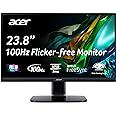
The Acer KC242Y Hbi is a sleek 23.8-inch Full HD monitor featuring AMD FreeSync for smooth visuals, a rapid 1ms VRB response time, and a 100Hz refresh rate. Designed for both professional and gaming use, it offers ergonomic tilt, low blue light protection, and versatile connectivity with HDMI and VGA ports, making it a perfect blend of performance and comfort.


| Standing screen display size | 23.8 Inches |
| Screen Resolution | 1920x1080 |
| Max Screen Resolution | 1920 x 1080 Pixels |
| Brand | acer |
| Series | KC242Y Hbi |
| Item model number | KC242Y Hbi |
| Item Weight | 6.8 pounds |
| Product Dimensions | 7.6 x 21.3 x 16.3 inches |
| Item Dimensions LxWxH | 7.6 x 21.3 x 16.3 inches |
| Color | Black |
| Number of Processors | 1 |
| Voltage | 240 Volts |
| Manufacturer | Acer |
| ASIN | B0BS9T3FNB |
| Date First Available | February 19, 2023 |
A**Y
good product
good product
D**6
No regrets at all
I found these because I got an ad on Instagram for 2 monitors for 180 with $20 shipping, which I thought was killer, so I checked Amazon for a similar deal. Welp, these were a better deal. My whole setup with the Blackview mini pc was under $400. I use it for school and work mostly. Nothing too graphics intensive I guess, long videos, spreadsheets, and low input graphic design, but it looks really good to me. The screens give me absolutely no problems. I’ve been able to run trading software on it seamlessly as well. It looks good to me, and for the cost it’s pretty impossible to beat. Took my space from bleh to semi-professional. Do it, and get a vesa mount. You won’t regret it. And for the cost I figured I’ll use this until I’m making enough to throw away an extra few hundred for minimal increases in specs, and an extra couple grand on a better computer. I game on my tv so I doubt I’d notice. It’s no 4K 120+ hz, but I get 1080p at 100hz but I usually stick to 60hz, and I can spend hours at the computer. I also have a laptop for when I’m on the go, but I can hook it up to this for a 3 screen work setup. 2 screen setup for 180? Why not! You won’t regret it.
J**.
works well
Using with a MacBook Air, M2, through a USB-C hub to the monitor's HDMI. The picture is good enough and it serves my purposes as an office computer monitor well. It is very good for a reasonable price.
G**S
Amazing in the moment, but longevity is in question
I was attracted to this product due to its promise of incredibly low input delay. Sure enough, I feel it! However, this does come at a price, that being lifespan concern. At least it is a relatively affordable price for a gaming monitor.I am using this with a Windows 10 gaming setup, and I can see that I'm supported for a refresh rate between 50hz and 100hz. At all times, I use a good amount of contrast, cooler colors, and a high value of black correction, which makes the monitor quite a ways brighter than I'd like, but ensures everything is far less blurry when things are in motion. (Such as scrolling screens, Windows desktop animations, and gaming.)During mundane browsing and office work, the screen is comfortable to use at all refresh rate levels. During gaming, however, you will run into an issue of unbearable motion blur. For example, I play Warframe, which is incredibly fast-paced and full of constant motion. The amount of unwanted blurring that this monitor can produce on its own is almost vomit-inducing, and I have been gaming all of my life. Yet, actually, this screen can absolutely handle the game, but it requires everything to be at the highest setting levels:Set your computer's refresh rate to 100hz, then fiddle with the monitor's built-in settings to switch on its "Over Drive." Use the buttons/knob on the back of its right side. Now, these two things combined will completely eliminate the monitor's issue of motion blur, as well as deepen the black colors to a perfect degree. (Also, the monitor allows for customizable "setting presets," which the monitor itself remembers. So it takes me all of five seconds to switch between screen intensities or refresh rates, meaning that pre-gaming and post-gaming has a low setup time, but still noticeably there.)Anyhow, the wording of that Over Drive feature is what bothers me. I'm overclocking my gaming monitor just to use it without bothersome motion blur? Does this mean that I'm putting my gaming monitor at risk of having a lower lifespan? That's quite worrying. But, I did only spend around $100 USD on this product, so the affordability does remain acceptable. Hence why I've docked stars towards screen quality, but the product is still overall a 4-star monitor. Powerful for the price.
D**L
Best one yet
So far so good! Best little monitor I've ever owned
M**D
Very good second monitor for the price.
Had a very old Acer monitor that after many years finally died. Replaced it with this current model version - but in a 24" screen size, larger than the previous one. I use split screens frequently with my computer but only wanted a lower budget monitor for the task as I am not a gamer. This one certainly fits the bill based on price and overall quality. Based on the advertised refresh rate it likely would be suitable for gaming as well, but that is something I cannot comment on from first hand experience.
A**
Excellent Monitor for Gaming and Everyday Use
The Acer KC242Y Hbi Monitor is a fantastic choice for gaming and general use. The 23.8-inch Full HD display provides sharp and vibrant visuals, and the zero-frame design enhances the viewing experience. With AMD FreeSync and a 100Hz refresh rate, gameplay is smooth and responsive. I also appreciate the 1ms response time, which is great for fast-paced gaming. The low blue light feature is easy on the eyes during long sessions, and the tilt adjustment is a nice bonus. Highly recommend!
U**O
Excellent
Monitor does the job very well good quality well packed life is good
Trustpilot
2 months ago
5 days ago