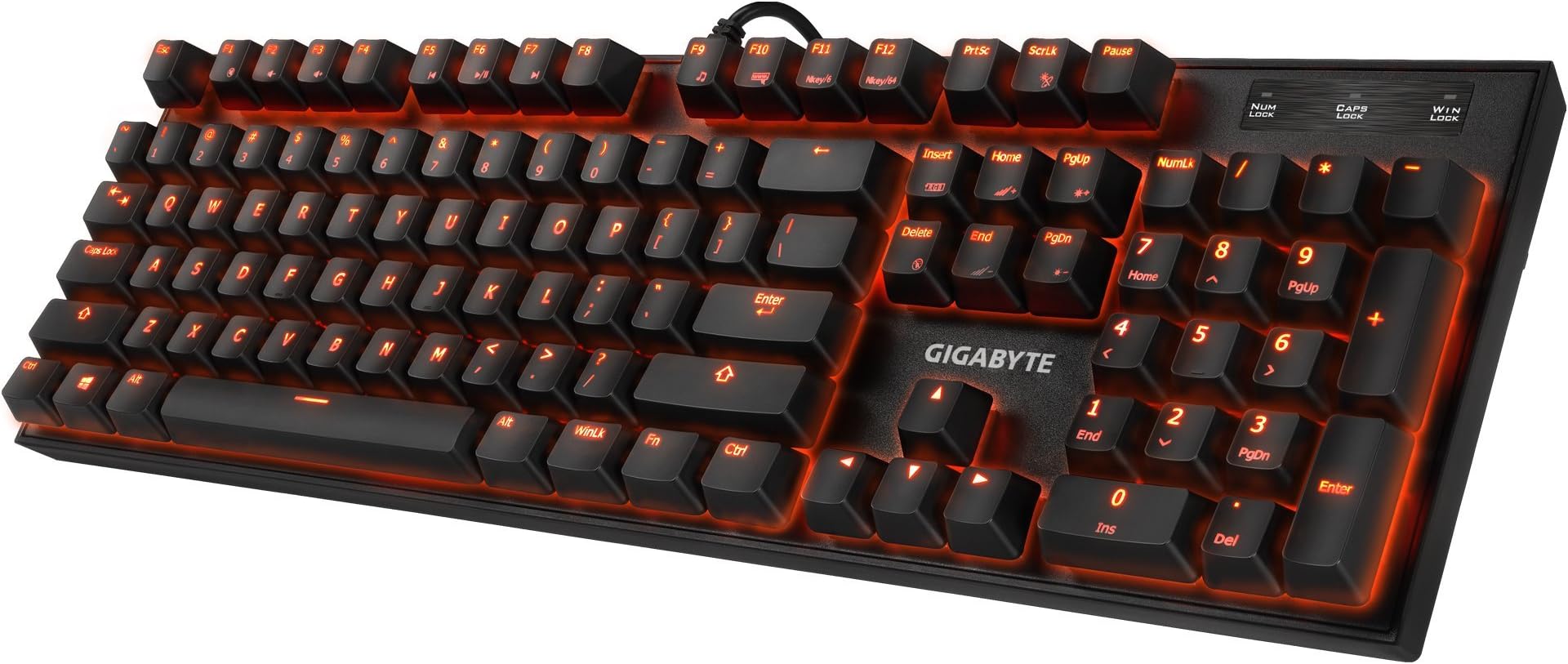
🎮 Light up your game, own every keystroke!
The GIGABYTE GK-FORCE K85 RGB Mechanical Gaming Keyboard delivers professional-grade performance with customizable 16.8 million RGB lighting, durable mechanical switches, and full anti-ghosting technology. Designed for PC gamers and power users, it features on-the-fly multimedia controls and a Windows lock key to keep distractions at bay, all housed in a sleek wired design.
| ASIN | B01F9UEKN8 |
| Additional Features | Backlit |
| Brand | GIGABYTE |
| Built-In Media | User Manual |
| Button Quantity | 85 |
| Color | Black |
| Compatible Devices | PC |
| Connectivity Technology | USB |
| Customer Reviews | 4.4 out of 5 stars 776 Reviews |
| Enclosure Material | Mechanical key switch gaming keyboard |
| Global Trade Identification Number | 00813567022565 |
| Hand Orientation | Ambidextrous |
| Item Height | 2 inches |
| Item Weight | 3 Pounds |
| Keyboard Backlighting Color Support | RGB |
| Keyboard Description | Gaming |
| Keyboard Layout | QWERTY |
| Manufacturer | Gigabyte |
| Model Number | GK-FORCE K85 |
| Number of Keys | 104 |
| Power Source | Wired |
| Special Feature | Backlit |
| Style Name | K85 |
| Switch Type | Mechanical |
| UPC | 813567022565 |
| Warranty Description | 2 years |
A**Y
quality where it counts!
i've had this board for a few weeks now, so it's time to render judgement! we've all read reviews by folks here on amazon that clearly should not have been written - ie any review by someone who complains that blue switch keyboards are "too loud", lol - so let me begin by stating that i am an avid collector of dirt-cheap mechanical keyboards of all kinds. aukey, tomoko, redragon, random mid-tier brands like thermaltake's gaming division's stuff, but i also dabble with the good - i've purchased a corsair k95 from amazon, and bought a ducky secondhand from someone i know irl. so i like to think that my opinion is grounded in the sort of experience that might make this a good review. anyways that paragraph is probably going to be longer than the review itself. let's get on with it: first off, i will start with the bad. why? because honestly it's not that bad, you'll see why in a second. THE KEYCAPS ARE GOD-AWFUL!! too lazy to take a video, but i'm not kidding or exaggerating when i say that some of the stock keycaps literally just sort of fell out while i was typing. my arrow keys were all garbage, as well as a handful of the qwerty keys. ok! thats out of the way! on to the good: the good news is who cares!!!! what sort of nerd keeps stock keycaps anyways! as you can see from my picture, i went and replaced most of my keycaps anyways - the WASD and arrow keycaps are from a redragon kumara, the rest are from some random set i ordered from ebay or something. when you pay less than 40 bucks for a mechanical keyboard, you know you're going to be getting compromises somewhere. so the way i see it - the "bad" here isn't really a "bad", because of all the things i would choose for gigabyte to compromise on, it would have to be the keycaps. the switches are solid, set into the board with no wobble (that is where redragon saves money, the result is crooked keys). the case is well-designed, with an aluminum face that offers low-profile easy access for cleaning, as well as a nice hefty weight for a solid base. as promised, the keys offer a nice and quiet typing experience. the only real noise comes from the stabilizer bars on the space/shift/enter keys, though honestly that might be my fault, i threw the new keycaps on without stopping to check to see if the stabilizers needed to be attached or not. when i first noticed the bad keys, i didnt know if it was the keycaps themselves, or the switches. as you can tell i concluded that it must be the keycaps, because after switching them out, the new keys grip onto the switches tightly. anything else? the media keys are what they are, the only ones i ever use are volume up/down/mute and gigabyte follows the general trend of placing these three at f2/f3/f4, with the fn key used to activate them. a little neat thing i dont see on all keyboards is that gigabyte replaced the right-hand windows key with a windows LOCK key - ie it merely enables or disables the left-hand windows key. super useful for gaming. yup, thats about it. all-in-all, probably my favorite sub-$40 keyboard ive used yet, but also, it's rare to find a red-switched keyboard for that price, most of them tend to be blue switched. but it's more than the switch type itself - it really is just a nice, solid keyboard. honestly not sure why i'm writing this review either, because anyone who reads this review is now a potential competitor of mine, in the race to snap up as many of these as i can before they're gone forever. so uhhhhhhhh disregard all that and go buy a rottay or something
C**T
K83 Red - a quality keyboard at a budget price with REAL Cherry MX Red Switches!
This is for the K83 Red Switch keyboard since there are multiple products reviewed here. This is the best functional "no-frills" mechanical keyboard you'll be able to find. There is no backlight, no RGB, no macro keys, and no software required to be installed. This keyboard is 100% plug and play with no setup required! I picked it up for an absolute bargain price on sale for $39.99 here on Amazon. For me the lack of unwanted features keeps the price point down and you're still getting a solidly produced, high quality keyboard using real Cherry MX Switches. These are not Oetemu, Gateron, or Kailh switches. I am an avid PC Gamer and this keyboard is the bees knees. Even though this is the standard 104-key layout with no macro keys (thank goodness) or dedicated media keys I feel it should be noted the function (FN) key to the right of the space bar allows many shortkey functions which work just fine. Pressing FN+F1-F12 (L to R): Home, volume down, volume up, mute, play/pause, stop, previous track, next track, default music player, default mail app, task manager, and calculator. If you've never typed or gamed on Cherry MX Red Switches before, especially if you're coming from Cherry MX Blues or Browns, you may have an adjustment period like I did. They have a very light actuation force of 45 grams. Because of my experiences, I highly recommend getting these o-rings if you want to quiet it down, and limit your key travel to keep you from bottoming out on the board. They only took me about 20 minutes to install: ThreeBulls 120Pcs Rubber O-Ring Switch Dampeners Keycap white For Cherry MX Key Switch Keyboards Dampers http://a.co/7GLscP1 (ThreeBulls 120pc Rubber Red O-Rings) Putting o-rings on a Cherry MX Red switch keyboard will make this keyboard just as quiet as most dome switch keyboards. I am so impressed with this Gigabyte K83 keyboard that I am most likely using it to replace my Razer Blackwidow Chroma v2 -- which I think says a lot. I don't need bloated software and unwanted macro keys.
K**E
Best value keyboard for gaming and my typing
When I bought my first mechanical keyboard, I bought one of those also $30-$40 generic Chinese boards. While I had no issue with its function, one thing that is common with those boards is to come with clicky switches. I noticed the hysteresis inherent in MX Blues and their clones was actually causing unrecognized inputs in games, and the clicky noise was bothering me personally for long writing sessions. So I decided to hunt down a cheap linear board to see if that was more my speed. Much to my surprise, I found this board, which bears the brand of a bigger name in the parts industry (albeit Gigabyte is not known for their keyboards), and has genuine Cherry switches. It features no backlighting, which I wouldn't have minded but am also not crying over not having. What it does feature, however, is extremely solid feeling construction. I feel like this board will actually last me a few years, barring some kind of accident. On to the switches: I should have started out with Reds in the first place. I much prefer the lighter actuation weight and the lack of a loud click. While this board is of a "open" design, the bottoming out sound is not too bad, and honestly is only a little louder than your typical office style rubber dome keyboard. The MX Red switches are excellent for gaming, featuring no hysteresis (the switch resetting higher than it actuating, making double tapping the key more difficult), and due to the light nature of them it allows me to FLY across the keyboard. Even with bottoming out I feel much faster on this keyboard. This keyboard features everything you need out of a standard keyboard, with durable mechanical switches and key rollover, making it an excellent replacement for an office board or one of those budget membrane gaming keyboards. BEST value for your money, PERIOD. 5/5 stars.
N**T
Heavy solid backplate and good action.
I was afraid to go cheap and not spend $100+ on a mechanical because I have used an old IBM steel back you could defend yourself with and other quality units. Amazon takes things back so I went for it. Delightfully surprised. It makes just the right amount of noise to keep me happy and not irritate others. The keystroke springs are light and have a very solid stop at the end like tapping on a thick table. I much prefer this over soft rubber stops. Key travel depth is just long enough it forces you to type correctly but not so much your hitting extra keys. Wide rubber feet and enough weight it will never slide. Why are all keyboards not this easy to clean! Oh my goodness the keys just slide right off and can go in the dishwasher. No pits and springs around and beside all the keys to trap everything drifting by. Really the best possible design for functionality and cleaning. The switches are mounted right on top of a thick metal top plate. A really solid metal plate! No 30 watt 256 color RGB strobe microwaving my eyeballs and trying to give the dog seizures. Or fighting robot performance plastic housing with fans. Thanks for making at least one keyboard for me. Heres hoping they continue to make more units that are maybe different colors and key-fonts, even backlit, but classy enough to use at work or in front of a client. A windows key lockout! Where was this years ago when I really needed it. Another nice bonus. Micro silkscreened suggestions for the function keys like volume, play/pause, and email buttons. A perfect simple replacement for the junk keyboards that come with most computers today. As long as the switches stand up to light use I will consider these for a replacement keyboard in the future.
A**5
What an excellent, well priced, entry level mechanical!
This was my first mechanical keyboard and I cannot be happier about it! I got it for sale really cheap, and with Cherry MX Red switches. The build quality is superb, has good weight, keys feel awesome. I can press as many keys as I want and they will all be input. Perfect for gaming. No clashing. The only reason I subtract a star from this review is that the keycaps the keyboard comes with are not of the greatest quality. The writing on them starts to rub off early on, and although I had this for several months and the letters have not rubbed off completely. I could notice discoloration of my most used keys only a few weeks after buying the keyboard. The good thing is, since these are standard Cherry MX keycaps, you can change them all easily when the time comes. In all, I think this is a great entry level mechanical, especially if you can get it for sale like I did.
T**K
Amazing keyboard with no bells or whistles
Keep in mind, this review is for the GK-FORCE K83 RED model, as there seem to be several different models listed under this amazon product. I bought this keyboard for work, as I'm a software engineer and spend a great deal of the day typing. My work provided me with a standard Dell membrane keyboard, and I was looking for a replacement that had CherryMX switches but wouldn't stand out and look too 'gamery'. This board was the cheapest Cherry switch keyboard I could find ($40 with no special sale), so I snatched one up. I was very impressed with the build quality. The top plate is full metal (the surface that the keys are on, whatever that is called) and overall the board feels very high quality. Been using for a few days now and have nothing to complain about. Pros: Amazing build quality - the full front plate (the part that says 'Gigabyte') is metal, the board is quite heavy and does not bend at all, and flip-up feet feel extremely solid Price - for a CherryMX board, you just can't beat it Winlock button - a nice touch for gamers Cons: Media control - maybe not a big deal to some people, but I did miss having dedicated media control buttons when trying it at home. It has media control on the F keys, but the FN button must be held down to use them, turning media control into a two-hand process since the FN key is on the opposite side No flare - potentially a pro if you're specifically looking for a mechanical keyboard that isn't flashy Neither cons really apply to me since I listen to music on my phone at work, so it's pretty much exactly what I was looking for. Well done, Gigabyte.
D**L
It was good while it lasted
It just didn't last long enough. I don't expect a mechanical keyboard to fail in three years, yet, this one did. Correction: in a way, it failed from the beginning. Number keys kept popping off and had to be put back on at least once a day. Annoying, but not enough of a deal breaker to send it back. But, recently, the left control key started failing on certain functions - such as cntrl shift end and home. It still worked on others, though. I tried taking apart the entire left side of the keyboard and cleaning it, but nothing worked. As a writer who often produces thousands of words a day, this was unacceptable. Oddly enough, the right control key worked just fine and for a while I limped along using that key for certain commands but I was afraid I was teaching myself habits I'd come to regret once I again had a fully functional keyboard. When it worked, though, it was a great keyboard. Highly responsive with a great tactile feel. If I were rating on that alone, it would definitely be a five.
C**L
Printed keys are rubbing off less than two week after receiving keyboard...
Pros: - Keyboard is sturdy and heavy - There is a Fn key for the task manager - Cost - Looks classic and simple Cons: - Keys are printed instead of molded - Inconsistent alignment of prints on keys - Keys are wearing off after less than two weeks of use. This is unacceptable, considering Dell's cheapo keyboards can hold up for years. See photo for example. Note the fading on the common keys (A,S,D,F,C,E,R,T) compared to the Q key. E is the worst for obvious reasons. - The tactile feel is great with 2 o-rings on each key, but 4 or 6 of the keys did not work, indicating that either the actuation distance is inconsistent, or the key caps are inconsistent. I am hoping is it the latter, as I would expect better quality from Cherry MX switches. Neutral: - Keys are fairly quiet with o-rings, except for space bar and wide keys. Space bar is quite loud actually. - Keys are concave, but not greatly so. Your fingers fit to them, but they are not hugged by them. - Keys are consistent with the pressure needed to actuate them when pressed from the top. If pressed on the edge, there is more resistance, which can cause an occasional key to be skipped. Not what I was expecting for Cherry MX switches. - I noticed that there are occasionally double-typed keys, though I am not ruling out that this is my own fault, as I am more used to tactile keys. - Some keys are not snug on the switch stems, so if you plan on transporting this keyboard, you accept the risk that one or more keys may fall of in transport. - I feel the need to replace the keys caps with higher quality ones. I have never really had this concern before.
Trustpilot
3 weeks ago
1 month ago