🚗 Elevate your drive with BOSS: Big screen, big sound, zero compromises!
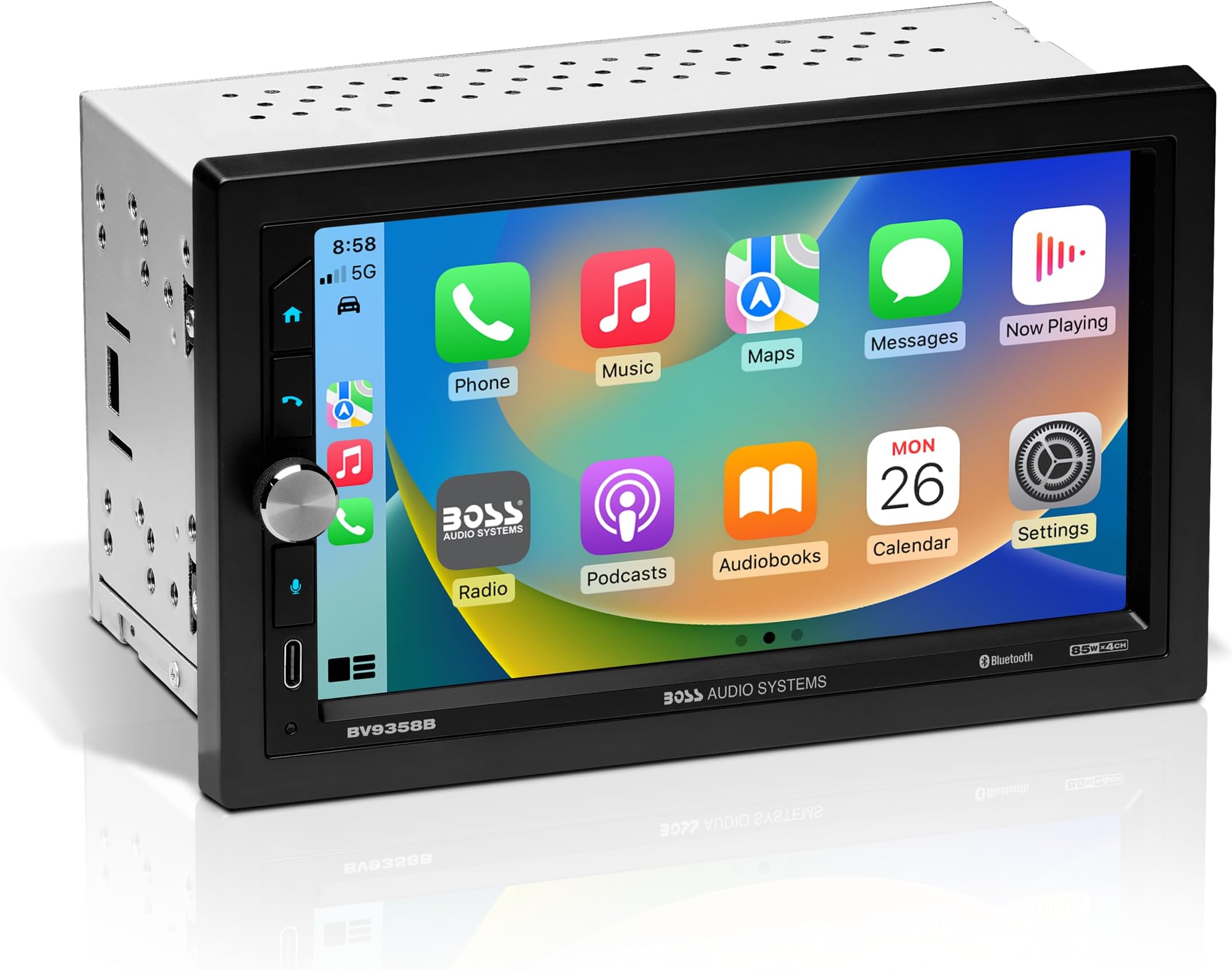
The BOSS Audio Systems BV9358B is a Double DIN car stereo featuring a 6.2-inch touchscreen with Android screen mirroring, Bluetooth hands-free calling, and multi-format media playback including CD, DVD, USB, and SD. It offers extensive connectivity options such as auxiliary input, front and rear camera support, and steering wheel control compatibility, making it a versatile in-dash entertainment and communication hub for modern drivers.


| ASIN | B01FC3SPPG |
| Best Sellers Rank | 138,879 in Electronics & Photo ( See Top 100 in Electronics & Photo ) 311 in Car In-Dash Mounted Video |
| Guaranteed software updates until | unknown |
| Item model number | BV9358B |
| Manufacturer | BOSS Audio Systems |
| Product Dimensions | 16 x 17.78 x 9.91 cm; 1.13 kg |
A**M
Packed in after 9 months
Had it 9 months, built in amplifier is awful and it now no longer turns on, delivery was quick and the unit is easy to install but to be honest, its a regretful purchase.
E**N
Work well,i love it
M**A
Ya tengo varios meses con el producto y no a presentado ninguna falla y se utiliza la mayor parte del día porque lo Puse en una camioneta de trabajo en la Toyota hiace 14 pax.
S**S
Good quality for the price. It does everything I want it to do in my old Dodge Ram.
E**S
Que enviaron lo que pedí
S**I
Overall, I am very pleased. My main reason for the replacement was the factory CD player stopped working. Secondary goal was adding bluetooth / handsfree, and also a 3rd party add/on backup camera system I had stopped working. This unit accomplished all three goals, and eliminated the use of the clumsy backup camera display and bluetooth headset, which was really more distracting than just using the phone. I ordered a dash kit and wiring adapter for use in a 2006 Chevy Colorado. The factory GM antenna won't fit into aftermarket radios, and the wiring adapter prevents having to cut the vehicle's factory wiring, although, you do have to "tap" splice a couple of the vehicle's wires. Most of the wiring was straight forward. You could easily use the tags on this radio's wiring harness and the wire callout on the wiring adapter's package to do 90% of the wiring, assuming your are not color blind. However, there are a few items which are not quite so obvious: This simple one is the "Parking brake" wire on this radio's wiring harness. The idea is you need to have the parking brake set in order to use the DVD player, otherwise a black screen and message will display when you try to play a DVD. I just tap spliced that wire to the ground lead so I can play a DVD without the parking brake set. I have no idea why I would ever do so, but I didn't want to wire it to the parking brake. The next easiest is the power from the backup lamps to the backup camera. I had to find a wiring diagram for my vehicle to see what color wire is used to power the backup lights. I think it was green on this chevy. The cable with the RCA connector and extra red wire is both the power for the backup camera, and the signal to the radio to let it know when the vehicle is in reverse. That red wire gets spliced directly to the radio's wiring harness, apart from the vehicle's wiring adapter, and the RCA connector plugs in on the bottom left port on the back of the radio (left is from the driver's position, with the radio in the dash). On the rear of the vehicle, the red wire is not only spliced to the camera's connector, but it is also tapped to the power for the backup lights, so you need both connections. The RCA jack on the rear, obviously, connects to the camera. The most difficult connection is the vehicle "ACC" power connection. This is just a signal, it doesn't power the radio. This 2006 Chevy Colorado did not have an "ACC" power connection in the factory radio harness. That factory radio is "always on", it just has a serial connection from the vehicle's computer to perform functions like sounding the chimes when you leave your keys in the ignition and open the door. - A function that will be lost with an aftermarket radio. The problem I had was figuring out where to tap the "ACC" power. I needed to find the correct wiring diagram for the ignition switch wiring on this vehicle. It turns out, there is only one wire that had "ACC" power on it. That wire runs from the ignition switch to the computer. On this vehicle, it was a white wire with a red stripe, and it was accessible under the driver's side dash (not "easy", but it can be done). The large connector to the left of the steering column disconnects by rotating the blue lever down (the lever is facing towards the rear of the vehicle in its normal position). It uses a cam to disconnect the steering column wiring from the vehicle's harness. Once the harness is disconnected, you can tap a length of wire (included with the camera's wiring) to the "ACC" wire. Then, re-connect the wiring harness (use the blue lever to secure the two parts back into position) and route your wire up to the radio, using some zip ties to secure it to some rigid objects in order to prevent it from getting caught in the accelerator linkage, or any other moving parts. Finally, splice that wire directly to the radio's "Accessory +" lead. My original plan to simply splice to the always-on lead from the "Radio" fuse left me with the problem that my phone stayed paired to the radio, even when I was inside the house. My secondary plan to just tap the power feed for the blower, since it is only on when the key is in the "run" position worked fine, until the blower speed was turned past "2". When the blower was on high, evidently there was enough voltage drop on that lead to turn the radio off. The features are largely intuitive. The backup camera comes on immediately when in reverse, even if the radio is off. The backup camera overrides any other function, including cell phone use. The phone continues to work, but you don't have any on-screen control while the backup camera is on, meaning when vehicle is in reverse. The bluetooth pairs easily. The phonebook function does not work with my phone (it is neither Android nor iPhone - Kai OS), but you can dial numbers onscreen, if you know the numbers to dial. Likewise, the call history doesn't work with my phone. The on-screen controls to hang up or mute a call are large and easy to use. Transferring from bluetooth to the phone seems to only work from the phone, or by turning the key off. The only thing that bugs me is you cannot manually tune the radio, or at least I haven't figured out how to do so. You just have up and down "seek" arrows, that pull in the next station that is strong enough. Not great if you are trying to set your AM presets. Probably fine for FM stations, or while traveling away from home.
Trustpilot
2 weeks ago
3 weeks ago