
DOWNLOAD THE APP


Customer Services
Copyright © 2025 Desertcart Holdings Limited
DOWNLOAD THE APP

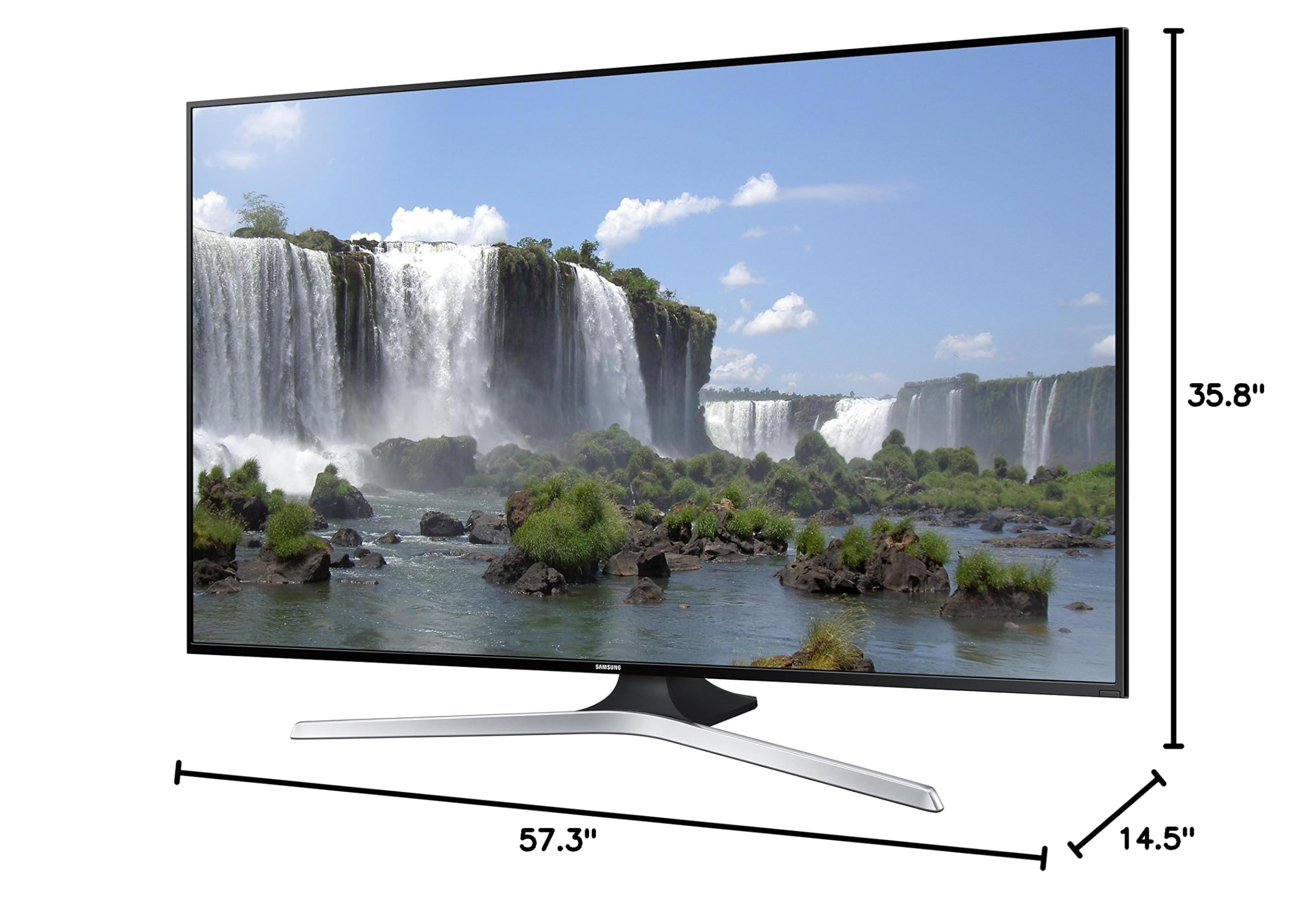
📺 Elevate your viewing game—because your space deserves a screen that’s as smart as you are.
The Samsung UN65J6300 is a 65-inch Full HD Smart LED TV featuring a 120 CMR refresh rate for smooth visuals, built-in Wi-Fi for direct streaming, and multiple HDMI and USB ports for versatile connectivity. Its slim design and large screen make it ideal for stylish, tech-savvy professionals seeking immersive entertainment.


| Brand Name | Samsung Electronics |
| Item Weight | 56.2 pounds |
| Product Dimensions | 57.3 x 14.5 x 35.8 inches |
| Item model number | UN65J6300AFXZA |
| Is Discontinued By Manufacturer | No |
| Color Name | Black |
| Special Features | Flat |
| Item Weight | 56.2 Pounds |
| Standing screen display size | 65 Inches |
| Aspect Ratio | 16:9 |
| Voltage | 1.2E+2 Volts |
| Wattage | 65 watts |
M**S
Loved it so much I returned it... and got the 60 inch.
Synopsis: I am not a videophile however I want a good picture, color, and little light reflection for my money. After reading this review ([...]) they called the J6300 a good mid-range TV. So I pulled the trigger on the 55 inch TV. I loved it so much that I decided to return it, spend the extra $300 and get the 60 inch TV. Great TV for the money. Works for me, great picture, and more. I would recommend this TV to anyone looking to get a nice TV with SMART TV technoligy but not spend for top of the line 4k, curved, etc.!!! Update 03/24/2016 !!!A message popped up on my Samsung TV that it will no longer support Skype as of June 2, 2016. Thought this piece of information would be relevant especially if purchasing this TV with the idea of using Skype. This would affect my review to a 4.5 stars as oppose to 5 on software, I did want to use Skype on it however a proprietary camera is required. My overall experience with the TV is still 5 stars, love it. If you are looking for a TV that supports Skype all Samsung TV's will not as of June.Review: As mentioned above I am not a huge videophile but I wanted the best for my money on a mid range TV. This Smart TV was worth it. Great picture, great color, enjoy the Netflix, Amazon, Pandora, and other apps. The J6300 DOES have the option for Skype however you need to purchase the Samsung Camera. I tried plugging in my Microsoft camera but it kept asking for the Samsung camera by the specific model number. No issues for me there, I'll just continue to use my computer.The color is good, the picture is good, and you can turn off the "Soap Opera" effect although I don't know what the settings are just Google "Samsung J6300 turn off Soap Opera effect" (Is it affect or effect? lol)Yes there is reflection on the screen so if you have a light behind you or a very bright room you'll need to angle it right. I have no problem viewing this TV in the day time, I just moved the TV in a way where the windows are not behind me. I do have a lamp behind me but I can easily move it.The sound is okay. I feel any TV nowadays have such small speakers that you are not going to get the best quality sound. Let me put it this way. If it's normal sound level in the house, it's okay. But as soon as people talk at a normal level or loud activity goes on I need to pump it up above "50". At that point I can hear but it's not 100% clear. Again I'm not looking for the best viewing experience, surround sound, etc. I would like to get the Samsung Speakers but at this point want to spend my money elsewhere. The speakers in the TV are do-able. Again for a mid-range, well worth it.The size is a bit deceiving. It's amazingly small for it's size. I think it's the very skinny profile and borders. Sitting about 7-8 ft back from my TV the 60 inch is perfect. The 55 inch just seemed a little small for the size of the room.The shipping was awesome!! It was wrapped well in extra Styrofoam an no cracks or problems with the picture. Everything was good.On returning the 55 inch for the 60 inch Amazon was extremely helpful. There was no re-stocking fee (I called them within 3 days of getting the first TV), no shipping fee or anything. They refunded my card that day, coordinated a pick up, and then I went online and purchased the 60 inch TV. So my experience here was excellent.I originally paid 1300 for the TV and on Nov 23 2015 the price dropped $450 US (within the 30 day window or price matching). Again Amazon came through and refunded me the difference plus tax.Con: I get light reflection from the lamp behind me... I really need to move it, it's been a month. hahaha Seriously the only cons are: 1. Yes there is light reflection however I have the lamp directly behind me. 2. The speakers are a bit hard to hear with a lot of ambient noise. Let's put it this way, I don't think you could have a Super Bowl Party with the standard TV speakers and hear everything over crowd noise. At that point though I think you would have some sort of sound system.**Update 12.21.2015**I moved and have the TV in an area where the lamp is not behind me. Looks even better. Great TV for the money. Glad I got it.
J**F
EXCELLENT UPGRADE FROM A 50" VIZIO! (That Vizio bit the dust on Week #50 of use, BTW. grrrr ....)
Vizio used to be my first choice from a budget perspective, but the step-up to this Samsung for not much more $$ is so very well-worth it, IMHO.Many more apps to choose from, & all the ones I've tried so far work consistently (which wasn't always the case w/ Vizio apps). I also like the Netflix & Amazon app formats on this tv (the Amazon app format on Vizio required several clicks for proceeding to the next episode in a series, whereas w/ this tv, it's intuitive & streamlined, as it should be.)The remote control for this tv is also preferable, as it's bigger & provides more functionality ~ a BACKLIGHT button for use in a dark room; a GUIDE button that links to an actual listing of shows (Vizio didn't); a MENU button that leads to a wider array of options ~ Menu > Broadcasting > Schedule Manager is a much appreciated option for customizing automatic channel changes to preferred shows at set times & the Sleep Timer is another of the features Samsung has that the Vizio didn't; the EXTRA button provides info about the actors, musicians, etc w/in the show or music video that's on; the TOOLS button leads to a subset of useful features, some of which are redundant, thus providing numerous ways to get where you want to go as opposed to only one often-difficult-to-remember way for a specific task; the INFO button is another fave, as it provides the actual time IRL, in addition to a show's run time. There's even more, but [1] I've droned on enough about the remote, & [2] I haven't even learned it all. Also, I won't reinvent the wheel when in-depth deets re: the SPORTS button can be found here: http://www.samsung.com/in/article/the-best-way-to-watch-sports-on-your-tv but suffice it to say that it's a sport fanatic's dream of an option.My Vizio sound bar is compatible w/ this Samsung, thankfully, & setup was nothing more than plug & play. I'm not the best ear, but the speakers on this tv don't seem tinny & weak like some flatscreens where standard speaker sound is compromised due to a sleek frame.All that discussion elsewhere in a review about substandard panels? Take it w/ a grain of salt ~ personally., I am so glad I researched thoroughly & ultimately disregarded that questionable review, because the picture on mine is outstanding & I couldn't be happier w/ my purchase. I did save some bucks by purchasing an "Open Box Deal" (who cares about a scratch on the back of the unit?), but in retrospect, buying this same tv at full price would still give me my bang for buck.One thing I do notice is that the DYNAMIC picture mode is entirely too bright on one particular show, maybe others that I just have not discovered yet, but man, it makes for impressive & brilliant colors elsewhere, including for viewing photos, & it's a three click process to amend it, so no prob.I've barely used the browser because tooling around using the remote to drive cursor seems silly when my laptop is always handy, but I've ordered a wireless keyboard & webcam to optimize this tv's capabilities (one in particular being the Skype app, which Vizio didn't have) because the browser was surprisingly prompt w/ loading pages & video playback ~ something to be said for that quad processor, I guess.I also appreciate that Samsung has the sound increase / decrease reflected in actual numbers rather than vague bars (easy to note the appropriate number for a hard-of-hearing house guest or how much to dim the volume when the rest of the house is asleep) & too that it's placed midway down in the screen's left margin, so that subtitles or chyrons aren't overwritten when adjusting the sound. One last thing that I notice Samsung doing better than Vizio is how much more legible all screen text is ~ it's like Vizio has no concept of an entire generation of baby boomers w/ tired eyes.
Trustpilot
2 days ago
4 days ago