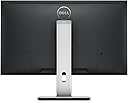
🖥️ Elevate your workspace, dominate your day.
The Dell UltraSharp U2715H is a 27-inch QHD monitor featuring a 2560x1440 IPS display with ultra-thin bezels, extensive ergonomic adjustments including 360° pivot, and 5 USB 3.0 ports. Designed for professionals seeking productivity and seamless multi-monitor setups, it also boasts eco-friendly arsenic-free glass and mercury-free LED technology.


| ASIN | B00P0EQD1Q |
| Adaptive Sync | G-Sync |
| Additional Features | Anti Glare Screen |
| Aspect Ratio | 16:9 |
| Best Sellers Rank | #366,600 in Electronics ( See Top 100 in Electronics ) #7,333 in Computer Monitors |
| Brand | Dell |
| Built-In Media | LED-backlit LCD monitor - 27", Stand |
| Color | Black |
| Color Gamut | 99.00 |
| Compatible Devices | Desktop |
| Connectivity Technology | HDMI, usb |
| Contrast Ratio | 1000:1 |
| Customer Reviews | 4.2 out of 5 stars 768 Reviews |
| Display Resolution Maximum | 2560 x 1440 |
| Display Technology | LED |
| Display Type | LED |
| Global Trade Identification Number | 00884116153054 |
| Hardware Connectivity | DisplayPort, HDMI, Mini-DisplayPort, USB 3.0 |
| Has Color Screen | No |
| Image Contrast Ratio | 1000:1 |
| Item Dimensions D x W x H | 8.07"D x 24.12"W x 21.61"H |
| Item Weight | 10 Pounds |
| Manufacturer | Dell Computer |
| Model Name | TD5f1 |
| Model Number | TD5f1 |
| Mounting Type | Desk Mount |
| Native Resolution | 2560x1440 |
| Number of Component Outputs | 3 |
| Picture Quality Enhancement Technology | IPS |
| Pixel Pitch | 0.233 |
| Refresh Rate | 60 Hz |
| Resolution | QHD Wide 1440p |
| Response Time | 8 Milliseconds |
| Screen Finish | Glossy |
| Screen Size | 27 Inches |
| Screen Surface Description | Glossy |
| Specific Uses For Product | personal |
| Total Number of HDMI Ports | 2 |
| Total USB 3.0 Ports | 5 |
| Total Usb Ports | 5 |
| UPC | 884116153054 |
| Unit Count | 1.0 Count |
| Viewing Angle | 178 Degrees |
| Voltage | 240 Volts |
| Warranty Description | 3 years warranty |
| Warranty Type | 3 Years Manufacturer Warranty |
E**.
Quite Good Except for Very Poor Luminance Uniformity on First Sample (But See Update)
NOTE: This is the original review. An update is included below. I've had the U2715H for a few days, and it's great except for two issues. The luminance (screen brightness) is very uneven. This problem was noted in an in-depth review of the monitor on TFTCentral where it was rated poor in this regard, and I was hoping I'd have better luck. The luminance on the left side of the screen is much lower than the right side of the screen. I've measured it with an accurate light meter, and the luminance on the left is 35 percent lower than the right. This is very noticeable on an image with a solid light colored background. I've seen other comments about this, including on the Dell forums. I'm going to try another sample to see if I have better luck, but one poster on the Dell forums experienced uneven luminance on six samples of the U2715H. Not a good sign. Dell's policy regarding backlight uniformity is as follows (from the Dell monitor forum FAQs): "Dell monitors do not have 100% backlight uniformity specification. As long as the center 4" circle (7" circle for 27" and larger monitors) meets our manufacturer specifications, it is acceptable." I don't know if this is common in the industry, but this allows for quite non-uniform luminance on the sides of the screen. The second issue with my monitor may not be the fault of the monitor, but I have seen a few other comments about this. I'm including this in case anyone else has experienced it. The monitor comes with a mini DisplayPort to DisplayPort cable. When I connected the mini DP end to the monitor and the DP end to my graphics card (an ASUS GTX 970 Strix), the monitor at first wouldn't recognize the presence of a signal. This happened with several attempts at reconnecting the cable and rebooting. When I connected the monitor with an HDMI cable, everything worked fine. I reconnected the DP cable and the monitor eventually recognized it. (You need to manually select the correct input in the monitor's on-screen settings, and it stores settings separately for each input.) It worked fine for awhile, but occasionally the monitor wouldn't sense a video signal on system boot requiring several attempts to connect. This only occurred at boot, and if the video signal was recognized it remained connected for the duration of the session. I've ordered a new DisplayPort cable to see if the included cable is bad. In the meantime, I'm using HDMI which still allows the display of the monitor's full 2560 x 1440 native resolution. In all other respects, the monitor is quite good. The pixel density is perfect for a 27-inch monitor. Type is very crisp and not too small. The monitor is nice looking with a solid stand. The touch sensitive buttons are a bit of a pain to operate at first until you get the hang of it. The IPS glow is very present, as it is with most IPS monitors. I don't find this to be an issue for most images, but you can clearly see it if you're watching anything in letterbox format, for example. The poor luminance uniformity, however, has made me deduct two stars from my review. This is a big issue if you work with image editing. It might not be important to you if you use the monitor for gaming. (I do both.) If a replacement monitor is better, I'll follow up with a revised review. UPDATE March 5, 2015 I received a replacement monitor yesterday and I've added back two stars to the review. The luminance uniformity is much better on this one. It still has lower luminance on the left side of the display, but it's less than a 10 percent difference. It's only detectable using a light meter and isn't noticeable in use. Good enough for me. The only downside is that the maximum luminance on this panel (at 100 percent brightness) is about 250 cd/m^2. This is less than the specification for this monitor which Dell lists as 350 cd/m^2 (typical) and 280 cd/m^2 (minimum). I'm not too concerned about this since I've set the monitor to 35 percent brightness and I'm getting about 125 cd/m^2 which is plenty bright for my normal usage. I haven't had the intermittent connectivity for the DisplayPort mentioned in my review of the first monitor, but it's only been two days. I bought a second DisplayPort cable to try out if it happens with the replacement monitor. Thanks to Amazon for overnighting the replacement monitor. I've been a customer of Amazon since they just sold books because of their great customer service. UPDATE March 20, 2015 The replacement monitor eventually succumbed to the black screen on boot problem (no signal detected) when connected using DisplayPort. However, it may not be the fault of the monitor. There are lots of posts on the Nvidia forum about the same problem when using other monitors. It may be a handshake issue with the DisplayPort interface, and the GTX 970 and 980 graphics cards seem to be particularly affected. I've read that Nvidia claims to have released an upated BIOS for these cards to address the problem but is leaving it up to each card manufacturer to distribute it. So far, ASUS hasn't provided an updated BIOS but people have reported that EVGA has. For now, I'm back to using HDMI.
S**N
Excellent 2560x1440 Monitor!
This monitor was worth the money. I spent a few days searching for a monitor and choose to buy this over others. I upgraded from an LG 1920x1200 monitor which I had for 7 years. It still works great but I felt it was time to upgrade since I recently built myself a new gaming PC. I didn't want to go with 4k at this time since It demands to much and I didn't want to buy two graphics cards just for 4k so I settled for 1440p. I played Team fortress 2, Alien Isolation, The Evil Within and Borderlands 2 on this monitor so far and I love it. No issues with ghosting or anything. I know 120hz is great (I seen a friends 120hz monitor) but I really didn't want another TN panel since it's all I ever had and wanted to try something better then TN for the first time and boy am I glad I did cause the colors on this screen look fantastic and looks better then my friends TN panel for sure and better than my old monitor too. I'm happy with 60hz right now since the games I play look great. My old LG monitor had USB's on the side and I do miss those but this monitor does have USB 3.0 in the back which is ok but I would have liked one or two on the side. The bezel... where is it? Really though the bezel on this is so thin, it's the best I have ever seen on a monitor. 2560x1440 Looks great and I really like how much more space I have on the desktop while looking at websites and such. What I think they could of done better is with the touch controls. I wish it had a little light once pressed but it's not a huge issue. The controls for me are very responsive though which is great since some reviews I saw on other sites said the touch controls don't always work right but again I haven't had any issues with them at all. When I first got the monitor I found it to be way to bright so I turned it down from 50 to 30 but I could see other people turning it down even more cause it's still bright at that setting. I also had no dead pixels at all which I was glad about! I love the height adjustments on this monitor. Well all in all I have no regrets on buying this monitor and I look forward to Batman: Arkham Knight and and Witcher 3 when they are released :)
C**.
Simply the best monitor in its class on the market
Simply the best monitor in its class on the market. This had low input lag, beautiful and accurate color reproduction, sharp text, and great thin bezel. If an IPS, 24inch, 2K monitor without costly g-sync is what you want this is THE one to buy. Its great for office use, artist use, and gaming. Good for gaming a long as you are content with 60hz. I am, and given I do digital art and game, this is fine compromise for me. Its IPS so the viewing angles are amazing. There is absolutely zero color shift when viewing this monitor at any sane angle. It has a best in class refresh rate and less than 10ms input lag meaning you will have decently responsive gaming. You might not win a CSGo tournament using one of these, but if your idea of fun is slapping on an action RPG or even playing an FPS in anything less than hardcore competition mode you will do fine. Again this monitor does compromise as its an all-around performer rather than a single-focused product. Still I game on this and I'm quite happy. I even play racing sims on this and I'm happy. Its got DC violate controlled backlight LED's Thus 100% flicker free and NO headaches from s***ty PWM lighting. The backlight its not 100% uniform but from what I've seen scouring reviews nobody's is. These have found to have no more than a 5% variance in luminescence across the panel in the two I own. There is IPS glow, its inherant to the IPS technology. Until we get affordable AMOLED displays this is just the price of getting good color. Its not a perfect monitor, but in terms of an all around great 2k display this one wins. This monitor also quite acceptably down-scales/interpolates to deliver a 1080p source. Their is only a minor blur effect, and most of the fuzziness is inherent to having a 1080p source on such a large display. So this will be able to drive Blue-ray or console content with a quite an acceptable experience. I could go into great detail about this montor's color reproduction but its easier just to say I'm a digital artist with far better than average-joe's color sensitivity. Not only do I not have color blindness but I've carefully trained my perception to pick out very subtle changes in color. Trust me when I say this is an *accurate* colored monitor. Mind you accurate is less saturated than most people think. Most display (like your samgsung phone that every gushes over, are over-saturated. But these can easily be tuned with a colorimeter or spectrometer to produce print-accurate color. With these I can produce paintings and order a finished print that is exactly what I expected. I use a colormunki colorimeter and use displayCAL to tune my color profiles. The slightly matte screen prevents glare and doesn't produce any graininess that I can see. Display port in and out lets you daisy chain in case your graphics card (like mine) only has 1 DP and you want dual monitors. Its a modern monitor that only supports modern ports, which thank god. VGA needs to just die already. That being said it doesn't have VGA or DVI connectors so plan accordingly. And hooray for VESA mounts. It uses 100mm mounts. I'm able to mound them monitor arms and free up desk space for more junk and clutter! As a final thought. IMO, eventually the VESA standard Adaptive sync will end up winning the format war between AMD and NVidias absurdly priced, proprietary G-sync. But I think we are several product generations away from a GPU-montior synchronization technology becoming standard on all mid-range and up monitors. Thus its a safe choice to buy one these today if you cannot afford an Acer predator. For anybody who doesn't game at all, this is a no-brainer. This is the 2k monitor you have been looking for.
J**S
Absolutely beatiful monitors but Dell QC could be better
These monitors are absolutely beautiful. I am running a triple monitor setup off my surface pro though one monitor is running at a reduced resolution of 2048x1152 due to display port 1.2 bandwidth limitations. If I wish I could always use a usb video adapter though and run the third at full 2560x1440 resolution by connecting it to a usb 3 port. I love these monitors and I love my setup now. It is great for programming and researching and whatever the heck else I want to do. Picture is beautiful, response time is great and back light bleed is relatively minimal. A note about back light bleed: Back light bleed is an inherent part of IPS technology it seems, some are worse than others and I think shipping makes it worse than when it is at the factory. One thing worth knowing, the backlight bleed decreases or goes away to a degree. So if you mount your monitor and think it looks bad, run some video content on it for awhile. I put my monitors up and though the backlight bleed wasn't bad, I ran a movie fullscreen (pacific rim is a good movie for this as it has no black bars and lots of movement and colors or you could use an animated tv show of some kind) on loop for ten hours and the backlight bleed was noticeably better than when I first unboxed it. I think in shipping things get tossed around and the light filters or screen gets compressed in spots. I think getting it up and out of the box and running some content lets it warm up, expand, whatever, and seems to lessen bleed. I don't know what the reason is but for me, it works and any bleed I did notice originally was much less after running some content and using them for some days. So why 4 stars and not 5. In four words: Poor Dell Quality Control In more words: In my quest to get 3 monitors, I had to return multiple defective monitors. I was not returning for back light bleed as that is just an inherent part of IPS monitors(see above), but I did receive one monitor DOA with a cracked screen(maybe not dells fault), one with a plastic back that was not seated properly(basically frame exposed a bit), and a couple with bright/dead pixels. I am sure my experience is aberrant but it is worth noting. Hopefully your experience will be better. In the end though I got three beautiful monitors and amazon was super easy and friendly to deal with through out it all despite the # of returns. Just one more reason why amazon is tops in customer service and puts most everyone else to shame. So given the end result and how great my setup is, overall I would say it was worth it despite the frustration of dealing with Dell's QC issues. These are stunning monitors that are sharp and have great color out of the box.
B**K
Monitor detaches from stand! Dell won't fix or acknowledge!
First, the picture quality on this monitor is great! I used it for a bit over a year. No complaints. I did a lot of work and watched a lot of YouTube on this guy. Happy days. But then, the sun started to set a little earlier, the winds blew a little stronger, and jobs required us to move. As the wife carefully attempted to move the monitor for the first time, she lifted it from the base, and in an instant, the screen detached and a crack sprinted across the screen like a bolt of lightning. After the dust had settled, I examined the machine and discovered a critical flaw: the base and monitor have 2 "snaps". In one the monitor is secure. In the other the monitor is looking to jump off the stand like it's the Titanic. Both locking modes look exactly the same. I have zero idea why they would do that. The worst part is, I took a video clearly showing the problem, called Dell, talked to 3 people, and NO one would help nor even LOOK at the video! It's clearly a design flaw in the product (imagine if there is an earthquake in a city with a lot of Dells--monitors will be raining down like fireballs from Zeus). They said "Unfortunately because it's a monitor we don't do repairs". I said, "How about a replacement?". They said "Because it's a user caused issue we aren't allowed to do that". I said, "look at the video", they said "Let me transfer you to sales they'll help you buy a new monitor". Anyway, I cannot recommend this Dell monitor as you cannot trust a product which has the feature, apparently on purpose, "designed to fall on your face".
A**.
Great Value, Wonderful Aesthetics
Dell UltraSharp U2715H 27-Inch Screen LED-Lit Monitor After owning the Dell UltraSharp U2715H for a couple of months, I can say this is a fantastic 27inch 2k computer monitor for any minimalist design freak out there. I absolutely adore this display; The picture quality is great, the viewing angles amazing, the color accuracy is impressive (it comes factory calibrated out of the box), the brightness is very bright (I usually use comfortably at 20% brightness, so it can get very bright), and the design is gorgeous. I use this monitor with both Windows 10 and Mac OSX El Capitan, and I can tell you it makes both systems look great. This is coming from someone who was using a 24 inch TN 1080p gaming monitor for the past couple of years.. The difference in picture quality monumental. Let's just say I am not planning on buying a TN panel again. This monitor's IPS display blows my old TN panel out of the water. The colors are sharper, more vivid, and have more depth. I'm not sure about gaming performance (I don't really play much games anymore) but I can tell you the bump up to a larger 27 inch screen feels much more luxurious with lots of space to multitask. If you are reading text all day too (maybe a writer or developer) you will appreciate the sharper picture produced by the 2k pixels this monitor. The availability of ports is nice as well. One mini-DisplayPort and one regular DisplayPort fits all my needs, and allows me to connect my MacBook Pro Retina via the Thunderbolt port (purchasing the monitor even includes a mini-DisplayPort to DisplayPort cable that suits this need perfectly). Other than that, it has 2 HDMI ports, and a USB 3.0 hub on the back. I use this quite frequently and find it useful, as I connect my keyboard and mouse through there with my desktop tower on the floor next to my desk. The only drawback is that it's not very accessible, it's behind the monitor on the back, and it access it you pretty much have to turn it around so you can see what you are doing. Now my favorite part: the Design. The virtually borderless design is just amazing. It will make your desk look sleeker, and I enjoy glancing over at it from time to time to enjoy the look of it even when it's off. It really is a beautiful looking monitor, and even the little white glow from the power button gives it a trendy feel (none of that blue or red light nonsense). The stand is also very sturdy, and the swivel actually works, and quite smoothly at that (I know right?). My one qualm is that the function buttons are touch (yuck, I prefer the responsiveness of a click button) and they do NOT light up when you press them. This can make finding the buttons difficult in the dark, I frequently find myself just sliding my finger to the left of the power button to see if I can trigger one of them. This monitor would be a great purchase for anyone, but I think particularly for those Mac users out there that are looking for an alternative to the Thunderbolt display. It really fits in with the Apple silver and black keys design, and is just a joy to have sitting on your desk. With it's slick modern look, it looks great whether you are using it or not. Note: I purchased this monitor initially because of the Wirecutter's favorable review of it: [...]
T**V
Great for programmers, with a few tweaks to settings
Monitor arrived in perfect condition; I used to worry about shipping large monitors like these, but now I'm accustomed to receiving an abused outer box, with the actual product box being unscathed inside. Plugged in via Display Port (glad to finally ditch the clunky bigger DVI), and happy to report no dead pixels (you always hold your breath on that first power-on, dontcha?). Performance-wise, my older GTX 660 has trouble keeping up with videos in full screen, but windowed 1080p is no problem, and we're talking about a 3-year old graphics card so this was totally expected; will upgrade to new card soon. I'm able to view 125 glorious lines of code in one screen, which has a measurable effect on my productivity. I use this monitor almost exclusively for programming. So far everything's great, but one observation is that it took more time to get the image/colors tweaked right for text than I anticipated. I'm not saying that's a huge drawback, or that the menu system is poor, it's just that out of the box I wasn't satisfied with the initial presentation. The good news is that it is very configurable, the bad news is that you may have to spend extra time getting comfortable. For reference, the settings that made the most difference for me were Custom Colors all set to 90, Brightness 70 - 100, Contrast 90 - 100, and Sharpness 50 - 80 (the Sharpness seems to make the biggest difference for text). I sometimes switch to "Standard Mode" or "Multimedia" presets depending on the ambient light. I thought I might eventually get used to the "touch-sensitive" buttons for on-screen adjustments, but I have to admit I hate them more and more each day. I work in a dark room, and it would have been much better to have tactile feedback of actual buttons, even cheapo plastic ones. The touch-sensitive areas are definitely cool and professional, but I mistouch options more often than I hit them. Really annoying. Plus it feels weird to mash a flat bezel. At least Dell lets you customize 2 areas for quick access, thus minimizing navigation. Maybe with more practice, my rage will subside... The stand, as other have said, is amazingly good; the first factory stand I've ever liked. However I did upgrade to an Ergotron vesa mount just to get more desk space, but fortunately the 27" stand's attachment fits my other 24" Dell monitors, an unexpected bonus. I do see the backlight bleeding that everyone talks about, but it really is minimal on my screen. I almost never do dark colors, so it's mostly imperceptible while coding. The anti-glare coating is great, no reflections whatsoever. The bevel is so thin, it's practically begging for a companion monitor next to it. Even after the few criticisms I mentioned above, this is easily the most outstanding monitor I've ever used for coding. I love this monitor, and glad that I spent a little more for quality rather than getting a cheaper option.
T**M
Quality 27" Monitor
I received my U2715H yesterday and have been testing it to see is there anything wrong with it. Honestly I do not know why I didn't purchase this 27" monitor earlier. I actually chose the Asus MX279H prior to this purchase. I had to return both the original MX279H and the replacement because of a glitch with the monitor. I then continue to search for a monitor and I researched on the LG 34" monitors. I was kind of afraid with all the negative reviews for the LG 34" monitors. As such, I went back to choosing a Dell. Anyhow, I am glad that I pulled the trigger on buying this monitor. It is a little pricey, but I do believe I got what I paid for. The monitor is aesthetically pleasing and the stand that comes with it is sturdy and durable. I'm able to turn the monitor to the left or to the right, so that saved me some money as I was about to get a turn table for the monitor. I am just a user, so I'm not going to comment on the details of the graphics because that is way above my head. As a user, I'm please with the colors of the monitor. I do not notice any light bleeding on the corners like some other reviews mentioned. There is no automatic "flicker on and off" while I'm using the monitor. (A sigh of relief). I have connected the Dell with the mini display port to display port to my Macbook Pro Late 2012 Retina. I have full resolution of 2560 X 1440 at 60HZ. I still got 60HZ with HDMI, but I didn't get the 2560 X1440; I got like 2160 X 1440 with an HDMI connection. This might have to do with he HDIM cable that I'm using; I am not sure. I tried daisy chaining with he display port out to my old Viewsonic VA2226W, but it didn't work. I must mention I used the Apple mini display port to DVI-V connector when trying to do the daisy chain option because my VA2226W does not have display port option. As such, I can not comment will it work with other monitors that has a display port in option. Currently my view sonic works fine when connecting directly to my Macbook Pro (so I have the Dell on the left side and my old view sonic on the right side of my Macbook Pro. I have encountered a problem with Dell registration online. I was unable to register the product as Dell won't accept my monitor's Service Tag. However, this issue was resolved by calling Dell. This monitor has a 1 year warranty and an additional 2 year extended warranty. I bought this monitor for work purposes and also for regular use. I hope this review will be helpful for users that are seeking a good working quality monitor.
D**N
Amazing!
Amazing monitor! Highly recommend to everyone.
A**A
Muy buen monitor, compatible con Mac
Compre este monitor después de probar varios más para usar con una Macbook Pro, con este la imagen se ve muy bien sin tener que bajar software para ajustarlo, tiene muchas entradas, es algo caro pero vale la pena.
A**R
Maybe the best monitor in its price range.
Very good monitor. I must say that my other monitor was a budget HP, which had good colors but was a bit small for me. 27", in my opinion, are perfect for productivity and gaming, as long as your GPU is powerful enough. The bezels are thin, with tactile buttons, the stand feels solid and plenty of degrees of freedom to move the screen around. Discrete, looks almost like an office monitor, perfect if you don't like all of the "gaming" aesthetic. The screen is IPS, 2560x1440. Being an IPS, it shows a bit of glow, but nothing of concern even with dark themes. If you want super dark blacks, you'll need to wait for microLED or OLED screens, but it will still take a while. The colors are intense and bright, but luckily the lowest brightness setting is good enough for dark rooms. Not a single bit of PWM flickering even at low brightness. Pixel size is small enough to show crisp text but big enough to use it with 100% UI scaling in Windows and Linux. Movies and games look awesome, and you got plenty of real estate when working with ofimatic apps or browsing. Of course, if you got more money, you can go for higher end models, but for the prize is a very good monitor. No dead/stuck pixels at all, solid, good looking and a noticeable upgrade from a 24" 1920x1080 monitor.
S**Y
Great monitor. Perfect color contrast.
If you use it on daily basis I extremely recommend this monitor. Vivid and realistic colors. The only downside at work. HP monitor automatically switches to new device when it detects new input. This one does not .. so you manually have to go through the menu to switch to the other input.
K**H
Good quality.
Good quality.
Trustpilot
1 month ago
1 day ago