


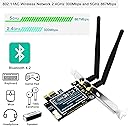
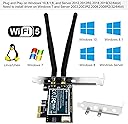
desertcart.com: FebSmart Wireless AC 1200Mbps PCIE Wi-Fi Adapter for Gamming,Video Streaming on Windows Server, 7, 8, 8.1, 10(32/64bit) Desktop PCs,PCIE WiFi Card (FS-AC86BT) Review: Works great, both Wi-Fi and Bluetooth - What's NOT to like? The price was good and it combined both Wi-Fi and Bluetooth in one unit. The fit is good, the backplate is sturdy and there were no problems installing. Wi-Fi worked immediately. I did have some issues with the Bluetooth, but I attribute that to previous drivers and Microsoft doing something weird in the 20H2 update. I'd previously been using an ASUS BT-400 thumb sized USB adapter and it worked flawlessly until that update. From then on, any pair of headphones using any driver I could find just left them with choppy, stuttering audio. I've tried different headphones, I've tried newer and older drivers, I've then gone on to upgrade my processor, motherboard, processor, ram, etc, so it wasn't a hardware issue. Google searches show that MANY people have had the very same issue and have not been able to resolve it given the assistance given. I was hoping new hardware with different drivers would help. I DID have that same stuttering issue on initial install with this FebSmart adapter, further confirming that it was NOT a hardware issue. I went into the device manager and a couple of other places and just started removing devices and deleting drivers, then trying to get Windows to recognize the drivers on the provided disc being meant for the hardware was a bit of a headache. I blame Windows refusing to let go of the old drivers from the previous hardware and insisting that they were meant for this adapter. I'm not really sure what finally cleared out whatever the problem was, but Bluetooth works now, and flawlessly, for the first time in nearly a year and a half. I like that I don't have a USB port filled with a thumb adapter and that everything fit nicely inside the PC case. So, the bottom line is that it's working and working well and I'm very satisfied with this adapter. Review: Best Wifi Product ever bought - Exceptional performance as it connects directly to PCIe express slot and very stable full gain connection. Speed is pretty good see screen shot that's full speed I am getting from it. more over I do lot of video conferencing from my desktop pc with this wifi connectivity. I would highly recommend this product. 5 star our 5.






| ASIN | B07JJFYG7J |
| Brand | FebSmart |
| Compatible Devices | Desktop |
| Compatible Operating System Family | Windows |
| Customer Reviews | 4.3 out of 5 stars 455 Reviews |
| Data Link Protocol | IEEE 802.11ac |
| Data Transfer Rate | 1200 megabits_per_second |
| Hardware Interface | PCIE x 1 |
| Manufacturer | FebSmart Co.,Ltd |
| Mfr Part Number | FS-AC86 |
| Model Number | FS-AC86 |
| Number of Items | 1 |
| Unit Count | 1 Count |
F**1
Works great, both Wi-Fi and Bluetooth
What's NOT to like? The price was good and it combined both Wi-Fi and Bluetooth in one unit. The fit is good, the backplate is sturdy and there were no problems installing. Wi-Fi worked immediately. I did have some issues with the Bluetooth, but I attribute that to previous drivers and Microsoft doing something weird in the 20H2 update. I'd previously been using an ASUS BT-400 thumb sized USB adapter and it worked flawlessly until that update. From then on, any pair of headphones using any driver I could find just left them with choppy, stuttering audio. I've tried different headphones, I've tried newer and older drivers, I've then gone on to upgrade my processor, motherboard, processor, ram, etc, so it wasn't a hardware issue. Google searches show that MANY people have had the very same issue and have not been able to resolve it given the assistance given. I was hoping new hardware with different drivers would help. I DID have that same stuttering issue on initial install with this FebSmart adapter, further confirming that it was NOT a hardware issue. I went into the device manager and a couple of other places and just started removing devices and deleting drivers, then trying to get Windows to recognize the drivers on the provided disc being meant for the hardware was a bit of a headache. I blame Windows refusing to let go of the old drivers from the previous hardware and insisting that they were meant for this adapter. I'm not really sure what finally cleared out whatever the problem was, but Bluetooth works now, and flawlessly, for the first time in nearly a year and a half. I like that I don't have a USB port filled with a thumb adapter and that everything fit nicely inside the PC case. So, the bottom line is that it's working and working well and I'm very satisfied with this adapter.
S**.
Best Wifi Product ever bought
Exceptional performance as it connects directly to PCIe express slot and very stable full gain connection. Speed is pretty good see screen shot that's full speed I am getting from it. more over I do lot of video conferencing from my desktop pc with this wifi connectivity. I would highly recommend this product. 5 star our 5.
D**E
Decent card for the price
Decent card.... increased my download speed from 15-20 mbs on the old card, to 45-55 mbs on the 2.5 mhz band. 5 mhz band is at about 60-80 mbs, but drops connection every so often; about 50ft from router in another room. 2.5 mhz band is very stable however.******update one year of having card: 5mhz is literally unusable 2 rooms (50') away from router;won't stay connected for any decent length of time. Bit super stable 2.5 band; never drops connection.
M**N
Easy to install and huge improvement
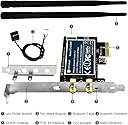
Originally had a usb wireless-n adapter installed, but the signal strength was terrible. This adapter was about 10x faster (speeds jumped from about 6mbs to 65-70mbs), which is acceptable given the pc's location in my house. It was easy to install and included a smaller bracket for slimmer cases - nice inclusion. It also comes with Bluetooth which connects to a USB header on the motherboard. That was a bit finnicky but I think that's an issue with the mobo/USB headers, rather than this card. I haven't tinkered with it because I don't truly intend to use any Bluetooth devices with it (it's an older pc with a couple refreshed components to facilitate my kid's digital learning days). Should that change, I will look into any driver updates that may help improve performance. Overall, it is a great value, easy to install, and a huge improvement over my previous adapter. The dual antennas picked up my router's signal far better and made for a more enjoyable experience for my kid.
J**N
Successful PC Installation and Performance
I had just upgraded my home Spectrum Internet service with their high speed Modem and Router. I then had my OLD wireless card would not connect to either of two wireless signals. NOW, with this new PCIE wireless adapter, my older PC is connected to the Internet and performs great!
B**M
Not entirely functional on Debian Linux
This product claims to be compatible with Linux through the "ATH10K" driver. This is technically correct. It does function properly under ATH10K and will connect to my wifi networks. However, it appears to have some compatibility problems with the UFW firewall software. When I have my firewall enabled and the driver is installed, my desktop will fail to boot about 3/10 times, seemingly randomly. I am not going to disable my firewall to use a wifi adapter. I spent 4 weeks troubleshooting this to give the product a fair chance, reading the Debian support pages and the FebSmart website. This has caused me a number of work disruptions. No other device I have gives me this issue. I ended up returning the product and changing to a TPlink brand device recommended by the Debian Wiki. I do not want to say that this product is bad, it worked entirely functionally in Windows 10. However, I cannot give more than 3/5 stars because I feel that their advertising of the ATH10K driver on the product page was overselling the actual level of tested hardware+software compatibility. If you have windows, this product is likely fine for you and I would recommend it as a good purchase. If you are using a different operating system, I recommend you look at the user manual first, and buy later.
J**Y
Great buy for the price!
Signal strength: I'm a single professional that rents a finished basement in a house, with the wifi router on the main floor upstairs. This adapter picks up the signal very well, with no noticeable drops in speed or signal strength. Installation: I'm not a PC-building person and this was super easy to install. A friend showed me where on the motherboard it mounts when the time comes and when it did, it took about one minute to plug it in and screw it in place. On-boarding: This product comes with a disc with drivers, but my windows 10 PC automatically installed the necessary drivers without ever needing to insert that disc. Caveat: I was using a USB wifi adapter, so I was connected to the internet already before installing this adapter, so that may have been why.
G**E
Great solution to avoid wires.
I supplied this to an employee for her home office workstation. I was a little skeptical about the WiFi speed, but she was able to install it herself and has reported excellent speeds and reception. It sure is better than 50' of CAT-5 running up the stairs. We don't 'allow' gaming on work machines, so I just threw five stars at it because it's running Autocad, REVIT, TEAMS, Zoom and Photoshop just fine.
C**E
Disappointing
Works but speeds are extremely slow even when next to the router ~10mb/s for a gigabit internet connection
Trustpilot
1 week ago
2 weeks ago