Buy anything from 5,000+ international stores. One checkout price. No surprise fees. Join 2M+ shoppers on Desertcart.
Desertcart purchases this item on your behalf and handles shipping, customs, and support to USA.
🎬 Elevate your home theater game with Polk’s sleek sound powerhouse!
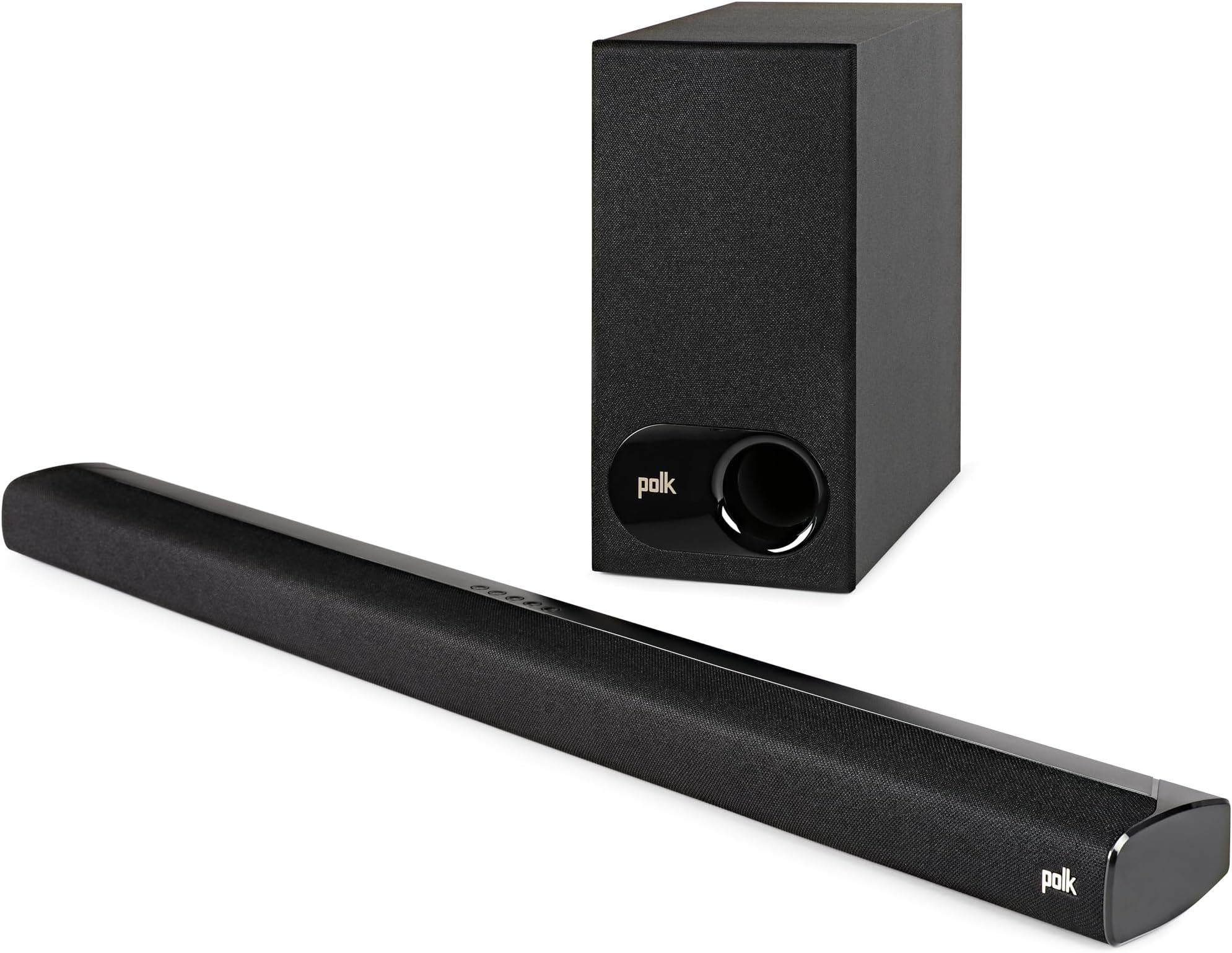
The Polk Audio Signa S2 is a premium ultra-slim soundbar with a wireless subwoofer, designed for 4K and HD TVs. Featuring 5 full-range drivers, exclusive VoiceAdjust technology, and Dolby Digital decoding, it delivers rich, clear audio with deep bass. Setup is quick with included HDMI and optical cables, and Bluetooth streaming lets you play music wirelessly from your devices. At just over 2 inches tall, it fits easily in any space and supports wall mounting or placement in front of your TV.


| ASIN | B07H1B3PY9 |
| Additional Features | VoiceAdjust |
| Age Range Description | Adult |
| Antenna Location | For Surround Sound Systems, For Smartphones or Tablets, For Televisions |
| Audio Driver Size | 5.25 Inches |
| Audio Driver Type | Dynamic Driver |
| Audio Output Mode | Surround |
| Best Sellers Rank | #3,122 in Electronics ( See Top 100 in Electronics ) #14 in Home Audio Sound Bars |
| Bluetooth Range | 10 Meters |
| Brand | Polk Audio |
| Built-In Media | 5' (1.5m) HDMI cable, 5' (1.5m) Optical cable, Literature, Remote, Two power cords and sound bar, power supply |
| Color | Black |
| Compatible Devices | Smartphone, Tablet, Television |
| Connectivity Protocol | Bluetooth |
| Connectivity Technology | wired, wireless |
| Control Method | Remote |
| Controller Type | Corded Electric |
| Customer Reviews | 4.4 out of 5 stars 21,891 Reviews |
| Enclosure Material | Plastic |
| Frequency Response | 20 KHz |
| Is Waterproof | FALSE |
| Item Dimensions D x W x H | 3.31"D x 35.43"W x 2.15"H |
| Item Type Name | Polk Audio SIGNA S2 Polk TV Sound Bar and Wireless Subwoofer Speaker with HDMI and Bluetooth Black |
| Item Weight | 3.9 Pounds |
| MP3 player | No |
| Manufacturer | Polk Audio |
| Maximum Range | 7 Meters |
| Model Name | SIGNA S2 |
| Model Number | AM6214-A |
| Mounting Type | Bar Mount,Tv Sound Bar |
| Number of Audio Channels | 5.1 |
| Number of Items | 1 |
| Power Source | AC |
| Speaker Maximum Output Power | 25 Watts |
| Speaker Size | 2 Inches |
| Speaker Type | Soundbar, Subwoofer |
| Specific Uses For Product | Home Theatre |
| Subwoofer Connectivity Technology | Wireless |
| Subwoofer Diameter | 2 Inches |
| Tweeter Diameter | 2.54 Centimeters |
| Unit Count | 1.0 Count |
| Warranty Description | Electronics: 1 year / Drivers: 2 year |
| Warranty Type | Limited |
| Water Resistance Level | Not Water Resistant |
| Wireless Technology | Bluetooth |
| Woofer Diameter | 5.25 Inches |
R**B
Easy to setup, easy to use, great sound
This relatively low cost sound bar has remarkably good sound for such a low profile. Setup was easy. It came with HDMI and optical cables for attachment to the TV. I attached the HDMI to the ARC (Audio Return Channel) HDMI connection of my flat panel and just turned it on. The TV recognized the sound bar by turning off its internal speakers and playing sound through the sound bar. Additionally, it shows the audio level bar on-screen whenever the TV or sound bar remotes are used to adjust the audio level. I plugged in the wireless subwoofer and it connected automatically to the sound bar, but there is also a manual process if necessary. It is also easy to use. There are various adjustments that can be made with the sound bar remote, but once these were made we only use the TV remote. The sound bar appears to go into sleep mode when the TV is off and comes back on when the TV is turned on. It is compatible with Dolby 2.1 content, but it cannot be upgraded with additional speakers. There are five inconspicuous buttons on the top of the sound bar: on/off, source selection, Bluetooth on/off, volume down, and volume up. Bluetooth is used for playing sound from other sources like a smart phone. These buttons also appear on the sound bar remote along with other buttons for mode selections. There are three sound buttons: Movie, Night, and Music. We use the Movie mode mostly as it “expands” the soft and loud sounds as if in a movie theater but with 2.1 speakers. The Night mode “compresses” the sound levels, making “quiets” a little louder and “louds” a little lower. This mode is good for late night listening with the sound turned down so that others aren’t disturbed by loud explosions and you can still hear the “quiet” portions. The final sound mode, Music, is for listening to music with the frequencies set at a more equal distribution. There are also three buttons for Voice Adjustment. These adjust the voice frequencies to make voices easier to understand. At the highest level, number 3, we can tell that voices are much clearer but they sound somewhat unnatural. Consequently, we normally use level 1 and occasionally level 2 when necessary. There are a series of lights on the front screen to indicate operation and when modes are selected. The main light comes on when the sound bar is in operation and goes off when it goes into sleep mode. This is a soft light and I do not notice it when watching the TV. The color changes whenever the Dolby 2.1 signal is received and being used. Other lights on the front will turn on momentarily whenever a new mode or source is selected to indicate that the signal has been received and the change made. There is also a light that comes on when Bluetooth is turned on. This goes off when Bluetooth is turned off or when Bluetooth goes into sleep mode if it is not in use for more than 15 minutes. Note, the auto sleep mode is not the default and this option has to be manually selected to be in use. This sound bar produces much better sound than the TV speakers and requires little attention once the adjustments are set; we mostly use the TV remote. My only criticism regards adjusting the subwoofer levels. The subwoofer has bass minus and plus adjustment buttons on the remote but, unlike the other mode adjustments, there is no visual indication that anything is happening when this is used. There isn’t even an indicator that it is wirelessly linked except for the lights used when manually connecting it. The bass can be adjusted up to the point that deep voices and drums rattle items on the shelves in the room. When adjusted down to reduce such rattles we have no way of knowing if we are at a mid or lowest level. The bass can be adjusted to what is being listened to, but it would be nice to know the actual setting so that a “standardized” level could be selected for particular circumstances.
C**N
Good sound, clear dialog, turns on/off automatically
June 2020: still functioning perfectly. I think once or twice I’ve had to unplug the subwoofer to get it work again. Very rare occurrence. The remote can be slightly difficult to get to work (needs the right angle) but I almost never have to use it because the TV controls it. Great sound bar, 100% recommend. December 2019 update: still working great. Original 2018: I got this speaker a couple weeks ago and it's been working great so far (November 2018). I plugged in both the HDMI ARC cable and the optical cable, per the instructions and it started working after I turned the TV off and then on. It turns on instantly along with my TV when I press the Apple TV remote. The volume changes through my TV remote (or Apple Remote). There are three different buttons for levels of voice clarity, but I haven't had to use it at all which is a huge plus. The bluetooth syncing works very easily, again a problem that many other sound bars have. There is no Alexa integration, but that probably helps keep the price low (no mics or networking hardware, a plus in my opinion). The wireless subwoofer has totally satisfactory sound for a semi-large living room, and was completely plug-and-play. I just plugged it in behind the couch and it works perfectly, no syncing needed. This model also doesn't have any problems that affected the last generation (namely turning off after 30 seconds if no audio input), which is great. The price is fair, and it mounted to the bottom of my TV easily. I was not able to figure out what the two "spacers" are that were included in the package. The instructions didn't seem to say what they are.
D**N
Nice With A 2020 LG TV
My first soundbar! This is definitely a big improvement in sound (volume, clarity and bass) over what were already pretty nice sounding built in television speakers which I listen to at about volume level 9 (of 100) for casual daily YouTube videos. I can bring it to level 13 when wanting to be more immersed in Netflix and such. I don’t need much volume in my home (though in my car I have a 12” subwoofer and play music at 75% volume LOL). VOLUME: The sound bar can get much louder and with that extra volume it stays more clear without being distorted unlike the built-in television speakers that start to sound distorted when it gets 50% and above in volume. REMOTE CONTROL: This soundbar CAN be controlled with my TVs remote so long as it’s connected not just with the optical audio cable but the HDMI cable as well going into an ARC HDMI port on the tv. The soundbar turns on when I turn on my tv and turns off when I turn off my tv. I don’t see a volume level on the soundbar which is my first complaint about the soundbar. It’s also not on my tv when using the soundbar. I just see a + or - on the tv when I press those buttons. EQ (ISSUE 1): Sadly there is no real EQ settings on this. There are several buttons on the REMOTE ONLY (not on the soundbar itself) that have 6 custom sound settings: Movie, Night, TV, voice 1, voice 2 and voice 3. I’m not sure if you can combine these. I switched to “night” and then “voice 3” thinking that maybe it would simply enhance the voice on night mode but when I press night mode again it resets the voice setting. So I think it’s either or. And as a 7th choice you have your bass volume. Thats the extent of EQ options. When using the built in speakers the TV had tons and tons of options with 5 frequency sliders (for sub bass, bass, mids, high mids and treble), surround sound, magic sound, add bass, add treble… so much. That’s all greyed out when using the optical audio out to this soundbar. I don’t know if all of those settings would still be there if I got an LG sound bar with my LG television. But considering I don’t know what brand of television will be my next, I couldn’t worry myself with matching the soundbar brand. So far, I guess it doesn’t matter that there aren’t as many EQ settings, the speaker sounds pretty good as is. I leave it on “Movie” for everything. I have my Apple Music hooked up on the television but haven’t used it for music yet, I presume I would want to put the soundbar on the music setting for that. ISSUE 2: I am not sure is an issue with the speaker or the television but when watching YouTube for example, if you are on the YouTube menu, there is no audio signal being sent to the speaker and thus you see single white dot of light. When you have clicked on a video and the audio signal is sent to the sound bar, the single white light turns green. The PROBLEM is that there is a fraction of a delay after the video has started before the sound starts on the speaker. There are many videos I watched that for some reason has someone speaking from the very first frame of video and the sound bar always misses it, the sound turning on 1-2 words late into the video. It has nothing to do with speaking specifically, whatever the sound is in the video, the speaker doesn’t activate until a fraction of a second after the video starts. It’s a bit jarring, and a little more annoying. If I rewind the video to the beginning I’m just repeating the situation because rewinding means there is no audio signal going to the speaker and so I see the white dot again, that once again doesn’t turn green until a fraction of a second after the video starts again. But aside from those issues, it really does sound good and I haven’t felt a need to crank up the base much because it sounds pretty full as is, without sounding too bassy or muffled. I experimented with the voice enhancement buttons. I’ve settled on “voice 2” to bring just a little bit more clarity and audibility to the voices when I have the volume a bit lower so as not to disturb others. It sounds good, I can make it louder than ever before if I want. I can control its volume and on/off without needing its remote (though I need its remote for the other EQ settings). I got it “open box” but it looked brand new I must say for $143.80 which is a good price for what this is. And I trust the Polk brand.
J**D
Surprisingly good sound, easy to set up, you can turn off auto-off
Lots of reviews here, and many complain about the "auto-off" feature that turns the soundbar off if there's no audio input for 15 minutes. YOU CAN TURN THIS FEATURE OFF. Hold down the "TV" button on the remote for about 5 seconds; a light will flash on the soundbar and the feature will be OFF. Repeat the process to turn it back on again. Now that that's out of the way: I've been using an A/V receiver and hi-fi speakers for a 3.0 (front right, left, center) experience. The problem is, with an over-the-air antenna with TiVo DVR, Roku, smart TV, and disc player, it's gotten very complicated. I turned to the Polk Signa 2 soundbar to help simplify things. Setup was easy. I used the supplied HDMI-ARC connection on my TV, plugged in the soundbar and "sub-woofer" to the wall, and that was that. I was really impressed with the quality of the sound, even at high levels. It plays much louder than I expected and still delivers clean sound. The dialogue enhancement settings give me clearer dialogue on modern movies than my previous center channel speaker delivered. The soundbar comes on automatically when the TV is turned on and it goes off when the TV is turned off. Any remote that controls the TV volume will automatically control the soundbar volume. Couldn't be easier! The "sub-woofer" is really a powered woofer. The speaker is 5.25" in diameter, powered by a 60-watt built-in amp. It delivers good bass at satisfyingly loud levels but calling it a "sub-woofer" is stretching the definition. Still, the sound is much better than you get from a television's built-in speaker and plenty good enough for this hi-fi enthusiast. The soundbar is quite short, barely more than 2" high, which means it fits very nicely under my LG television on legs on a shelf. It looks as if it came with the TV. The wireless woofer can sit about anywhere but sounds best on the same wall as the TV. Anybody can make a soundbar but I chose Polk because of their hi-fi reputation. I'm very happy with my choice. Now, some notes for those who have had trouble getting the soundbar to work. Make sure you're using an HDMI-ARC connection on your television. That "ARC" is critical. Not every HDMI connection is "ARC," which means Audio Return Channel. It should be marked as such. If you don't have an HDMI-ARC connection, you can use an optical connection or Bluetooth, but you'll lose some features like auto-on. Use the supplied high speed HDMI cable. Don't use an old HDMI cable. They've gotten better over the years. Remember to change the "sound output" setting on your TV. It must be set to output sound to the HDMI-ARC connection, or to the optical or Bluetooth outputs if that's what you're using. It works from your TV, so it doesn't matter what sources you use for programming. However, the soundbar will take up one HDMI connection on your TV. If you have a lot of sources plugged into your TV, you may come up short on HDMI inputs.
R**A
great sound
really loved the quality and sound for the price
C**E
Best sound bar that has great depth and bass for under $300.00
Trebble is a little raspy at higher volume. Over all for the money i believe this is a great sounding deep rich punchy bass for under $300.00 bucks. SOLD AMERICAN!!!
C**S
Not Recommended For PC
I bought this soundbar to set up under my ultrawide screen on my PC in 2022. I've had constant annoyance with this soundbar since then and it's 2024 now. I originally set this up using an optical cable directly to my PC. Originally, I would start to notice odd volume differences between games or between sessions. I thought it had to have been an issue with the way I had audio configured on Windows or in the individual games. But, I ruled that out when I had a particularly bad audio session where it sounded like all the channels were off and I was only hearing audio from one channel. I simply unplugged the optical cable and plugged it back in and the audio was perfect again. After that I switched from optical cable to 2.5mm Aux cable and I haven't had that issue since. That could have been an issue with my motherboard's optical port. I don't know. But, then I started to notice the sub problem. If I'm being honest, I didn't realize this whole time that the bass of the subwoofer was cutting in and out. I'm not sure exactly when I started to notice it, but once I did, I couldn't stop hearing it. It happens so frequently and intermittently that it's hard to tell at first I guess. But that's the biggest issue and once you notice it, it becomes extremely annoying. Over the last year or so I've half-heartedly attempted to look up the problem. It's taken this long for me to actually do something about it because I often use headphones instead. Looking it up, there's a few discussions specifically about the Signa S2 and subwoofer cutting in and out. I'll save you the trouble of having to look too far. They usually say it has something to do with wireless interference. I can tell you as of today that's definitely not the case for me. Admittedly, I have multiple network devices (Modem/Router combo AND a secondary Router). Both devices have wireless with both 2.4Ghz and 5Ghz bands. But I have the wireless disabled on both of those devices. My PC has onboard wireless with again the same bands. Everyone says it's the 5Ghz band and that by disabling it, it fixes the problem. First, no one should have to do that. I have my sub RIGHT next to the soundbar. There's nothing between them. But regardless of all that, today I disabled everything. There was no wireless signal from any device in or around my PC (including Bluetooth). The subwoofer was still cutting in and out. I tried multiple times using the sync button and forcibly reconnecting the subwoofer to the soundbar using their pairing method over the years. Nothing fixes this subtle cutting in and out. So I'm done. As of today, I'm moving on. I'm in the middle of narrowing down on a couple of integrated bass soundbars to avoid any possibility of other wireless devices somehow interfering with my audio device. To be perfectly honest, in this day and age, that just shouldn't be happening anymore. It's a reminder of the old days of 2.4Ghz wireless house phones interfering with wireless routers causing disconnects on your gaming sessions. It's just makes me wonder what were they thinking? Hopefully this helps anyone else thinking about trying the same thing to avoid the same mistake I made.
T**G
Great sound and performance without breaking the bank!
Puts out great sound quality and volume level! I’m very pleased with this purchase! It sits above my fireplace and under my large screen tv. It’s just a perfect fit.
A**N
Almost Perfect
The Signa S2 is, perhaps, one of the best "bang-for-your-buck" sound bars I have found. The sound quality is crisp and clean, and when paired to the sub, very well-rounded. I find it to exceed my expectations for the price. My only gripe is related to the settings...there is no display field (only small lights), so it's challenging to know where your settings (bass, treble) and preset values sit. I have yet to experience issues with connection as per other reviews, and the initial/ongoing sub pairing has been flawless. Overall, I would highly recommend this to anyone looking for a high-quality, cost-effective sound bar.
M**N
Simplesmente o melhor
Melhor custo benefício sem dúvidas qualidade sem tamanho
R**D
Awesome Product
I am amazed to listen the High definition sound in such a small package. 5 Stars to the seller !!
G**V
This can surprise you
I basically bought this for watching BBC nature documentaries since my TV's inbuilt speaker had hard time delivering clear dialogues but I think this Signa S2 is overkill for that purpose. I should have gone for Signa Solo which was selling for 8k during sale (including bank discounts). Now coming to it's capabilities. FORMAT IT PLAYED : Dolby digital, Dolby digital plus, DTS, DTS-HD (Master Audio) and many other formats except Dolby TrueHD & Atmos where TV displayed something like "audio not supported in this video". My biggest concern was if it can play DTS files and it plays them brilliantly. I felt DTS sounded better than Dolby but it may be due to higher bitrate of dts files. VOCALS are amazing. Super clear. Actually whole sound speactrum is too clear with great instrument separation that you will be able to distinguish between different sounds/instruments being played. High notes tone (Tweeters) are just pleasant to listen to. Polk's Voice adjust feature is extremely beneficial and works as advertised. But since soundbar produces such crisp and clear sound I never felt to use that feature but I tried just to test it out and it worked great. It easily fills 15x20 room with just 50% volume that you would feel like sitting in a theater. Now coming to BASS: It's the most controversial part with Signa series soundbar. When playing dolby movies (I played Batla House and Justice league) the rumble was so huge even at low base level setting that it literally felt like being in the scene of the movie. The rumble penetrated 3-4 walls in my house and could be felt beyond 30 feet. When Polk says "Deep Bass Technology" they are truly honest with their claim. Bass felt like Sub-bass most of the time than normal Bass. Bass is what you can hear, Sub-bass is what you feel in your whole body. I also noticed there was no down firing driver in the sub. When you place your hand near sub you will barely feel anything even while producing THAT deep Bass rumble in action scene. Bass effect is more like 3D and feels like PVR cinema at home. These guys (Polk Engineers & Scientists) know the science of sound and are Master of acoustics so they have done something there in the Bass department. Now the controversial part of NO BASS. It occured mostly during streaming music via Bluetooth or even while playing directly from TV. Bass was so loose & non existent (70% of the time) that one would easily get disappointed. Only thing about the bass present during music is some "air pressure type" loose Bass ,which you can only hear, without having any body,depth, weight or punch. But when you watch dolby/DTS movies Bass will just shock you in many ways that you won't be able to believe yourself. One can easily feel that Super deep Punch and weight with 3D effect. So there's definitely some improvement to do in that Bass department but it won't affect your experience during watching any movie. For music lovers I would suggest to go for Magnify Mini rather than Signa S1/S2. It was very easy to install and I used HDMI Arc to connect to my TV. Using Polk's remote I can turn on Bluetooth ,connect with my OnePlus 7 and stream. I actually enjoyed listening to music since I rarely listen to Bass heavy songs ,so Bass issue never bothers me. I got it for around 14k so it's Value for Money for me and actually delivers more than what I paid for. I received 4 power cables (2 two-pin & 2 three-pin). Received all other accessories like optical cable,HDMI cable, remote, batteries. Thanks for reading my review. Cheers ;)
R**B
Sounds well
Sounds OK , solid , good bass and mediums, but lacks of trebles. Good for the price , if you are looking for astonishing sounds it is not your soundbar.
Trustpilot
2 days ago
2 months ago