Buy anything from 5,000+ international stores. One checkout price. No surprise fees. Join 2M+ shoppers on Desertcart.
Desertcart purchases this item on your behalf and handles shipping, customs, and support to USA.
๐ Fusion5 FWIN232+: Power, Portability & Performance in Your Hands
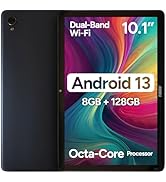
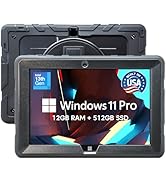
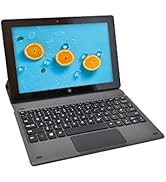
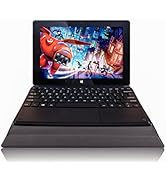
The Fusion5 10.1" Windows 11 Tablet PC (FWIN232 Plus) combines a powerful Intel 13th Gen quad-core processor with 8GB RAM and a stunning Full HD 1920x1200 display. Ultra-slim and lightweight, it offers versatile connectivity including 5G WiFi, USB 3.0, Micro HDMI, and Bluetooth 4.4. Perfect for professionals, students, and creatives seeking a portable Windows 11 device with reliable performance and a 12-month US warranty.


| ASIN | B07HY8X46F |
| Age Range Description | Adult |
| Aspect Ratio | 16:10 |
| Battery Average Life | 6 Hours |
| Battery Capacity | 18 Watt Hours |
| Battery Cell Type | Lithium Polymer |
| Battery Power | 18 Watt Hours |
| Best Sellers Rank | #36,512 in Electronics ( See Top 100 in Electronics ) #689 in Computer Tablets |
| Brand | Fusion5 |
| Built-In Media | Tablet, USB 3.0 cable, micro HDMI cable, charger, manual/warranty card (if applicable) |
| CPU Model Number | N series |
| CPU Model Speed Maximum | 1.8 GHz |
| Camera Description | Front, Rear |
| Cellular Technology | 5G |
| Color | Black |
| Compatible Devices | Various Windows 11 compatible devices (e.g. keyboard, mouse, speaker, headphones) |
| Connectivity Technology | Bluetooth, USB |
| Customer Reviews | 4.1 out of 5 stars 3,657 Reviews |
| Display Refresh Rate in Hertz | 60 |
| Display Resolution Maximum | 1920*1200 Pixels |
| Display Type | LCD |
| Front Photo Sensor Resolution | 2 MP |
| Generation | 4th Generation |
| Graphics Coprocessor | Broadwell GPU (Intel Gen8) |
| Graphics Description | Integrated |
| Hard-Drive Size | 64 GB |
| Hardware Interface | Micro-HDMI, USB 3.0 |
| Headphones Jack | 3.5 mm |
| Human-Interface Input | Microphone |
| Item Dimensions L x W x Thickness | 10.24"L x 0.67"W x 0.39"Th |
| Item Weight | 0.69 Kilograms |
| Lithium-Battery Energy Content | 18 Watt Hours |
| Manufacturer | Fusion5 |
| Memory Slots Available | 1 |
| Memory Storage Capacity | 64 GB |
| Mfr Part Number | FWIN232+ |
| Model Name | FWIN232 PLUS S1 |
| Model Number | FWIN232+ |
| Model Year | 2018 |
| Native Resolution | 1920 x 1200 pixels |
| Number of Rear Facing Cameras | 1 |
| Operating System | Windows |
| Operating System Family | Windows |
| Other Special Features of the Product | Expandable Storage |
| Photo Sensor Resolution | 5 MP |
| Processor Brand | Intel |
| Processor Description | Intel Quad-Core |
| RAM Memory Installed | 8 GB |
| RAM Size | 8 GB |
| Rear Facing Camera Photo Sensor Resolution | 2 MP |
| Screen Size | 10.1 Inches |
| Size | 128GB |
| Specific Uses For Product | Productivity (Education, Office Work, Industrial Use), Entertainment (Movies, TV Shows, Gaming, Web Browsing) |
| Supported Audio Format | MP3 |
| Total Usb Ports | 1 |
| Video Capture Resolution | Native FHD 1080p |
| Video Processor | Intel |
| Warranty Type | Limited |
| Wireless Compability | 802.11ac |
| Wireless Technology | Bluetooth, Wi-Fi |
W**H
Versatile and Capable Tablet
The fusion 5 tablet is good at what it is designed for. I personally use it for photo editing when I donโt have ready access to my PC. It is fully capable of handling most of the commercial photo editing software I use to include image stackers and video compression software. Itโs extremely portable and fits nicely in my photographers backpack. While this is an excellent alternative to more expensive units, it does have a small but worth mentioning shortcoming. Battery life. On a full charge, I can get an average 12 hours of use without being tethered to an external battery pack or wall outlet. In truth 12 hours is more than adequate for most trips, however, there have been times when the battery life has been a detriment to field work requiring an external battery source, which creates additional weight on hikes to photograph landscapes, wildlife, and even my favorite Astro photography. All in all, this is a great tablet that performs well, is easy to set up and use, and isnโt cost prohibitive. If you are looking for bang for the Buck, the Fusion 5 is the answer!
X**R
Well-priced tablet, works well as a smart home controller
Decently priced Windows tablet. I use one as the touchscreen controller for my pool/spa UI I created. Good response time and has run 24x7 for years with no reboots (except OS upgrades) or issues. Screen brightness and image quality has stayed very good the whole time. I bought this one as a hot spare for the day the original finally dies (as all products do). My only complaint is the intrusiveness of Windows updates that make running a seamless kiosk-like experience tough but that isnโt anything to do with the tablet, just the inconsistency of MSFT updates. The other fairly minor nit is the ports have changed over the years (types and locations) but the product name hasnโt changed. Not a big deal but I was surprised to find the power charging port had moved from the left to the right side. Fortunately I left plenty of charging cable behind the tablet on the wall and can shift it over but having the same basic product offering name change things like that could be a surprise for some. Maybe rename it the Fusion6? Iโve also tried the Android version of this tablet and it is a good option as well if you prefer Android. It has some better options than Windows for kiosk purposes but I prefer the Windows remote access options.
W**N
10.1" Fusion5 Tablet PC Model FWIN232 Plus
I received this tablet just this past week and while I'm still investigating all the bells and whistles, I have to say I'm very impressed and pleased with the product and its ease of use. When I purchased this tablet I was looking for something at a reasonable price that had more memory and storage space than the tablet I've had for three years and that came with a Windows operating system. I found both of my needs supplied with this tablet. The $199 price was great compared with other tablets, some of which didn't match up to this one, and it comes with a Windows operating system. This tablet as many assets: + Physically, the 10.1 inch LCD display screen is just the right size, meaning it's not so small that it becomes difficult to work with and it's not so large that it can't be carried in a purse, small bag or backpack. The screen is very clear and the colors are crisp. The shell is made of hard plastic, which seems the style with just about all tablets, so it's lightweight and easy to hold. + According to the specifications the tablet comes with Intel Cherry Trail Z8350 Quad Core (up to 1.92GHz), 5.0 MP camera (front and rear views), 4 GB DDR RAM, 64 GB storage, Wi-Fi capability, built-in Bluetooth capability, 6000 mAh battery, One Drive free online storage, accepts up to a 128 GB micro card (not included), built-in G-Sensor (haven't figured that one out yet) and built-in hi-fi speaker and microphone. It also has a a USB port. USB cable and power cable are included. + It comes with Windows 10 Home Edition pre-installed. The fact that it has a full-size 3.0 USB slot was a real plus when purchasing this tablet. That's one of the main things I missed with my other tablet as I had to purchase an adapter to use a flash drive and it was very slow. There is also a keyboard dock for an attachable keyboard, which I wouldn't mind having, but so far I've been unable to find one for this tablet. So far I've installed Firefox browser (the tablet comes with Edge browser) and several open source software programs (GIMP and OpenOffice) and even with Windows 10 installed I have almost 40 GB of free space for other programs. The tablet starts and runs quickly. Use of the Internet is very quick. I've had up to 10 tabs open at the same time and had no problems with internet speed. Wi-Fi works wonderfully. The graphics are nice and clear, videos are crisp and the touch screen works very well. I'm still getting used to the on-screen keyboard, it can be temperamental about where the user touches the keys and with what force. It doesn't seem as quick as on my other tablet or an Android but that might be because I'm not used to the feel of it yet. Sound is actually pretty good based on a few videos I've looked at and it comes through nice and clear with an earphone. I'm not sure about battery life. I normally use this in the evenings, mostly writing, surfing the web and doing research. When I turn it off after about 4 hours the battery still shows quite a bit of power remaining, which means the battery lasts longer than in my other tablet, which is a positive. I'll update in the future as to the battery capability. The battery does seem to recharge quickly. Based on what I've seen so far, I'd recommend this product to anyone who's looking for a good tablet at an affordable price. It has a 12 month limited warranty included.
D**N
Great Budget-Friendly Tablet
I was looking for a small Windows-based tablet to replace an Android tablet that died. This was to sit beside my recliner for Internet searches, email, YouTube, and other light weight needs. The Fusion5 fills the bill excellently. All Windows features are working well. For a 10" display, it is easy to read and viewing videos is conformable. Having a touch screen is a necessary feature that some competitors lack. I have two external additions from mt previous unit that I have found helpful: a Bluetooth keyboard and a stylus. The Fusion5 on-screen keyboard is easy to use and quite responsive. I just like touch-typing. The touchscreen works just fine but I have large fingers and I just like a stylus. These may enhance your experience as well but definitely are not required. As far as performance, the Fusion5 is powerful enough to handle all me needs. It even runs Microsoft Office applications well. I fully recommend this tablet. UPDATE 02/28/2025 This workhorse of a tablet has greatly benefitted me both personally and professionally. It is so easy to have a Windows-based tablet with me when in the field meeting with customers and having the same experience I have with my home computer. I use an external keyboard so I recommend considering the docking station for this tablet. I use a passive/active touchscreen pen so I do recommend a screen protector (as should be used for all touchscreens).
M**.
Runs Win11 "S" mode by default; Only runs items downloaded from MS AppStore, unless...
...you disable it. Contacted the Vendor, and they never mentioned it could be disabled. One star given because of the hours and frustration involved due to the lack proper information regarding the device during the purchasing process and the minimal support after the purchase. Now, the rest of the story: Issues: Yes, I am a very biased user. I have UNIX, Linux, and MS OS administration experience. If you want an inexpensive "entertainment toy" that only runs stuff from the Microsoft App store(including their browser and their version of word, spreadsheet, and), and you don't mind being REQUIRED to have a "Microsoft on-line account" or being forced to pay the subscription for O365 (and, dare I say it, soon for the operating system itself?), you'll probably love it. You will need a keyboard and a mouse to use it effectively for any of the supplied office product (e.g. PowerPoint, Word, Excel). So count on spending another $40USD to $80USD. The OS on the tablet is associated with your Microsoft account...not sure what that might mean later with respect to giving it to someone (family member, etc.), donating, or selling it. The new "owner" Might be required to purchase a new OS. Just something to consider if these are some of your thoughts regarding the purchase. My Needs and Interaction with Fusion5 I simply needed a device with physical USB and HDMI ports and run a simple stage timer program that I purchased many years ago - and no, there was no equivalent in the MS App store. I didn't need a network connection or anything. That being stated, if you want it for non-mind numbing purposes, you have two choices. Get something with a full operating system (or an Apple device) or disable the "S" mode. There are several videos on line that discuss how to do this. I spent HOURS trying to get a "non-verified" program to work on this thing as the inexpensive tablet I was using and it wasn't until I ran a command shell window that the OS finally stated that it was in S mode. I contacted the folks at Fusion5, explained exactly what I needed to do with the tablet, and ended with, "If I can't do this, the unit useless to me" and I'll need to return it. How do I reset to factory settings". Resetting didn't even work as the OS requested the source OS installation files! What I Ultimately Found I was fiddling with it today to figure out how to clear it (was on the verge of using the format command) and stumbled on a way to turn off the "S" mode and finally got the program I needed to run for a business conference last weekend(yes, AFTER I needed it) to work. Questions So, my question to the folks at Fusion5, why don't you document somewhere that the tablet CAN be taken out of S mode? And Amazon, why isn't it in the description that this is intended for entertainment purposes or, if you purchase the subscription to O365 (monthly charges) and that ONLY Microsoft Verified (e.g. locked to the MS-App store) can be run? Two questions of a somewhat legal perspective come to my mind; Anti-trust violations on the OS part(although, they do give themselves an "out" with the ability turn S mode off...but...; "Bait and switch" (e.g. states Windows 11, but neglects to make the full statement that it has "restrictions" on the Amazon description side (although, I do understand that Amazon takes boiler plate from the vendors - Maybe vendor descriptions should be vetted more appropriately). If you have gotten this far, I sincerely hope you see this as a fair assessment given the reason for my purchase in the first place. If you are Amazon or Fusion5, in the future, please pay more attention to the product descriptions (by the way, I see information lacking on many products here on Amazon and affiliated vendor websites) especially when a product advertises something Windows 11, as one expects the full product, not a product with reduced features or capabilities.
D**K
A good tablet that gets along with Windows 11 quite well.
I know PCs and operating systems pretty well, maybe more than I should after owning a computer and business phone system business for twenty-four years. I am in the process of replacing all our Windows 10 devices, which are all over 11 years old. I choose a mini PC for myself, a mighty one, and the Fushion5 for my wife. The Fusion is a pretty good tablet, with a higher screen resolution than most. It has both a USB C and a USB 3.0 port. A USB C to USB 2.0 adapter was included in the box. That is helpful. We choose to use a folding keyboard instead of a docking one. The tablet booted quickly and set up Windows 11 Home and its many upgrades with only a couple of minor hiccups. It performed these tasks better than I expected. So far so good. To sum it up, a well-made tablet, that performs well, and the price is good.
S**R
Good little device, works well at a good price.
Handy little device. I use it for the shop, loaded some automotive diagnostic software and connect via USB to a pass thru device to reset codes, etc. Also use it to connect to bluetooth speakers for playing music. Works fine for what it is, a little slow sometimes but usually not enough to be a bother, probably power saving related. Touch screen is decent, could be a little more sensitive and a little bit bigger. I got the 10" but maybe should have found a 12" so I can work it a little easier with my fat fingers. One thing that I really like is that it can be charged thru a micro USB but it also has a separate AC charger with a tiny barrel connector. Was connected with the USB and still able to drain the battery down playing games or something, haven't tried with the AC adapter, also haven't tried plugging them both in at the same time... So far so good, no complaints, everything seems to be working well. My original plan was to remove everything I could to clean it up and just use it for the diagnostic software but since it is working ok I've added a few apps for other stuff. Probably get a keyboard for it and then see how it works for a mobile arduino programmer. It has a wide (3/4" or so) black border around the screen, but screen is actually 10" diagonal so it is as advertised. I kind of like the border because it gives me something to hang on to when carrying it around. If you want a basic windows tablet, this one seems like a good choice.
J**T
Excellent Product
Opened it and set it up as it had a partial charge. Started right up and was easy to get started. Very lightweight which is a plus for me. I charged it overnight. For my purposes (crafting) it was a very good choice. Only one thing (for me) is the fact that the use instructions were hard for me as there were not many and I have never used a tablet before so that was the reason for the difficulty. I did get some guidance from my friend and now that I know how to use it, I am very pleased with it. It is an excellent price, the screen is large enough for me to see, and it connects wirelessly to my internet. Highly recommend it.
D**E
Cargador UK.
No me ha gustado que viniera con enchufe UK. He tenido que buscar un adaptador. No especificaba esto, por lo menos claramente. Me planteรฉ pedir funda con teclado, pero no me arriesgo a que no sea en espaรฑol.
C**L
What a brilliant device...!
My Samsung Tablet finally died and I needed a replacement. I'd long realised that I didn't want another Android tablet again as I'm not very tech savvy and found the interfaces difficult to manage. Imagine my delight when I came across the Fusion 5 tablet computer that runs on Windows 11! For me this is the best solution - a tablet that runs like my computer and interfaces with my desk-top machine seamlessly. And all for less than ยฃ300 - brilliant! Now I can take my entire office out with me when I'm working or travelling away from home. This alone is a great gift - the ability to carry on working on the same project no matter where I am. It's just so reassuring to have the same icons and programmes always with you; I'm so much more productive because of this brilliant device. The Fusion 5 screen is bright and responsive to the touch, so much better than my previous tablet. Another improvement is that the battery lasts all day without charge. I bought a Bluetooth key-board and mouse to complement my Fusion5 - both interface seamlessly with it and give me the familiarity of a separate key board and mouse. Have I any complaints - No! Just a niggle - it takes a 5 second press and hold to get it to start. This is more a testament to my impatience when I've got an idea in my head that needs to be written down! After all my desk-top takes at least 10 seconds of whirring and clicking to get to the same status. As I say, what's not to like with the Fusion 5!
M**A
Decent desktop alternative in a pinch
I bought the Fusion 5 tablet as an emergency replacement for my big desktop that had blown its PSU (under guarantee). I ordered it with the docking keyboard, a 128GB TF/SD card and a screen protector. It all arrived in 2 days which was handy as I had to produce some Word docs urgently for work. I installed a spare Office 365 (you get up to 5 on the standard subscription) and I was away. There was some other software that I needed that wasn't available from the Microsoft Store, and so I had to change from the installed Windows S operating system to Windows 10 Home (a relatively simple couple of clicks from the Settings menu) and so was able to install my favourite photo editor. The 1200x800 screen is fine for simple stuff, but for big docs and spreadsheets it is a bit small and so I decided to connect it to my 27" 4k screen which it would do, which is fine for Word, Excel and photo-editing, but had real trouble with hi-res video. I didn't try it with a spare 1080p screen, but in retrospect that might have been a better decision, but hey-ho. I did have some trouble with the docking keyboard, in that if my thumb just brushed it when typing (especially the space bar) I would find myself typing words in the wrong place! I think that's my problem with trackpad laptop keyboards in general and I really missed the right button function. However, for simple surfing when sitting on the sofa it works fine (as does the screen keyboard). For working at my desk I decided to plug the tablet into an 8-way USB adapter and plug in wired mouse and keyboard, which along with powered external hard drive meant that I could type normally and access my backup files off the drive. We hadn't had a tablet before, and so the Fusion5 is a bit of a happy novelty, and so much easier to use than our ancient smartphone. So what did I like: It works well for most things (e.g. word processing, web stuff, email), the price, the mobility, full-size USB connector, HDMI connection to external (up to 4k) monitor. What I didn't like: An HD screen would be good, though the 10" works perfectly well and you can use it for YouTube. The trackpad was annoying for me, but something I could adapt to (I couldn't work out how to switch it off, which would have been useful!). The tablet speakers are very quiet, but work fine with headphones or external speakers. Overall the Fusion5 is a pretty decent tablet and laptop alternative to my ยฃ2.5k desktop. I couldn't do CAD or video editing on it, and running a 4K screen was marginal with respect to screen refresh rates (and made video unwatchable, though worked fine on it's native screen). The battery life was fair when not plugged into the USB adapter or 4K screen and I got 6hrs of Word processing as an experiment (though most of the time it was connected to its mains adapter). It is a good general-purpose mobile solution. I didn't use the onboard cameras except for Skype (which was fine, except the speakers aren't very loud). It upgraded to Windows 1903 just fine and now with my desktop back it is a really useful mobile (sofa, train meetings) solution.
P**E
rc
tendras la forma de colocale un teclado y soporte a la tablet
P**S
Deems good but no Australian format power adapters for charging
tablet appears a good purchase. Australian buyers beware there is no Australian charger adapter connections included in purchase, something I would expect if selling into Australia
Trustpilot
3 weeks ago
2 days ago