Buy anything from 5,000+ international stores. One checkout price. No surprise fees. Join 2M+ shoppers on Desertcart.
Desertcart purchases this item on your behalf and handles shipping, customs, and support to USA.
🚀 Upgrade your workflow with speed and space that keeps you ahead!
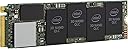
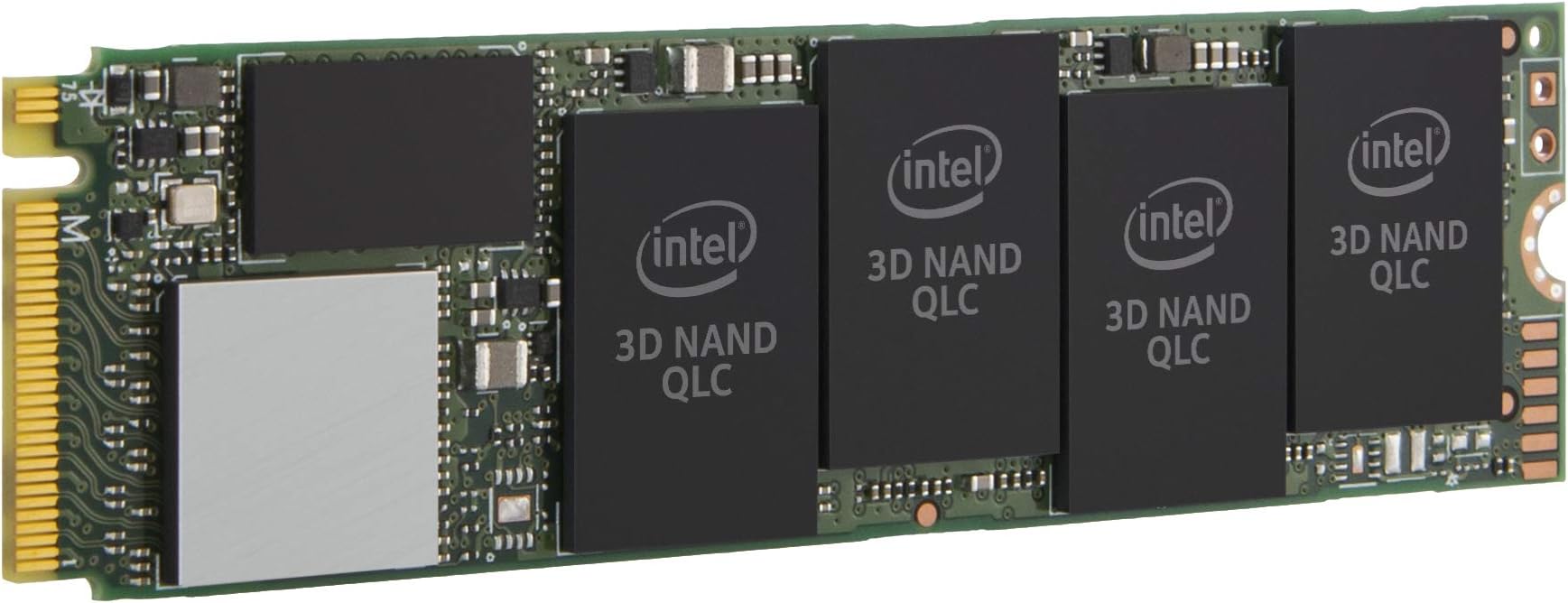
The Intel 660p Series 1TB M.2 2280 SSD leverages QLC 3D NAND and PCIe NVMe 3.0 x4 technology to deliver up to 1800 MB/s sequential read and write speeds. Designed for professionals and gamers seeking high-capacity, cost-effective storage, it fits a wide range of devices with its compact form factor, offering a perfect balance of performance, reliability, and value.


| ASIN | B07GCL6BR4 |
| Best Sellers Rank | #72 in Internal Solid State Drives |
| Brand | Intel |
| Built-In Media | SSD, Warranty |
| Cache Memory Installed Size | 1 |
| Compatible Devices | This drive is compatible with servers and arrays that accept M.2 2280 PCIe drives |
| Connectivity Technology | PCIe |
| Customer Package Type | Standard Packaging |
| Customer Reviews | 4.8 out of 5 stars 2,734 Reviews |
| Data Transfer Rate | 1000 Gigabits Per Second |
| Digital Storage Capacity | 1 TB |
| Enclosure Material | 3D Nand Flash |
| Form Factor | M.2 22 x 80 millimeter |
| Global Trade Identification Number | 00735858381086, 00735858381512, 05032037131599 |
| Hard Disk Description | Solid State Drive |
| Hard Disk Form Factor | 3.15 Inches |
| Hard Disk Interface | NVMe |
| Hard-Drive Size | 1 TB |
| Hardware Connectivity | PCI |
| Hardware Platform | PC, laptop |
| Installation Type | Internal Hard Drive |
| Item Dimensions L x W x Thickness | 6.5"L x 4.75"W x 0.75"Th |
| Item Type Name | Intel SSD 660p Series (1.0TB, M.2 80mm PCIe 3.0 x4, 3D2, QLC) |
| Item Weight | 0.1 Pounds |
| Manufacturer | D&H |
| Media Speed | 1800 megabytes_per_second |
| Mfr Part Number | SSDPEKNW010T8X1 |
| Model Name | 660p Series |
| Model Number | SSDPEKNW010T8X1 |
| Number of Items | 1 |
| Read Speed | 1800 Megabytes Per Second |
| Specific Uses For Product | personal, gaming, business |
| UPC | 735858381086 735858381512 |
| Warranty Description | 5 Years |
S**R
Outstanding value for the use case of a storage READ drive
I bought the 2TB model. The installation was simple; just make sure your board has the right M-Key M2 slot. I just turned off the computer, put this drive in, booted up, and went to the computer management portion in Windows to partition and format it. It was a very easy and fast process. It should be noted this drive uses QLC memory, which is the worst and cheapest. If you are doing a database workload or will utilize heavy writes, like writing 200GB+ files regularly, you won't be happy. If you plan to use this as a drive to store applications such as games, you'll be quite happy. This drive has a decently sized SLC cache, so as long as the file writes don't get large and frequent, it'll make the drive overall fast enough; by that I mean 2GB/s or very close to it. If the writes are large and frequent, this drive will be slow. If that is your workload...pay for it with an appropriate drive. My use case is a drive to store all of my games. With many being over 50GB now, you need a big drive if you have lots of games like I do. For this purpose, the drive is outstanding in terms of value. It delivers great performance in the use case of reading all those textures and feeding the RAM and CPU. If you want to use this as a boot drive, you can. It will work well in this case, but there are better options if you want outstanding performance. Still, this is a big upgrade if you're using a magnetic disk or old SSD. As to the durability of QLC, if your use case is application storage, this really shouldn't be anything to worry about. Unless you're doing very high write workloads, the SSD will last a long time. I have a 10 year old Intel SSD, and the Intel tool says it is only 10% through it's life, and I used that as an OS drive for many many years.
C**1
Intel 660p 2TB is the best value for the money period.
NVMe SSD drives are finally coming down near SATA SSD prices and this unit is a beast for the cost and performance. While not as fast as offerings from Samsung, the 660p drive's QLC NAND flash makes up much of the difference by having an additional 240GB SLC cache in front. This cache is a revolving buffer that writes in background to the QLC. Once filled however, you may find files in the 10s or 100s of GBs may slow down at some point but, that's a lot of fast NAND to fill up for the average user. Power users pushing very large video or audio files for editing however may not be as satisfied as they can conceivably run past that cache size and begin writing directly to the QLC NAND. At that point, writes become slower than even the worst SATA SSD's on the market due to QLC's very poor write performance. Drive lifetime is another consideration. From longest to shortest TBW: SLC > MLC > TLC > QLC. QLC's total TBW (Terabytes Written) is about a quarter of MLC I believe, meaning you are sacrificing longevity for cost however even at 400TBW, this will last an average user 3-5 years and those who don't game much or edit media will see longer times. This number however is for the QLC memory only while the SLC will have a longer lifespan. Some percentage of users don't even fill up the 240GB of SLC giving them exceptional value with a drive of this design. In summary, for most users who want fast load times for video games or even just getting into Windows or Linux in seconds, this drive is fast enough that you won't notice the difference between this and a higher performance NVMe SSD. Power users needing the higher initial and sustained throughput of something like Samsung's EVO PRO line may not be as happy with the performance of these QLC drives and should probably stick with TLC/SLC drives. EDIT: Update 1 year later - With the drive a little over half full, I've used only 13.7 TBW out of 400. I do a ton of gaming on this machine and expected a much higher number. Also, I did finally fun into an issue with the front side SLC cache filling up during a large copy from my RAID but using Intel's SSD Toolbox I was able to clear the cache with a single click and bring performance right back up to full speed maxing out my RAID's read speed at about 420 MB/s. Pros: Price/MB Front-end SLC cache makes it a good performer Cons: Shorter lifespan than other NAND technologies (low TBW) Once exceeding SLC cache, drive can be VERY slow - NOTE: use the Intel SSD Toolbox to clear this periodically and you'll be fine.
T**D
Best bang for your buck
Prior to this SSD drive, I had a SanDisk 960 GB SATA SSD M.2 drive. I am transferring files at ~200-400 MB/s with that drive, but this Intel M.2 NVMe SSD blows it out of the water. I would personally say this is in between the speeds of SATA SSDs and high-end NVMe SSDs since I was getting benchmark speeds of ~ 1.4 GB/s. It was super easy to install on Windows 10 Pro 64 bit OS on an Alienware 17 R3 laptop, and I plan on transferring this drive to a new laptop in the future once the 9th gen Intel processors release to retain data. Keep in mind that this isn't a glorified Samsung Pro series NVMe SSD, but it definitely raises brows amongst the tech community in terms of value and performance. At a rated 200 TB TBW, this NVMe drive will go a long way. Let's say I transferred 10GB of data daily... That means I would be writing 3.65 TB of files a year making this theoretically capable of lasting about 55 years. Realistically, I plan to replace this drive after 5 years of use due to the exponential advancement in tech... In the meantime, this is the best deal you can get from a reliable company in regards to speed, reliability, endurance, and value. Overall, this makes a perfect storage drive for content creators, gamers, or tech enthusiasts looking for value and performance.
G**A
GREAT price, small, SOME issues, replacement drive was sent
The price of a 2TB drive was great so I tried it. It is installed in an external case by QNine that works great. I now don't have to carry around the triple sized (which is still small). Long term usage of it in this manner is unknown but so far it works great. I did pair it directly from USB C to USB C but I am not running games from it so I have not even looked at the numbers to see about speeds! Took off ONE star, should have been half a star if it were possible, for a failure of one of two devices but data could be mostly recovered. WARNING: Had one of the two I purchased fail in about a month after the one year point. No problem as there is a 5 year warranty. First thing Intel says is "contact the seller"; yeah, well Amazon's first thing says "contact the manufacturer". Thanks, great circular argument. I then spent 2 weeks and many, many hours troubleshooting not only on my own but with the Intel people. Workarounds were required because the information they wanted is impossible to get unless the drive is in the computer - a laptop means you take it apart and put it back together BUT, worse, my laptop only allows ONE of the NVMe PCIe drives to be installed at a time - so once installed it cannot be found as it is the boot drive. No problem - I have an external case but nope - the case doesn't allowed SMART status which is needed. NO PROBLEM - found a great little program which gave me a lot of the SMART data so I could send it to the tech team. Finally, I gave up. The 2 TB of data was backed up so no big deal. Well, kind of no big deal as getting the backup up to date was no easy and yet more time and since it wasn't a "real time" backup it isn't "perfect". None of my time would be a problem except for the last Intel insult - "Return of the SSD will be on your dime." WHAT? Oh, yes, they offer to send me the replacement for $25 and the cost of the unit of which the latter will be credited when they get the old drive back. OK, I can see the unit charge until they get it but I have never been charged to send back a FAILED product!!! Most companies feel pretty bad about the failure of their products and want to get a new one out to you fast and get the broken one back! Not Intel, I guess. UPDATE: Intel did replace this drive with a working unit; they were good that when I called "no more troubleshooting" they were not only QUICK but they overnighted the part to me!!! My ONLY complaint, besides the unit failure - they ding your credit card for over $400 for a part they sell for half of that! IN other words - I think they charge you for BOTH the one sent and the one you are returning for some odd reason as the list price on the Intel website for the part is, like said, half of the price they charge your card for "holding" purposes.
R**S
Works with my Mac Pro (late 2013) a total upgrade worth it !
I must say that I'm extremely happy with the price the performance and how easy it was to install it ! I have used two different adapters Sintech NGFF M.2 nVME SSD Adapter Card for Upgrade 2013-2015 Year Macs(Not Fit Early 2013 MacBook Pro) and Cablecc 12+16pin 2014 2015 to M.2 NGFF M-Key SSD Convert Card for A1493 A1502 A1465 A1466 both adapters work perfectly installation is a little bit different especially the way you fix it into the motherboard but no problem with it either I decided to keep the first adapter that I mention it here now. I am a heavy duty user or 3D applications like blender 3.0.1 which makes the machine get hot and so do not Forget to put a heat sink on top of the SSD (QIVYNSRY M.2 Heatsink NVME 2280 SSD Heat Sink Support Single Double Sided M2 SSD Cooling with Thermal Silicone Pads Cooler for Computer PC PS5 PCIE NVME or NGFF SATA M.2 SSD Installation, Black) I also bought extra memory all the way up to 64 GB (OWC 64.0GB (4 x 16GB) PC3-14900 1866MHz DDR3 ECC-R SDRAM Memory Upgrade Kit, ECC Registered, (OWC1866D3R9M64), Compatible with Mac Pro 2013) I also have replaced the main CPU with a 12 core (Intel Xeon E5-2697 v2 Twelve-Core Processor 2.7GHz 8.0GT/s 30MB LGA 2011 CPU BX80635E52697V2 (Renewed)) here are the screwdrivers that use to assemble and disassemble my Mac Pro Torx Screwdriver Set,TEKPREM 8 in 1 Security Torx Screwdrivers with T3 T4 T5 T6 T7 T8 T9 T10 Torx Bit,Complete Torx Repair Kit for Mac Mini,iMac,Xbox Controller,PS3,PS4,Computer and Pocket Knife also do not forget Corsair XTM50 High Performance Thermal Compound Paste | Ultra-Low Thermal Impedance CPU/GPU | 5 Grams | w/applicator to Bond the SSD with it and afterBond the SSD with with the adapter all these items where very cheap at the time that I purchase everything but now the price is a little higher. But either way this update totally makes sense compared to what you would had spend at the time of buying the computer with this configuration at Apple when the computer was available, it's totally worth it!. All the components put together makes a very powerful computer. I recommend doing the upgrade it work flawlessly ! I add the descriptions of the components that I also got at Amazon I am very happy Cheers !
J**E
Great For Storage. Not the fastest, but still reasonably fast
This drive is outstanding for general everyday use. I use it to store my Steam library, movie collection, photos, and a lot of archival backups and that sort of thing so it has worked great for me for the past 3 months. I bought this drive because my new laptop doesn't have slot for big 2.5" mechanical drives and instead only has 2 NVMe slots. I chose a fast SLC NVMe SSD (Samsung 970 Evo) as my primary boot drive to get stupid-fast speeds for my operating system + apps and then chose this Intel 660p SSD as my storage drive where I keep the rest of my bigger files that don't necessarily need to be accessed ludicrously-fast. Don't get me wrong, this is still a very speedy drive and it's served me very well and I have no complaints, but remember that you're buying this to get a huge amount of storage at a really good price (for NVMe SSDs anyways). Other 2TB NVMe SSDs can be twice as expensive. The value is the amount of storage, not the performance or longevity. That's the benefit of this drive. You will get pretty good read and write speeds, especially with relatively smaller files (a couple GB) but once the SLC cache fills up performance will dip substantially (see screenshots). Writing files that are several hundred MB or a couple GB usually goes very fast, but bigger files will slow down after the initial burst. This drive can be great, but just consider how you'll be using this. You can probably use it as your boot drive and install Windows just fine, but that's not the ideal use case of this drive in my opinion.
J**S
1.3GB/sec
I bought the 2TB Intel 660p NVMe SSD, "new", from Amazon Services, Inc. (not an other seller). Reviews indicate it has an OK buffer size, with SamSung and even HP a little better. However, the price is stellar, and it's still faster at any of its speeds than my prior device. I was a little worried because of some claims that their new device was mislabeld. The package I received had the safety tape cut already. I was worried. I inspected closely, and everything was correct. No fingerprints, no damage. When I installed the device, it said power cycles 2, power-on hours 0. Hardware ID is Intel SSDPEKNW020T8, and size is 2 TiB. Now that my concerns were assuaged, I used Macrium to clone. Cloning from my old drive pushed 430GBytes in 45 minutes. Macrium claimed 1.3GB/sec. Swapped the device, and re-enabled BitLocker, reinstalled Steam, etc. So far, performance is great. It's been 3 days, and backups are fast, games load fast, etc. I was on NVMe before, so I didn't expect to notice any difference. I do. It's not as much as the difference from HDD to SSD, but it is like the difference between SATA and NVMe. So, as a reminder, every few years, check performance for the next generation of SSDs. If your system supports it, and you run any demanding workloads (VirtualBox/VMWare, gaming, etc), then consider an upgrade. UPDATE 2020-02-07: the performance is still about the same. 7300-7900 read iops and 9-15k write iops. Bumping up the queue depth brings that into the 30-90k range. Throughput is int eh 1300-1500 range on read, and 790-1700 range on sequential writes.
S**G
Good product
Item as described.
A**ー
安い、が心配。
大容量なNVMe SSDの中ではかなり安く、メーカーもIntelな為、信頼性は高いと思います。 しかしながらQLCな為、TBWは従来のSSDと比べかなり減っており、どれぐらい持つかが心配です。 intel純正のツールを入れてると、寿命が推定値で見れるので、ツールのインストールは必須だと思います。 読み/書きは十分な速度が出ており、ストレスはありません。 そもそもSATA SSDと、早いNVMe SSDを比較しても体感では早さを全く感じる事が出来ないので、 そこまで高速である必要は無いのではないかと思います。 無名メーカーのどんなNANDを使ってるか分からないTLC SSDを買うぐらいだったら、 これを買ったほうがいいと思います。
C**G
Preis/Leistung TOP! Nur bestimmte Szenarien Ideal.
Diese Platte habe ich mir für meine Spiele gegönnt besser gesagt zwei davon. Warum zwei? Ich betreibe die zwei SSDs im Raid0 Verbund und komme so auf 3225 MB/s Lesen und 2797MB/s Schreiben. Zum Vergleich, meine Samsung EVO 860 schafft 543MB/s. Das kann sich sehen lassen. Jedoch ist diese SSD definitiv nicht für Leute die sehr viel Daten Traffic auf der Platte verursachen, da die Garantie bereits bei 200TB bei der 1TB Platte erlischt. Daher verwende ich diese ausschließlich für Games. Die hat man länger drauf und muss überwiegend nur Lesen und das zügig. Das Laden der Games ist unglaublich schnell!! Fazit Preis/Leistung ist Top! Jedoch ist die Platte nicht für Jeden geeignet. Für Games hingegen ist sie Perfekt, am besten in einem Raid0 Verbund.
P**C
It's a good drive for its price
One of the cheaper drives on its market. Not a speed demon by any means, but definitely decent given its price tag. I decided to buy it to use in my Synology NAS as an M.2 read cache (which is probably a bad idea given that this flash type wears out faster and is rated for less writes than others) but no other SSD could beat the price at the time of my purchase. Overall the NVMe SSD is functioning well and caching stuff properly without any hiccups
S**C
2tb and initially very slow in late 2013 MacBook.
I replaced my original 512Gb samsung SSD drive in my old MacBook late 15 inch pro retina. Restore of mac was through a mojave bootable usb (formatting the new drive as AFPS). Used paragon disk manager for the windows bootcamp side and it loaded back fine after creating an initial new bootcamp and restoring onto there. My previous disk was 512gb but the restore from time machine has take-over nearly 900gb on the new drive! bizzare, but presume I had a lot on icloud that can now fit on! The lane width via system report showed as 1. Therefore speeds were half the speed of original drive at 370MBs for read and 380 for write. The whole laptop was sluggish and unresponsive. After nearly a week of trying to get firmware updates I gave up (Instructions from Intel website don't work on Mojave) . So I prepped Amazon for a return of the drive. Just in case I reseated the drive and it failed completely coming up with ? in a box. I tried several other reseats with the same result and was convinced I had killed the MacBook! I put the original disk in and all ok and booted! I could get by! The old ssd showed width of 4 and I had a working laptop. I then did a final full reseat of the new drive including reseat in adaptor, ensuring all the way in until it clicked in the long sintech adaptor (had to be brutal btw). I rebooted and It went black for a about 3 minutes and I made a coffee. It eventually started to boot. Was it my imagination or was it fast again? System Report showed a width of x4. I ran speed checks. Read 1400MBs and Write 1200MBs. Very responsive! Eats slightly more battery than before, but very marginally as the battery is rather old and worn out showing as poor anyway. No sleep issues and performed several reboots without issue. I am now very very happy.
J**C
Installé dans un boitier externe, fonctionne très bien
Installé dans un ORICO NVME M.2, fonctionne très bien pour des transferts rapides de fichiers volumineux.
Trustpilot
2 months ago
1 month ago