Buy anything from 5,000+ international stores. One checkout price. No surprise fees. Join 2M+ shoppers on Desertcart.
Desertcart purchases this item on your behalf and handles shipping, customs, and support to USA.
❄️ Stay Cool, Stay Ahead — The Ultimate Air Cooler for Power Users
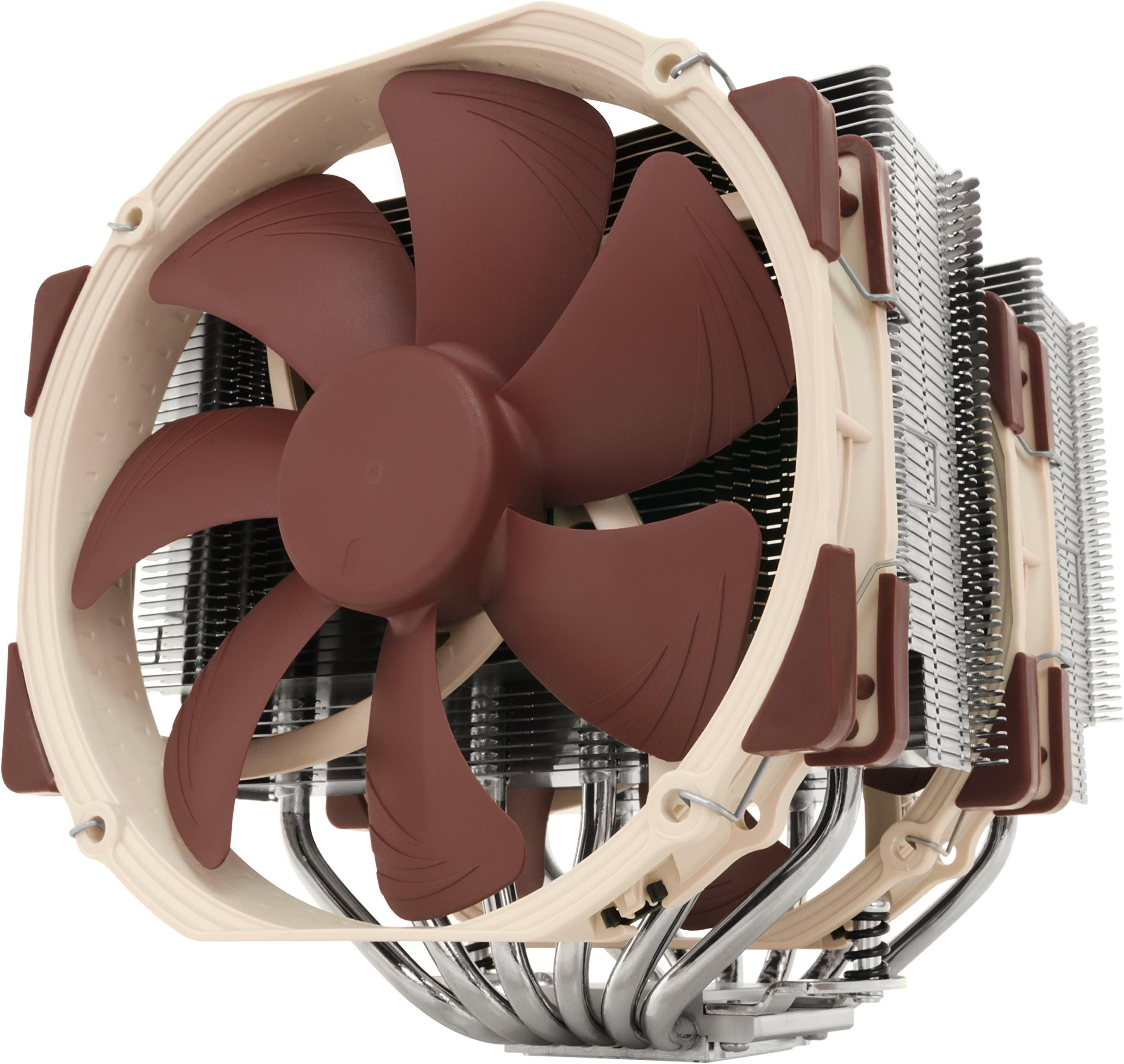
The Noctua NH-D15 is a premium dual-tower air CPU cooler featuring 6 copper heatpipes and two ultra-quiet 140mm NF-A15 PWM fans. Designed for high-performance overclocking and silent operation, it supports a wide range of Intel and AMD sockets with the easy-to-use SecuFirm2 mounting system. Backed by over 250 awards and a 6-year warranty, it includes premium NT-H1 thermal paste and low-noise adapters, making it the top choice for professionals seeking elite cooling and reliability.


| ASIN | B00L7UZMAK |
| Air Flow Capacity | 140.2 Cubic Meters Per Hour |
| Best Sellers Rank | #41 in Computer CPU Cooling Fans |
| Brand | Noctua |
| Brand Name | Noctua |
| Compatible Devices | Desktop |
| Cooling Method | Air |
| Customer Reviews | 4.8 out of 5 stars 11,567 Reviews |
| Global Trade Identification Number | 00807320186861, 00842431012456, 04716123315360 |
| Included Components | Item |
| Item Dimensions L x W x H | 9.33"L x 8.62"W x 6.53"H |
| Item Weight | 1.3 Kilograms |
| Manufacturer | Noctua |
| Material Type | Copper (base and heat-pipes), aluminium (cooling fins), soldered joints & nickel plating |
| Maximum Rotational Speed | 1500 RPM |
| Model | NH-D15 |
| Noise Level | 24.6 Decibels |
| Number of Items | 1 |
| Part Number | NH-D15 |
| Power Connector Type | 4-Pin |
| Product Dimensions | 9.33"L x 8.62"W x 6.53"H |
| UPC | 807320186861 803983039766 842431012456 |
| Unit Count | 1.0 Count |
| Voltage | 12 Volts |
| Warranty Description | 6 year manufacturer’s warranty |
| Wattage | 1.56 watts |
C**N
Amazing Air-Cooling Performance
==================================== ===Review for 2025 (AMD AM5)=== I'll still recommend this cooler for most CPUs, and for newer gen chips you can even get the NM-AM5/4-MP83 mounting kit for free from Noctua. However, I've moved to the NH-D15 G2 LBC for AM5 and have submitted a review for that model on its product's page. ==================================== ===Review for 2022 (AMD AM4)=== Bought another one of these recently for a new AM4 build, and once more the performance is outstanding. There were minor changes to this model's packaging where they added parts for the AM4 socket. From what I understand you can also request these parts from Noctua directly with proof of purchase on an older model NH-D15. I have a higher core count on this CPU with higher clocks compared to my previous build below, and it's holding the temps between 37-53C from idle to max load. It's also nearly silent with only some very minor wind noise under load. The RAM I'm using on this build is a bit taller than I'd like, but the case does allow the secondary fan to fit just fine with the slightly added height from the fan adjustment above the RAM. I can absolutely recommend pairing this with the Fractal Torrent given its size and the overall purpose of these being air-cooling. Keywords to help searches for fitment: -MSI MAG X570S Tomahawk -Fractal Torrent (full size) -G.SKILL Trident Z Neo ======================================== ===Review for 2017 (Intel LGA1151)=== This air cooler defeated my old Corsair H100i v2 in cooling efficiency, noise, quality, and likely overall space consumption (no tubes or radiators blocking sides of the case). I'm getting at least 8-10C cooler with this thing over water and it's not even running at full speed. Not to say the water cooler was bad, but just weigh your options depending on how you set up your case cooling. Even with the slight offset of the optional fan, using Corsair Vengeance LPX sticks, I had plenty of headroom in the Air 540 even though it stated a 170mm clearance. Keywords to help searches for fitment: -Gigabyte GA-Z170X-Gaming 7 -Corsair Air 540 -Corsair Vengeance LPX ======================== ===Notes for both G1 models=== It's awesome that this thing fits so many different socket types, should I choose to switch to AMD then I don't have to buy a different kit I just change out the mounts. The build quality of the hardware is outstanding, none of the parts feel cheap or of poor manufacturing. Assembly and installation is easy to follow even though it looks way too large to sit on the socket. Some may be concerned about strain on the CPU/socket but I'd say it's comparable to some AIOs in this category, the tubes on some AIOs can absolutely put tension on the socket. If you're not concerned with the interior looks of your case then you should seriously buy this thing. If you *are* concerned with the interior looks of your case then search for the Chromax product line to compliment this hardware. If you're unsure about the optional secondary fan fitting, take a 140mm case fan and set it on top of your RAM (vertically as if it were on the cooler sitting above the RAM). If it still clears the side of your case with a few millimeters to spare then you're likely OK. Both 140mm fans are almost fully adjustable, they move/notch up and down on wire clips using the heat-sink fins as mounting points. The fans are 140mm with 120mm mounts, probably for compatibility to fit a 120mm fan as the optional for those with taller RAM. These do come with thermal paste as well.
B**R
The most powerful, yet quiet, air cooler available today.
I've got two D15s and a D15S for point of reference. I'll compare it here with alternatives like the Silver Arrow IB-E Extreme, NH-U14S, D15S, Cryorig R1 Ultimate and the Dark Rock Pro 3. The D15 deserves its reputation. It is, without any doubt, the most powerful cooler for the real world. It's true that the Reeven Okeanos can keep up with it, and the Silver Arrow IB-E Extreme can even surpass it, but in the real world, owners won't put up with coolers that loud. Those two are leveraging high RPM fans to compensate for inferior efficiency, and as a result, most owners are going to clamp down on fan speed and end up with lower performance coolers. The D15 is so quite, even under full load, that inside a case it might as well be silent. Its full performance range is, thus, accessible in the real world. If you're alright with loud heat sinks, I have to imagine that using two Noctua NF-A14 iPPC 3000s would still defeat all comers. I'm not sure how well those fans would fit given the NF-A15's (stock fan) strange frame. In my view, the Okeanos and Silver Arrow don't offer serious competition for this because of the way they achieve their performance. Far more interesting, for a comparison, are its direct competition from Be Quiet! and Cryorig, namely the Dark Rock Pro 3 and the R1 Ultimate. The R1 Universal, in my opinion, is the direct competitor to the D15S, so I won't get into it much here. The Dark Rock Pro 3, while it is measurably quieter, is simply not in the same league of performance as the D15. On top of this, it's harder to install, and in practical terms, both are virtually silent anyway. The DRP3 has more in common with the outgoing D14 anyway, with its dissimilar front and middle fans for memory clearance. The R1 Ultimate poses a much bigger challenge for the D15. It is ever so slightly behind the D15, and a little louder, but in some ways it's more, and in some ways it's less, compatible. The R1 is significantly taller than the D15, so people with certain case limitations will be left out. However, it's also narrower than the D15, meaning not only is it more friendly to the neighboring PCI-E slot, it's also easier to reach down and unlock the GPU from the motherboard. Furthermore, it overhangs the memory less, although due to the way the fans are mounted, it may still have less clearance than the D15. Perhaps the R1 Ultimate's biggest weakness, relative to the D15, is the fans. The XF140s do look great and are actually quite good fans, but they're still using modified sleeve bearings that will negatively impact noise and longevity, as well as severely limit orientation (not a problem for most builds). Although the D15 is probably the most powerful air cooler ever made, at least in terms of noise levels that normal people would find tolerable, it does have several weaknesses. The first is its extreme width, which I've already discussed. On some of my more poorly spaced motherboards, like my new Crosshair VI Hero, I actually have to remove the middle fan to reach the GPU lock. The other is, I'm sad to say, quality control. I've had many Noctuas before and never found an appreciable scratch. But I've had two D15s and a D15S and all three have had minor blemishes. The first D15 had a small, but deep, scratch on the top plate/fin. The second had other, smaller scratches, although these are not really noticeable. The D15S was the worst, which had a small, but easily recognizable, corrosion spot on it, and it's being returned now. I can only guess that the increased surface area, probably about twice that of the next largest current-generation Noctua cooler, the U14S, makes it that much more likely for a scratch to occur. Still, I've come to expect better from Noctua. That said, you simply cannot find an air cooler that puts out this performance at this volume. There is almost no reason to use anything else in general. That's why it gets 5 stars. Although it's arguably the most powerful, is it the best? Probably not. I'd say that, depending on your needs, the D15S or the U14S is better. The D15S comes with only a single fan, but it moves the heat sink away from the GPU, making it easier to work on the computer and clearing the GPU on smaller motherboards. The U14S has infinite RAM compatibility on both sides, making it easier to work on your computer and allowing you to use any RAM you like. Thus, depending on which compatibility issue concerns you more, I'd go with either a D15S or a U14S. Each gives up between 1 and 2 degrees Celsius in overclocked loads, due almost exclusively to being single fan heat sinks. If you want D15 performance, simply add a second fan to the D15S, and a dual fan U14S will get very, very close to the D15. In many tests, I've ever seen dual fan D15Ses beat D15s, although it's unclear why that would be. Perhaps they're better aligned with the intake and exhaust fans in the case. Perhaps they are less affected by the heat coming off of the GPU. I'm not really sure, but suffice it to say, you can achieve D15 performance without some of the hassles of the D15. I've added photos of the D15 (non-S) with and without the front fan to give you an idea of memory overhang. For compatibility reasons, some people may decide just to go without the front fan altogether, with also works fine.
M**K
Excellent product!
This is above and beyond what I expected, and is everything it claimed to be. Very well built, super quiet, solid mounting, and does the job (although I do not overclock or otherwise truly max out the CPU). I've been using it for 4 months on an Intel Core Ultra 9 285k on a MSI MPG Z890 EDGE TI WIFI7 Gaming MOBO with a Gigabyte Nvidia GeForce 5070 Ti 16G GPU.
J**N
I never thought air cooling would work this well and figured liquid cooling was my best choice to consistently high CPU temps gi
I have had many Fans over the life of my i7 2600k. From the Stock to water cooling AIO and Custom. Believe be when I say the Noctua has done alot for my system. I never thought air cooling would work this well and figured liquid cooling was my best choice to consistently high CPU temps given the demand I have my CPU running at. With the water cooling I would run Prime95 and peg the temps at 88-90C OC'd to 4.3. I figure maybe my thermal paste was old/not applied right/whatever else. I tested with 3 different coolers multiple applications using different methods (the dot, the line) I even drained the system and added "high performance liquid. None of it helped. I broke down and began looking at air coolers. I read reviews (ALOT) and finally decided on this one. I'm happy I did. First I have built PC's since i was 16 (i'm 44 as of this writing) The other Air Cooler manufacturers need to follow suit on how to install a bracket and cooler. Installation was a breeze, They suggest removing the motherboard from the case which i scoffed at. Although i knew it would be a tight fit the bottom plate went in VERY easy. Total time of installation was less then 10 mins. Prime95 temps? 70 OC'd to 4.3 Pro: - This thing is just HUGE The size, the cooling capability, the airflow... Best CPU cooler on the market IMHO - everything you will need to hook this up is included - Contacted them asking how much a new bracket would be once i get my new 7700k. The offered me a free back when i'm ready. - Thermal paste included but was not automatically installed (love that!) -Quiet as a church mouse Con: - It is HUGE, be careful moving your desktop around as you do not want to crack your motherboard -They attach the middle fan in place. They should just leave it off as you will need to access that area. Getting the Fans back on is annoying. It's not hard but I do not have the smallest hands in the world and the tension loaded clips are tough to get a good grip in a tight space (my case and hands aren't compatible) This is a very small annoyance and not enough for me to knock a full star off.maybe just a 1/4 star. -If your into looking in your case(i'm not) you might not like the colors of the Fan's They are Tan/Beige and Brown. I don't have a window in my side nor do i care about RGB so i can handle the colors.
H**N
Perfect for my setup
I've always heard great things about Noctua NH-D15s, and now that I can finally experience one, those claims are all accurate. The Noctua NH-D15 is great for users who want a quiet and cool air cooler. Packaging was super clean and used a lot of recyclable cardboard, which is always great to see over plastics and Styrofoam. The manual was super easy to follow and had pictures to help illustrate the steps you needed to follow. Installation was simple to follow, but I've also built a few PCs before so I already had some knowledge from prior builds. Conveniently, they include a thermal paste syringe so you don't have to worry about buying your own, or trying to find that tube you left somewhere a year or two ago when you last build a PC. Performance is exceptional. My thermals have never been this low or consistent. For reference, I have been using an AIO with a single fan radiator, so I was due for an upgrade. I run a Ryzen 5800x3D, and I haven't seen my temps go higher than 80 degrees, even during my full load stress test. My idle temps are consistently around the 38-50 degree range depending on background tasks. The noise level is also fantastic, considering I can barely hear the fans when they are running at full bore. Overall, if your case has the space for this beast of a cooler, it is worth the investment. Especially considering Noctua has an excellent customer support team who will ship you a new bracket if you upgrade to a system that requires a new one that didn't come with your original box.
S**E
Amazingly Cool
First point: Intel makes good processors, and they can take abuse. Your personal mileage may vary, and I’ve built AMD based systems as well. I’ve been running an Intel i7-3770K for 5+ years now. Installed it with the stock fan that ships with the CPU. Never paid any attention to it after installing it, until about 3 weeks ago. I’ve been part of Seti@Home since 1999, and World Community Grid and BOINC since 2012. Set them to run on my computer when I wasn’t using them. I upgraded my video card to a GeForce 1070 from the 760 in late October, and decided to run a few projects that take advantage of the Nvidia GPU. I decided it was time to look at conditions on the mobo and chips and bought CPUID’s Hardware Monitor Pro (they have a free version that is also excellent). What I observed was somewhat shocking, and I’m lucky I didn’t burn up the CPU along the way. I had been running my system full bore on the BOINC projects for the past 5 years, and the GPU intensive projects for the past 7 weeks. GPU temps are fine, even though overclocked, they barely break 60C. My CPU however, was reaching as high as 98C and was averaging around 89C. Like I said, Intel makes a hardy product. See attached photo of the stock heatsink/fan I removed. It’s not pretty. Even after throttling back my system, CPU temps were still peaking into the high 80’s, and at idle would be in the mid to high 60’s. Clearly something was wrong, and I needed to remedy the situation. Figured an upgrade was in order and after some research, decided on the Noctua NH-D15. It’s massive, yes, but it is also quiet, efficient, and it does what it says it will. Running full bore now and temps rarely breach 70C, and at idle it stays in the 40’s. All in all I consider that excellent for an air cooled setup. I have not made any adjustments yet to the fan’s power slope in the BIOS, to see if I can get even lower temps, though I suspect I can drop the temps by a few degrees in doing so. I also bought the NF-S12A case fan and the NF-A8 for the side mount. The fans, all of them, are super quiet compared to before. I think I may now be a Noctua customer for life.
M**N
Yeah, okay. I can recommend this.
If you're one of those people looking for that one review that tells you whether this thing will work for you, I will do my best to be that reviewer. -Almost everything you can read about this online seems to be true from what I've seen while running it. Temperatures are great, it's very quiet, and is a quality product. I stress-tested my Ryzen 9 7950X with Prime95 and the cooler manages to keep it at a rock-steady 75C during prime-number searches. It would probably hold a lower temp with a more aggressive cooling curve, but it's plenty good enough. It definitely works really well, even better than my all-in-one radiator. -The installation isn't the *hardest* but the size of the heat sink and the clips for attaching the fans to it are a bit finnicky. The heat sink is so wide it will obscure 3 or 4 pin fan plug-in points on the motherboard underneath it. If you have wire extensions, plug them in on the board before any installation so you aren't trying to do keyhole surgery to plug in the fans. The instructions also do not show you how to attach the clips to the #2 fan, so you need to look at the one that is pre-installed for a reference. -I needed to remove my GPU for this installation because the product is so large that you need the room to work. -Cleaning probably isn't too bad, but might require disassembly of the whole thing for a deep-clean. Be ready for almost the entire reinstallation procedure if you want to clean it. Not much worse than maintaining other cooling equipment though, if you ask me. -The price is a little high at first glance, but I feel like the cooling performance and ease of use of the AI Suite software more than makes up for it. Looking at you, Corsair! Your iCue software sucks ass! -Installation process from me: I recommend plugging in at least one or two of the wire extensions that they supply you with onto the board immediately so your plugs are ready to go. Take the fan that came preinstalled OUT or you cannot screw the heatsink down onto the CPU. Get your standoffs and mounting brackets in place. Screw the heatsink down after applying your thermal paste. Reattach the fan you removed from the center. Be sure to note which direction the air is flowing! Each fan is labeled with arrows showing the direction the blades turn and the direction the air flows through it! Attach fan #2, and plug both fans in. Reinstall any other hardware you removed for the installation, like I did with my GPU.
H**R
Very good cooler for the Ryzen 5800x
First, let me state it does work as promised and advertised. It keeps my new Ryzen 5800x idling at around 34 degrees c and gets in upper 60s with intense use. The noise level is almost impercetible when compare to the Wraith cooler I had on the 3700x that was previously installed. Installation: I watched some Youtube videos which gave me the impression that installation outside of the case was the easiest way to approach it. I started this approach with the MSI MPG x570 Gaming Plus Wifi after breaking everything down and removing it from the case. What I discovered when putting it back into the Zalman X3, was it was very difficult to get it back in and then to screw back down the motherboard. That wasn't the worse part as that occurred with reconnecting the power connectors -especially the cpu connectors located at the top of the board. The cpu connectors at the top left of the board on the MSI were located right against the cooler fins and because of the narrow space between the fins and the top of the case, I struggled trying to get the connectors set, cutting my knuckles against the sharp fins while attempting this (there is some blood stains on the fins now.) I managed to get the cpu connectors in, so I thought. When everything was reconnected and I fired it up for the first time, the motherboard shut down when attempting to initiated the cpu and then it would not power back on. Not wanting to remove everything again, I tried the 3700x back into the socket to see if I had a bad cpu. I got the same results. I removed everything again and removed the board. MSI has a very thin pcb with a lot of flex and it bent under the weight of this cooler trying to lift in the case and back out. I immediately noticed that the cpu connectors were not seated fully so I tried to test the board outside of the case with the same results - shorting out at cpu initiation. Without anything installed the board would power up it was a short at the cpu power connectors. Luckily, I had a Asus Tuf Gaming X570 Plus Wifi that I had used previously sitting in the closet. I pulled that out and tested the board with the old 3700X and it was in working order. I had to put the video card on it and connect to the monitor so I could flash the bios to support the Ryzen 5800X. Once I did that, I broke it down again and this time installed the board into the case and did all my connections before installing the Noctua. This time everything went well and I finished installing my new upgrade, the Asus Strix 3080. Everything runs cool and quiet despite the how much space was lost with this upgrade. I am very happy with this cooler and my knuckles are healing!
F**N
Good product
Haven't done tempersture tests yet, so this is a review just of visual checks and assembly experience. Solid piece of engineering. Well-designed with loads of fins, included 2 fans that can be fixed in whatever direction you want (depending on your case airflow direction). Came with all accessories, incl long screwdrivers, to be able to uuse for AMD and Intel mobos (last 3 generstions or so as of 2024). Peach-brown fans are Noctua trademarks, but ugly. Came with paste, just enough for 1 application. Overall, pricey, but great quality and well thought-out design.
H**A
Le roi des refroidisseurs, mais attention à sa taille ! ❄️👑
Acheté en août 2024 pour 109,90 €, le Noctua NH-D15 s'est rapidement imposé comme le refroidisseur idéal pour mon PC gamer milieu de gamme, équipé d'un AMD Ryzen 7 7700X et d'une GIGABYTE Radeon RX 7800 XT sur une carte mère MSI Pro B650-S WiFi. Et je dois dire que je suis impressionnée ! Tout d'abord, parlons des performances. Bien que je n'aie pas de point de comparaison directe, mon processeur tourne à environ 70° en session de jeu avec un seul ventilateur de monté (2 possibles), ce qui est très satisfaisant. On peut dire que ce refroidisseur fait son travail avec brio ! Côté bruit, c'est le silence absolu. En fonctionnement normal, le NH-D15 est presque inaudible, et même sous charge, les ventilateurs de ma carte mère sont légèrement plus bruyants. Pour les amateurs de silence, c'est un véritable atout. L'installation a été un jeu d'enfant. Tout le nécessaire était fourni : pâte thermique, outils et adaptateurs. Je n'ai rencontré aucun souci lors du montage, si ce n’est que de me rendre compte que je ne pourrais pas ajouter le second ventilateur faute de place dans mon boitier. Je l'ai donc monté avec un seul ventilateur, car le second touchait ma barrette de RAM. Cela n'a pas posé de problème, car même avec un seul ventilateur, les performances sont déjà excellentes. Donc un conseil pour ceux qui envisagent d'acheter ce refroidisseur : faites bien attention à ses dimensions. Il est massif, et il est essentiel de vérifier que le NH-D15 s'adapte à votre boîtier, tant en profondeur qu'en largeur, surtout si vous prévoyez d'utiliser un second ventilateur avec une config plus gourmande en rafraichissement. En termes de design, le NH-D15 est magnifique. Les lamelles du radiateur sont fines et nombreuses, assurant une excellente dissipation de la chaleur dans le boîtier. J'aurais souhaité une autre couleur pour les ventilateurs pour s'accorder avec mes composants noirs, mais cela ne gâche en rien l'esthétique générale. Les tiges de métal qui ressortent du radiateur sont plutôt élégantes et détournent le regard. Quant au rapport qualité-prix, il est indéniable. Les performances obtenues avec un seul ventilateur, couplées à la réputation de Noctua sur les sites spécialisés, justifient amplement l'investissement. En conclusion, le Noctua NH-D15 est sans conteste le roi des refroidisseurs d'air. Il offre des performances exceptionnelles, un fonctionnement silencieux, et un design soigné. Si vous cherchez à garder votre processeur au frais tout en gardant votre PC silencieux, ne cherchez pas plus loin ! 😄❄️
B**R
Noctua NH-D15 – Der König der Luftkühler
Der Noctua NH-D15 gilt als einer der besten Luftkühler auf dem Markt – und das aus gutem Grund. Mit seiner hervorragenden Kühlleistung, einem durchdachten Design und der gewohnt hohen Verarbeitungsqualität von Noctua setzt er Maßstäbe in der Luftkühlung. Kühlleistung – Konkurrenz für AiO-Wasserkühlungen Der NH-D15 ist ein Dual-Tower-Kühler mit sechs Heatpipes und zwei großen NF-A15 PWM 140-mm-Lüftern. In Sachen Leistung kann er es problemlos mit vielen 240-mm- oder sogar 280-mm-AiO-Wasserkühlungen aufnehmen. Selbst High-End-Prozessoren wie der Intel i9-14900K oder AMD Ryzen 9 7950X werden effizient und leise gekühlt, selbst bei hoher Last. Lautstärke – Flüsterleise Kühlung Noctua ist bekannt für seine leisen Lüfter, und der NH-D15 macht hier keine Ausnahme. Selbst bei voller Drehzahl bleibt der Geräuschpegel erstaunlich niedrig. Im Silent-Modus mit den mitgelieferten Low-Noise-Adaptern ist er kaum hörbar, während er dennoch hervorragende Temperaturen liefert. Kompatibilität und Einbau Der Kühler ist mit vielen Sockeln kompatibel, darunter Intel LGA 1700, 1200, 115x, 2066 und AMD AM5, AM4. Dank des SecuFirm2-Montagesystems ist der Einbau einfach und sicher. Allerdings sollte man beachten, dass der Kühler sehr groß ist (165 mm Höhe) und daher nicht in jedes Gehäuse passt. Zudem kann es bei hohen RAM-Modulen zu Platzproblemen kommen – in diesem Fall kann man den vorderen Lüfter etwas höher montieren oder ihn komplett weglassen. Design – Funktional statt auffällig Optisch bleibt Noctua seinem klassischen Design treu: Beige-Braune Lüfter sind Geschmackssache, aber für viele PC-Enthusiasten ein Zeichen von Qualität. Wer eine modernere Optik bevorzugt, kann zur schwarzen Chromax-Variante greifen. Fazit – Einer der besten Luftkühler überhaupt Der Noctua NH-D15 ist die perfekte Wahl für alle, die maximale Kühlleistung bei minimaler Lautstärke suchen. Dank exzellenter Verarbeitung, einfacher Montage und einer beeindruckenden Performance bleibt er auch Jahre nach seiner Veröffentlichung einer der besten Luftkühler auf dem Markt. ✅ Vorteile: ✔ Hervorragende Kühlleistung, fast auf AiO-Niveau ✔ Sehr leise, auch unter Last ✔ Hochwertige Verarbeitung und lange Lebensdauer ✔ 6 Jahre Herstellergarantie ❌ Nachteile: ✖ Sehr groß – passt nicht in jedes Gehäuse ✖ Kann hohe RAM-Module blockieren ✖ Klassisches Noctua-Design nicht jedermanns Geschmack ⭐ Bewertung: 5/5 – Der NH-D15 bleibt der unangefochtene König der Luftkühlung!
F**4
Il refroidit super bien mais il est enorme lol
Il est franchement nickel, et facile a monter, le seul truc c’est qu’on doit surélever le 2eme ventilateur a cause des barrettes de mémoire, du coup j’ai mis que le ventilateur du milieu et meme avec un seul ventilateur mon processeur ne chauffe vraiment pas
寺**井
大きいけど良く冷えます
TDP105WのCPUに3年間使用したが、故障無く良く冷やしてくれた。CPUに負荷をかけるとうるさくなるけど、耐久性や冷却性はとても良いです。 但し大きいのでゆとりのあるケースでしか使用できません。
Trustpilot
2 months ago
3 weeks ago