🎨 Edit smarter, faster, and cooler — your creative edge awaits!
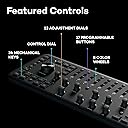
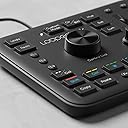
The Loupedeck+ is a professional-grade photo and video editing console featuring 24 programmable buttons and dials, native support for over 15 major creative apps including Adobe Lightroom Classic and Premiere Pro, and an ergonomic design that enhances workflow efficiency. With instant setup via factory profiles and deep customization options, it empowers both beginners and pros to achieve precise, immersive edits while joining a thriving community of creators.


| ASIN | B07C2X4R9M |
| Additional Features | Ergonomic |
| Antenna Location | Professional Photo and Video Editing |
| Best Sellers Rank | #3,561 in Film Photography #8,067 in Computer Keyboards |
| Brand | Loupedeck |
| Built-In Media | Loupedeck+ Console |
| Button Quantity | 17 |
| Color | Black |
| Compatible Devices | Adobe Classic CC 7.4 and later, Adobe Lightroom 6, After Effects CC, CC Audition, Final Cut Pro X, Photoshop CC, Premier Pro CC, Skylum Aurora HDR Compatible Devices Adobe Classic CC 7.4 and later, Adobe Lightroom 6, After Effects CC, CC Audition, Final Cut Pro X, Photoshop CC, Premier Pro CC, Skylum Aurora HDR See more |
| Compatible Tablet Computer Models | AAUB P30 |
| Connectivity Technology | USB |
| Customer Reviews | 4.2 out of 5 stars 1,651 Reviews |
| Enclosure Material | Plastic |
| Generation | 2nd Generation |
| Hand Orientation | Ambidextrous |
| Item Dimensions L x W x H | 15.55"L x 5.91"W x 15.55"H |
| Item Weight | 670 Grams |
| Keyboard Backlighting Color Support | Single Color |
| Keyboard Description | Multi Functional |
| Keyboard Layout | QWERTY |
| Manufacturer | Loupedeck |
| Mechanical Keyboard Switch Model | Tactile |
| Mfr Part Number | LDD-1801 |
| Minimum Required Operating System Version | Windows 10 |
| Model Name | Loupedeck+ |
| Model Number | LD+ |
| Number of Keys | 24 |
| Number of Sections | 3 |
| Power Source | USB-powered |
| Recommended Uses For Product | Professional Photo and Video Editing |
| Series Number | 1 |
| Special Feature | Ergonomic |
| Style Name | Contemporary |
| Switch Type | Membrane |
| Theme | photo and video editing |
| Unit Count | 1 Count |
| Water Resistance Level | Not Water Resistant |
N**E
One of the "must have" greatest tools
Despite the fact that this is second one I ordered (first one ordered for photographer friend), I missed to take unboxing video, as was unpacking like a child ;) for me this is second brand found here on Amazon, after Anker, who has great packaging, minimalist, still stylish and enough secure for shipping. The rest is from the point of view of Adobe Lightroom Classic user (not using other apps and maybe will try if it will work with Luminar later): Design is great as of allocation of controls and buttons, practically you have access to all major functions at a time and doubling them with fn button. Especially rotary and scrol controls with "reset" functions with click (depress). Both above mentioned makes it easy to use for all categories of users from beginner level and up... In addition it has wonderful app to manage device functionality, changing and fine-tuning settings out of default app specific presets. As of value for the money it seems great to me - and I'm not trying to evaluate and compare even other manufacturer's devices, but even compared to their advanced model CT - even if this one is bigger and "bulkier ", still ability to have simultaneous access to multiple scrolls and dials at a time (2 hand operation) is "advantage" over CT's design, especially for beginners and specific to photo processing. Plus price is half of that... I'm planning to play around this one and also get CT later, so I can compare those two... Overall, this is an amazing tool.
D**O
SOOOO COOL - I spent a lot of time in a Dark Room
Coming from a traditional darkroom where you turn knobs to make actual adjustments, this is SOOO cool and not just in a novelty way... The price is pretty hard to take, but if you are in a stuation going though a lot (hundreds/thousands) of photos at a time its well worth it just for sorting ease. I can also see how overtime it will allow you to become a better editor I am already finding myself using adjustments i would have never used without the ease of the loupedeck. Only complaint is the cord but I think speed would drop if it was cordless ask a gamer... lol Overall I am happy I splurged on myself I think the quality is good, and its not that much more than a MAC/Corsair/other high end mechanical keyboard. It would be cool if it was built like a Corsair keyboard... I don't need RGB but that cord... It would be better braided since this is going to get moved anytime its not in use, also at least backlight stuff PLEASE lol the color wheel dots are pretty small and who likes to have ambient light on to read a keyboard? Also since you insist needing a USB it would be cool if you had a passthrough USB on the deck somewhere, it's wide enough you could easily put one on the side (I am sure you are already developing the next version). Its mostly NICE plastic.... Titanium or something would be cool but then again I probably couldn't afford it if you did that lol. But don't think because it's plastic its 'cheap' its extremely well made. I think a lot of the bugs and stuff you read will be resolved with firmware updates, just make sure you are using the correct Lightroom version for your firmware it matters. ALSO INSTALL DIVERS BEFORE YOU PLUG IT IN!!!!
K**.
4.5 stars. Absolute must for photo editing in LR.
This is absolutely a must have if you are even a hobbyist photographer who does a fair share of editing. This sucker will literally cut down your editing time. Not only will it increase editing time but playing around with edits is simple and quick. You can switch between two different modes to assign a new set of action to the keys if you are very in depth. This is perfect for me with just the one set. All the essential are at your fingertips and once you memorize the locations you will fly. This will also lead to better editing in my opinion because you get to play around more without loosing time and figure out which works best. Just a push down on the knobs resets that editing back to it's original state. Cropping is amazing. You can crop quickly and fast while leveling all with this. In my opinion it provide more accurate leveling/cropping compared to the mouse. Have more precision and slow control if you want to get that crop adjustment just right. There are a few qualms but it could be the software system but sometimes if you are going to fast it will freeze up and will skip a lot of photos when going forward or backwards. Also my key to go from b/w to color or visa versa sometimes takes 4 or 5 clicks to change the color mode. I don't know if that is just a fault on mine or if it is just how it is. If you were thinking about getting it... just buy it. Thinking about buying it is plenty to justify buying it.
D**S
Worth the money
While I'm not sure I'm in love with the Loupedeck+, I sure wouldn't want to edit large volumes of photos without it now that I've had the experience of using it. (I had held off on buying the previous version.) I have recently needed to do basic adjustments in Lightroom to almost 2,000 photos from several jobs in order to make proofs for online galleries for customers to order from. I'm sure that I saved many hours of work with the Loupedeck+ compared to the tedious process of carefully mousing the sliders in LR. Yes, it's kind of expensive, but if you do a lot of work in LR and you can swing the cost, then go for it. A few usage comments: 1) I found the Exposure knob much faster and easier for quickly dialing in a good exposure than mousing it and is my most frequently used adjustment. 2) I didn't realize before I got it that the large Control Dial could be used for adjusting angle. I'm often shooting in situations where I'm switching quickly between horizontal and vertical and don't always get things very level, but the Control Dial makes it easy to quickly fix it. However, I do wish the software would allow for fine-tuning the increments of change for that dial and others. 3) The D1 dial is very handy for fine-tuning image cropping and is something else I didn't know about ahead of time. 4) The Undo & Redo keys also turn out to be much more useful than I expected. 5) After a couple weeks of use, I'm using about half the knobs and buttons very regularly and the others rarely or not at all so far. 6) The physical set-up I use at my workstation is to put the Loupedeck+ closest to me and put the regular keyboard behind it and the mouse to the right. I find that I still need to use the keyboard and mouse for some things. Areas for improvement: 1) One of the sticky rubber feet on the bottom keeps coming off 2) Ability to change adjustment increments as mentioned previously 3) The software seems to have a bug using it with LR Classic CC. When in Crop mode and using the mouse to move the image relative to the cropping (instead of the arrow keys), LR will sometimes start rapidly adding Crop Rectangle steps to History. 4) I would like the Loupedeck+ to be able to be propped up at a higher angle like you can with some keyboards 5) I would like it if there was some way to indicate on the keyboard what I've set the custom dials and buttons to besides putting a piece of tape on the Loupedeck+ with the custom function written on it. 6) Make the color spots under the eight knurled dials larger so they're easier to see, especially in the dim lighting many of us use when editing 7) I would like the Control Dial to have a much softer/lighter push down action. Bottom line: For me, the Loupedeck+ is worth the money and I look forward to ongoing improvements of the hardware and software.
J**N
Loupedeck is better then streamdeck
I’m going to answer the question on content creators,gamers and streamers. ((((Loupedeck consoles versus Stream Deck)))). 🎮🎥 If you're on the fence about which one to choose, I've got your back! Here are 5 reasons why you should consider buying Loupedeck consoles over Stream Deck: 1️⃣ Enhanced Editing Power: Loupedeck consoles are specifically designed for photo and video editing. With their intuitive layout and customizable dials, buttons, and sliders, you'll have precise control over your editing software. It's like having a mini editing studio right at your fingertips! 2️⃣ Seamless Integration: Loupedeck consoles seamlessly integrate with popular editing software like Adobe Lightroom, Photoshop, and Premiere Pro. This means you can effortlessly navigate through your workspace, adjust settings, and perform complex tasks with ease. It's a game-changer for productivity! 3️⃣ Superior Ergonomics: The Loupedeck consoles are ergonomically designed, providing a comfortable and efficient workflow. With their tactile buttons and responsive dials, you'll feel more connected to your editing process, resulting in quicker and more accurate edits. Say goodbye to tedious mouse clicks! 4️⃣ Durability and Build Quality: Loupedeck consoles are built to last. They are constructed with high-quality materials and have a sturdy feel that can withstand long hours of use. Investing in a Loupedeck console means you'll have a reliable companion on your content creation journey. 5️⃣ Community and Support: Loupedeck boasts an active and supportive community of creators who share tips, tricks, and custom presets. Being part of this community means you'll always have a resource to turn to when you need inspiration or guidance. Plus, Loupedeck's customer support is top-notch! Pics Ive uploaded are stream decks getting “white screen of death” you wont see this problem with loupe deck So, if you're serious about taking your editing and streaming game to the next level, consider getting yourself a Loupedeck console. Its specialized features, seamless integration, ergonomic design, durability, and fantastic community support make it a worthy investment for any content creator.
A**.
Great at first...
I bought this editing console to help speed up my editing and culling during the holidays. At first this thing was great! A little bit of a learning curve and breaking years of keyboard muscle memory, but by a day or 2 I was pretty comfortable with it. Knocked out a wedding and was loving it. I then took a few days off for the holidays and tried using it again and it's been an absolute nightmare.... constantly freezing, turning photos green when importing them, but the biggest and most annoying glitch has been I'll be editing and then all of a sudden Lightroom just starts spazzing out and phantom scrolling through the entire library of photos and it becomes unresponsive. It won't allow me to stop it at all. I have to restart my computer and wait for it to reach the end of the library. But ultimately still need to restart because the computer stops reacting to commands. The computer (Mac M1 2020) has been updated to the latest software, the latest Loupedeck+ software has been installed, I've tried restarting countless times, I've tried plugging and unplugging the editing console, using different adapters (USB to USB C), using different ports, plugging the editing console directly into the computer vs through a Studio Display. NOTHING seems to fix this issue permanently. It'll be okay for a little bit but it ALWAYS ends up happening again. I've had to redo this wedding 3 times now.... Beyond frustrated. I reached out to Loupedeck's customer support directly through their website (because that's where Amazon directed me) - said they'd get back to me within 2 days, well it's not been 4 days and no word from them. For $250+ dollars it shouldn't be doing this.... I WANT to love this thing, it does streamline things when it does work, but I'll likely be returning if Loupedeck can't get it straightened out
®**D
works well for lightroom 6, not as good for capture 1 pro 12, no individual color adjusters
I got this to help my transition to capture 1 pro 12. I been using lightroom 6 for a while and it is a great software, quick to use and I don't need this editing deck. Since Adobe is going toward cloud and subscription base, I looked else where for a new photo editing software. Teh colsest to LR6 is capture 1 pro 12 which can reead my newst camera the nikon z6 file natively. The keyboard is built alright mostly plastic, nob are plastic but feels good, color scroll wheel are too plasticly, wished it could be the nicer Logitech metal rubber scroll wheel. My rgb corsair keyboard has metal and rubber, feels more high end then this. but this is ok. Software it works great with lightroom 6 all the buttons and program to the text on the keyboard. There are a few programable items but I can't figured out how to do that yet. This is a 5 out of 5. But for capture 1 pro 12 it is only a beta. All the color adjusters and lum, sat and hue don't work at what they are intended to do like in lightroom. The red is like some color temp. Loupdeck hasn't figured out that yet. I could see any of capture 1 option for individual colors. Would be a 4.5 stars if it worked on capture 1 right.
A**R
Learning to really like this
When I first purchased it, I was disappointed. The build quality isn't as high as it could be. For instance, the potentiometers don't feel as solid in your hands as they do on a high-end piece of audio equipment. But after using the device for a month, I realize that everything actually does work exactly as intended. And with so many pots, the cost would be much higher if the build-quality was on the high-end. In short, it works just fine without deficiency. If you buy this thing, be a little patient with it. Like learning how to type, your fingers don't originally know exactly where to go. Eventually, my brain just learned where all the pots that I regularly use are. I'm much more efficient using the Loupdek+ for most of the images that I need to adjust. I don't typically make adjustments to individual color tones, so I don't use the back row of sliders. It almost seems like a bit of a waste to include them, consideringly how rarely I would use them. As far as the large keys go, I guess they would be important for people who swap keyboards for when they're editing. For me, I keep the Loupdeck+ directly behind my keyboard, and I use the keyboard for pretty much everything it works for. I use the Loupdeck+ for the pots. I was going to give this a 4-star rating, but it really does do exactly what it claims, and it saves me a ton of time. If I had to change one thing, I would make it be able to adjust Shadows and Highlights in Lightroom without needed to go into Develop mode because that takes time to enter and exit. Of course, this is probably a LR limitation, not really Loupdeck+'s fault.
N**A
現像がはかどります
質感は他のレビューの通りかなり安っぽいです、3COINSとかの激安キーボードレベルですね。水平の机に置いても少しガタツキ感じたりもします。ですが、使い勝手は非常に良いです、現像スピードが劇的に上がるのと、細かい設定がしやすいので現像の楽しさがアップしました。物理的なツマミがあるとこんなに快適になるのかと感動しました。結構な大きさなのでそれなりの広さのデスクが必要になります。総じて満足です
T**D
Videobearbeitung so günstig und effizient wie nie
Ich bin schon länger um das Loupedeck+ herumgeschlichen. Als Hobbyfotograf habe ich die Entwicklung von vornherein verfolgt, aber der Kauf hat sich für die eher sporadische Bildbearbeitung in meinem Fall (noch) nicht gelohnt. Interessant wurde es, als Loupedeck auch Adobe Premiere Pro CC integrierte. Damit sollte nun auch die Videobearbeitung möglich sein. Also landete das Gerät direkt in meinem Warenkorb. Als das Loupedeck+ bei mir eintraf, hatte ich große Erwartungen. Der erste Eindruck war gut. Das Gerät kommt in einer ansprechenden Verpackung, die das Essentielle und keinen unnötigen Schnickschnack enthält. Schnell wurde der Treiber installiert und ich konnte das Mischpult direkt mit Premiere verknüpfen. Die üblichen Tastenkürzel für die Arbeit mit Premiere hat Loupedeck direkt integriert, was die Arbeit zu Beginn enorm erleichtert. Die Belegung und Anordnung der einzelnen Tasten ist sehr intuitiv, so dass ich mich schnell an die neue Arbeitsweise gewöhnt habe. Das Blättern in den Aufnahmen, das Festlegen der In- und Outpoints sowie das Schneiden haben super funktioniert. Das wahre Highlight ist allerdings die Farbkorrektur, denn diese muss sich nicht im Lumetri-Farbfeld befinden. Ein einfaches Drehen an den Reglern für Belichtung, Sättigung und Kontrast etc. sorgt schon für die gewünschte Veränderung und dabei können sogar mehrere Regler gleichzeitig genutzt werden. Durch die präzisen Regler sind auch feine Farbkorrekturen möglich. Das Loupedeck+ hat meine Arbeit in Premiere Pro unheimlich effizient gemacht. Ich bin mit dem Preis-Leistungs-Verhältnis total zufrieden. Wenn man bedenkt, wie teuer andere Produkte zur Videobearbeitung sind, sind 230 € absolut gerechtfertigt. Zumal das Loupedeck+ eben auch noch die Bildbearbeitung mit anderen Programmen ermöglicht. Ich bin gespannt, was da in Zukunft noch von dem finnischen Hersteller kommt und möchte das Loupedeck+ schon jetzt nicht mehr missen.
A**K
Formidable et indispensable outil de retouche
Utilisation pour traitement photo et vidéo. En photo : j’en suis à plusieurs centaines de photos traitées depuis mon achat (j’ai justement un stock immense en attente) et je me rends compte que je me vois très mal reven8r en arrière et faire du traitement lightroom sans ce loupedeck plus. Il faut quelques heures pour le configurer (comprendre le logiciel, déterminer quelles sont ses fonctions utiles personnellement puis attribuer spécifiquement chaque fonction à chaque bouton). J’avais certes utilisé le profil de base mais j’ai fait de nombreuses modifications. Pour chaque photo, le gain en temps de déplacement de pointeur souris et de clics est incroyable. De plus on ne regarde quasiment plus les réglettes de réglages affichées sur écran, et on se concentre réellement sur l’image ! C’est d’une efficacité redoutable. Je le conseille vraiment pour toute personne qui doit traiter de nombreuses photos. A noter : en débutant j’ai eu peur de la résistance de certains boutons (surtout les boutons rectangulaires) mais en fait tout se passe bien, et les bruits ’suspects’ (un genre de grincement / grattement/ressort qui est trop léger) ne sont restés que sur 6 touches sans que cela pose le moindre problème, d’autant plus que j’utilise surtout les molettes silencieuses et les molettes crantées. En vidéo : pour l’instant j’ai eu moins le temps de m’y consacrer mais ai déjà tout configuré selon mes fonctions préférées, et en test simplifié ça a l’air tout aussi efficace qu’en photo. Évidemment, ici, il y a une différence, c’est qu’on utilise beaucoup plus la souris en parallèle qu’en traitement photo.Toujours est-il est que le Loupedeck plus est ici encore un gain de temps mais surtout une autre façon de gérer la post-production, de façon plus pratique, plus tactile.
T**H
Loupedeck +review
Excellent and fast service I highly recommend buying your products I hope in the coming days to buy from your company Forza Italy& Juventus😁
K**D
Edit your photos in minutes
I have used it with LR only so I am speaking just for that. I am not a professional photographer but rather an enthusiast/hobbyst and I took a fair amount of photos that I like to edit. Pros - very nicely build and layout despite being all plastic - can customize it with the app. - allows to be more productive and makes browsing and editing lots of pictures a breeze Cons: none that I could find. Some more experienced/professional photographers may give a more thorough feedback but can find other reviews on the Internet Some may call it a gimmick but do not dismiss it until you try it, you will be pleasantly surprised
Trustpilot
1 month ago
2 months ago