

Desertcart purchases this item on your behalf and handles shipping, customs, and support to USA.
🔗 Connect in 4K, Power Your Play — Stay Ahead, Stay Connected!
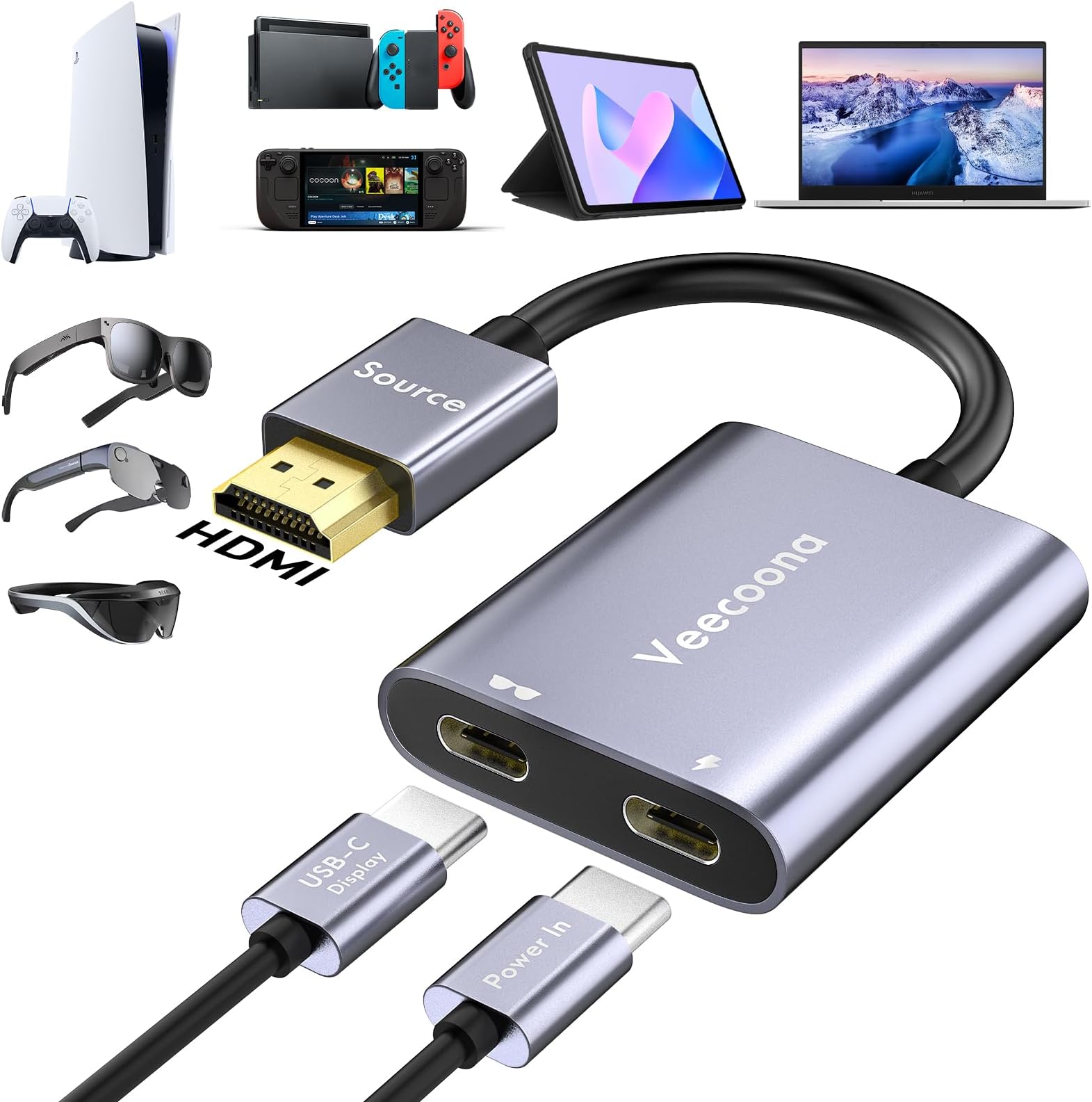
The Veecoona HDMI to USB-C Adapter delivers stunning 4K@60Hz UHD video from HDMI sources to USB-C displays, optimized for AR glasses, gaming consoles, and portable monitors. Featuring a dedicated USB power port for stable output, an aluminum shell for heat dissipation, and broad compatibility across leading devices, it offers plug-and-play convenience with premium reliability backed by 24/7 support and a one-year warranty.


| Brand | Veecoona |
| Compatible devices | AR Glasses, Laptop, Monitor, PS4/5, Xbox |
| Connector type | HDMI , USB Type C |
| Current rating | 1 Amps |
| Input voltage | 5 Volts |
| Number of ports | 2 |
C**R
Works as advertised, pay attention to power and display cable requirements
From a functional standpoint, this HDMI-to-USB-C converter from Veecoona absolutely works as advertised; however, you must pay close attention to the power and video cable requirements to get it to work. Foremost, the adaptor doesn’t come with the necessary cables to actually make this work. It comes with a USB-A-to-USB-C cable for powering the device; however, I feel this is the wrong cable to include. Most USB-A ports on laptops supply up to 0.9 Amps max, and likewise, any external phone charger will likely be under an amp and fail to power it. This device absolutely requires a minimum of 1 amp. Initially, I tried this on my computer's USB-A port, but it didn't power the device. I also tried it in a separate USB-A charger hub, and it also failed to power it. Only after I got a 3A power supply (from a Raspberry Pi) with a USB-C port did it finally power on. Secondly, the other sticking point is the USB-C-to-USB-C video cable. It doesn’t come with this, but you absolutely need a Thunderbolt-compatible cable. There are many nice braided cables out there that are great for charging or data transfer, but don't meet Thunderbolt specifications. To add to this, be aware that this is only HDMI to USB-C unidirectional, not the other way around. I ordered this simply as an option in case I run into a monitor with USB-C-only input, which is actually rare. I work in systems administration, so it’s nice to have a variety of cables and adaptors on hand, just in case something comes up. For reference, I tried this setup on a portable monitor, plugged into a mini PC’s HDMI port. The portable monitor has USB-C video input. From a performance standpoint, the adaptor matched the monitor's max 4K resolution, and the video was clear and had the aspect ratio I expected. I can easily see this being useful for older devices needing to connect to a USB-C-only monitor. I feel like the use case and need for this device is rare, though, as most monitors with USB-C also have an HDMI input. In my case, I have a couple of portable monitors that both have USB-C and mini-HDMI as video inputs, so if you also have this setup, I would rather opt for a single-cable solution with a single HDMI-to-mini-HDMI adapter instead. I do have a couple of dev board monitors that have USB-C-only inputs, so this does have a use case, but it’s certainly a rare exception. From a usability and ease of use standpoint, having multiple cables attached to a single device creates a wiring mess and makes setup difficult. I feel like most users will lack the necessary power and cable requirements to make this work initially. Likewise, troubleshooting this requires looking at four different things to determine where the problem may lie, making this device much more complicated and less plug-and-play than it initially seems. Having so many wires to one point also makes it much less of a portable solution since you are required to bring several cables with you. As for improvements, the vendor could have included an LED on the device to indicate whether it’s powered on and if it has sufficient power. That would eliminate any guesswork regarding the power requirements issue that I ran into. The only way to know that it's on is that the adaptor gets warm and/or the video actually displays on your screen. I will give them one thing. All requirements and specifications are clearly outlined in the vendor's listing for this device. However, the device itself didn’t really come with any documentation reiterating any of this. Cost-wise, at about 30 dollars, I would opt for a single-cable solution if possible. However, if you don’t have a Thunderbolt-capable USB-C to USB-C cable and a 1+ amp power supply, you are looking at at least another $ 30 investment to get this working. Aside from those requirements, this device absolutely works as advertised, so if this is what you need, it's a viable option.
D**O
Works, but high price and less than ideal cords.
This connection port works well enough with no bells or whistles. The included HDMI cable is only a few inches long however and the charging cable does not include an outlet port. At this price, I’d say you are over paying for what you get.
J**F
Solid addition to a world of single port usb c devices.
In a world where many modern devices (especially laptops, tablets, and gaming handhelds) are moving toward a single USB-C port for everything, this HDMI to USB-C adapter has quickly become one of my favorite accessories. Specifically designed as a unidirectional HDMI Male (source) to USB-C Female (display) converter, it supports crisp 4K resolution at 60Hz, making it perfect for connecting everything from Nintendo Switch, PS4/PS5, and Xbox consoles to high-end AR glasses like the XREAL One, Air 2 Pro, VITURE Pro, RayNeo Air 2s, Rokid, and even portable monitors. The build quality immediately stands out. Instead of cheap plastic, this adapter features a sleek metal finish that feels premium and durable in your hand. It has a solid, high-end weight to it without being bulky, and the compact, portable design means it slips easily into a pocket, backpack, or tech pouch for on-the-go use. The HDMI male end plugs in securely without any wobble, and the USB-C female port accepts cables smoothly with a reassuring click. I’ve been testing it regularly over the past few weeks across multiple devices, and it has performed flawlessly every time. On my Nintendo Switch, it delivers a clean, lag-free 1080p signal (the Switch’s native output) to my portable monitor and AR glasses with excellent clarity and color accuracy. When connected to my MacBook Pro, it handles video output beautifully for extended desktop setups or streaming content. Whether I’m using it for casual gaming sessions on the big screen (or in AR), productivity work, or simply mirroring content, the adapter maintains a stable connection with no flickering, signal drops, or resolution issues. What I appreciate most is how straightforward and reliable it is. Plug-and-play functionality means no drivers, no software installations, and no complicated setup—just connect your HDMI source device to the adapter, plug in your USB-C display cable, and you’re ready to go. It has handled everything I’ve thrown at it without any compatibility hiccups, even with devices that are notoriously picky about video output. For the price, this is an outstanding value. It’s inexpensive yet doesn’t feel or perform like a budget product. The metal construction gives it that satisfying premium feel, while the 4K 60Hz capability ensures future-proofing for higher-resolution devices down the line. If you own AR glasses, a portable monitor, or any HDMI-equipped console and frequently find yourself needing to expand your single USB-C port into a full display output, this adapter is a smart, dependable solution. Highly recommended for anyone in the portable gaming, AR/VR, or mobile productivity space. I’ll definitely keep this in my everyday carry kit from now on. Solid 5-star performer! Would buy again without hesitation.
D**S
Works great, but only needed if your monitor doesn't have an HDMI port.
I should have read the description more thoroughly before ordering. This adaptor only works if the input source (ie: computer, gaming console etc) uses an HDMI output and the monitor that you're using has a usb-c connection. This will not work if you're wanting to plug the HDMI cable into the monitor, that cable has to go to the computer or gaming console. This will not work with a MacBook Pro or modern electronic device that has usb-c output, again, it only works if the electronic device has an HDMI port that you need to connect to a monitor that does not have an HDMI port. The device itself works great, I was able to connect my PS3 to Dell monitor (HDMI end plugged into the PS3 and the usb-c plugged into the monitor). This also works great with the Nintendo Switch, plugged the HDMI port into the docking station and was able to connect my usb-c travel monitors to it that way. Only reason I'm docking one star is because it in would be better if the source cable was universal (HDMI or usb-c, not just HDMI).
P**R
Campact and it worked!
Not something I'll use every day, but I just happen to be able to test this! It work, No issues! And fits neatly into bag with my portable monitor. Probably wont uses everyday, but it does feel like it will last!
Trustpilot
2 weeks ago
3 weeks ago