Desertcart purchases this item on your behalf and handles shipping, customs, and support to USA.
❄️ Keep your cool in style with the ROG Ryuo 240 – where performance meets personalized flair!
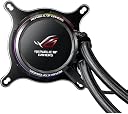
The Asus ROG Ryuo 240 is a premium 240mm AIO liquid CPU cooler featuring a vibrant 1.77" full-color OLED panel for real-time system stats and custom animations. Equipped with dual 120mm PWM fans delivering 81 CFM airflow at a quiet 37.6 dB noise level, it ensures optimal cooling efficiency. Aura Sync RGB lighting offers limitless customization, perfectly syncing with Asus ecosystems. Built with durable aluminum and reinforced tubing, it guarantees longevity and flawless compatibility with Asus motherboards, backed by a 6-year warranty.


| ASIN | B07H2LGDBT |
| Air Flow Capacity | 81 cfm |
| Best Sellers Rank | #2,696 in Water Cooling Systems |
| Brand | ASUS |
| Brand Name | ASUS |
| Compatible Devices | AMD: AM4, TR4* AMD: AM4, TR4* |
| Cooling Method | Water |
| Customer Reviews | 4.2 out of 5 stars 307 Reviews |
| Global Trade Identification Number | 00192876039632 |
| Included Components | 2 x 120mm ROG Ryuo Fan Model 12, Accessory Pack of Screws and brackets, G RYUO 240 Liquid Cooler, Quick Start Guide, Thermal compound (pre-applied), USB Cable for Software control |
| Item Dimensions L x W x H | 9"L x 1.89"W x 9"H |
| Item Type Name | ASUS ROG Ryuo 240 RGB AIO Liquid CPU Cooler 240mm Radiator Dual 120mm 4-pin PWM Fan - OLED Panel & Fan Control |
| Item Weight | 1 kg |
| Manufacturer | ASUS Computer International Direct |
| Material Type | Copper Aluminum |
| Maximum Rotational Speed | 2442 rpm |
| Model | ROG RYUO 240 |
| Noise Level | 37.6 db |
| Number of Items | 1 |
| Number of Packs | 1 |
| Part Number | ROG RYUO 240 |
| Power Connector Type | 4-pin pwm |
| Product Dimensions | 9"L x 1.89"W x 9"H |
| UPC | 192876039632 192876241448 |
| Unit Count | 1 Count |
| Voltage | 12 volts |
| Warranty Description | 3 Years |
| Wattage | 60 |
K**P
Solid AIO Cooler. RGB looks great.
I was skeptical when I first bought this. RoG tends to be more expensive for the same quality as cheaper similar hardware. The radiator is solid. The fans do look cheap but so far work great and are pretty quiet. The LCD screen is pretty cool. I havent set up the software yet though for it. I havent herd any coil whine or any noises yet. My i7-8700k is OC to 4.8 and it keeps it extremely cool under load. My previous cooler was a Gammaxx GT and this runs at 10 cooler. It's beautiful and I would definitly recommend it.
W**D
Best AIO I have Used YET!!!!
This is by far the best AIO Asus I have used yet, Went from a NZXT X72 Triple Radiator to this ASUS Rog Ryuo 240. And this Performs for cooling dont see a difference, which is awesome cause its only a dual radiator compared to the triple, maybe 1 or 2 celsius different hardly noticed. I saw alot of reviews claiming promblems with live dash. installed and works flawless. NO PROMBLEMS AT ALL. But, I will say I am using a ASUS Z370-F Motherboard. So not sure about other boards. but works perfect with ASUS boards. I have only had it a Week so far. but no issues. Excellent Build Quality and as far as the hose lenght, Its the same lenght as my NZXT X72 , I saw some post about being really long hose. but I am using just a mid tower and its perfect lenght. My NZXT X72 was a Great AIO also. I just love the look of the Asus, and alot of people saying the RGB ring was to dim, Very bright, Also could be i downloaded the newer version of live dash, which i saw they already had a couple of updates so far. But otherwise AWESOME AIO from ASUS. But I ma using a ASUS motherboard.
M**K
Sexy looking AIO with some disappointing software
I wanted a good looking AIO to use and the x52 Krakens have been plagued with pump issues so I decided to give this a shot. Using it in a Lian-Li O5SX on a 2700x. It idles at 37C and under full load it hits 65C. I was most looking forward to the OLED display and I was expecting a little bit more. The LiveDash software is annoying and sometimes buggy. The software has to be running for your custom animation to display, and trying to load a custom animation is a pain with the software refusing to load the animation. Its sexy looking AIO when you can get the OLED display to work.
N**Z
Great AIO, but best to catch on sale.
A fantastic AIO for those seeking a more gaming edge. Aesthetically one of the best looking coolers on the market, OLED screen is awesome, and performance is par with other high end coolers. Only complaints would be that I have no customization on my OLED screen which is the key advertisement for this product. ASUS software is a fluke, I cannot use custom GIFS and JPEGs, even when I thoroughly followed set instructions to do so.
J**E
Incredibly pleasing!
Perfect for the Lian Li 011 mini! Tube length is perfect and the OLED screen is definitely a bonus. It's a little on the tuff side when it comes to instillation mainly cause it has 3 wires coming out of it and they can be frustrating to hide but other than that it's a great aio. My CPU idles at 23C and I've never had it once go over 43C on any stress test. I absolutely recommend.
S**M
Caused cpu DAMAGE! Just don’t get it. Much better coolers out there..
I got this cooler for my first build because I was going for an asus themed build. About one week into playing on the pc I noticed a lot of frame drops and lag. I brought up my monitoring software and it turns out my cpu was running at 94 degrees C. This is not good for the cpu cause it causes cpu damage. I immediately shut down. This continued to happen for about 2 months until today when I had enough. I checked the thermal past applied and if the heat sink was secure ( which it was) and eventually just gave up. DO NOT BUY THIS COOLER!!!! And don’t even think about tech support. I literally waited 4 hours on the phone for some guy to tell me there is nothing he can do. He could send a new cooler because they were “out of stock”. Just don’t buy this thing. It might look cool but you’ll barley be able to see it in the pc anyways. I recommend the NZXT kraken. Good build quality and much more for the price.
V**C
You need an Asus motherboard
For strictly cooling capabilities, this seems to get the job done. But if you're buying this cooler, you want more than just cooling. See why I'm giving it two stars: This requires an Asus motherboard to utilize any of the hardware monitoring capabilities. I did not see this information anywhere on Amazon so I decided I'd be the one to mention it. Also the software to customize the display, LiveDash, is somewhat hidden on Asus's website. When you visit the support and downloads link for the product it shows you one utility to download. That's not LiveDash. To get LiveDash you need to click the plus sign to show more downloads. This is where you'll find the software. It's very non-intuitive. It's not anywhere on the Asus ROG site either. All this being said, I'm unable to load custom gifs onto the cooler. And since I can't use any hardware monitoring capabilities, I'm stuck with the baked in ROG gifs (custom JPGs do work). My gifs are formatted correctly (160x128 and less than 1mb) and I see it load into the cooler (a RYUO drive appears in your my computer) but nothing ever happens. Firmware is updated, software is the latest build, no luck with reboots either. Between the frustration of finding the software, the lack of information anywhere about the hardware monitoring requiring an Asus motherboard, and the software itself simply not working, I'll be returning this product. It is clearly a buggy mess and is not ready for prime time yet. I'll stick with Corsair. Edit 12/26/2018: I've been messing around with this cooler now for awhile and have been able to get gifs loading semi regularly. I had to re-install the firmware about a dozen times though, which is laughable. And occasionally it still freaks out and I have to re-install the firmware to get it cooperating again. It also doesn't boot with the previously set GIF loaded. It only loads once I manually launch the LiveDash software after Windows is booted. It also likes to not remember my rotate settings. One thing I have been able to do is get my PC's specs displayed on the cooler despite not having an Asus motherboard. The "banner" option in the LiveDash software gets saved to an XML file. I'm able to manipulate this XML file with PowerShell by feeding it data from CPU-Z and WMI. By having my script continually run in the background, I'm able to display Time, Date, CPU load, CPU temp, RAM usage, etc (See the pic). Basically any data you can pull from WMI can be displayed this way dynamically. Here's the code I'm using in PowerShell to get my PC's specs and temps displayed. Make sure you're running the PowerShell ISE as administrator. Clear-Host $i = 1 Do{ #Generate CPU-Z Log file Start-process "C:\Program Files\CPUID\CPU-Z\cpuz.exe" -ArgumentList "-txt=cpuinfo" -Wait #Variables $CPUtemp = (((Get-Content "C:\program files\CPUID\CPU-Z\cpuinfo.txt") -match "Temperature 0") -match "Package").substring(16,2) $CPUpercent = Get-WmiObject Win32_Processor | Select -expandproperty loadpercentage $RAM = Get-WmiObject Win32_OperatingSystem | Select totalvisiblememorysize, freephysicalmemory $RAMtotal = [math]::Round($ram.totalvisiblememorysize/1024/1024) $RAMusage = [math]::Round(($RAM.TotalVisibleMemorySize - $RAM.FreePhysicalMemory)/1024/1024,1) $IPAddress = Get-NetIPAddress | Where addressfamily -eq "ipv4" | Where interfacealias -NotLike "*loopback*" | Select -first 1 | Select -ExpandProperty ipaddress $Date = Get-Date -Format "MM/dd/yy hh:mm tt" #XML Stuff [XML]$XMLfile=Get-Content(“C:\Program Files (x86)\LightingService\OledLastProfile.xml”) $XMLfile.root.profiles.profile1.main.single.player.setting.text_list.text_string1 = "$date" $XMLfile.root.profiles.profile1.main.single.player.setting.text_list.text_string2 = "$($env:COMPUTERNAME) - $($IPAddress)" $XMLfile.root.profiles.profile1.main.single.player.setting.text_list.text_string3 = "CPU: $CPUpercent % / $CPUtemp °C" $XMLfile.root.profiles.profile1.main.single.player.setting.text_list.text_string4 = "RAM: $RAMUsage GB of $RAMtotal GB" $XMLfile.save(“C:\Program Files (x86)\LightingService\OledLastProfile.xml”) #LiveDash Start-Process -filepath "C:\Program Files (x86)\ASUS\LiveDash\LiveDash.exe" Start-Sleep -Seconds 1 Stop-Process -Name LiveDash Start-Sleep -Seconds 4 } While($i -eq 1)
D**N
Not worth $155, but I love it.
Easy install, tube sleeving feels great, all cables leave at the best spot in the top left *in my install with the tubes exiting the left*. Keeps my 2600x nice and cool. I already had AI Suite and Aura Sync for my pc, so all I needed was LiveDash. Cons: best to have an ASUS motherboard, need three different software to fully leverage it, but you can get away with just AI Suite. Pricey
A**A
Excelente producto
Muy bueno en cuanto a refrigeración, ideal para un i7 de 11va, además cuenta con una amplia personalización en la pantalla y es facil de instalar
A**R
Great performance and great looking
Keeps i7 8700k idle at 25c and maxs 40 when gaming, easy installation.
Q**1
Aio with livedash...awsome!!!
Easy to install, powerful 2x 120mm fans, normal size 240mm radiator... But the biggest selling point is the livedash led screen on the pump. You can customize to whatever image or gif that you want... It cools my processor very good even on OC and the fan noise is very good...
A**Z
Buen sistema de refrigeración.
Muy recomendado, su estetica es de 10, cumple sin temas su funcion de disipar el calor, lo tengo con un ryzen 3600x y bajo carga no pasa de 50°.
M**I
悪くはないが高い
RYZEN5 3600とasus B450Mで使用中。しっかりと冷やしているが、負荷がかかるとファンがやかましい位にうなってくる。 ポンプ部分も小さくメモリとの干渉もない。ポンプの画面表示も見やすく動作状況の確認には丁度よい。 残念なのは付属のソフト。正しく動作しないときがある。
Trustpilot
2 weeks ago
3 weeks ago