Desertcart purchases this item on your behalf and handles shipping, customs, and support to USA.
🖥️ Elevate your workspace with style, stability, and a splash of RGB magic!
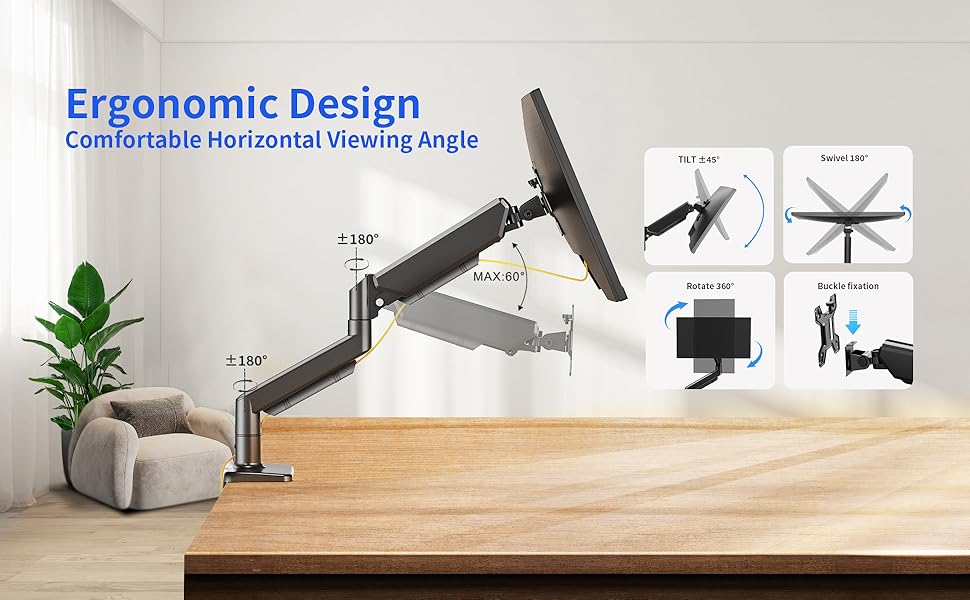
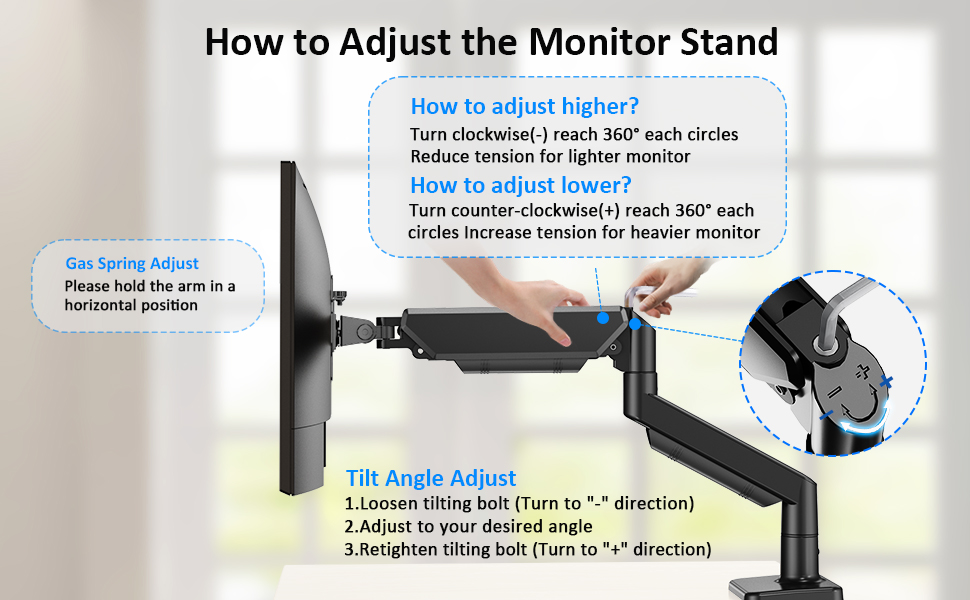
The Ares Wing Monitor Mount supports large curved and ultrawide monitors from 17 to 49 inches, holding up to 44 lbs. Crafted from durable aluminum and iron, it features a fully adjustable gas spring arm with 360° rotation, tilt, swivel, and height adjustments for ergonomic comfort. Its 20 dynamic RGB lighting effects let you customize your setup ambiance, while easy installation options and fatigue-tested components ensure long-lasting, stable performance.


| ASIN | B0DP3YYH6R |
| Best Sellers Rank | #16,896 in Computers & Accessories ( See Top 100 in Computers & Accessories ) #71 in Computer Monitor Arms |
| Brand | ARES WING |
| Brand Name | ARES WING |
| Colour | Black |
| Compatible Devices | Monitor |
| Customer Reviews | 4.2 out of 5 stars 72 Reviews |
| Enclosure Material | Aluminum |
| Manufacturer | ARES WING |
| Material | Aluminum |
| Maximum Tilt Angle | 50 Degrees |
| Maximum-Supported Screen Size | 49 Inches |
| Minimum-Supported Screen Size | 17 Inches |
| Model Number | GDT1003LBKV1 |
| Mounting Type | Tabletop Mount |
| Movement Type | Articulating |
T**R
Rock-solid monitor arm, perfect for ultrawide screens
This monitor arm is extremely well built and easily handles a large, heavy ultrawide monitor without sagging or drifting. The materials feel premium, the joints are tight but smooth, and once positioned it stays exactly where you set it. Installation was straightforward, and the cable management is well thought out, keeping the desk looking clean. Height, tilt, and rotation adjustments are smooth and precise, making it easy to dial in an ergonomic setup. The RGB lighting is subtle and tasteful rather than over-the-top, which is a nice touch. If you’re running a larger or higher-end monitor and want a sturdy, premium arm, this is absolutely worth it.
G**.
LED Lighting requires a longer hold to activate
Mount is sturdy and easy to assemble - initially thought LED RGB did not work but it just needed the switch to be held longer instructions indicate 2 seconds - its more like 8 to 10 seconds. Using with a 34” MSI curved monitor.
F**E
Great arm for a G9
Sturdy and can hold a G9
K**N
great price & quality product
very nice monitor arm, durable, heave solid arm, bonus on RGB as well
L**1
Mounting an ultrawide is tricky—needs two people—but once set up, it’s solid and worth it.
Holds up my Samsung Odessey G9 handily. The cable management is not good, the plastic cowlings have channels that aren't wide enough and I broke the plastic pins just trying to get them off. I used zip ties and that's fine. I suggest that Ares switch to velcro straps with a slow in the metal to allow them to thread through, cables are thick and with a USB, Power, and two monitor cables to thread through plastic won't cut it. I like the RGB but unfortunately I can't see it unless I get up and look behind my monitor. I knew that would happen, but the price didn't differ from a non RGB so I took this one anyhow. I've rarely seen the nice RGB ring on the back of my Samsung either. Both would only be visible in an office environment or where the desk isn't against a wall or outside window like mine. It took some hit and miss adjustments to get the perfect spot for the Odessey G9 and it's heavy. I suggest asking someone to help you, I'm a big guy and I was worried about damaging my monitor while adjusting it. The way the swing arm works you can't have it centered on your desk unless you want the monitor way forward. I found the sweet spot. The last small issue I had, I know I seem to be pointing out mostly negatives, but I do like the arm which is why I put 4 stars, the way the tilt works is wonky, the fact that you can tilt up then it's hard to get it to tilt down is a mixed blessing. The monitor doesn't sag, that's for sure, but there was a few time when I was adjusting the tilt before mounting the monitor where it went past vertical, tilted up, and I couldn't figure out how to get it to go back down after completely backing off the tension screw. Perhaps I just don't understand the mechanism and if it wasn't that way the monitor would sag. I got it eventually though. I still think I made the right choice. Excuse the cables in the backside photo, I still haven't found a solution even though I have a Cable Management Spine Cord Organizer for my sit/stand desk, there are just too many.
Trustpilot
1 day ago
2 months ago