Desertcart purchases this item on your behalf and handles shipping, customs, and support to USA.
๐ Power, speed, and control โ all 13 ports in one sleek hub!
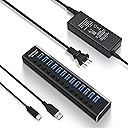
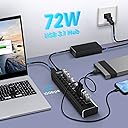
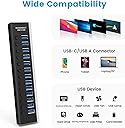
The Rosonway 13-Port Powered USB 3.2 Hub delivers ultra-fast 10Gbps data transfer across 13 ports, powered by a reliable 72W adapter with built-in surge protection. Its aluminum alloy body offers durability and style, while individual port switches provide precise control. Compatible with USB-A and USB-C devices across Windows, Mac, and Linux, this hub is the ultimate solution for professionals seeking to expand connectivity and streamline their workspace.


| ASIN | B09HBQS54V |
| Best Sellers Rank | #215,229 in Computers & Accessories ( See Top 100 in Computers & Accessories ) #2,384 in USB Hubs |
| Brand | Rosonway |
| Brand Name | Rosonway |
| Colour | Black |
| Compatible Devices | Gaming Consoles, Keyboards, Mouse, Printers, USB Flash Drives |
| Customer Reviews | 4.2 out of 5 stars 211 Reviews |
| Data Transfer Rate | 10 Gigabits Per Second |
| Enclosure Material | Aluminum |
| Hardware Interface | USB |
| Item Dimensions L x W x H | 20.8L x 4.1W x 2.5H Centimeters |
| Item Highlight | USB Extender Hub with 12V/6A Power Adapter, Individual On/Off Switches, Type A and Type C Cables for PC and Laptop |
| Manufacturer | Rosonway |
| Manufacturer Part Number | RSH-A13 |
| Model Number | RSH-A13 |
| Number of Ports | 13 |
| Operating System | ['Mac OS X', 'Windows 11/10/8/7', 'Linux'] |
| Product Features | Play, Plug, Powered |
| Special Feature | Play, Plug, Powered |
| Total USB Ports | 13 |
E**D
Very flawed product
Where do I start. The ports are loose so any bump and cause devices to disconnect. The lights are so dim and at an odd angle so it's almost impossible to see which ports are on unless your in the dark. And finally the 72W seems to be limited to 10W per port so you can't even fast charge anything.
K**E
Game changer
This thing saved me. I simply ran out of USB ports on the back of my computer and also wanted to clean up the appearance of my computer space. Utilizing the extra ports on my monitors simply wasn't pretty. Everyone likes to hide the cords, right? It doesn't help that some Corsair products have very thick USB cables that are difficult to plug in beside each other (keyboard in particular). I used some heavy duty double sided tape to attach this hub to the back of my desk and have so far plugged 7 different cords and dongles into it. Tadaa! I don't even need to have the USB on my monitors powered anymore, so that actually allowed me to put some cords away for good. Everything looks so much cleaner with all the cables tucked way down behind my desk. Everything works as you'd expect, just like plugging it into the back of your computer. I didn't have to make any adjustments. The hub shuts off by default when the computer shuts off, so all your little led lights and such don't stay on all the time. It's great for any device that doesn't require power 24/7. If you have an external drive that you want to keep running, perhaps you can play with some settings (BIOS?) or just plug it in elsewhere. Speaking of LED lights, the blue lights on this are not too bright. This is good in my opinion. I don't want bright blue lights lighting up the room or clashing with the custom ARGB lighting of my computer. So, thank you for keeping it subtle. This hub does exactly what it needs to. It's perfect in my opinion. Buy it. Also do what I did and get some quality double sided tape to keep it secure (and hidden).
P**N
Great overall, with a few areas for improvement
I purchased the 13 port USB 3.1 Hub to connect my Flight Sim rig peripherals together. I am using all 13 ports (Joystick, Throttle, Rudder Pedals, Eye Tracker, StreamDeck XL, 3x 1024x768@60hz inch USB displays, 3x MFD button boxes, 2x Control Panel) and it works flawlessly. It is very convenient to plug in and remove from my main PC without needing to run multiple wires across my room. I have been using the USB hub for a couple of months and I have not had any issues with disconnection. The buttons to control individual USB ports work well and I appreciate the indicator light which letsy ou know if it is on/off. I also purchased a seperate extension cable to connect it to my PC (about a 10 foot cable) and it works great. There are two areas for further improvement of the product. The first, and perhaps most concerning, is that it is possible to plug a USB device into the socket backwards with only a little more force than you would use to plug it in correctly. It would benefit from having a slight adjustment to the design to prevent this from happening. The second issue is it gets *hot.* It would not burn you or cause any risk for fire, but I was suprised at how warm the USB housing gets. I suspect this is why it is made of aluminum - to assist with cooling. I would make sure you do not use it in an enclosed space and that it has room for air to flow around it. In summary I am very satisfied with this purchase and would purchase it again. I would like to see the 16 port become available in USB 3.1 in case I add a few more peripherals. As is, this suits my needs for now, and it works great.
D**E
Not a USB C hub as implied! USB C Hub Expander NOT!
I'm totally blind. So all I have to go by is the discription that my screen reader can read and not the photos. By what I read, this sounds like an USB C type of connector At the hub and it sounded like it came with 2 cables to be able to connect it to the C port or A port but had an USB C connection at the hub. This doesn't have a C connection at the hub. This has a USB B conection USB 3.0/3.1. I order longer cables thinking it was going to be a C connecter at the hub and I knew that the cable that came with the hub are very short and worthless to me. Needless to say, I received the hub and was disapointed to find out the cable that goes into the hub is a USB B connection. Then the cable comes out the end of the hub and not the back of the hub. So trying to sit this ona small shelf with both the USB B connector and power connector coming out the side of it not going to work well at all. Would have been nice if the discription said that this was an USB B connector at the hub and if it had, I probably would have hunted for something else. Same goes the discription should have said the power and USB connection came out of the side of the unit and not the back of it. After all, not everyone can see an photo. They also should have provided longer cables like 4 or 6 foot and not 2 foot or 30 inches ones. Way to short. Then the cable should have had a bend at the end of them at the hub so that the cable would go towards the back of the unit away from the switches being the cable doesn't plug into the back of the unit to start with. Now I'm stuck trying to find a 6 foot 10GB USB C male to USB B male that has a bend at the USB B end so I can try to use the hub. Or even an USB A male to USB B Male 10GB 6 foot and has a bend at the USB B end. But so far no luck. Due to the above stuff! Is why I'm giving this 1 star.
S**R
Works but it's an odd arrangement.
It uses a really odd USB topology to get to 13 ports that might not work for you. Internally this thing uses 4 USB hubs chained together with 2 ports at level0, 4 ports at level1, 3 ports at level2, and 4 ports at level3. 13 ports, 4 levels. The physical order of the ports also isn't the same as the logical order of the ports, so you're trial-and-error guessing with HwInfo to figure it out. The problems with doing this deep chaining instead of a flatter layout is weird latency/timing issues or disconnects with audio devices. You can also run into the hub depth limit on windows if you use a port that your motherboard is also chaining into a hub (common with front panel USB ports). Or you'll get random "this device has stopped working" popups. Anyways while this thing does work, it can be very finicky. If you only want a single "hub" you're limited to 4 ports. Any 7 port hubs are doing 3+4 with 2 hubs internally. 10 ports is likely doing 3+3+4 with 3 hubs. The most reliable strategy for getting 10 or more ports would be to get a really good USB 3.2 10Gbps 4 port hub and plug other hubs into it so you know you're only dealing with 2 levels of chaining instead of 3 or 4.
Trustpilot
1 month ago
2 weeks ago