🎨 Elevate your digital canvas—where precision meets portability!
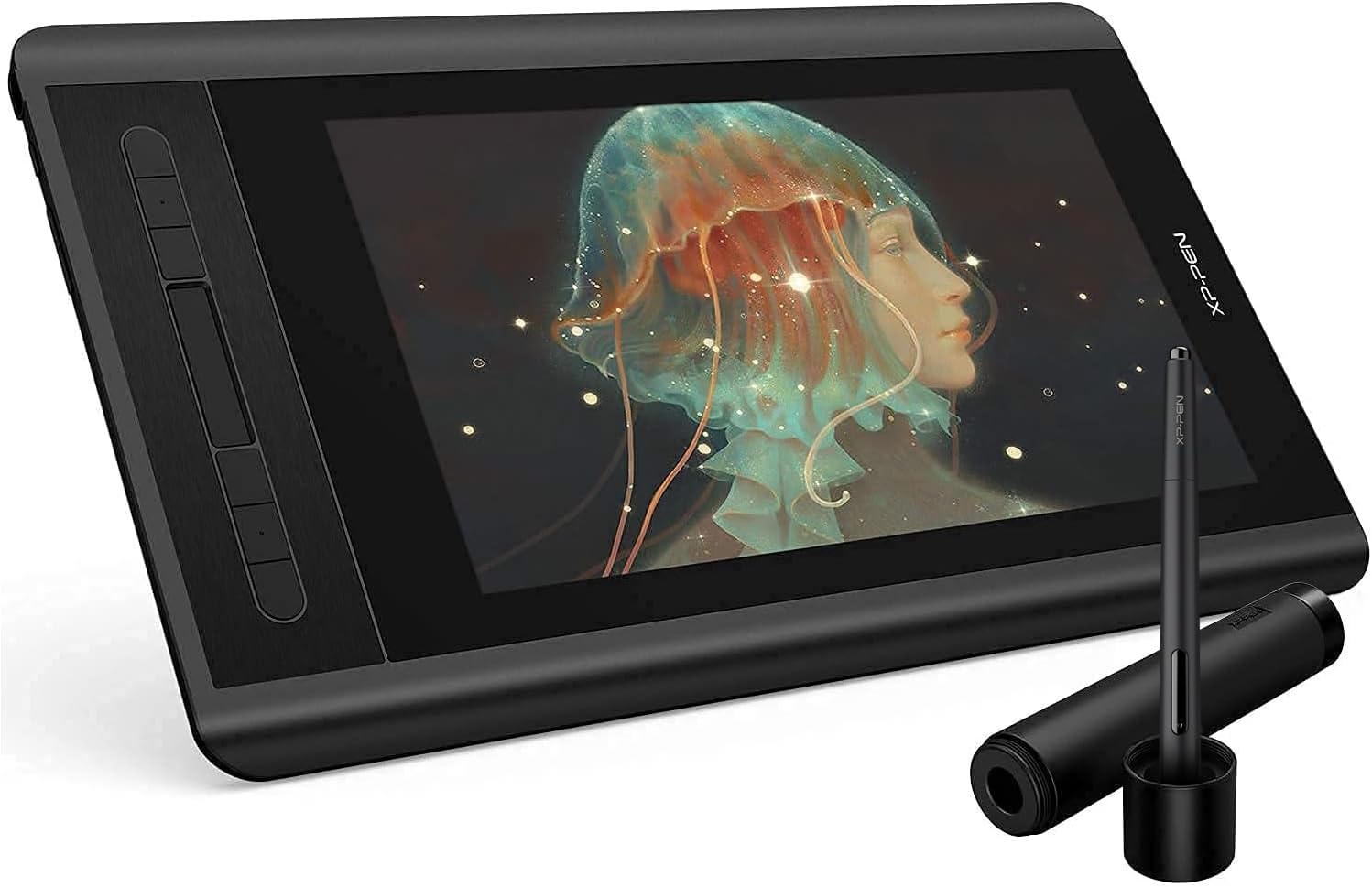
The XP-PEN Artist12 is a compact 11.6-inch FHD drawing monitor featuring a vibrant 100% sRGB IPS display, an ultra-responsive battery-free stylus with 8192 pressure sensitivity levels, and customizable shortcut keys. Compatible with major OS and creative software, it’s designed for professionals and creatives seeking a portable, high-quality digital art experience with seamless workflow integration.


| ASIN | B07GNK18VJ |
| Best Sellers Rank | #15 in Computer Graphics Tablets |
| Customer Reviews | 4.3 4.3 out of 5 stars (11,985) |
| Date First Available | August 20, 2018 |
| Is Discontinued By Manufacturer | No |
| Item Weight | 2 pounds |
| Item model number | Artist 12_SML |
| Manufacturer | XP-PEN |
| Product Dimensions | 14.33 x 8.58 x 0.31 inches |
J**S
Excellent in almost every way
This item has only been a positive impact on my small but satisfying art career. I bought the XP-pen deco tablet before this and after using it for a while decided I could use an upgrade. Boy what an upgrade this was! First things first, the colors on the screen are better than most laptop screens. It was very noticeable to me, and I was actually quite surprised when my background picture looked so much better on the drawing screen than my laptop screen. The pen for this tablet was one of the whole reasons that I bought it. Unlike many other tablets out there, even the high end ones like Wacom tablets tend to have a stylus that is chunky to say the least. I would never see myself EVER writing with an actual pencil with that weird shape and thick profile, but this stylus is sleek and feels exactly like an everyday pencil. This means that I can draw with it for hours on end, and the first thing that stops me is getting tired mentally, not getting tired of holding a chunky pencil. Next is the quality of use. The driver is easy to find and install, and allows for almost endless customizability for the shortcut keys and even the scrolling strip. I may not yet be a very well seasoned digital artist, but for anyone who wants to strreamline their workflow, this tablet has enough options to satisfy someone in at least the intermediate stages of learning. The pen has a good number of pressure levels, and after adjusting the pressure curves (also easily done in the driver) it feels almost effortless to get the right thickness in your lines. The point where the pen draws a line is snappy and will only lag behind the pen tip when moving quickly across the screen, at which point you don't even notice. The resolution might not seem mind blowing at first, but considering that the drawing screen is smaller than most laptop screens, the pixels will be smaller than on most regular computer screens. Maybe you might notice if you have a very high end screen you use. The overall form factor of the tablet is small and easy to carry. I lug mine around in my backpack along with my laptop and notebooks and it doesn't feel too much heavier. It is nice that it comes with a pen case as well, as I doubt the pen would be quite as resilient without it. There is only one or two things that I wish this tablet did better, and they are more a fault of the product that I selected than the quality of the product itself. I wish the screen were just a bit bigger at times. It feels a bit unfortunate that the tablet is the size of a normal laptop, but the screen is noticeably smaller. Then again, this would come at the tradeoff of larger pixel size, so I can live with it. Lastly, the cables that you have to plug in to get the thing working feel like a hassle if you want to be able to draw between classes or in a spare 20 minutes. You have to spend the first 2 minutes plugging the thing in, and then you have to spend the last 4 unplugging everything and packing it all away. This is comparable to most other tablets in this range or slightly higher though, so I can't say that I would expect more. I do hope that with the widespread nature of lightning ports on computers these days, we'll start to see a few more tablets that have some lesser port needs than 2 usb and 1 HDMI cable to work. Overall, if anyone is looking for a drawing tablet that is on the cheaper end but wants to really up their digital art game, I think this is the perfect choice, as it did that very same thing for me.
C**A
I’ve been using the XPPen Artist 15.6 Pro V2 for almost 6 months now, and it’s been an amazing
I’ve been using the XPPen Artist 15.6 Pro V2 for almost 6 months now, and it’s been an amazing tool for my ZBrush workflow. The pen is very responsive, with great pressure sensitivity and tilt support — perfect for sculpting fine details. The screen quality is excellent, with sharp resolution and accurate colors, making it easy to see forms and textures clearly. The shortcut keys and dial have really improved my efficiency, letting me zoom, rotate, and switch tools without constantly reaching for the keyboard. It’s comfortable for long sessions and has been completely reliable so far. If you're into digital sculpting, especially in ZBrush, I highly recommend it. A solid choice for any 3D artist!
S**E
Good bang for buck
The XP-Pen 12 is a great drawing tablet overall, especially for the price. It offers clean, fine detail and makes digital art feel much more natural thanks to the comfort and precision of using a pen instead of a mouse. The screen is responsive, pressure sensitivity works well, and it’s a solid upgrade for anyone getting serious about digital drawing or design. My only real downside is that I wish it were wireless. I understand that display tablets like this generally aren’t wireless, but it would still be nice to have fewer cables on the desk. That said, it’s a minor complaint compared to the value it delivers. I’d definitely recommend the XP-Pen 12 to anyone on a budget who wants better accuracy, smoother lines, and a more enjoyable drawing experience without spending a fortune.
B***
I. Am. OBSESSED.
I’ve always drawn since I was young. I’m new to digital art. I tried using my sisters tablet that didn’t have a screen. I could not draw on it to save my life because I can’t break myself from looking at my pen when I draw. I needed a tablet with a screen to fix the disconnect. This one is PERFECT. Here’s my review. Pros: 1. The packaging is so nice, the tablet and everything has such a quality you will feel like you paid $1000. $200 is such a steal!! 2. The tablet itself is HUGE. I mean I thought I knew what size it was gonna be but good lord I was in awe. 3. They took such care with everything included. The battery-free pen is always ready to use & comes with 8 additional tips (in a sleek cylinder when not in use). 4. Customizable buttons (I’m not sure how to program yet) and a slide bar for zoom. 5. Matte finish feels like paper. 6. Brightness controls on the side. 7. Works amazing with ClipPaint studio. 8. Functions as a separate monitor. Cons 1. You can’t use it without being tethered to a full PC. That’s totally fine with me but is important to know. 2. Lots of cables. I don’t have more than 2 HDMI ports and have to alternate my second monitor with this tablet (which really is just a me problem). I bought a USB hub which is loooooong overdue because I have a lot of equipment. 3. No sleep mode. I have to force myself to remember that if I shut my pc down I need to physically turn off my tablet so it doesn’t burn up (again, a me problem). There’s no reason I can think of to not buy this unless you don’t plan to use it. The most issue I’ve had is learning to use the Clipstudio, but the Artist 12 is truly professional and way underpriced. All these negative reviews have to be from people who have little understand of tech and PCs. Just make sure you hook it up correctly and the program you’re using is on the correct settings. You’ll love it!
J**Z
Para el precio y calidad, esta bien Lleva el lápiz, puntas, un trapito para la pantalla, un guante, la tableta, cables conectores y manuales Problemas Prisión, siento que debes presionar mucho para que salga la línea lo que da menor naturalidad Pantalla: colores un poco brillantes y brillo de base alto Lapiz: se vuelve un poco inútil el único botón que tiene y que no tiene relieve Puntos buenos Accesos rápidos: Muy cómodos Visualización: obviamente el ver lo que hace ayuda en rapidez Tamaño: No ocupa demasiado espacio en escritorio Pantalla: Practicamente no refleja luz Precio: Barato en comparación a sus competidores además de que es bastante completa Extra: Acostumbradote a los problemas igual se le puede sacar mucho probecho, así que no estamal
B**A
I have not had this for very long but I'm so far pleased with it. This is not my first graphic tablet but it is my first display one. The XP-Pen Artist 12 is a display graphic tablet which must be plugged into a laptop or monitor for it to work, it is not functional as a standalone product just to be clear. Inside the box includes wires to plug in, several wall mounts for different regions, a drawing glove, a screen cleaning cloth, some manuals, the pen (which also has an eraser on the other end of it as well as extra nibs in the holder) and of course, the tablet. There is no stand included. Display: The display matches the monitor almost perfectly. There may be a small difference color-wise but it is almost undetectable. The working space is slightly smaller than 12 inches (and forgive me if I'm off as I am not the best when it comes to measuring) so it may feel a little small at times. The contrast and color scales are customizable in the settings so you may adjust it to better replicate your computer monitor. But do be aware that turning up the brightness (buttons on the side near the input plug) on the tablet itself may also affect the contrast and cause things to look weird. If you have overhead lights on while using it, you may notice some glare issues that can obstruct your vision. As the display is not laminated, there is a small observable gap between where you place your pen and where your cursor appears on the screen. This parallax issue is easily overcomable in my personal experience and doesn't actually affect the way you draw but it may bug you if you are prone to being displeased by that. Pressure and Drawing Experience: The pressure sensitivity is rather decent (I'm no expert though) and though the display looks smooth, there is a grippy, textured feel to drawing on it. The pen detection distance is rather short, however, so the pen tip must be pretty close to the screen at all times if you want to hover over something without clicking or drawing. I am satisfied with the drawing experience though. Because there is no stand included, you may find yourself in awkward positions or practicing poor ergonomics so I do recommend purchasing one. Shortcut keys: The tablet includes short cut buttons to the side and a scroll wheel all of which are mappable in the settings. The scroll bar is not very sensitive but its still useful. The pen also has a shortcut button on one of its sides but is incredibly inconvenient to use as it rests flat and is therefore undetectable by feel. You'll have to stop what you're doing to look at it if you're determined to use it and there have been times where I gripped a little too hard after habitually rotating it and accidentally pressed it while drawing. Software: You must first uninstall any drivers from other brands you had installed and then search for the XP-Pen drivers on their official website. I have not had any driver issues but there may be select software incompatibilities that you should be aware of. I used Paint Tool Sai on my previous Wacom tablet before getting this one only to find that XP-Pen has some strange issues with the program. The pressure sensitivity completely stopped working and the pen eraser is rendered obsolete. The pressure sensitivity can be fixed by installing and using a special version/pack of Paint Tool Sai but I am not aware of any eraser end fix. Durability: I researched about this Tablet before buying and this aspect was completely inconclusive. I used to have a Wacom graphic tablet and I wanted a display (that wasn't Wacom prices) but I was concerned that I would spend a good 200 dollars for a month or two of use. Obviously the XP-Pen Artist 12 isn't a tank and should therefore be treated with utmost care. There is an included warranty but I hope to never need to use it. I will most likely update this aspect after further use down the line. Price: This one speaks for itself. The price tag is so good for a display tablet, its near irresistible. Overall, the XP-Pen artist 12 is a great display tablet, especially for the price and I can wholeheartedly recommend it.
J**L
Muito bom, produto perfeitamente embalado e protegido sem nenhum arranhão ou dano, com um tempo de envio bem rápido e um produto que atende suas expectativas
P**J
I am reviewing it after using it for 2 years. Currently I am using as an external display. its screen quality is great and its build quality is superb because it survived an accidental fall. no screen damage at all.
M**O
Ik heb deze tablet gekocht voor mijn vrouw. Ze wilde eigenlijk een "blinde" van Wacom maar tijdens onze zoektocht liepen we tegen deze aan die voor een vergelijkbare prijs een scherm biedt. Ik teken zelf niet, maar kon me voorstellen dat dit veel en veel fijner werkt. Dus we hebben de gok genomen, na wat reviews te hebben bekeken, en deze tablet gekocht. Ik ben niet bekend met de concurenten, ook niet met Wacom, dit is onze eerste tablet voor tekenen maar hij is erg prettig en mijn vrouw is er dolgelukkig mee. Ik raad hem dus ook zonder meer aan voor mensen die een keer willen proberen of digitaal tekenen iets is voor ze. Het werkoppervlak is groot genoeg en het scherm is erg scherp en mooi van kleur (al ben ik geen kenner en zal er natuurlijk voldoende op aan te merken zijn als je gaat kalibreren en zo, maar ok, in deze klasse (zowel van tablet als artiest :+ ) doet dat er niet zo veel toe. De pen zelf ligt lekke rin de hand en zelfs ik kon er prima mee schrijven, het is echt net of je op papier werkt.
Trustpilot
3 weeks ago
1 week ago