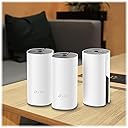
🚀 Elevate your home WiFi game—because buffering is so last decade.
The TP-Link Deco M4 3-Pack Mesh WiFi System delivers expansive 5,500 sq.ft. coverage with AC1200 dual-band speeds, supporting up to 100 devices seamlessly on a single network. Featuring advanced mesh technology, it ensures uninterrupted roaming throughout your home, robust parental controls, Alexa compatibility, and an easy app-based setup backed by 24/7 award-winning support.


| ASIN | B07NF6V8SC |
| Batteries | 3 Product Specific batteries required. |
| Best Sellers Rank | #155,179 in Electronics ( See Top 100 in Electronics ) #427 in Whole Home & Mesh Wi-Fi Systems |
| Customer Reviews | 4.5 4.5 out of 5 stars (11,283) |
| Date First Available | March 19, 2019 |
| Is Discontinued By Manufacturer | No |
| Item Weight | 0.106 ounces |
| Item model number | Deco M4 (3-Pack) |
| Manufacturer | TP-Link |
| Product Dimensions | 3.57 x 3.57 x 7.48 inches |
V**N
Solid economical buy for home Wifi mesh system needs with good signal bandwidth
This review is about TP-Link Deco Whole Home Mesh WIFI System – Seamless Roaming, Adaptive Routing, Up to 5, 500 Sq. ft. Coverage, Works with Alexa(Deco M4 3 Pack). Need: Setup mesh router system for WIFI on my two-storey 3000 sq.ft home. Price: I started with Google Wifi system (3-pack) but ended up preferring the TP-link system primarily because of the price-point (approx, $300 vs $150). Setup: Connect to ISP-provided router (disable WiFi if it has one). The provided setup installations via downloaded TP-Link mobile-app are thoroughly straight forward. One thing to note is that the positioning of the each mesh-router would depend on the layout of the house (location of walls/other signal-blocking obstacles, Wifi-needing devices etc.). Some competitors have option that indicates the strength of the mesh setup as to whether if a router needs to be re-positioned). I myself did the manual way of identifying the places where router needs to be placed, did the setup via the app and then moved throughout the house doing internet-speed tests. Once you do some trial and error, and feel comfortable, it should hold good then onwards (provided your ISP-provided-bandwidth is good enough). The speeds provided (upload/download Mbps) by each router is at par with my ISP-plan speeds. Notable Aspects: I created dual networks (2.4Ghz, 5Ghz). You may configure WiFi-devices to connect to both/one. Yo may very well assign static IPs which is probably required for camera-security-system setups (involving cameras, receiver, switches etc.). I operate the system in 'Router' mode where it is responsible for IP-assignment. Also, you may assign priority to some devices like mobile-phones, laptop etc (so, they aren't bandwidth-throttled by other competing devices. There are 2 ethernet ports on the back (one obviously to connect to ISP-provided router) and the other may be used in cases where direct LAN access is needed for any devices (I use one to connect to my mobile-carrier-signal-booster). You may stick some devices to a particular router (eg: Ring doorbell) or by default, beam-forming with have devices connect to router generating max-signal-strength. In cases where you may want to reboot the system, it is possible to do so via the mobile-app. The mobile-app is mostly functional with some occasional lag (like when renaming some connected devices, it sometimes takes 2 tries to achieve it, also when refreshing the connected devices list it takes 5-10 seconds for the devices list to refresh etc.). Attaching few snaps. Overall, hardly any complaints after 6 months of usage. I'll update this review if I notice anything substantial.
J**N
May save your marriage.
Prior to TP-Link Deco, I lived a life full of angry women (wife and four daughters) who constantly chastised, berated and blamed me for wifi outages, poor connection speed and inability to stream their favorite shows. I felt emasculated, inadequate and an overall failure as I was told that wifi and all electronics was my job. Step one was to change from ATT uVerse as they had poor 25 mbps download speed in my neighborhood. Done. I moved to Spectrum with 400 mbps download thinking my woes would be cured. Nope. I had poor home coverage as our house is larger than average. Even after adding a Nighthawk router to replace the inadequate, buggy router from Spectrum, I still fell short and was barely getting any signal on my third-floor office. After calling in a Spectrum technician, we discussed a Mesh network and he said it was mandatory. I researched systems and bought the TP Link system. Setup was simple and despite having to hookup what seemed like 100 devices (laptops, wifi-tv's, Blink security, ipads, Kindle's, phones, desktops, Energy consumption meter, etc.) it was 100% worth the trouble. My speed in the house is consistently fast and is also reliable. My wife now speaks to me again and brags of my wifi and technical prowess. I sometimes catch her giving me that approving look that all men yearn for. I believe it has improved her libido as well. My daughters no longer hold their heads in shame when their wifi-entitled friends come over. TP Link is to thank as my home is now a blissful wifi-paradise.
F**Y
STOP THINKING...JUST GET IT!
By far the best ISP WiFi router alternative for the money. Before this I tried so many options to boost the junky ISP Wifi router signal. We have a house with 2 floors and the ISP router was constantly cutting out and dropping signals. The only strong area was just in front of the router. Now we have a strong signal through tour the whole house, in the backyard and even in the garage. You can even buy more nodes if necessary, but most won’t need it, three should cover most average size houses nicely. And the best part is that there haven’t been any complaints about slow WiFi since I installed the system, (dads you know what I’m talking about). Also, setup was really simple. I heard that some other systems might have been challenging, which is one reason I chose the TP Link. Directions are pretty clear and there are lots of YouTube videos to walk you through the setup (but you really won’t need it), setup is a snap. They also look nice, no need to hide them like most other routers. Seriously, stop debating and just get it. I was not paid to do this review. I bought the system out of necessity and after several months of service with no hiccups in service, I’m 100% satisfied with my purchase would absolutely recommend the product to anyone who is frustrated with their lousy coverage from their ISP WiFi router. Just buy it. You won’t regret it.
P**X
Vorweg: Manche Rezensionen hier sind schon merkwürdig. Beispielsweise wenn Unwahrheiten / Halbwissen verbreitet werden oder man sich im Jahr 2021 beschwert, dass man zur Einrichtung ein Smartphone braucht. Solche Rezensionen sind leider wenig hilfreich. Auf der Suche nach einem leistungsstarken Mesh-System, bin ich bei diesem System von TP-Link gelandet, welches zwei Freunde schon länger nutzen und sehr zufrieden sind. Verpackung: Die drei "Decos" wurden, wie üblich, schnell und sicher verpackt geliefert. Jeder Deco ist nochmal einzeln eingepackt und liegt stabil im Karton. Einrichtung: Tipp vorweg > Die Einrichtung aller Decos erfolgt an einem Ort. Erst NACH der Einrichtung werden die Decos in die Zimmer / Stockwerke verteilt. Benötigt werden lediglich ein Netzwerkkabel (liegt bei), einer der Decos, natürlich euer Router und ein Smartphone mit der "Deco-App" aus dem App-Store. Einfach den ersten Deco einstecken (Strom), mittels Netzwerkkabel mit dem Router verbinden und der sehr guten Anleitung auf der App folgen. Innerhalb weniger Minuten waren dann alle drei Decos konfiguriert und schon einsatzbereit! Klasse. Zur Verbindung: Der erste Deco ist dann der "Haupt-Deco" und sozusagen die Zentrale des Systems. Von ihm aus wird das WLAN dann zu den anderen Decos geschickt. Diese WLAN-Verbindung zwischen den Decos ist auch zwingend notwendig, um das Signal im ganzen Haus zu verteilen. Man kann das System auch per LAN betreiben, wenn man zB sehr dicke Zwischenwände oder Decken hat. Da müssen aber ein paar grundlegende Dinge beachtet werden, ansonsten funktioniert das System nicht! Mehr dazu ganz unten! Sendeleistung: Sowohl die Geschwindigkeit, als auch der Empfang sind überragend. Ich habe nun in allen drei Stockwerken einen Deco stehen und damit in jeder Ecke des Hauses perfekten Empfang. Es würde theoretisch (bei dünnen Wänden) ausreichen, wenn man nur einen einzigen Deco im EG aufstellt, da die Sendeleistung deutlich besser ist als die Sendeleistung des normalen Routers. Um die volle Geschwindigkeit zu haben, empfehle ich trotzdem, in jedes Stockwerk einen Deco zu stellen. Selbst in der Garage, am Pool und im Gemüsegarten (50m entfernt) habe ich bei geschlossenen Türen/Fenstern immer noch WLAN! Bei billigen WLAN-Systemen erstellt jeder einzelne Sender ein eigenes WLAN-Netz. Man müsste also jedes Mal mit dem Handy/Laptop manuell das WLAN-Netz wechseln. Super nervig! Beim TP-Link Mesh System wird stattdessen EIN großes Netz erzeugt, welches das ganze Haus versorgt. Optik: Das optisch schlichte System lässt sich problemlos mitten in der Wohnung platzieren und stört überhaupt nicht. Auf der Oberseite befindet sich eine kleine weiße LED zur Statusanzeige. Die kann man deaktivieren, aber wir benutzen sie sozusagen als Nachtlicht und schlagen damit zwei Fliegen mit einer Klappe :-) Zuverlässigkeit: Ich nutze das System mittlerweile seit 8 Monaten (Dez. 2020) und hatte noch keinen einzigen Ausfall. Einmal eingerichtet und es läuft bis heute tadellos. Smartphone-App: Wie o. g. ist die Einrichtung per App wirklich einfach. Das bekommt man auch als Laie hin. Über die App werden z. B. auch Softwareupdates installiert, die Netzwerkgeräte und Netzwerkeinstellungen angezeigt, eine Kindersicherung einrichten, Geräte gesperrt usw. Also wie bei einem normalen Router auch. Scheinbar ist das System auch Alexa-kompatibel, habe ich aber noch nicht getestet. Zusammenfassung: Ich bin wirklich begeistert. Das Mesh System von TP-Link ist schnell & einfach eingerichtet, ist super schnell, absolut zuverlässig/stabil, lässt sich innovativ mittels App (und Alexa) bedienen und hat eine sehr gute Sendeleistung. Auch die besagten zwei Freunde, die das System besitzen, sind damit sehr zufrieden. Daher gibt es klare 5* und eine Weiterempfehlung und hoffe, dass Dir diese Bewertung weitergeholfen hat. Hinweis zum Betrieb per LAN: Aufgrund unserer massiven Kellerdecke reicht das WLAN leider nicht in den Keller, weshalb ich im Keller einen weiteren Deco per LAN anschließen musste. Das funktioniert aber ausschließlich (!!!!), wenn folgende Reihenfolge der Geräte eingehalten wird: DSL/Kabel/Glasfaser-Hausanschluss > Router > Deco (Eingang in Port 1, Ausgang aus Port 2) > zum Schluss der Switch/Netzwerkverteiler. Der Haupt-Deco MUSS also unbedingt zwischengeschaltet sein, damit die anderen Decos im Netzwerk erkannt werden. Es reicht nicht, den Haupt-Deco irgendwo im Haus anzuschließen. Ohne diese Reihenfolge klappt der Betrieb per LAN sonst nicht.
R**B
używam kilku takich urządzeń - sprawdza się doskonale. Bardzo łatwa konfiguracja. Możliwość pracy w trybie repeatera albo routera. Dostępna aplikacja na komórkę do zarządzania siecią. Kontrola rodzicielska, alerty bezpieczeństwa, filtry, podgląd do aktywności w sieci. Po prostu działa, bardzo wygodne i komfortowe narzędzie. Nie ma sensu bawić się w jakieś openwrt - szkoda czasu.
L**.
Moro em uma casa onde o ponto principal fica bem longe do escritório, ja havia tentando passar cabos, repetidores padrão, mas nada funcionou. Esse aqui resolve. É caro, mas resolve. - O app de gestão é excelente pra quem tem família: tem relatorio de sites mais acessados, função de bloqueio de acesso, voce pode priorizar algum device (ex: eu priorizo os computadores de trabalho) - Da pra programar um horario para os LEDs apagarem (um dos roteadores fica no meu quarto) - À medida que voce vai andando pela casa, ele automaticamente te roteia para o melhor sinal - Não vi nenhum problema de latência até o momento. - Instalação muito fácil. Enfim. Recomendo.
V**N
1 Ağustos 2021 tarihinden beri kullanıyorum. Hiç bağlantı sorunu, kopma yaşamadım. Evin yapısı U şeklinde ve kalın duvarlardan dolayı sorun yaşıyordum. Bu cihazı alınca sorunum çözüldü. Arada firmware güncellemesini kontrol ediyorum var ise yapıyorum. Sonrasında uygulama üzerinden Ağ optimizasyonunu kullanıyorum. Uygulama üzerinden aklınıza gelebilecek tüm ayarları yapabilirsiniz. Gayet basit bir ara yüzü var. Daha farklı, daha gelişmiş versiyonları mevcuttu aldığımda fakat Gigabit Port özelliği ve kablosuz çekim alanı alırken dikkat ettiğim bilgilerdi.
A**R
The documentation on the devices is almost non-existent. It mostly relies on the in-app setup program to describe what needs to be done. What is poorly documented is the 2 modes of operation (router and access point) with router being the default mode. In router mode, the wifi network is seperate to the wirede network and nat'ed. There are options ofr port forwarding in this mode which would be beneficial if this is the mode you desired. I was after having a mesh network on the same LAN I have already. In the router mode, the LAN can't connect to devices on the wifi network unless you use port forwarding. I eventually found the access point option (which their own support staff didnt seem to know existed or didnt know what it was). It took a while to find it, but once setup in access mode, the system performed VERY well. With better written documentation, this would have been a much less painful install. If they had a web setup program, that would have made it easier too. Each time you decide to factory reset the device (or just reboot it) mainly while getting the initial setup the way you want, it seem to take about 3 minutes (it seems longer) to reboot the device to the point where you can try another config. Would I buy this device again ? Absolutely ! The device looks very good, it provides excellent wifi and I'm very happy with it now, but I must admit I was really regretting the purchase until I found the access point mode.
Trustpilot
3 weeks ago
2 weeks ago