We remain fully operational. Our teams are working around the clock to ensure your deliveries continue safely.

DOWNLOAD THE APP


Copyright © 2025 Desertcart Holdings Limited
DOWNLOAD THE APP







Buy anything from 5,000+ international stores. One checkout price. No surprise fees. Join 2M+ shoppers on Desertcart.
Desertcart purchases this item on your behalf and handles shipping, customs, and support to USA.
🖨️ Print Big, Spend Small, Work Smart!
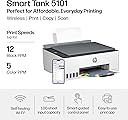
The HP Smart Tank 5101 is a high-capacity, multifunction inkjet printer designed for professionals who demand cost-effective, high-quality printing. Featuring refillable ink tanks that yield up to 12,000 black-and-white and 6,000 color pages per fill, it dramatically reduces printing costs by up to 96% compared to cartridge models. With wireless connectivity and the HP Smart App, users can print, scan, copy, and fax directly from mobile devices. Its sleek design with rear paper feed and dust protection fits seamlessly into modern workspaces, delivering sharp prints at resolutions up to 4800×1200 dpi.


| ASIN | B0BL466Y41 |
| Additional Printer Functions | Copy, Scan |
| B&W Pages per Minute | 12 ppm |
| Brand | HP |
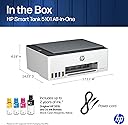
| Built-In Media | Main unit, complete ink bottle + 1 black bottle, black print head, color print head, power cable (approx. 4.9 ft (1.5 m), USB cable (approx. 3.3 ft (1 m), setup guide, reference guide |
| Color | gray |
| Color Pages per Minute | 5 ppm |
| Compatible Cartridge | Purchase genuine HP for additional ink bottles. HP31 (70ml Cyan Magenta Yellow) / HP32XL (135ml Black) |
| Compatible Devices | Android / iOS, Desktop PC, Laptops, Smartphones, Tablets |
| Control Method | App |
| Controller Type | Apple Airprint, iOS |
| Customer Reviews | 3.9 3.9 out of 5 stars (4,242) |
| Dual-sided printing | No |
| Duplex | Manual |
| Hardware Interface | USB 2.0 |
| Initial Page Print Time | 14 Seconds |
| Ink Color | 4 colors (black, cyan, magenta, yellow) |
| Item Dimensions D x W x H | 36.2D x 43.4W x 15.7H cm |
| Item Type Name | Inkjet Printer |
| Item Weight | 11.09 Pounds |
| Manufacturer | 日本HP |
| Maximum Copies Per Run | 99 |
| Maximum Copy Resolution Black and White | 600dpi |
| Maximum Copy Resolution Color | 600dpi |
| Maximum Copy Speed Black and White | 10 ppm |
| Maximum Media Size | A4 |
| Maximum Print Resolution Black and White | 1200×1200 |
| Maximum Sheet Capacity | 100 |
| Maximum print Resolution Color | 4800×1200 1インチ当たりのドット数 |
| Model Name | HP Smart Tank |
| Model Number | ST 5101 AIO |
| Other Special Features of the Product | Borderless Printing, Network-Ready, Refillable Ink Tank |
| Paper Size | A4、A5、A6、B5、封筒(長形3号/長形4号)、はがき、往復はがき、10×15cm、L判、2L判など |
| Print media | Envelopes, Glossy photo paper, Paper (plain) |
| Printer Connectivity Type | USB, Wi-Fi |
| Printer Output Type | Color |
| Printer Type | Inkjet |
| Processor Count | 1 |
| Scanner Type | Flatbed |
| Series Number | 5101 |
| Total USB 2.0 Ports | 1 |
| Total Usb Ports | 1 |
| UPC | 196068963484 |
| Warranty Description | Compatible with HP Quick Exchange within the free warranty period. If HP determines that the fault cannot be solved by remote, the faulty printer itself will be replaced free of charge. We will ship your replacement next working day, If you purchase one year or print up to 30,000 pages, you are covered by the warranty |
| Warranty Type | Limited |
| Wattage | 3.02 W |
M**Z
An excellent, economical, and high-performance option for the home or office, offering printing, scanning, and copying capabilities with refillable ink tanks that drastically reduce the cost per page. It features Wi-Fi connectivity, good text quality, and easy mobile setup.
C**N
Dear HP, why has your printer quality dropped so much? I have Only owned HP printers for as long as i can remember, mostly having good success with them. The best printer i ever had was my first, a Deskjet from the 90's. While the color wasn't the premium level they have today (so they say), i used that thing like mad for more than 6 years. After that one, each NEW printer lasted less than the one before that. My last one was the HP ENVY 6055e (purchased in 2023). It lasted me 1 year and the #1 reason i got rid of it was same issue i'm having today with the Smart Tank. Before the 6055e was an Envy Photo 7858 (purchased in 2021); I really liked how well everything looked when printed, but i struggled to get it to print after a year. In the end i was hand feeding it every time to make it work. My brother has that printer and still hand feeds each sheet. The Smart Tank 5101 I purchased on April 14, 2025 (currently doing the review 7 months later). I got this for 2 reasons: 1) to fix the paper load issue, and 2)I was hoping to print my own designed sublimations to press on to shirts. Well, not even a year yet and by far, this is the worst HP Printer i have ever owned. I waited this long to do the review as i really wanted it to work out and at nearly $200, i had my fingers crossed. 30 minutes now trying to print TWO LABELS and the printer finally fed the label sheet, but then it spit it out with nothing on it. I'm back to trying to get this to print The gravity feed on the Smart Tank i thought would make things better, but if anything it's worse. No matter how many pages i stick in, 1, 20 or 40, it doesn't matter as majority of the time i can't get anything to print. Paper, labels, card stock, doesn't matter thick or thin, i find myself having to fight 20+ minutes to print ONE page. I've tried talking to HP reps and they explain how to do the cleaning maintenance, something i've done with these for 25+ years and to load more paper into the feed. I don't have any more that i could even load this thing with; this is just insanity. On this Smart Tank, i thought maybe it's like the others and i need to clean off the wheels. Uh, there's no easy way to clean the rollers as there are no panels on the bottom or back that come off. As a matter of fact, if you have a jam, the only way to get in is thru the front panel (and no the scanner bed does not lift open); best have some long pliers or tweezers to reach in there, especially if you have big hands They do have a display for errors and print info, but it's just symbols, no words and is on the top, in the middle of the printer. If i want to attempt to read it, i have no choice but to stand up to look directly down at it; you can't read it from any other angle. The old printers had it on the front face and had words. I can't get these labels to print. Even removed the label sheet, still nothing. Those 1-star reviews for this printer are increasing and now i know why. Holy Wait Time Batman, it finally loaded and started printing; 45 minutes to print one sheet. It's a good thing i didn't have a hammer in this room, as the ungentle persuasion was a thought for a while. The page i got to print, was not my 2 labels i needed. I just said to heck with it and printed a full sheet on glossy photo paper and it printed. I tried for a second page, just as a test and NOPE, back to the same issues as before. I give up. This was the first printer in a long time that i got Brand New, not a refurbished model and did not up for the extended warranty, which in the end is gonna cost me dearly. I have 2 HP OMEN PCs and like them both, they have worked great and are chuck full of name brand components. As for the Smart Tank if anyone else gets this, i hope you don't have the same issues because it is so frustrating.
E**M
I recently purchased the HP Smart Tank 5101 Wireless All-in-One Ink Tank Printer, and so far I’ve been very impressed. The setup instructions were clear and easy to follow, and installing the ink was straightforward with no mess. My first print job came out crisp and high quality, which immediately gave me confidence in the printer. I’m primarily using this printer for labels and real estate documents, so I don’t anticipate heavy ink usage, but the print quality has been excellent across the board. The Wi-Fi connectivity works seamlessly, and being able to print directly from my phone has been incredibly convenient. Overall, this printer has exceeded my expectations and has been a great addition to my home office. I’m very happy with the performance and print quality so far.
D**A
Every printer is different. Ink wells are different to replace, but this one is relatively easy. The directions are clear with pictures. And then the machine works/prints exceptionally! Precisely what we were looking for.
T**3
I use this printer for home use. I initially filled all the ink and have only had to refill the black ink once in two years! It prints and copies well. I would highly recommend this printer for home use (maybe for office use too but that’s not what I have used it for).
Trustpilot
2 days ago
3 weeks ago