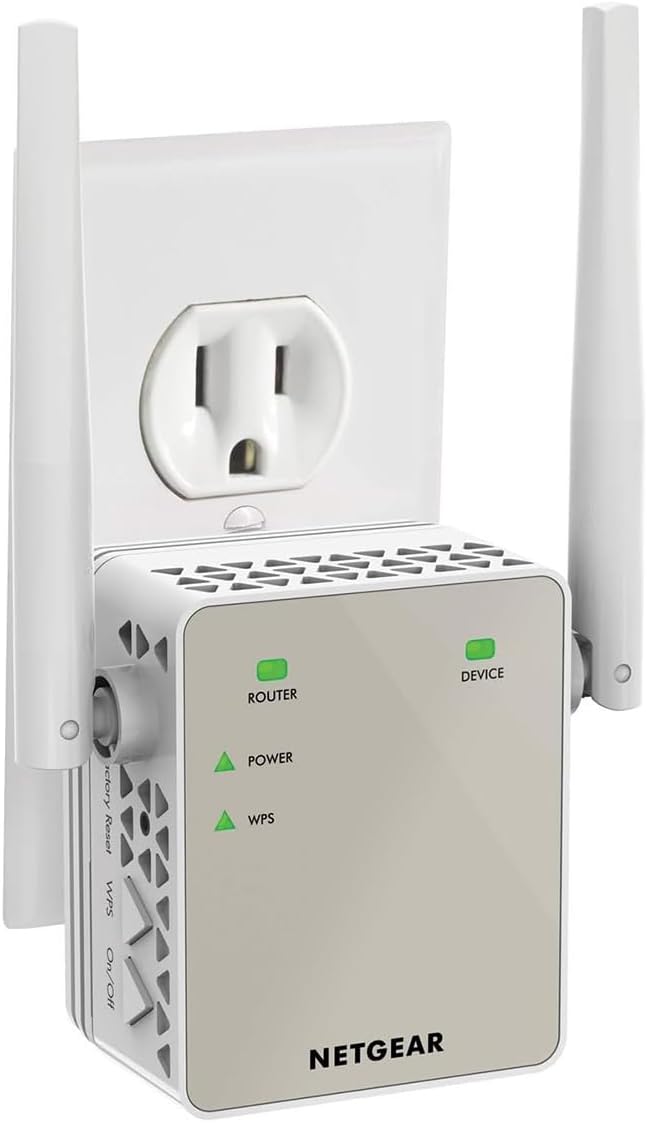
After logging into NetGears Setup Page and making a password and 2 security questions I found it fairly simple and quick to get the AC1200 WiFi Range Extender to lock into my router. I live in a mobile home and the WiFi connection in the living room where the router is located is fine but when you take your laptop or Ipad down to the other end of the trailer, in the bedrooms you lose quite a bit. On a lot of sites you would get a lot of buffering. Once I put AC1200 in the back bedroom it was like having the router in the room. Plus there are no cord connections, just plug it in the wall socket. If I want to use an Ethernet Cable with my laptop in the bedroom there is an Ethernet Port on the side of the AC1200 Extender to plug into. Some Extenders I reviewed before buying this one don't have that feature. You can't go wrong with this model. Works great. And if your a member of Amazon Prime you'll get it in 2 days. I did.After logging into NetGears Setup Page and making a password and 2 security questions I found it fairly simple and quick to get the AC1200 WiFi Range Extender to lock into my router. I live in a mobile home and the WiFi connection in the living room where the router is located is fine but when you take your laptop or Ipad down to the other end of the trailer, in the bedrooms you lose quite a bit. On a lot of sites you would get a lot of buffering. Once I put AC1200 in the back bedroom it was like having the router in the room. Plus there are no cord connections, just plug it in the wall socket. If I want to use an Ethernet Cable with my laptop in the bedroom there is an Ethernet Port on the side of the AC1200 Extender to plug into. Some Extenders I reviewed before buying this one don't have that feature. You can't go wrong with this model. Works great. And if your a member of Amazon Prime you'll get it in 2 days. I did.After logging into NetGears Setup Page and making a password and 2 security questions I found it fairly simple and quick to get the AC1200 WiFi Range Extender to lock into my router. I live in a mobile home and the WiFi connection in the living room where the router is located is fine but when you take your laptop or Ipad down to the other end of the trailer, in the bedrooms you lose quite a bit. On a lot of sites you would get a lot of buffering. Once I put AC1200 in the back bedroom it was like having the router in the room. Plus there are no cord connections, just plug it in the wall socket. If I want to use an Ethernet Cable with my laptop in the bedroom there is an Ethernet Port on the side of the AC1200 Extender to plug into. Some Extenders I reviewed before buying this one don't have that feature. You can't go wrong with this model. Works great. And if your a member of Amazon Prime you'll get it in 2 days. I did.After logging into NetGears Setup Page and making a password and 2 security questions I found it fairly simple and quick to get the AC1200 WiFi Range Extender to lock into my router. I live in a mobile home and the WiFi connection in the living room where the router is located is fine but when you take your laptop or Ipad down to the other end of the trailer, in the bedrooms you lose quite a bit. On a lot of sites you would get a lot of buffering. Once I put AC1200 in the back bedroom it was like having the router in the room. Plus there are no cord connections, just plug it in the wall socket. If I want to use an Ethernet Cable with my laptop in the bedroom there is an Ethernet Port on the side of the AC1200 Extender to plug into. Some Extenders I reviewed before buying this one don't have that feature. You can't go wrong with this model. Works great. And if your a member of Amazon Prime you'll get it in 2 days. I did.After logging into NetGears Setup Page and making a password and 2 security questions I found it fairly simple and quick to get the AC1200 WiFi Range Extender to lock into my router. I live in a mobile home and the WiFi connection in the living room where the router is located is fine but when you take your laptop or Ipad down to the other end of the trailer, in the bedrooms you lose quite a bit. On a lot of sites you would get a lot of buffering. Once I put AC1200 in the back bedroom it was like having the router in the room. Plus there are no cord connections, just plug it in the wall socket. If I want to use an Ethernet Cable with my laptop in the bedroom there is an Ethernet Port on the side of the AC1200 Extender to plug into. Some Extenders I reviewed before buying this one don't have that feature. You can't go wrong with this model. Works great. And if your a member of Amazon Prime you'll get it in 2 days. I did.After logging into NetGears Setup Page and making a password and 2 security questions I found it fairly simple and quick to get the AC1200 WiFi Range Extender to lock into my router. I live in a mobile home and the WiFi connection in the living room where the router is located is fine but when you take your laptop or Ipad down to the other end of the trailer, in the bedrooms you lose quite a bit. On a lot of sites you would get a lot of buffering. Once I put AC1200 in the back bedroom it was like having the router in the room. Plus there are no cord connections, just plug it in the wall socket. If I want to use an Ethernet Cable with my laptop in the bedroom there is an Ethernet Port on the side of the AC1200 Extender to plug into. Some Extenders I reviewed before buying this one don't have that feature. You can't go wrong with this model. Works great. And if your a member of Amazon Prime you'll get it in 2 days. I did.After logging into NetGears Setup Page and making a password and 2 security questions I found it fairly simple and quick to get the AC1200 WiFi Range Extender to lock into my router. I live in a mobile home and the WiFi connection in the living room where the router is located is fine but when you take your laptop or Ipad down to the other end of the trailer, in the bedrooms you lose quite a bit. On a lot of sites you would get a lot of buffering. Once I put AC1200 in the back bedroom it was like having the router in the room. Plus there are no cord connections, just plug it in the wall socket. If I want to use an Ethernet Cable with my laptop in the bedroom there is an Ethernet Port on the side of the AC1200 Extender to plug into. Some Extenders I reviewed before buying this one don't have that feature. You can't go wrong with this model. Works great. And if your a member of Amazon Prime you'll get it in 2 days. I did.After logging into NetGears Setup Page and making a password and 2 security questions I found it fairly simple and quick to get the AC1200 WiFi Range Extender to lock into my router. I live in a mobile home and the WiFi connection in the living room where the router is located is fine but when you take your laptop or Ipad down to the other end of the trailer, in the bedrooms you lose quite a bit. On a lot of sites you would get a lot of buffering. Once I put AC1200 in the back bedroom it was like having the router in the room. Plus there are no cord connections, just plug it in the wall socket. If I want to use an Ethernet Cable with my laptop in the bedroom there is an Ethernet Port on the side of the AC1200 Extender to plug into. Some Extenders I reviewed before buying this one don't have that feature. You can't go wrong with this model. Works great. And if your a member of Amazon Prime you'll get it in 2 days. I did.After logging into NetGears Setup Page and making a password and 2 security questions I found it fairly simple and quick to get the AC1200 WiFi Range Extender to lock into my router. I live in a mobile home and the WiFi connection in the living room where the router is located is fine but when you take your laptop or Ipad down to the other end of the trailer, in the bedrooms you lose quite a bit. On a lot of sites you would get a lot of buffering. Once I put AC1200 in the back bedroom it was like having the router in the room. Plus there are no cord connections, just plug it in the wall socket. If I want to use an Ethernet Cable with my laptop in the bedroom there is an Ethernet Port on the side of the AC1200 Extender to plug into. Some Extenders I reviewed before buying this one don't have that feature. You can't go wrong with this model. Works great. And if your a member of Amazon Prime you'll get it in 2 days. I did.After logging into NetGears Setup Page and making a password and 2 security questions I found it fairly simple and quick to get the AC1200 WiFi Range Extender to lock into my router. I live in a mobile home and the WiFi connection in the living room where the router is located is fine but when you take your laptop or Ipad down to the other end of the trailer, in the bedrooms you lose quite a bit. On a lot of sites you would get a lot of buffering. Once I put AC1200 in the back bedroom it was like having the router in the room. Plus there are no cord connections, just plug it in the wall socket. If I want to use an Ethernet Cable with my laptop in the bedroom there is an Ethernet Port on the side of the AC1200 Extender to plug into. Some Extenders I reviewed before buying this one don't have that feature. You can't go wrong with this model. Works great. And if your a member of Amazon Prime you'll get it in 2 days. I did.After logging into NetGears Setup Page and making a password and 2 security questions I found it fairly simple and quick to get the AC1200 WiFi Range Extender to lock into my router. I live in a mobile home and the WiFi connection in the living room where the router is located is fine but when you take your laptop or Ipad down to the other end of the trailer, in the bedrooms you lose quite a bit. On a lot of sites you would get a lot of buffering. Once I put AC1200 in the back bedroom it was like having the router in the room. Plus there are no cord connections, just plug it in the wall socket. If I want to use an Ethernet Cable with my laptop in the bedroom there is an Ethernet Port on the side of the AC1200 Extender to plug into. Some Extenders I reviewed before buying this one don't have that feature. You can't go wrong with this model. Works great. And if your a member of Amazon Prime you'll get it in 2 days. I did.After logging into NetGears Setup Page and making a password and 2 security questions I found it fairly simple and quick to get the AC1200 WiFi Range Extender to lock into my router. I live in a mobile home and the WiFi connection in the living room where the router is located is fine but when you take your laptop or Ipad down to the other end of the trailer, in the bedrooms you lose quite a bit. On a lot of sites you would get a lot of buffering. Once I put AC1200 in the back bedroom it was like having the router in the room. Plus there are no cord connections, just plug it in the wall socket. If I want to use an Ethernet Cable with my laptop in the bedroom there is an Ethernet Port on the side of the AC1200 Extender to plug into. Some Extenders I reviewed before buying this one don't have that feature. You can't go wrong with this model. Works great. And if your a member of Amazon Prime you'll get it in 2 days. I did.After logging into NetGears Setup Page and making a password and 2 security questions I found it fairly simple and quick to get the AC1200 WiFi Range Extender to lock into my router. I live in a mobile home and the WiFi connection in the living room where the router is located is fine but when you take your laptop or Ipad down to the other end of the trailer, in the bedrooms you lose quite a bit. On a lot of sites you would get a lot of buffering. Once I put AC1200 in the back bedroom it was like having the router in the room. Plus there are no cord connections, just plug it in the wall socket. If I want to use an Ethernet Cable with my laptop in the bedroom there is an Ethernet Port on the side of the AC1200 Extender to plug into. Some Extenders I reviewed before buying this one don't have that feature. You can't go wrong with this model. Works great. And if your a member of Amazon Prime you'll get it in 2 days. I did.