๐ฆพ Elevate your workspace โ where power meets style!
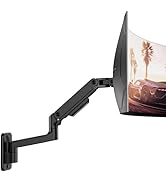
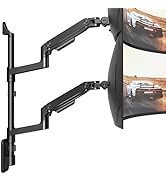
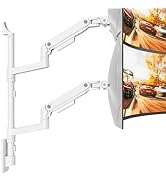
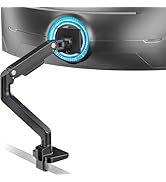
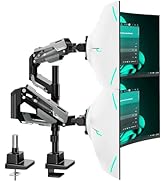
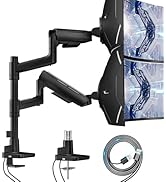
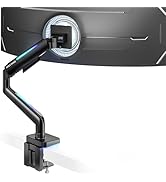
The ARES WING Desk Monitor Mount is a premium, durable aluminum arm designed for 17 to 49-inch ultrawide and curved monitors, supporting up to 44 lbs. Featuring a fully adjustable ergonomic design with 360ยฐ rotation and 20 customizable RGB lighting effects, it enhances both productivity and gaming ambiance. Easy to install with versatile mounting options, itโs backed by a 3-year warranty and built to last with over 20,000 gas spring cycles tested.


| ASIN | B0CS5FX149 |
| Brand | ARES WING |
| Brand Name | ARES WING |
| Colour | White |
| Compatible Devices | Monitor |
| Compatible devices | Monitor |
| Customer Reviews | 4.3 out of 5 stars 288 Reviews |
| Enclosure Material | Aluminum |
| Manufacturer | ARES WING |
| Material | Aluminum |
| Maximum Tilt Angle | 50 Degrees |
| Maximum-Supported Screen Size | 49 Inches |
| Minimum-Supported Screen Size | 17 Inches |
| Model Number | GDT1003LWH |
| Mounting Type | Tabletop Mount |
| Mounting type | Tabletop Mount |
| Movement Type | Articulating |
| Movement type | Articulating |
B**A
Highly recommended !!!! used for Alienware 32 gamer curvo 4k qd-oled - aw3225qf
I recently purchased the ARES WING Monitor Desk Mount, and I have been thoroughly impressed with its performance and build quality. This mount has exceeded my expectations in terms of both functionality and ease of use. 1. Sturdy and Durable Construction The mount features a robust build designed to support monitors ranging from 43.2 cm to 124.9 cm (17 to 49 inches), which makes it an excellent choice for large or ultra-wide monitors. It can hold up to 20 kg, which is plenty of weight capacity for most monitors on the market. The materials used are solid and premium, providing a strong and reliable hold for even heavier monitors. 2. Gas Spring Technology for Smooth Adjustments One of the standout features of the ARES WING mount is the gas spring mechanism. The arm is incredibly smooth and easy to adjust, whether youโre moving the monitor up and down, tilting it, or rotating it. The gas spring system ensures that you can effortlessly adjust the monitor to your ideal position with just one hand. This feature is particularly useful for those who need to quickly change their setup, whether for work, gaming, or media consumption. 3. Perfect for Curved and Ultra-Wide Monitors The ARES WING is particularly well-suited for curved and ultra-wide monitors, which can sometimes be tricky to mount due to their size and weight. This mount provides excellent support and stability, preventing any wobbling or sagging, even for large 49-inch ultra-wide monitors. The arm design allows for a full range of motion, giving you complete flexibility in how you position your monitor for comfort. 4. Easy to Install and Adjust Installation was straightforward and quick. The clamp base is easy to attach to most desks, and the instructions were clear. Once installed, adjusting the monitor height and tilt is simple, with the gas spring providing an effortless movement range. The cable management system is also a nice touch, helping to keep your workspace clean and organized by hiding cables behind the arm. 5. Versatile and Ergonomic With the ability to adjust not only the height but also the tilt and rotation, this mount ensures that you can achieve an ergonomic setup tailored to your needs. Whether you're standing, sitting, or simply looking to fine-tune the angle for your optimal viewing position, the ARES WING delivers a highly customizable experience. 6. Space-Saving Design The single-arm design is perfect for freeing up desk space. It keeps your monitor elevated and off the desk, creating a more minimalist and organized work environment. This is especially useful for small desks or for those who prefer to maintain a tidy and clutter-free workspace. Conclusion: The ARES WING Monitor Desk Mount is an excellent investment for anyone looking to improve their workspace setup. Its sturdy construction, ease of adjustment, and compatibility with curved and ultra-wide monitors make it a standout choice. Whether you're working, gaming, or just watching movies, this mount will undoubtedly enhance your experience by providing a smooth, customizable, and ergonomic viewing solution. Highly recommended!
O**T
very strong, install process could be slightly improved
awesome monitor arm, my samsung odyssey g5, ultra wide 34" used to sag with my previous arm but this one supports it like it weighs nothing. breeze to install. the only thing that could be improved is the cable management that doesn't use any screws so kinda useful but if you pull on the cables a bit the brackets to hold the cables can pop out. it's not a problem once you've given it enough cable length but it makes the setup a bit annoying. also you can't screw/unscrew the desk clamp while the arm is on the base so put it in position before placing the arm
S**E
arm
I give this arm a 10/10. From my experience it was flawless in every way. Would highly recommend! really well built. holds the monitor verry well
J**K
Solid and well-built with an excellent design
This has been an excellent monitor arm and holds my 32โ monitor with no issue and no sag. I firmly believe it could hold even more weight without a problem. I bought this to replace a cheaper monitor arm that would slowly drop over time and had constantly annoyed me. I debated against this one versus a more expensive variation from the same brand as my monitor. From photos, this one looked nearly identical in every way with similar specs and Iโm thrilled I went this route. The price is very fair and well worth the cost for the value. Last, Iโm very happy with the way it looks on the desk. Itโs very minimal, with squared off edges (which I prefer over round), with a classy matte finish to the metal.
J**S
Good arm for the G9
This arm does in fact support the G9. Everyone saying that it doesn't, clearly didn't read the instructions to adjust the tension of the arm spring. Also, there are a few people saying the LED lighting doesn't work. You have to long press the button to turn the LED lighting on/off. Plug the USB cable into the computer to have the lights turn on/off with the computer. The lighting will remember the last mode it was on and resume that mode after 2 seconds. Only 4 stars for the simple fact that the wire isn't white. I have a white desk with a white monitor arm and a white Display Port cable. The black USB cable stands out and is hardwired to the arm. I am resolving this by wrapping up the black wire and tucking it in and using a white USB extension cable. Could also go with a white cable sleeve.
Trustpilot
1 week ago
3 weeks ago