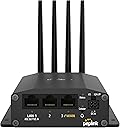
🚀 Stay connected, stay ahead—your mobile network powerhouse.
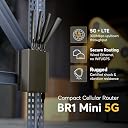
The Peplink MAX BR1 Mini 5G is a compact, business-grade mobile router delivering ultra-reliable 5G connectivity with dual SIM redundancy and integrated eSIM. Featuring gigabit Ethernet LAN ports and advanced QoS, it ensures seamless, prioritized data transfer up to 300 Mbps. Designed for professionals who demand uninterrupted remote access and scalable dual WAN capabilities, this router is your ultimate mobile networking solution.




| ASIN | B0CQP9L9TB |
| Antenna Location | Business |
| Antenna Type | Fixed |
| Box Contents | 1 x 12V 2A 4 Pin Power Supply (ACW-632), 1 x BR1 Mini 5G, 4 x 5G/LTE (ACW-235) antennas |
| Brand | Peplink |
| Brand Name | Peplink |
| Colour | Black - |
| Compatible Devices | Laptop, Personal Computer, Smartphone, Tablet |
| Connectivity Protocol | Ethernet, LAN, WAN |
| Connectivity Technology | Ethernet, LAN, WAN |
| Control Method | App |
| Controller Type | App Control |
| Coverage | Mobile network only |
| Customer Reviews | 3.6 out of 5 stars 13 Reviews |
| Data Transfer Rate | 300 Megabits Per Second |
| Frequency | 5 GHz |
| Frequency Band Class | Dual-Band |
| Is Modem Compatible | No |
| Item Weight Unit of Measure | 0.43 Kilograms |
| LAN Port Bandwidth | 10/100/1000 megabits_per_second |
| Manufacturer | Peplink |
| Manufacturer Part Number | MAX-BR1-MINI-5GN-T-M-PRM |
| Maximum Upstream Data Transfer Rate | 300 Megabits Per Second |
| Model Name | MAX BR1 Mini 5G |
| Model Number | MAX BR1 Mini 5G |
| Number of Ports | 3 |
| Operating System | Peplink SD-WAN Operating System |
| Other Special Features of the Product | QoS, Remote Access |
| Special Feature | QoS , Remote Access |
| Unit Count | 1 Count |
| Voltage | 12 Volts |
| Wireless Communication Standard | 802.11a |
| Wireless Compability | 802.11a |
K**I
Works great with Verizon hotspot plan
A little bit pricy for a 5G modem only unit. But it works great with Verizon hotspot plan. Just plug SIM card then it connects. Remote control from inControl APP is another great feature. Easily to monitor and update setting. Don’t need to plug in LAN cable to check status(but initial setup is still needed). Signal is way much better than my old Netgear LTE modem. This is great choice as a backup internet modem.
J**N
Newer models are not very good
I used Peplink/Pepwave devices for about 10 years, but the newer models are just not good. This device was very unstable, especially on the 5G and 4G Band 66 signals. Even though my signal strength was relatively strong, the unit would disconnect for about 2 minutes at least 10 times every day. The 4G Band 4 was the only band that was relatively stable. I previously had the Max BR1 Pro 5G unit and it had the same issues. I thought it may have been the cell towers but now I can rule that out because I purchased a KuWFi Outdoor 5G Router here on Amazon and it works great; Super stable 5G and 4G connections on all bands. I will not purchase any more Peplink products.
W**L
This device is a hit and miss with T-Mobile Business Internet (not usable for Home Internet)
Well, I've spent almost two weeks trying to get this to work on a T-Mobile Business Internet Account. I was a Home Internet User then converted to a Business Internet Account. First line it just blinks green. I had T-Mobile reset the network settings twice, then provision the line again. Still no dice. Then I tried a new line-id with same results. Went to the store 4 times and tried as many SIM cards plus two. If you have an existing account this may work, but as it stands I think T-Mobile is a brick with this device if starting fresh. I'm debating to return the PepLink to rule out the hardware (which appears fine to me), or dump T-Mobile and use another data provider. This whole experience has left a real sour taste in my mouth with T-Mobile Business Internet. 6 SIMS 4 Trips to the store 36hrs with phone support 3 network resets 1 master reset And a whole new Line Number created to rule that out. Verizon may work. I think that's the next step or return the device to rule that out.
C**P
stability issues
These frequently lock up with any of the newer firmware. Convenient remote management.
M**S
Don't waste the money
Sub-par performance. There are less expensive options that provider better throughput.
Trustpilot
2 weeks ago
1 month ago