🖨️ Print smart, live smarter — your home office MVP awaits!
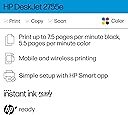
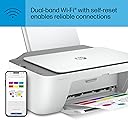
The HP DeskJet 2755e is a compact, wireless all-in-one inkjet printer designed for home use. It delivers crisp color and black-and-white prints at speeds up to 5.5 pages per minute, with a maximum resolution of 1200 dpi. Featuring dual-band Wi-Fi with automatic self-reset, mobile printing via the HP Smart App, and 3 months of Instant Ink included, it offers convenience, reliability, and cost savings for everyday document needs.


| ASIN | B08XYP6BJV |
| Additional Printer Functions | Copy, Scan |
| B&W Pages per Minute | 7.5 ppm |
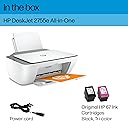
| Box Contents | DeskJet |
| Brand | HP |
| Brand Name | HP |
| Color Depth | 24 bpp |
| Color Pages per Minute | 5.5 ppm |
| Colour | white |
| Compatible Devices | Laptops, PC, Smartphones |
| Connectivity technology | USB, Wireless |
| Control Method | Touch |
| Controller Type | iOS |
| Customer Reviews | 4.0 out of 5 stars 51,750 Reviews |
| Dual-sided printing | No |
| Duplex | Manual |
| Global Trade Identification Number | 00195161617966 |
| Hardware Interface | USB 2.0 |
| Ink Colour | black, cyan, magenta, yellow |
| Is Electric | Yes |
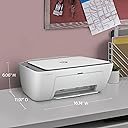
| Item Dimensions D x W x H | 30.4D x 42.4W x 15.4H centimetres |
| Item Type Name | Inkjet Printer |
| Item Weight | 7.55 Pounds |
| Manufacturer | HP Printers |
| Maximum Copies Per Run | 60 |
| Maximum Copy Resolution Black and White | 600 dpi |
| Maximum Copy Resolution Color | 1200 x 1200 dpi |
| Maximum Copy Speed Black and White | 7.5 ppm |
| Maximum Print Resolution Black and White | 1200 dpi |
| Maximum Sheet Capacity | 60 |
| Maximum Supported Paper Size | 8.5 x 14 inch |
| Maximum print Resolution Color | 1200 dpi |
| Model Name | 2755e |
| Model Number | DJ 2755e |
| Model Series | 2700 |
| Model name | 2755e |
| Network Connectivity Technology | USB, Wireless |
| Number of Trays | 1 |
| Other Special Features of the Product | Energy Star |
| Paper Size | 3 x 5 to 8.5 x 14 |
| Power Consumption Size | 2.5 Watts |
| Print media | Envelopes, Glossy photo paper, Labels, Paper (plain) |
| Printer Output Type | Colour |
| Printer Type | Inkjet |
| Printing technology | Inkjet |
| Processor Count | 1 |
| Resolution | 600 x 600 |
| Scanner Type | Flatbed |
| Series Number | 2700 |
| Special feature | Energy Star |
| Specific Uses For Product | Home document printing |
| Total USB 2.0 Ports | 1 |
| Total USB Ports | 1 |
| UPC | 195161617966 |
| Unit Count | 1.0 count |
| Warranty Type | limited warranty |
| Wattage | 2.5 watts |
B**A
Excelente compra
Me gustó mucho, impresión de excelente calidad, muy nítida y las que imprimí a color para mi proyecto quedaron geniales la mejor compra que hice, la recomiendo mucho
S**Z
Sad
Ink finished only after 10 prints
E**U
Great little printer
Works great. Very light weight.
I**O
Works with Eero mesh system
TLDR: good printer, works with eero wifi mesh system, set up in less than 10 minutes - great step-by-step instructions via HP Smart app. If you need a basic printer for occasional printing that's super easy to setup, get this. I initially bought the Canon Pixma MG3620. Downloaded their app to get things setup and what a nightmare. I have an eero wifi and the PIXMA printer would not show up on initial scan. I would select scan again after clicking a series of buttons on the printers and then it would popup only to show my wireless network listed 4 times with me being left to determine which one I connected to. I assumed it didn't matter but it did given after selecting 1 and inputting the password, it wouldn't connect. I would click the series of buttons on the printer again to begin the process again only to have all the wifi networks show up (mine + other networks it found) but in a totally different order. This meant I couldn't even weed out each of my 4 networks to find which one was right. Also, the one time I did manage to get it to connect, I had to set my eero wifi in legacy mode for it to connect. As soon as I removed it from legacy mode, the printer began failing again only for me to begin attempting to get it connected again. I looked on many forums but eventually couldn't find a solution as many other people had issues as well. Why do I mention the printer above? Because I then bought THIS hp printer and simply downloaded the app, plugged in the printer, turned it on, and followed the step-by-step instructions (with animations) and it immediately found my network and connected. No duplicate entries, no hassle, it just worked. I was printing within minutes. I then tested printing on my mac, my downstairs PC, and my phone with AirPrint and it all just worked. I spent almost 2 hours on the canon printer troubleshooting and it was just a huge headache. As for print quality between the two, I couldn't tell you, but if you just need a basic occasional printer, you can't beat this for the price and simplicity. Hope this helps.
J**.
TAL CUAL LO QUE OFRECEN
BUENA IMPRESORA, FÁCIL DE INSTALAR Y VIENE BIEN EMBALADA.
Trustpilot
1 month ago
2 months ago