Buy anything from 5,000+ international stores. One checkout price. No surprise fees. Join 2M+ shoppers on Desertcart.
Desertcart purchases this item on your behalf and handles shipping, customs, and support to USA.
๐ Elevate your home office game with smart, speedy, and sustainable printing!
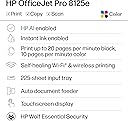
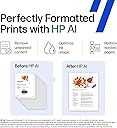
The HP OfficeJet Pro 8125e is a versatile all-in-one inkjet printer designed for home offices, delivering fast print speeds up to 20 ppm black and 10 ppm color. Featuring AI-enabled precision printing, wireless dual-band Wi-Fi, and a 225-sheet capacity with automatic duplex and document feeder, it streamlines professional-quality printing, scanning, and copying. Includes a 3-month Instant Ink trial and eco-friendly materials, making it a smart, sustainable choice for busy professionals.


| Additional Printer Functions | All In One |
| Asin | B0CT8ZJ7ZC |
| B W Pages Per Minute | 20 ppm |
| Best Sellers Rank | #458 in Office Products (See Top 100 in Office Products) #4 in Inkjet Computer Printers |
| Brand | HP |
| Built In Media | HP OfficeJet Pro 8125e All-in-One Printer; HP 923 Setup Black Ink Cartridge; HP 923 Setup Cyan Ink Cartridge; HP 923 Setup Magenta Ink Cartridge; HP 923 Setup Yellow Ink Cartridge; Power Cord; Regulatory Flyer; Ink Caution Flyer; Setup Poster; Reference Guide. |
| Color | Light Cement |
| Color Depth | 24 Bits |
| Color Pages Per Minute | 10 ppm |
| Compatible Cartridge | HP 923 Black Original Ink Cartridge 4K0T3LN; HP 923 Cyan Original Ink Cartridge 4K0T0LN; HP 923 Magenta Original Ink Cartridge 4K0T1LN; HP 923 Yellow Original Ink Cartridge 4K0T2LN; HP EvoMore planned to be available April 2024: HP 923e EvoMore Black Original Ink Cartridge 4K0T7LN; HP 923e EvoMore Cyan Original Ink Cartridge 4K0T4LN; HP 923e EvoMore Magenta Original Ink Cartridge 4K0T5LN; HP 923e EvoMore Yellow Original Ink Cartridge 4K0T6LN. |
| Compatible Devices | Laptops, PC, Smartphones |
| Control Method | App |
| Customer Reviews | 3.6 3.6 out of 5 stars (3,655) 3.6 out of 5 stars |
| Dual Sided Printing | Yes |
| Duplex | Automatic (standard) |
| Hardware Interface | Ethernet, USB |
| Initial Page Print Time | 18 Seconds |
| Ink Color | Black, cyan, magenta, yellow |
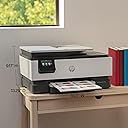
| Item Dimensions D X W X H | 13.29"D x 18.11"W x 9.17"H |
| Item Type Name | Inkjet printers |
| Item Weight | 8 Kilograms |
| Manufacturer | HP |
| Maximum Copies Per Run | Up to 99 copies |
| Maximum Copy Resolution Black And White | Up to 600 dpi |
| Maximum Copy Resolution Color | Up to 600 dpi |
| Maximum Copy Speed Black And White | 12 ppm |
| Maximum Media Size | 8.5 x 11.7 in |
| Maximum Print Resolution Black And White | 1200 x 1200 rendered dpi Dots Per Inch |
| Maximum Print Resolution Color | Up to 4800 x 1200 optimized dpi on HP Advance Photo Paper 1200 x 1200 dpi input Dots Per Inch |
| Maximum Sheet Capacity | 225 |
| Model Name | HP OfficeJet Pro 8125e All-in-One Printer |
| Model Number | 405T6A#B1H |
| Model Series | 8125e |
| Number Of Trays | 1 |
| Other Special Features Of The Product | Automatic document feeder; Touchscreen; Smart Advance Scan; Quiet mode; Print over VPN with HP+, Forest First product with HP+; FSC Certified Packaging; Contains ocean-bound recycled plastic; 45% post-consumer recycled plastic; Recyclable through HP Planet Partners; ENERGY STAR certified; EPEAT registered |
| Output Sheet Capacity | 60.0 |
| Paper Size | 8.5 x 11;8.27 x 11.7;8.5 x 14;7.16 x 10.12; Inches |
| Power Consumption | 4.07 Watts |
| Print Media | Paper (plain) |
| Printer Connectivity Type | Apple AirPrint; Ethernet networking; USB; Wireless (Wi-Fi); Wireless direct printing |
| Printer Output Type | Color |
| Printer Type | HP Thermal Inkjet |
| Processor Count | 1 |
| Resolution | 4800 x 1200 |
| Scanner Type | Flatbed, 1-sided ADF |
| Specific Uses For Product | Home and home office |
| Total Usb Ports | 1 |
| Unit Count | 1.0 Count |
| Upc | 196337163867 |
| Warranty Description | One-year limited hardware warranty with option to extend to two-years with acceptance of HP+ Offer. For more info please visit us at support.hp.com . |
| Warranty Type | One-year limited hardware warranty with option to extend to two-years with acceptance of HP+ Offer. For more info please visit us at support.hp.com . |
| Wattage | 100 watts |
User
cannot operate it. to complicated and haven made one myset
The one I have is an 8120 and I havent been able to get a copy for my self as of this date. however some other friends have and I really do need it, but will not work for me. I need a simple one. Can I send back? If so I need a shiping box. As you an tell I do purchase a lot and have been happy with all except this copier. I just need a simple one tough Would you consider sending me a box to return this one in, as I am not happy at all., and can I get a l00d% refund.?
User
Can not deal with incompatible ink cartridges anymore
I had to replace my HP printer that was almost this same model that I was very happy with. My new printer worked fine for a few months. I enrolled in the ink subscription service like before. From the beginning I had some issues with my printer telling me the cartridges were incompatible despite them coming from HP and being legit HP cartridges. I would fiddle with it to get it to finally work until a couple of days ago. I went to replace my ink and it will not validate the cartridges. I tried everything Reddit and YouTube told me to try after getting no where with HP support.I unenrolled in the ink subscription and tried to use regular HP cartridges but it still would not validate those either. Again, I tried all of the tricks and tips to no avail.Iโve spent two days fiddling with this stupid printer to get it to read and validate HP ink. Legit HP ink. Iโm done with HP and will be replacing this less than one year old printer (itโs May and I got it in August) with and Epson. I will never buy another HP printer until the cartridge issue is resolved with their software and their ink either lasts longer or decreases in price. I really hate it bc the print quality of this printer is great. The app is good, connectivity is good until recently, and the benefits of the ink subscription outweighed the issues. But now I donโt care if the ink was free if it wonโt work and takes two days to figure out then I donโt want it.The printer would stop printing mid page or document. It jammed some but not too much. It was not too noisy, lightweight, and easy to open and easy to change paper. It just wonโt validate their own cartridges to actually be able to print.A printer should work. Ink cartridges should work. Printers should last longer than a year. I do not recommend this product.
User
Great quality at an excellent price
I love HP printers. They are easy to set up and super easy to use. They produce a quality print. The paper tray is sufficiently large enough that you are not constantly having to add paper. The copier/scanner is super easy to use and creates an excellent reproduction of the original. And best of all the price is outstanding for a printer with all of these options and quality!!!!
User
TWIN KISS
This product came with in a week of ordering it, it is lightweight, sturdy has good direction to how to get started and hook up to our PC account. Prints with gusto and is very affordable. Just got it so not sure if it will last for 5 yrs.
User
HP OfficeJet Pro 8125e
I bought the HP OfficeJet Pro 8125e because my other printer stopped working. The size is perfect for my personal use. It was easy to setup. So far I have used it to print on one side and double sided and scanned documents and it has worked fine. I needed to print on legal size paper but haven't figured it out yet.The one I noticed, that I don't really like on this model is that when it prints, the tray "arm" doesn't automatically pull out. So you have to keep it open/pulled out. And if you close the tray arm and forget to pull it back out when you print your papers will fall on the floor.The print speed is not as fast as I would have liked compared to my other HP printer but the amount of paper it holds is like triple the amount, so that's a plus for me. After you print, it makes like resetting noise a few seconds afterwards, which is a bit weird to me, but I guess it is what it is.The printers screen is a bit small but I don't think I would be using it that much vs using the app on my computer.There is a orange cap you have to twist off on the ink cartridge, that for me was a bit hard to get off unless I am doing it wrong. Other then that replacing the ink cartridges aren't to hard to replace.for the price and for this printer just being for home use, I think it was a good buy.
User
HP printers : A Masteeclass of frustration
HP Printers: A Masterclass in FrustrationAfter owning two HP printers, I can confidently say I will never buy another HP product again.Both printers suffered from reliability issues, poor software, and a user experience that can only be described as infuriating. What should be a simple taskโprinting a documentโtoo often turned into troubleshooting drivers, reconnecting wireless settings, reinstalling software, and searching for support that seemed impossible to reach.The hardware quality was equally disappointing. Components felt flimsy, and neither printer delivered the durability I expected from a major technology brand. When a printer becomes the most difficult device in your home office to keep operational, something is seriously wrong.Perhaps the most frustrating aspect was customer support. When products fail, support is supposed to restore confidence. Instead, the experience felt like navigating a maze of automated systems, generic troubleshooting articles, and endless dead ends.A printer should be a tool, not a hobby. I don't want to spend my time updating firmware, reinstalling drivers, or wondering why a device that worked yesterday suddenly refuses to cooperate today.After two disappointing experiences, HP has lost me as a customer. There are too many alternatives on the marketโparticularly from Japanese manufacturers such as Brother, Canon, and Epsonโthat have built reputations for reliability and customer satisfaction.In my experience, HP has become a brand I can no longer recommend. What should have been dependable office equipment turned into a recurring source of frustration, wasted time, and disappointment.
User
Works great so far.
Not built as well as my older HP printer of 5 years old. Was not as easy to install as my older printer, but HP tech support was great and guided me through the setup. The printer works great so far since it is new. I have 5 devices connected, and all work well under WIFI.
User
Nice printer!
Easy setup and connections. Lots of different printing options! Seems solid!It does way more than I need it to, and thatโs a good thing! New ideas!
User
Excellent Printer But...
Easy to install. Excellent connectivity and good print quality from any device, but original repacement cartridges are really expensive and not easy for find in the UAE. The HP automatic ink replacement option lists a supplier who shows item is not available so that option (together with the 3-months free ink supply offer) is not available in the UAE, so it would seem...
User
Simple
Excellent printers! You basically jut plug it in to power, and it does everything else on it's own! Beautiful crisp photos too!Bast printers i ever had, for that price range. I recommend it!
User
A poorly executed, seriously compromised BAD printer.
This is a terrible printer. It has been dumbed-down to the lowest level of operation. The interface is terrible. When printing a text document from MSWord, using the 'Normal' level of print, described as 'High quality printing for most documents', the outcome was completely streaked. And this was AFTER doing a print head cleaning, where the report came through as Good. The problem seems to be due to the over-speed printing rate. The only way to get over this that I found was to switch to Best print quality setting, which forces the device to print more slowly.The colour touch pad interface is difficult to use. Buttons are small, hard to press and the menu choices are confusing. The interface in Win11 is terrible, and for example allows scanning at no higher than 300 dpi, whereas the scanner device seems to be capable of 1200 dpi. I am very sorry that I purchased this printer. HP has lost its way. There is NOTHING 'pro' about this terrible excuse for a printer.
User
As described.
Perfect, love it. Recommended.
User
Good to know before you buy.
The printer worked fine out of the box however, be aware of 2 things.The scanner cannot scan 2 sided documents using the document feeder's duplex feature, because there is no duplex feature offered on this model, according to HP Support. The HP website seems to indicate that it is possible, but it is not.The glass size is not large enough to scan a legal sized document, the only way to scan legal is through the document feeder. Measure the glass size and make sure it works for you before ordering. It is large enough to scan a letter sized document 8 ยฝ" x 11.
Trustpilot
1 month ago
1 month ago