Desertcart purchases this item on your behalf and handles shipping, customs, and support to USA.
🚀 Elevate your mobile workspace with premium flexibility and style!
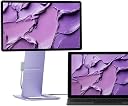
The SOTSU FlipAction Touch is a 14-inch Full HD portable monitor featuring an IPS panel with 178° viewing angles, a magnetic flat-pack stand for ultra-slim portability, and a versatile 360° pivot hinge with height adjustment. It supports multi-touch input and MPP2.0 stylus, offers pass-through USB-C charging, and connects via USB-C and mini HDMI. Designed for professionals on the move, it enhances productivity with vivid visuals and ergonomic adaptability, though touch features have limited compatibility with some Apple devices.


| ASIN | B0DKNH53YZ |
| Adaptive Sync | G-Sync対応 |
| HDMIポート数 | 1 |
| UPC | 850057055313 |
| resolution | FHD 1080p |
| おすすめ度 | 5つ星のうち4.2 5 レビュー |
| アスペクト比 | 16:9 |
| カラー | ライラックラックスタッチ。 |
| カラースクリーン機能付き | はい |
| コントラスト比 | 1500:1 |
| スクリーン表面の仕上げ | 光沢のある強化ガラス |
| ディスプレイ最大解像度 | 1920 x 1080 ピクセル |
| ネイティブ解像度 | 1920x1080 |
| ハードウェアインターフェイス | USB-C |
| ピクセルピッチ | 0.375 |
| ブランド | SOTSU |
| ブランド名 | SOTSU |
| メーカー名 | SOTSU |
| ユニット数 | 1 個 |
| リフレッシュレート | 60 Hz |
| レンズマウントの種類 | デスクマウント |
| 互換デバイス | ノートパソコン、デスクトップ、スマートフォン、Androidデバイス。 |
| 品目の寸法 (D x W x H) | 1.3奥行き x 31幅 x 17.5高さ cm |
| 商品の用途 | ディスプレイ。 |
| 商品の追加説明1 | タッチスクリーン |
| 商品の重量 | 1.77 キログラム |
| 型番 | FlipAction Touch 14" Lilac Luxe |
| 形状 | フラット |
| 応答時間 | 6 ミリ秒 |
| 明るさ | 400 |
| 画像コントラスト比 | 1500:1 |
| 画質向上テクノロジー | IPS、アダプティブ同期。 |
| 画面サイズ | 14 インチ |
| 画面サイズの単位 | 14 インチ |
| 画面表面の説明 | 光沢のある強化ガラス |
| 縦横比 | 16:9 |
| 色域値 | 100 |
| 視野角 | 178 度 |
| 解像度 | FHD 1080p |
| 通信・接続インターフェース | USB Type C。, USBタイプC, ミニHDMI。 |
| 電力消費サイズの測定単位 | 4 ワット |
B**R
Beautiful but doesn’t play nice with Apple
I truly appreciate the sleek design and portability of this monitor; it’s an attractive addition to my setup. However, I primarily use an M4 iPad Pro and was hoping for a seamless experience, particularly with the automatic rotation feature. Unfortunately, I’ve found that the auto-rotate functionality does not work with the iPad Pro, which has been disappointing While the monitor initially operates well, I've encountered issues with the controls becoming unresponsive after some time. For instance, I was scrolling through a webpage on the second monitor when I switched to my iPad screen. Upon returning to the portable monitor to scroll, it started behaving erratically—auto-scrolling and selecting items without my input. This forced me to disconnect the monitor entirely, which was frustrating On a positive note, the monitor does function well with my M1 MacBook Pro, but the touch features didn’t quite meet my expectations, and the auto-rotate issue persists. I configured it in portrait mode for a lengthy document and found that I could only move the mouse around rather than scroll through the document with my finger, which limited its usability Overall, while the portability and easy orientation adjustment are fantastic features, they alone may not justify the price tag. I’m hopeful that it will work better with my Dell tablet, although I predominantly use Apple devices.
Trustpilot
2 months ago
2 weeks ago