Buy anything from 5,000+ international stores. One checkout price. No surprise fees. Join 2M+ shoppers on Desertcart.
Desertcart purchases this item on your behalf and handles shipping, customs, and support to USA.
🎯 Dominate your digital domain with Archer GE800 — where speed meets style and every millisecond counts!
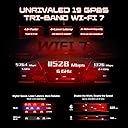
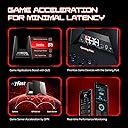
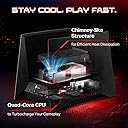
The TP-Link Archer GE800 is a cutting-edge Wi-Fi 7 tri-band gaming router delivering up to 19 Gbps speeds across 12 streams and 8 antennas. It features ultra-fast 2×10G and 4×2.5G Ethernet ports, a powerful quad-core processor with 2GB RAM, and dedicated gaming enhancements like turbo acceleration and a dedicated gaming port. Designed for large homes and intense gaming setups, it offers customizable RGB lighting and seamless network management via the Tether app. While it excels in speed and coverage, some users report long-term stability issues. Overall, it’s a future-proof powerhouse built to elevate your gaming and streaming experience.


| ASIN | B0D7MSQG4T |
| Antenna Location | Gaming |
| Antenna Type | Fixed |
| Best Sellers Rank | 31,776 in Computers & Accessories ( See Top 100 in Computers & Accessories ) 259 in Routers |
| Box Contents | 1 x Archer GE800 WiFi Gaming Router, 1 x QIG, 1 x RJ45 Ethernet cable, 1 x power supply, 1 x power supply., 1 x reset tool |
| Brand Name | TP-Link |
| Colour | black |
| Compatible Devices | Gaming Console, Personal Computer, Smart Television, Smartphone, Tablet |
| Connectivity Protocol | Wi-Fi, Ethernet, USB, Optical Fiber |
| Connectivity Technology | Ethernet, Optical Fiber Port, USB, Wi-Fi |
| Control Method | Voice |
| Controller Type | App Control |
| Country of Origin | Vietnam |
| Coverage | Large Home |
| Customer Reviews | 3.8 3.8 out of 5 stars (269) |
| Data Transfer Rate | 11528 Megabytes Per Second |
| Frequency | 6 GHz |
| Frequency Band Class | Tri-Band |
| Has Internet Connectivity | Yes |
| Has Security Updates | Yes |
| Is Modem Compatible | No |
| Item Weight | 4.87 Pounds |
| LAN Port Bandwidth | 10G/2.5G/1G |
| Manufacturer | TP-Link |
| Manufacturer Part Number | Archer GE800 |
| Maximum Upstream Data Transfer Rate | 19 Gigabits Per Second |
| Model Name | BE19000 Wi-Fi 7 Gaming Router |
| Model Number | Archer GE800 |
| Number of Antennas | 8 |
| Number of Ports | 7 |
| Operating System | TP-Link OS |
| Other Special Features of the Product | Access Point Mode, Guest Mode, Internet Security, Parental Control, Remote Access |
| RAM Memory Installed | 2 GB |
| Router Firewall Security Level | High |
| Router Network Type | home |
| Security Protocol | WPA/WPA2-Enterprise (802.1x) |
| UPC | 840030708824 |
| Unit Count | 1.0 count |
| Wi-Fi Generation | Wi-Fi 7 |
| Wireless Compability | 802.11.be, 802.11ac, 802.11ax, 802.11g, 802.11n |
R**V
After 3 months stopped working
W**.
I recently had purchased the BE800 to begin upgrading my home Wi-Fi. Coming from an old Nighthawk from 8 years ago, this was a big step. I had some reboot issues and problems starting connected for some devices, but overall was pleased with the increased range and speed. Then they finally released the GE800 in the US and I pulled the trigger right away to take advantage of the $100 discount that is ongoing until July 16th. Although I missed my LCD animations on the BE800, it was worth it for the increased number of devices, the perceived better range and so far much better reliability. The game enhancement features appear to be improving my gaming and I haven't had a single issue other than a DEAD power supply that came with it. I filed an RMA and used another supply with the same model number that I had. (UPDATE EDIT: I spoke with customer service, told them the issue with the power supply, and in less than a week received my replacement power supply. Very fast, very efficient, very consumer friendly!) The BE800 has become my satellite router for my EasyMesh network. Now I have seamless Wi-Fi throughout the home and I haven't had any need for rebooting or any other issues. The LED RGB on the router is a nice little feature, but lacks the usefulness that the small LCD on the BE800 had. I kept it simple and chose some custom colors and haven't thought of it again since I keep the router off to the side and more or less out of sight and mind. The Tether app is great and gives you a lot freedom for seeing Wi-Fi times, prioritizing certain devices, scheduling reboots and updates, customizing the RGB, and a few other great features. Overall this is a great router that should keep you at the front of the technology race for at least the rest of this year until the next big thing comes out. You'd likely be able to keep this router in your home network for the next few years without remorse.
F**D
Unfortunately my IPS dosen't deserve a router like this! Web/Browsing/Downloading/Streaming/ I'm getting better overall experience. For gaming: I noticed it handles the lag spikes too well and I'm getting an amazing and super stable ping in games in general which is something I always dreamed of!
I**C
I really wanted to love this router. For the first year, the Archer GE800 was fantastic. Speeds were excellent, Wi-Fi coverage was strong, and gaming performance was top-tier with low latency and smooth connections. Unfortunately, after about a year of use, serious reliability issues started appearing. AirPlay has become extremely unreliable. Even worse, when multiple Apple HomePods connect, the router will sometimes reboot itself, which is unacceptable for a device at this price point. My smart home setup has become frustrating to use because of this. Gaming performance has also degraded significantly. I now experience frequent disconnects, unstable connections, and sometimes I can’t even stay in a stable lobby. This is especially disappointing given that this router is heavily marketed as a “gaming” router. The final straw was when the router completely reset itself out of nowhere, forcing me to set everything up from scratch. Losing all configuration without warning is something I’d expect from a budget router.... not a premium Wi-Fi 7 flagship. When it works, it’s fast and powerful. But long-term stability just hasn’t been there for me. For the price, I expect rock-solid reliability, and unfortunately this router hasn’t delivered that over time.
D**E
I had been waiting on this GE800 router for some time, but it was always too expensive. Until Amazon Prime Days. It was on sale for $329 plus 25% back, which made it $247 plus tax (a steal). I have bought TP-Link routers for ages due to their reliability and value price points. My previous router, an AX11000 TP-Link Tri-Band model, had been rock solid for 4 years. Since I seem to be getting more and more newer devices that could jump on the 6ghz band and utilize Wi-Fi 7, I decided it was time for an upgrade. Even if you don't use this for gaming, it is a great router. Pros: 1) Wi-Fi 7. The new level is here, and this thing seems to have everything covered. MLO, 320 MHz Bandwidth, 4K-QAM, OFDMA, MU-MIMO, 19,000 Gbps, 1 SPF+ Port, two 10Gbps ports, and four 2.5 Gbps ethernet ports. It has 3 bands at 2.4 GHz, 5 GHz, and 6 GHz. 2.4GHz runs up to 1376Gbps, 5GHz runs up to 5764, and the 6GHz goes to 11528. If you don't plan on using the 6Ghz channel much, then this thing is overkill and kind of a waste. 2) Aesthetic. I will just come out and say it. It is the imperial shuttle from Return of the Jedi. Looks rather cool and lights up (if that is your thing). You can disable the RGB though if you don't want it. The four buttons on the front control WPS, Wi-Fi On/Off, Game Booster, and RGB On/Off. The back has the SPF+ port, 6 Ethernet Ports (two 10Gbps and four 2.5Gbps), the On/Off switch, the Power Port, USB 3.0 port, and a reset button that is recessed. The device comes with a tool to push the reset button. Think a SIM card ejector tool for your smartphone. The two towers have the built-in antennas with 4 in each side. The center is where the internal fan blows out hot air whenever needed. 3) Coverage for 2.4GHz and 5GHz bands. I thought my AX11000 router's range was extensive. I have a 2100sqft single story house that was well covered, and that router reached the garage beyond no problem. Anything beyond 20 ft outside though is where the signal ended. Not with this GE800 router. I can get all the way to the street and to the end of my back yard (2/3 acres) with both the 2.4GHz and 5GHz bands. Every device on those two bands seem to have a better signal compared to my older router. You will have no problem with dropped signals. Just make sure to place it in the center of the home and high up. I have it in my coat closet on the highest shelf. 4) Size. If you have not gotten a new router since Wi-Fi 5, then yes this will be rather large to you. If you have a Wi-Fi 6 or newer, this is actually on the smaller side. It was smaller than my AX11000 router. For all the power this thing packs, it is well designed and planned out. 5) Speed. I have a 1Gbps up/down fiber connection. I may upgrade to 2, but wanted to get a router that could handle it at some point. AT&T Fiber overprovisions their speeds now on all levels, so I actually get 1.3Gbps up/down. Now that I have 2.5Gbps or greater ethernet ports, I actually get the full speed to my desktop or any other device that can handle it. The latency also seems to be lower on this router compared to my last one. Also, make sure to schedule a weekly reboot in the router settings. I notice this clears up most issues with TP-Link routers, and I never have an issue with them since that feature was added years ago. Cons (well sort of): 1) Fan. This is both a positive and negative. It helps keep the device cool, which is a positive. The downside is that it is an additional item that can break at some point. The device does not keep it on all the time though. It will only come on when the device reaches a specific temp. The new firmware just released (July 2025) lets you choose how this router handles the fan functions. Some people in other reviews complain about the sound of the fan. I think it sounds just like a normal desktop fan in my chassis (a rather quiet one). I have the device in my coat closet, so I never hear it anyway. But it could be bothersome if sitting right near you. 2) 6GHz band. This is my first time with using this type of band, so keep that in mind. It is lightning fast, but limited in range (as expected). The firmware that was just released seem to extend the range some (my signal is better everywhere), but it is still not going to go far. I noticed the more walls the signal must travel through to your device, the worse the signal (the other bands are like that, but not effected as much as this band). Like the 6GHz band can get almost to my garage on the other side of the house (probably 50 to 60ft) since there is really only 2 walls between it. But my office is much closer (20ft) with 4 walls between it, and the signal is worse. Within 10ft though, this thing is a beast regardless. 3) HomeShield. This is actually helpful, but the fact you have to pay for the more advanced features on an annual basis (or monthly) is ridiculous. Many of these features are included for free on other routers. My previous router had an older version called HomeCare, which was free. Do you need the HomeShield advanced paid features? Not really. You can find better and cheaper security program alternatives. But at $36 per year, it is not too bad. It adds extra protection built into your router that covers the entire Internet connection. 4) Price. I claimed this was a steal on Amazon Prime Days, which is true for the power of this Wi-Fi 7 router. But compared to most routers, it is still too high. It ranges from $349 to $499 often and the MSRP is $599. Like I said earlier, if you don't plan on using the 6GHz band that has the most speed, this is overkill. You would be better off getting a cheaper Wi-Fi router that can be had for under $200. Overall: If you want the best bang for your buck on a Wi-Fi 7 router, this is it. It gives you insane speeds, great coverage, future-proof for the next 5 years (at least), and looks cooler than most routers. TP-Link gets a bad rap since it is a Chinese company, but they make some great consumer-friendly routers. And, they don't charge you an arm and a leg like Netgear, ASUS, and other "brand name" routers.
Trustpilot
3 weeks ago
1 day ago