Desertcart purchases this item on your behalf and handles shipping, customs, and support to USA.
⚡ Dominate your desk with speed, style, and unstoppable precision!
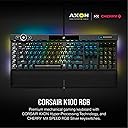
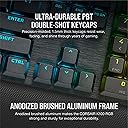
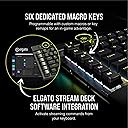
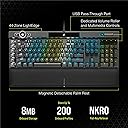
The Corsair K100 RGB Mechanical Gaming Keyboard combines cutting-edge AXON hyperprocessing technology with ultra-fast Cherry MX Speed RGB Silver switches, delivering 4,000Hz polling and 1.2mm actuation for elite performance. Its durable aluminum frame and PBT double-shot keycaps ensure longevity, while 44-zone per-key RGB lighting and a 3-sided LightEdge create a stunning centerpiece. Fully compatible with Elgato Stream Deck and iCUE software, it offers customizable control for gamers and professionals seeking the ultimate keyboard experience.

| ASIN | B08HR68MQZ |
| Amazon 売れ筋ランキング | パソコン・周辺機器 - 197,204位 ( パソコン・周辺機器の売れ筋ランキングを見る ) パソコン用キーボード - 3,140位 |
| GTIN (Global Trade Identification Number) | 00840006621935 |
| UPC | 840006621935 |
| おすすめ度 | 5つ星のうち4.6 1,792 レビュー |
| カラー | シルバー |
| キーボードの説明 | ゲーム |
| キーボードバックライトのカラーサポート | RGB |
| キーボードプレート素材 | アルミニウム |
| キーボードレイアウト | QWERTY |
| シリーズ番号 | 912 |
| スイッチのタイプ | リニア |
| スタイル名 | K100。 |
| セクション数 | 1 |
| テーマ | ゲーム用。 |
| ブランド | CORSAIR |
| ブランド名 | CORSAIR |
| ボタン数 | 104 |
| メーカー名 | Corsair |
| メーカー型番 | CH-912A014-NA |
| ユニット数 | 1 個 |
| 互換デバイス | ゲーム機 |
| 利き手 | 左右共用 |
| 同梱商品 | USBケーブル |
| 品目寸法(L x W x H) | 26.2長さ x 50幅 x 7.9高さ cm |
| 商品の推奨用途 | ゲーミング |
| 商品の追加説明1 | 照明。 |
| 商品の重量 | 3 ポンド |
| 商品外装素材 | アルミニウム ポリブチレンテレフタレート |
| 商品種別 | ゲーミングキーボード。 |
| 型番 | CH-912A014-NA |
| 外部機関認定情報 | Não |
| 対応デバイス | ゲーム機 |
| 接続技術 | 有線 |
| 特徴 | 照明。 |
| 言語 | オランダ語 |
| 通信・接続インターフェース | 有線 |
| 鍵盤数 | 110 |
| 電源のタイプ | 電源コード式 |
N**I
値段が高い過ぎ
日本のアマゾンは値段が高い過ぎ〜ヤバイ。
シ**ヌ
キーボード界の頂点
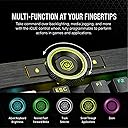
K95→K95XT→K100と全て所有しています。 海外のYouTuberの紹介動画で一目惚れして、neweggで個人輸入しました。(他にも色々買ったので送料無料で2万6000円くらい) キーキャップの形がXTまではコルセア独自のもので汎用性がなかったのですが、今回のK100から一般的なキーキャップに変更されたので、ジースキルの新作キーキャップを付けて使用しています。 Cherry軸と迷ったのですが、折角なのでコルセア独自軸であるCorsair OPXにしました。 レーザーでタイプを認識しているのでとても正確です。軽く指置くだけで反応するのでスピード勝負のFPSゲームにはもってこいです。スキャンレート4000Hzやサイドのライティング、iCUE コントロールホイールなど魅力が詰まったキーボードです。これからじっくりと愛用していこうと思います。
A**年
メーカー毎に異なるキーボードの配置に注意
長年LogicoolのG105を愛用していましたが壊れたので 友人の薦めでこちらの商品を購入させて頂きました。 打鍵感が大変心地よく、手をおく部分もあって好印象ではあったのですが Enterキーの位置、大きさ 他にも=や()、【】の位置等が前回愛用していた部分とは異なっていたため 作業(オフィス)で使うには非常に扱いづらいという結果となりました。 慣れてくればいいのかもしれません、実際タイピングしてた時は楽しかったです。 結局キー配列の似た安物の2千円キーボードを買いなおして使うに至りました 高い勉強料としてここに記します。
V**I
supreme product
I just got this keyboard and cant recommend it enough. very nice key strokes as well as aluminum body, and very comfy palm rest which I value a lot. its on the expensive side, but i got for alot cheaper because of promotion which was in place, so if you mange to snatch it while on sale, its a good product.
8**E
فخم حرفيا
الي يريد كيبورد كامل مكتمل جميل و فخم و سريع جدا جدا لانه شيري سيلفر و الحلو انه يحسسك بالكبسات الميكانيكه و متعه في الكتابه اما اللعب انسى تلاقي فيه اي سلبييه يعني بالمختصر هذا اسرع كيبورد جربته في الاستجابه الشكل رهيب و الار جي بي في كل مكان في الكيبورد و في الفرار على اليسار هذا تقدر تخص فيه اشياء وايد الكيبورد هذا بحر في التخصيص حرفيا
P**5
Muy buena calidad
100% recomendado
A**D
Don't buy
I bought this in January, but after a few months, the volume control key is not working anymore. Tried every single trick out there and it's no good. It's very strange that at such a price the keyboard starts having hardware issues in less than six months.
I**E
Fast light-touch-typing with extra macro keys and knobs, and fully programmable RGB lighting
Very smooth, love the light touch typing feeling of Cherry MX Speed, extra keys and buttons and knobs, and fully programmable RGB. I have been using Corsair K95 Platinum with Cherry MX Speed for 7 years and I needed another RGB mechanical keyboard for another PC, so I opted for Cherry MX rather than OPX so I don't have to get acclimated to new type of keys and swapping between Cherry MX and OPX when I move between PCs. I'm sure that if I haven't used Cherry MX before, I would have chosen OPX. I also used Cherry MX Brown, but I prefer Speed once I got used it. Although pricey (especially compared to Corsair K95 at the time I bought it), I took advantage of a sale. I couldn't find any mechanical keyboard that comes close to this one in terms of functionality and quality and programmability, especially the six macro keys on the left side I can't do without (I also considered Corsair K70 but they don't have macro keys). This mechanical keyboard is such a delight for gaming, coding, typing, etc. I use this on a Mac and Linux. Linux has ckb-next driver, and its development version (newer than release version as of Nov 2025) also detects the top left scroll and can program RGB on it. I created my own custom RGB lighting by copying one of the animations and then changing all the configurations to my liking. I use the USB port to connect my wireless mouse dongle and it works perfectly even if routed through a USB hub with on/off switches, then a USB KVM switch, and then through a third USB hub that is externally powered. If you are using a USB switch with mouse/key roaming feature that only works with a standard keyboard, there is a way to change the keyboard mode into BIOS mode by pressing some keys (search the Internet since it's not mentioned in the manual). You'll have to connect the mouse directly to the USB switch instead of the keyboard. You can revert back to normal mode with full functionality using some other key presses if you no longer need to be limited by a USB switch with key/mouse roaming feature. The wrist rest is very comfortable. It's nice that it's magnetically attached. The one in my old Corsair K95 had the plastic tabs broken so I had to throw it away. You probably won't find any alternative that comes close with macro keys, full custom RGB lighting, good quality, and the smoothness of a linear mechanical keyboard. If you've never used linear short activation switches, it may take some time to get used to it, but once you master it, you won't want to use any other switches. YMMV though.
Trustpilot
3 weeks ago
1 month ago