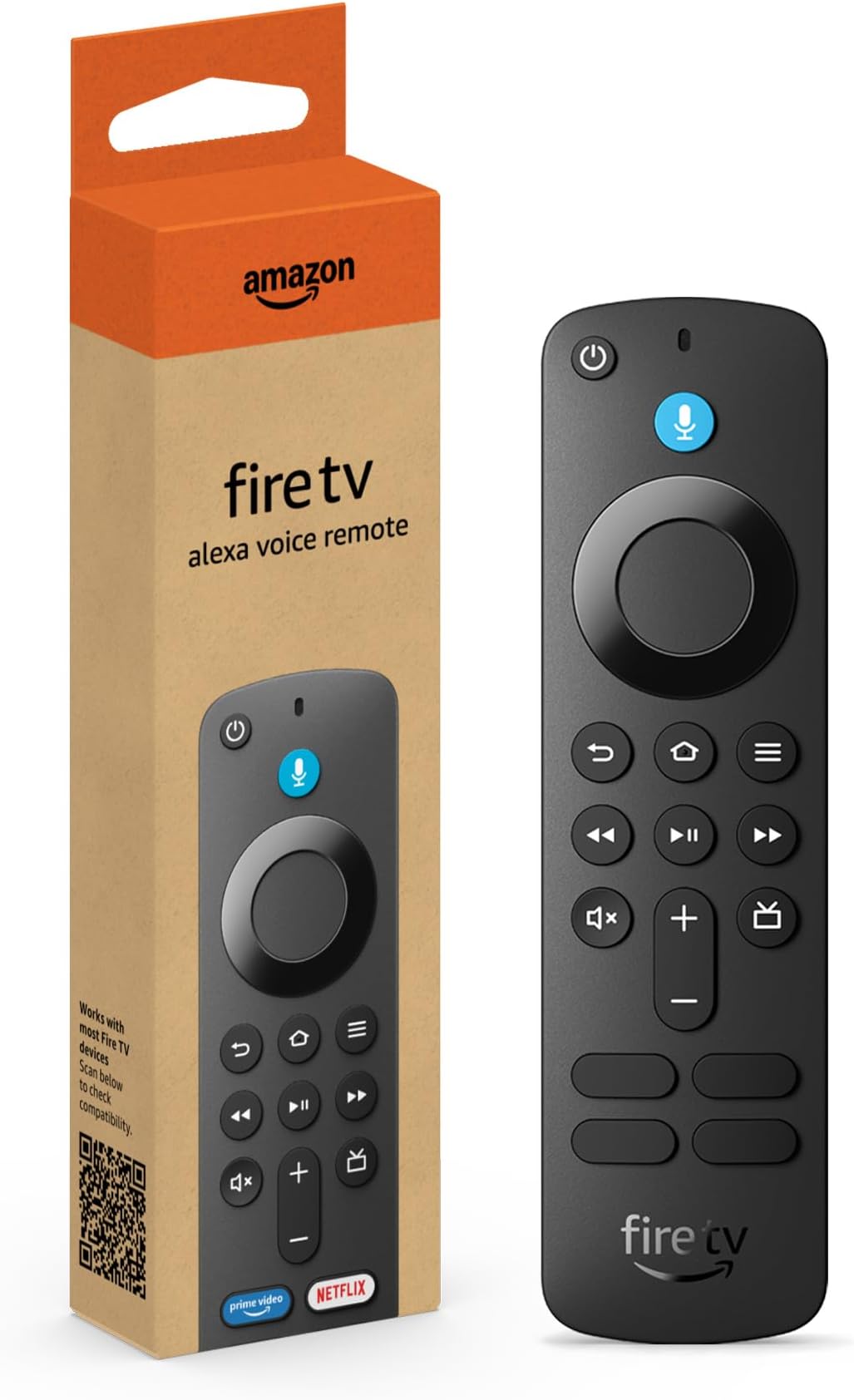
Amazon Fire TV Alexa Voice Remote (newest model) with TV controls, requires compatible Fire TV device
Desertcart purchases this item on your behalf and handles shipping, customs, and support to USA.
Description
🎬 Upgrade your binge game with the smartest remote in the room!
- LIVE TV MADE SIMPLE - New Guide button offers quick access to channel listings and live TV apps in one place.
- SEAMLESS ALEXA VOICE CONTROL - Just press and ask Alexa to find, launch, and control your favorite content effortlessly.
- UNIVERSAL ENTERTAINMENT COMMAND - Control your compatible TV, soundbar, and receiver with power, volume, and mute buttons.
- EFFORTLESS COMPATIBILITY SETUP - Works with most newer Fire TV devices and includes batteries for immediate use.
- INSTANT ACCESS TO TOP STREAMING APPS - Dedicated Prime Video, Netflix, Disney+, and Hulu buttons put entertainment at your fingertips.
The newest Fire TV Alexa Voice Remote enhances your streaming experience with Bluetooth connectivity, dedicated app buttons for Prime Video, Netflix, Disney+, and Hulu, plus a handy Guide button for live TV navigation. Compatible with most recent Fire TV devices, it also controls your TV, soundbar, and receiver, and comes ready to use with included AAA batteries.
Specifications
| Size | 38 x 142 x 16 mm |
| Weight | 43.4 g (without batteries) |
| Batteries | 2 AAA (included) |
| Technology | Bluetooth |
| Compatibility | Fire TV Stick Lite, Fire TV Stick (3rd Gen), Fire TV Stick 4K, Fire TV Stick 4K Max, Fire TV Cube (2nd Gen), Echo Show 15 |
| Warranty and service | 90-Day Limited Warranty and service included. Use of Fire TV is subject to the terms found here. |
Reviews
User
Just what I needed to replace my original Fire TV Remote that I wore the volume + and - markers off!
Just what I needed to replace my original Fire TV Remote that I wore the volume + and - markers off! It was easy to replace and works like new!
User
Easy to connect to Firestick Cube
The Firestick remote I received with my Firestick cube worked well for a few years but than the using the buttons became more challenging with sticking and not responding. I have 3 Fires Cubes and this was the first time I have had to replace a remote. After comparing the available remotes, I felt that purchasing new from the Amazon store was best and to avoid remotes that cost less and sold by another seller. Take the time when purchasing this remote to first research the listing for compatibility with the Firestick device you want the remote for. Connecting up the new remote was easy and it work well. I am going to hold onto the old remote, just in case I need a temporary backup for use. I am not a user of Alexa but this remote will provide should I have need of. I am glad I purchased, no longer feeling the frustration from the sticking and I would definitely purchase again and recommend. Again research if this remote is compatible with your Firestick device before purchasing.
User
Added App Buttons and Channel Guide Button are a nice touch
This is the newest Alexa Voice FireTV remote, for FireTV, FireTV Cube and FireStick devices.*note- Please check the compatibility list in the description, because while this remote works for most of the newer Amazon FireTV devices, it does NOT work with the older 1st Gen FireTV. *PROS:APP BUTTONS: The biggest change is the inclusion of the “Preset App Buttons” toward the bottom of the remote. These four buttons automatically launch Prime Video, Netflix, Disney Plus, and Hulu. I tested them out and each seemed to work well, launching the apps quickly.CHANNEL GUIDE BUTTON– This remote now has a Guide button (shaped like a little TV) to the right of the Volume buttons. We use a FireTV Recast to occasionally watch live TV, and this button pops up the Channel Guide so you can scroll through the live TV channels. After the recent FireTV homescreen menu change, it is pretty easy already to get to the Channel Guide from the Home page, but still, this makes it even easier.CONS:COST: At $30, this remote isn't exactly cheap. It works well, but might not be worth that price depending on your needs.OVERALL: This is a great remote, but I'm not sure if it is worth it to upgrade from a previous generation remote just for the added App Buttons and the Guide Button. We personally have found these buttons to be a nice touch though, as they might save you a second or two of scrolling. If you have an older remote that you were thinking about replacing anyway, then I would definitely recommend getting this one. (Also, keep in mind you CAN add this as a second remote to your FireTV Cube if you want, without getting rid of the first one, and you can use them both. We are currently doing that with one of our TVs, because we tend to misplace the remote anyway and having two that both work seems to be less of a headache.)
User
If only this superior emote could crack Apple's / Siri's proprietary ecosystem
This remote is almost identical with the one that came with my Alexa Cube--same dimensions, same weight, more sensitive voice recognition, plus instant connections to Prime Video, Netflix, Disney+ and Hulu. The directions for set-up are in tiny, busy print. Best to have both your first and this new remote handy during the set-up process and to familiarize yourself with the controls (my first attempt failed because I mistook the new colored (blue) Voice button for the "Home" button. If you can't find your original remote, no problem. Simply follow the 2nd set-up instructions for those without the original remote. And rest assured that any mistake can be erased by removing / reinserting the batteries and starting over.I was surprised--once I'd identified the "Home" button--to see my TV screen go into a mode conforming to the sequence described in the instructions. I saw a list of my "old" remotes and--after depressing the designated buttons and waiting the requisite number of seconds--soon saw an option for introducing my new remote to the previous ones used to access the apps showing on my Sony TV. There actually is electronic circuitry in the new remote that searches, finds and connects. Just don't rush it, but also don't be hesitant about indicating your choice when you're asked to make the selection.On the down-side, the soft, bright acrylic cover that I purchased for the original remote, is a poor fit for the new remote--unless you cut out sufficient material to expose the additional 4 app buttons. Also, if you're satisfied with your original remote, this new one--at a cost almost equal to if not greater than the price of a Fire TV stick or an Echo Dot 3rd Gen--should probably be seen as excessive.Do not expect the instructions to cover more than set-up, even though there are 20 buttons to learn prior to achieving total command of your new Alexa remote. I had planned to take the new remote for a spin and, upon failure, to return it. Fortunately, it instantly heard my instructions--"Alexa, Take me to Midsomer Murders, Season 3, Episode 4"--and translated them into fast, accurate results." It even passed the most critical test--viz., not requiring more time fussing with the gadget than time saved by using the gadget.Gets a qualified recommendation. Again, Alexa is a more compatible partner and better learner--at least in my experience--than Apple's Siri. Apple apparently believes its. buyer should pay 4 X the price (minimally) and spend 10 X the time entering letters (digitally and vocally). BUT Apple has commandeered apps and programs like Spectrum, which is inaccessible to Amazon's remotes and streamers as well as to streaming devices / sets with TCL or Roku. You may be forced to struggle with Apple's painstaking video equipment for entry into Apple's ecosystem.
User
The Remote Works & is Extremely Easy to Set Up.
I needed another remote due to the one that came with the Fire Stick I ordered in April suddenly stopped working. I was looking at off brand remotes along with Amazon's. I wasn't sure if off brand remotes were just as good so I just went with Amazon's to be on the safe side. This remote was extremely easy to set up because the connectivity was automatic when I went to Controllers & Bluetooth Devices in the Settings menu. For the asking price, I wanted an official remote I would have confidence it would work. As for a replacement remote, it does its job.
User
Fantastic Product
This is a fantastic remote control. I enjoy using this daily, and I would definitely recommend your products. Great job, guys!
User
Don't buy it
Wellllllll where to start? First off, this remote does not pair with any TV or Firestick. I have an Insignia FireTV 2nd Gen. My cousin who lives nearby has a new OmniSeries FireTV, and a next door neighbor has a 3rd Gen FireTV Stick. This remote does NOT work as a replacement for ANY of these devices. Trust me, I tried for at least three hours per device. In total, probably eleven hours of my weekend went towards thoroughly trying to figure out/test this device. I don't reccommend spending your weekend doing that. Considering a FireTV stick and remote is $25 and this was $30... I expected a lot more. So after trying for so long, I called customer service who was immediately rude to me. I explained exactly what I had done so far and Sunil (who you should hang up on immediately if you get him) went and said, "Hey, do this" and it was one of the things I'd already tried! He didn't read the thorough explanation of everything I had just tried! He continued to read from his script and then seemed to get irritated with me when I told him that I could NOT navigate to Devices and Controllers on my TV because my Echo was refusing to select it within settings with a voice command and I was unable to pair the replacement remote (this item I'm reviewing) or the FireTV remote app. I did NOT have my old remote and I clearly said that in the customer chat. So he decided: "I'm not gonna deal with this lady and her problems and told me to call Insignia customer service! (I work in IT and this literally means F you in my line of work. I can read between the lines) However, a few more google searches finally told me that this remote should only work with 3rd Gen devices (but if you look at the questions and answers here and read some of the fake reviews, people say it works). However, my neighbor has a 3rd gen device and it doesn't work with hers... So this device doesn't work at all. But the main point of this is I spent an hour talking to Sunil who could've told me off the bat that this remote would never work with my device due to hardware incompatibility! Basically, Amazon customer service is ill-trained to deal with technical issues and do NOT know how their own devices work much less how they're compatible. And I know it's not their fault. They're just given a script and no training. However, Sunil threatened to black list me! Can you believe that? Because I called him out on his BS, he wanted to blacklist me? Not that it's possible but the audacity.... So moral of the story. Don't buy this remote. It does not pair. Not even with the proper compatible device.
User
Super handy!
I bought one of the larger echos a couple years ago, I think, and they didn't come with remotes at the time. Makes sense since the intent was voice or touch navigation. Like a lot of people, it seems, I use mine more like a small TV with voice control. A lot of apps were pre-added and I added more, mostly to watch some shows in bed at night with a small screen, low volume and easy voice navigation. It's great for that but the one thing that drove me a little nuts right away was the volume control. There's just no way to get it just right with either voice or touch and the controls on top are actually hard to find and adjust in a dark room and getting out of bed to use them defeats the purpose. This remote solves that issue and several others. The volume control in the lower center is intuitive in the dark and offers much finer control of the volume than any other option. Honestly, I'd buy this just for that reason, I found the volume issues that annoying. But I have found that it makes navigating to various apps a lot easier, there are even some one-touch buttons to navigate to specific apps without a hassle. It's also very helpful for when echo wants to be stubborn about which episode to play when I tell it a show to bring up on amazon prime video. On some shows it seems to be confused about which one to start playing no matter what I tell it and with the remote it's no longer a problem. I can easily navigate down to the correct ep and start playing. Otherwise, I would again be getting out of bed to use the touchscreen and that was never my intended use for the echo device. So the remote just makes total sense and I believe it's now included on the newer models. I have also seen some cases for it that include a small light. It isn't backlit and has no light options built in so that could be handy if you don't find it intuitive to use in the dark but I got used to the controls very quickly and don't see a need for a lighted case. A backlit option would be a great upgrade, though, it's so common in other remotes. As far as installation, I just followed the instructions and had no problems at all. It's such a simple, useful addition to the echo that if I lost mine, I'd be buying another one right away.
Common Questions
Trustpilot