

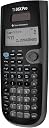
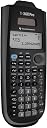


Texas Instruments ★TI-36X Pro Scientific Calculator [輸入品] [並行輸入品]
Product ID: 727864852
Details
- ブランドTexas
- 画面サイズ2.62 インチ
- 色ブラック///ホワイト
- 電卓タイプ関数電卓
- 電源バッテリー式
📊4-line MultiView display
📐Advanced trig & stats functions
🔋Solar + battery powered
Desertcart purchases this item on your behalf and handles shipping, customs, and support to USA.
📐 Elevate your calculations—because precision is the new power move.
The Texas Instruments TI-36X Pro is a sleek, solar-powered scientific calculator featuring a 4-line MultiView display and MathPrint technology. Designed for students and professionals tackling advanced math and science, it supports a wide range of functions including trigonometry, statistics, Boolean logic, and unit conversions. Lightweight and portable, it’s perfect for environments where graphing calculators aren’t allowed, making it a reliable companion from high school to college-level STEM courses.
| ASIN | B004NBZB2Y |
| Amazon 売れ筋ランキング | 文房具・オフィス用品 - 56,630位 ( 文房具・オフィス用品の売れ筋ランキングを見る ) 関数電卓 - 33位 |
| GTIN (Global Trade Identification Number) | 00033317029860, 00033317203666, 03243480103572, 03243480104739 |
| UPC | 197274678803 012303264850 527645823516 763615999007 778888085951 999997114824 791583761272 033317203666 734911329478 666672977165 640206706346 803982780126 806293526162 033317070251 872182668381 080175314317 033317029860 641438187811 523160308910 809302183899 999997491543 172302617702 012951710266 168141372360 067224971325 809385664070 702658636043 801593400624 638458801209 809186269108 1631207457… |
| おすすめ度 | 5つ星のうち4.7 22,401 レビュー |
| カラー | ブラック///ホワイト |
| ディスプレイの種類 | 液晶 |
| ブランド | Texas Instruments |
| ブランド名 | Texas Instruments |
| メーカー名 | Texas Instruments |
| メーカー型番 | 36PRO/FC |
| モデル名 | TI-30X |
| ユニット数 | 1.00 個 |
| 互換デバイス | TI 36X Pro |
| 付属品総数 | 1 |
| 商品の寸法 L x W | 18.3長さ x 8.3幅 cm |
| 商品の重量 | 0.32 ポンド |
| 商品外装素材 | プラスチック |
| 型番 | 36PRO/FC |
| 画面サイズ | 2.62 インチ |
| 画面サイズの単位 | 2.62 インチ |
| 色 | ブラック///ホワイト |
| 計算機タイプ | 関数電卓 |
| 電卓タイプ | 関数電卓 |
| 電池の個数 | 1 リチウム金属 電池(付属) |
| 電池の数 | 1 リチウム金属 電池(付属) |
| 電源 | バッテリー式 |
| 電源のタイプ | バッテリー式 |
K**O
Texas calculator
I've been using it for nearly two years, and it still works great. It was very helpful during both my FE and PE exams.
ふ**ゆ
使いやすい
他の方もおっしゃているとおり,ボタンの二度押しでサブファンクション呼び出しができるなど非常に使いやすい関数電卓です。 計算順序が北米式となっていますが,入力時にカッコをつけまくる癖があるので問題ありませんでした。 ディスプレイの視認性は国内メーカーの最新機種には劣りますが,屋内使用には十分で,不便さは感じていません。 商品とは関係ありませんが... 注文時,最初に「火バサミ」に「Scientific Calculator」と書かれたシールが貼ってあるものが届きました。 返金→再度注文 でちゃんと電卓が届きました。 TI製他機種のレビューなどを見ると,TI製電卓は(マーケットプレイス出品のものも多いためか)よく間違った品が届くようですので,急いで必要な方はとりあえず国内メーカの下位グレードを買って,時間に余裕があるときにじっくり選んで購入することをおすすめします。
P**A
What is in the other?
パッケージを開けたときのがっかり感は、他を圧倒するくらいの威圧感がある。 しかしこれは、外観が安っぽいだけのことであり、電源を入れた瞬間、TIワールドに引き込まれる。 マニュアルは付いてくるが、これを必要としないくらいの親近感がある。 通常、一つのボタンは、2つないしは3つの機能くらいしかないが、この電卓のそれは「キーを複数回押すことで」様々な機能を提供する。 しかもそれが本体に印刷されているため、マニュアルはまったく必要としない。 関数電卓としては、価格を含め途方もないポジションに君臨していると言える。 日本ブランドのギミックにあふれたおもちゃを選ぶのであれば、こちらを強く勧める。 HPの35Sを含め、この二つのメーカーの電卓は、他の追随を許さないところにいる。
ろ**と
使いやすい
いろんな関数電卓使ってきたけどとにかく使いやすくて演算結果もなかなか正確。 筐体が薄いのと、独特のクリック感があり、また計算履歴が残ってたり、電源がきれても入力途中ならそのままで復帰してくれるのもこの電卓ならでは。 パソコンでの計算ができない現場では大活躍してくれてます。 マニュアルは英語ですが、関数電卓を 使ったことがある人にはマニュアルを読まなくてもほとんどの操作ができると思いますよ。
カ**ス
T.I.の高機能関数電卓
なかなかいい関数電卓です! また、ほかの関数電卓では 統計や複素数モードに切り替える時、 モードボタンを押してそのメニューから選択しますが、 この電卓は、セカンドファンクションに モード切替キーが設定されているのです。 なお、行列やベクトルなどの高度な数学計算にも 対応しています! 行列式や逆行列、ベクトルの内積やベクトルの外積が 必要なら使ってみましょう。 CASIOでは、fx-915ESやfx-JP700、Canonでは、F-789SG、 SHARPでは、EL-520Mが同等の機能を持つ機種です。 この電卓が気に入らないのであれば、上記の機種を お勧めします。インターネットで調べてみましょう! 特に注目したいのは、分布計算ができることです。 正規分布や二等分布、ポアソン分布計算など、 合計7種類の高等分布計算が出来ます。 ただ一つ、欠点を言うと、√キーが セカンドファンクションのあり、 非常に使いにくいです。 逆数もセカファンにあり、キーセンスは最悪です。 こう言ってしまうと怒られるかもしれません(笑)。 メモリーの呼び出しは一覧表示でとても 使いやすかったです!これは評価したいです。 電源をOFFにしても計算履歴が消去されないのも 大きな魅力です。重宝するべきでしょう! 操作方法も特殊で高機能な関数電卓でした。 Texas Instrumentsさん、なかなかやりますね!! 操作方法が特殊な上、マニュアルが英語なので 初心者には決してお勧めできませんが、 操作方法が理解できれば、意外と使える関数電卓です。
ク**チ
優越感に浸れる!
カシオ、シャープ、キャノン、hpと使ってきましたが此方も中々良いモデルです! 能書きは英語でしたが、ある程度使える人はなれるまで、時間はかからないと思いますよ! 初心者でも、イジって入れば大体は使えると思う。 職場には誰も持っていないので羨ましがられたり、優越感に浸れたりデキマス! 人と同じのが嫌だったら迷わず買えよ、買えばわかるさ。優越感に浸れ!
M**W
斬新なデザインセンス
すでにHP、TI、Casioの多機能関数電卓を複数コレクションしていましたが、TI-36Xはグレーとブラックを基調とし、ブルー文字というクールなデザインで所有欲を掻き立て、最近価格がリーズナブルになったので購入しました。マニアならおわかりと思いますが、HP35Sの抜きん出た存在感と高級感、使用フィーリングはやはり別次元です。それを除くと、手元のTI製品(都合3機種)とCasio(JP900)ではさほど質感に違いがなく、操作フィーリングも同程度でした。その中では本機のキー配列やマルチファンクションが最もモダンで明瞭度が高い印象でした。JP900は非グラフ電卓で現在最強といわれますが、それより古い設計の本機もちょっとした計算の範囲なら性能差を感じません。星ひとつ減点は、液晶のコントラスト調節の段数が少ないこと、TIでおなじみのスライド式のカバーが本機ではあまりにも簡素で、たわむとカバーごとキーを押してしまう点などです。フィットするハードケースを探すことにしました。
東**鶏
TI-30XBと比較しても微妙
全画面ドットマトリクスの(少し)高機能な関数電卓ですが… ・キーの2度押しで目的の関数を呼び出せるが、それはごく一部のみ。 平方根がそうなってないッ!! つまり通常の裏キーに廻ってるので[2nd][x^2]と2ストローク必要なのは奇天烈大却下である。 ・電源切っても履歴を呼び出せるのは米国メーカー製としてはごく普通だが 履歴を呼び出して「確定」させないと追記・修正ができないのは本機最大かつ致命的な欠点。 行列やら計算できるってもそんなのPCにやらせたほうが何倍もいい。電卓には電卓なりの道があるというのに、高機能と言えばどんどんPCにもできるのを付け足して、肝心なUIをおろそかにしている感が多分にある。 三角関数などはキーを押すとsin, sin-1, sinh, sinh-1とループするが、じゃあx2と平方根も同じ様にループさせろと。なぜ平方根は[2nd][x^2]なんて2キー仕様にしたんだ。バカかよ。三角関数キーあたりの仕様が素晴らしいのに、なに手抜きしてンだTIは。どうせ高校生向きだからこんなんで良いだろって舐めてンのか!? 裏と表が逆じゃね?っていうキー ・平方根 ・quit ("安全"な画面クリアキー) なんでこれが設定で決められないの? ・数式通り表示と実数表示 →tan60度を計算させると√3と表示がでてくる。まあ、そうなんだけど キー押せば1.7320508ってでてくるんだが…デフォルトで人並みに奢らせて欲しいんだよ。 わざわざキー押さなくても最初から奢らせてほしいんだよッ!(机ドン 危険な[clear]キー ・これ、画面クリアだけでなく、履歴クリアも出来る…というか画面クリアするつもりでこのキーを連打してると履歴が丸っきり消えてしまう。まあ、そりゃクリアって書いてるからそうなんだろうけどさあああああ!! (ちなみに画面"だけの"クリアなら[2nd][mode](すなわちquit)で出来る) 北米式計算術 ・6÷2(1+2)は9を返す。国内メーカー製関数電卓は1を返す。これはTIを筆頭にいわゆる「北米式計算術」として認知されているが[要出典]、単純に省略された"*"を補完しているだけであり、国内メーカーは省略された"*"の優先度の方が高いという忖度で計算を行っている。これはどちらが正しいかという話ではなく、俺がこっちと決めたからこっち、という話なだけである。
C**Z
Excelente calculadora NO PROGRAMABLE
Tengo alrededor de 10 meses con la calculadora, por lo que me he animado a contarles la experiencia que he tenido con ella. Al principio es un poco tardada la transición entre usuarios de Casio a esta calculadora ya que tanto las funciones como la notacion que se usa es diferente, pero vale totalmente la pena, sobre todo por el display que puede mostrar operaciones y resultados anteriores al mismo tiempo, nunca había tenido una calculadora con esa capacidad y vaya de lo que me estaba perdiendo, es increíble el tiempo que te ahorras e incluso el desgaste mental de siempre tratar de aprenderte algunos resultados con varias cifras. Otra ventaja es la forma en que se insertan las operaciones, es mucho mas claro y se presta menos a confusión(por uso de paréntesis) ya que puedes escribir todo como lo escribirías en una libreta. Ahora lo que me parece un poco incomodo es que el signo menos no puedes usarlo como se te de la gana, hay dos tipos de menos, la operacion aritmetica y el signo como tal que indica cuando un numero es negativo, si por alguna razon usas el simbolo de sustraccion en una operacion como por ejemplo: (12)^-12 te dara un error, tienes que usar el signo de menos, el cual es (-) (asi es la tecla en la calculadora) y de esa forma no tendras problema alguno, la verdad es que te acostumbras demasiado rapido y no veo que sea una razon para no comprar esta GENIAL y POTENTE calculadora. Yo la uso para mi Ingeniería en Electrónica y me va de 10 para todas mis materias las cuales no son básicas, ya que ya estoy por concluir la carrera. Espero les sea de ayuda mi experiencia con esta calculadora que definitivamente es BUENA, BONITA Y BARATA!
I**I
Super
Elle fait très bien le boulot
U**A
Powerful and easy to use
This is the best scientific calculator that I've ever used. It provides a lot of the functionality of the Ti-84 graphing calculator for a small fraction of the price. There are few other calculators on the market that provide comparable functionality - namely the Casio FX-991ES/FX-115ES and the Sharp ELW516XBSL. However this calculator is the best of the group. What sets this calculator apart from the pack is its ease of use and excellent usability. You don't need to read the manual to figure out how to use it, and its features are very usable. Examples: Big, High Resolution Display: All the three high end scientific calculators (this, the casio, and the sharp) have pixel grid displays and can show expressions in their written mathematical form. However this calculator's 4 line display can show more on the screen than any of the other calculators. This makes long calculations easier, makes matrix entry much more usable, data tables more usable, and data entry for statistics much easier. Unique (in this class) capabilities of this display include: - See up to 4 expressions and results at a time. The calculator puts the result on the same line as the expression when it fits comfortably. The Casio and Sharp only let you see one calculation at a time, and you must scroll back to see previous calculations. - 3x4 augmented matrix entry (for a 3 variable linear system) where the entire matrix can be seen at once. On the Casio, you have to enter larger matrices one line at a time, and on the Sharp you can only enter one coefficient at a time. - 4 row * 3 column data entry for statistics: you can see 4 rows of 3 column data at a time, plus a data entry line below. On the Casio, you can only enter X and Y values rather than having 3 arbitrary lists, and the display can only show 3 rows of 2 column data at a time. The Sharp is also limited to 2 variable XY pairs, and as a further limitation you can only enter/view one XY record at a time. Thanks to the better display and better display use, the Ti-36X Pro is by far the most capable of the pack. No Complicated Mode Switching: In the Casio/Sharp sense of modes, the TI-36X Pro has only one mode. It can do everything in that mode. There is no separate mode for integration, statistics, data entry, solving systems of different types, etc. When working under time constraints, switching between modes and navigating elaborate nested menus wastes time and breaks one's chain of thought. Losing all calculation history on a Casio/Sharp when switching modes doesn't help either. On the TI-36X Pro, just press one button to do what you want without switching mode. Want to enter data for stats? Just press the DATA button and start entering data into the table. Want to jump to solving a cubic equation? Just press poly-solve and solve your polynomial. Want to jump back into your stats? Press DATA and you'll be back with all your old data intact. Once you're done with your stats, press CLEAR and you'll be back at the regular calculator window with your calculation history and saved variables just as you left them. Numerical Integration, Numerical Differentiation, Series Summation, and Sequence Product: All these features are quick, accurate, and need no explanation to use. Note that the numerical integration algorithm used here is faster and more accurate than the Simpson's Rule used on the Sharp. The sequence product is a handy feature that you don't see on other calculators. Overall, this is a fantastic calculator. I do recommend reading the manual though. This calculator has a ton of handy features that you probably aren't aware of. With that said, I have a few minor criticisms: - The 2x2 system solver shows the AX + BY = C form rather than a 2x2 matrix. This may be more beginner friendly, but its annoying to have to press enter twice to move between variables. You need to press enter twice because it lets you change the sign between AX and BY from + to - and back. This is a useless feature that slows down operation. A regular 2x3 (2x2) augmented matrix (as used by the 3x3 solver) would be more efficient. - You need to press the up button twice and then press enter to edit the previous expression. On the Casio, you only need to press up once and then start editing right away Notwithstanding these minor criticisms, I recommend this calculator whole heartedly. It's a must have for Engineers and Scientists.
P**O
Pour les étudiants
C est ce qu il fallait pour monfils et ces études
A**Z
Good
Good
Trustpilot
1 day ago
2 months ago