Buy anything from 5,000+ international stores. One checkout price. No surprise fees. Join 2M+ shoppers on Desertcart.
Desertcart purchases this item on your behalf and handles shipping, customs, and support to USA.
⚡ Power your storage like a pro — speed, scale, and stability in one sleek cable!
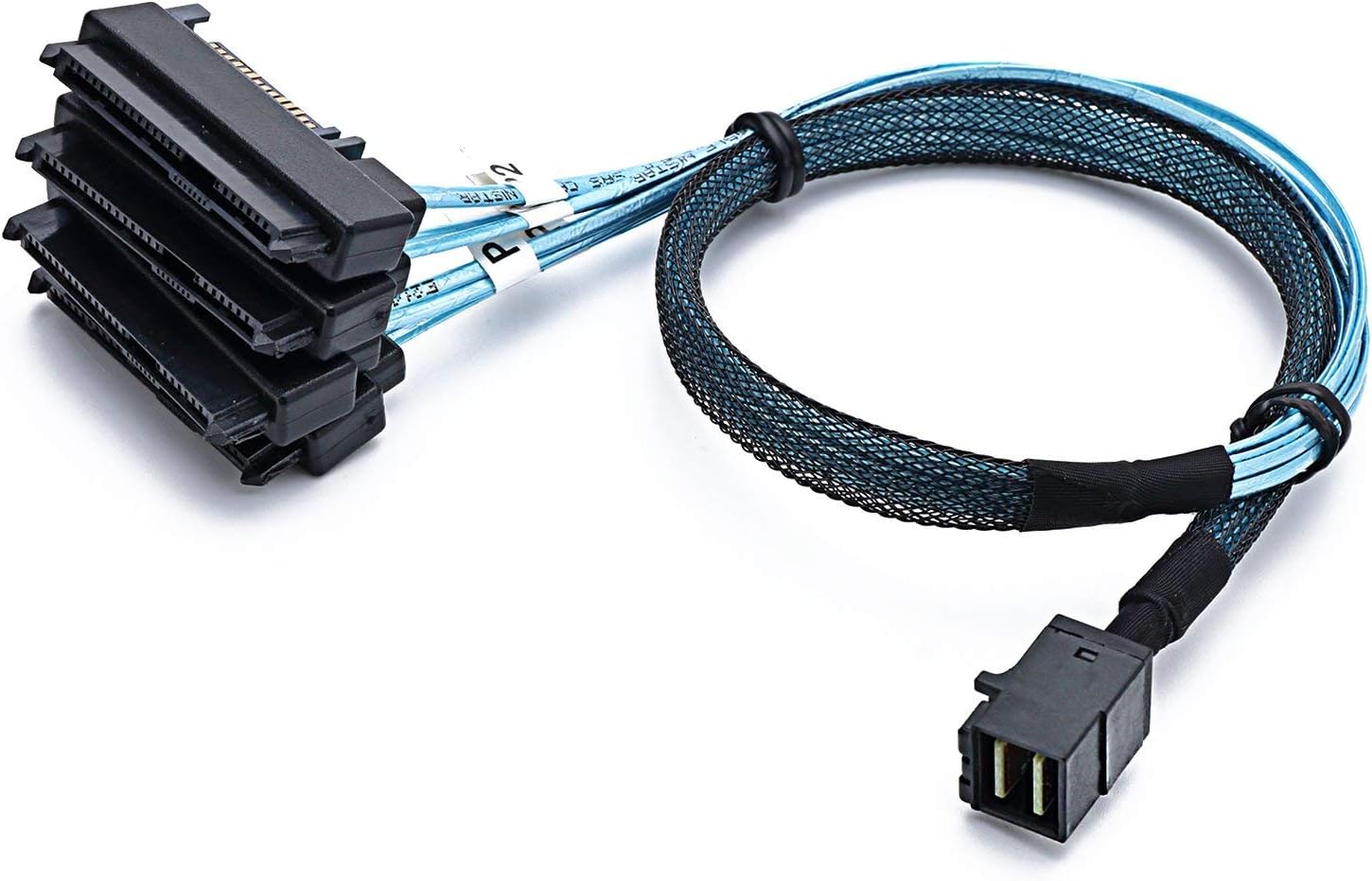
The CableDeconn SFF-8643 to (4) SFF-8482 Mini SAS HD cable delivers 12Gbps high-speed data transfer, connecting a single SAS controller to four SATA/SAS drives with integrated power support. Designed for internal server and storage array use, this 1-meter cable offers reliable, plug-and-play connectivity backed by an 18-month warranty and lifetime technical support.


| ASIN | B07B9SBSVW |
| Best Sellers Rank | #6 in Mini-SAS Cables |
| Brand | CABLEDECONN |
| Brand Name | CABLEDECONN |
| Cable Type | SATA/SAS |
| Color | Black,Blue |
| Compatible Devices | Server, Storage Array |
| Compatible Phone Models | No Compatible Phone Models |
| Connector Gender | Male-to-Male |
| Connector Type | Sas, Scsi |
| Customer Reviews | 4.5 out of 5 stars 304 Reviews |
| Data Transfer Rate | 12 Gigabits Per Second |
| Frequency | 12 GHz |
| Gauge | 30.0 |
| Indoor Outdoor Usage | Indoor, Outdoor |
| Item Length | 1 Meters |
| Item Shape | Round |
| Item Type Name | SFF8643 to sas cable |
| Item Weight | 70 Grams |
| Manufacturer | CableDeconn |
| Model | H0204 |
| Model Name | H0207 |
| Number of Items | 1 |
| Number of Pins | 29 |
| Other Special Features of the Product | High Speed |
| Part Number | 4336291152 |
| Recommended Uses For Product | Internal data transfer, connecting a SAS controller (SFF-8643) to four SATA/SAS disks (SFF-8482), and expanding storage capacity in servers or storage arrays |
| Special Feature | High Speed |
| Specification Met | RoHS |
| UPC | 695937722080 |
| Unit Count | 1 Count |
| Warranty Description | 24 hr dedicated email customer support,18 Month worry-free warranty, Lifetime Technical Support |
M**1
Worked perfectly! Good cable length. High quality
Worked perfectly. The length was good for my case. High quality materials. Let me connect a pair of SAS drives to my LSI HBA Internal card. Worked like a champ! I would buy, again.
B**R
Works to spec!
Works to spec! Would recommend. BITD TEMU had it for a fraction of the price with same quality....
W**M
Fast delivery
Cable works as it should.
M**M
SAS To Mini SAS Cables
Great product quality of connections and cable. Does what it's intended to be used for great functionality and right size.
A**.
Just works
They just work. The cord is fairly long and makes routing easy. It feels thin, but not cheap and easily plugs into my drives with no hassle.
B**F
Seems quality. ATTO benchmark showed read speed of 1600+ MB/sec on new SAS 12Gb drive
I bought the 4TB Seagate 12Gb/sec drive here and received last Wednesday. I didn't really know SAS, but I've worked as a systems engineer in Unix, enterprise backup, etc. so I was familiar with the "pro" vs. consumer dichotomy. I have a 6 year old Lenovo Thinkstation P300 Xeon box which I love. It's my home/work pc. I run a Broadcom-LSI Megaraid 9361-8i SAS-Sata raid storage card and a RAID-5 production volume with 3 Seagate SATA III drives. The card is specced for 12Gb/sec SAS, and I wanted to hook my backup volume to it and try things. The only caveat is as another has mentioned, when you plug in the power supply drive power connectors into the SAS-end of this cable, it makes a really tall/high-profile total connector, and I ran into obstructions with the case side panel. Since my raid drives are SATA III, I just swapped back the old SFF-8643 to SATA cables for those 2 side-oriented drives. Then I plug this new cable into the card's other mini SAS/SATA SFF-8643 interface, and the 3rd SATA drive in the RAID set I have connected with this new cable. It all works. I have a new Lenovo drive caddy coming so I can mount the 4TB SAS and swap into the PC for the current DVD ROM when I want to do backups. I kind of wish I bought an SED (self-encrypting disk) capable version, and I could then try Broadcom's safe store license for the controller card. But, eh. I try to do a backup a month with full image, and I use Windows built in ("sdclt" command at run box). What's funny in researching all this as a first-time SAS user, I see people bandying about "oh you need a SAS BACKPLANE". Backplane. That's funny. I haven't seen that since the 90s practically when I worked for EMC. Backplanes existed mostly in large storage arrays connected to a SAN. And the FRONTPLANE were internal channel directors cabled fibre channel to the san switch or open host production computers. What's ridiculous is the concept of BACKPLANE/FRONTPLANE, I've never seen anywhere in pcs or workstations. And yet somebody new is supposed to listen to the "experts" here and go chasing it. No, simply, you need to get a SAS-capable, PCI-E, storage controller card. "BACKPLANE!"
J**H
Excellent Match for LSI Broadcom SAS 9300-8i Host Bus Adapter
This cable worked perfectly with the LSI Broadcom SAS 9300-8i SATA/SAS Host Bus Adapter. I especially like the cable design feature that avoids the use of clunky molex cables to power the drives - its got the data port on one side, and the power port on the other. You don't need special power cables for your drives; your 15 pin power cables used with SATA drives will work fine with SAS drives. Cable length was more than long enough to accommodate my ATX full size case. With the HBA and two of these cables, you can plug up to 8 drives and free up a ton of motherboard SATA ports. This cleaned up the cabling a lot on the front side of the motherboard for me, and you still have your SATA ports if needed. 07-13-2020 Update: I forgot to mention that it's important to check hard disk compatibility with your SAS adapters. I chose Seagate ST8000NM0065 SAS 12 Gbps drives because they're on the compatibility list for the LSI Broadcom SAS 9300-8i Host Bus Adapter. My Seagate ST8000NM0055 SATA drives are also compatible with the LSI adapter and the CableDeconn cable.. It's also important to realize that you're not going to get anywhere near 12Gbps throughput, or roughly 1.5 gigabytes per second in a JBOD SAS drive setup. My JBOD setup tops out around 240 megabytes per second sustained write speed on very large files for the ST8000NM0065s with write caching enabled. That's about 1.9 Gbps.
J**E
Great quality
Good quality product! Works perfectly with my HGST SAS drives without any 3v pin tape hacks other cables require
A**S
Conexión rápida y sencilla
Todo perfecto, conexión rápida y funcional.
C**D
Werkt goed
Werkt goed
A**ー
問題なく使用できました
まず最初に私は専門家ではない為、誤った記述をしている可能性がある事を断っておきます。 今回初めて12Gbps対応のエンタープライズ向けSAS規格SSDを入手したため、Windows10のPCに搭載する為に購入。 使用したRAIDカードは12Gbps対応のIBM製ServeRAID M5210で、本ケーブルで2台のSSD(TOSHIBA製KPM51VUG1T60)を接続。(発熱対策でRAIDカードに追加のヒートシンクと4cmファンを後付けしています) 上記のRAIDカードは旧LSI製のMegaRAID storage manager(以降MSMと略します)にて認識したため、MSMからドライブ情報を確認したところ、「Negotiated Link Speed」は12.0Gbpsと認識していました。 MSM上からRAID0で論理ドライブを構築しフォーマット後に、CrystalDiskMarkにて全てデフォルトでテストしてみた所、画像1枚目のような結果になりました。 テストに使用したSSDのスペック上シーケンシャル・Read/Writeは2,100MB/s出るらしいのですがテスト環境や構築の違いなのかなとも思います(正直当方素人なので詳細は不明。1435MB/sをGbps表記にすると約11Gbps出ている計算になるのでRAIDカードの頭打ちなのかもしれません。)。一応同環境で使用しているcrucial製MX500 CT500MX500SSD1よりもシーケンシャル・Read/Writeは倍以上速かったため満足できる結果かと思います。 またMSM上からリンク速度を12.0Gbpsから6.0Gbpsに制限してテストしてみた所、画像2枚目のような結果になりましたのでご参考までにどうぞ。(MSMの「Negotiated Link Speed」上も6.0Gbpsと認識) 使用してみて気になった点はドライブに接続する側のコネクタが出っ張っている為、SATA電源を接続しケースに組み込むときに少し邪魔になる可能性があります。ケースに余裕が無い場合はSATA電源ケーブルはL字の物を用意しておいた方がいいかもしれません。 また、今回のテスト環境は素人がサーバーではなく一般的なWindows10PCに使用した際のレビューの為、あくまで「RAIDカードを乗せたWindows10でSAS-3.0のSSD使用できました。」程度とさせておいてください。 テスト環境 OS:Windows10 pro マザーボード:ASUS PRIME B-450-PLUS CPU:RYZEN 7 3800X メモリ:32GB(16GB×2) 使用SSD:TOSHIBA KPM51VUG1T60 RAIDカード:IBM ServeRAID M5210(熱対策にファンを取り付けてチップ温度65~70℃程度で動作) 使用ソフト:MegaRAID storage manager 17.05.06.00、CrystalDiskMark8.0.5
M**D
good quality
good quality
D**I
Tutto OK !!!
Tutto OK !!!
Trustpilot
2 weeks ago
3 weeks ago