Buy anything from 5,000+ international stores. One checkout price. No surprise fees. Join 2M+ shoppers on Desertcart.
Desertcart purchases this item on your behalf and handles shipping, customs, and support to USA.
📼 Digitize your nostalgia—because your memories deserve the spotlight!
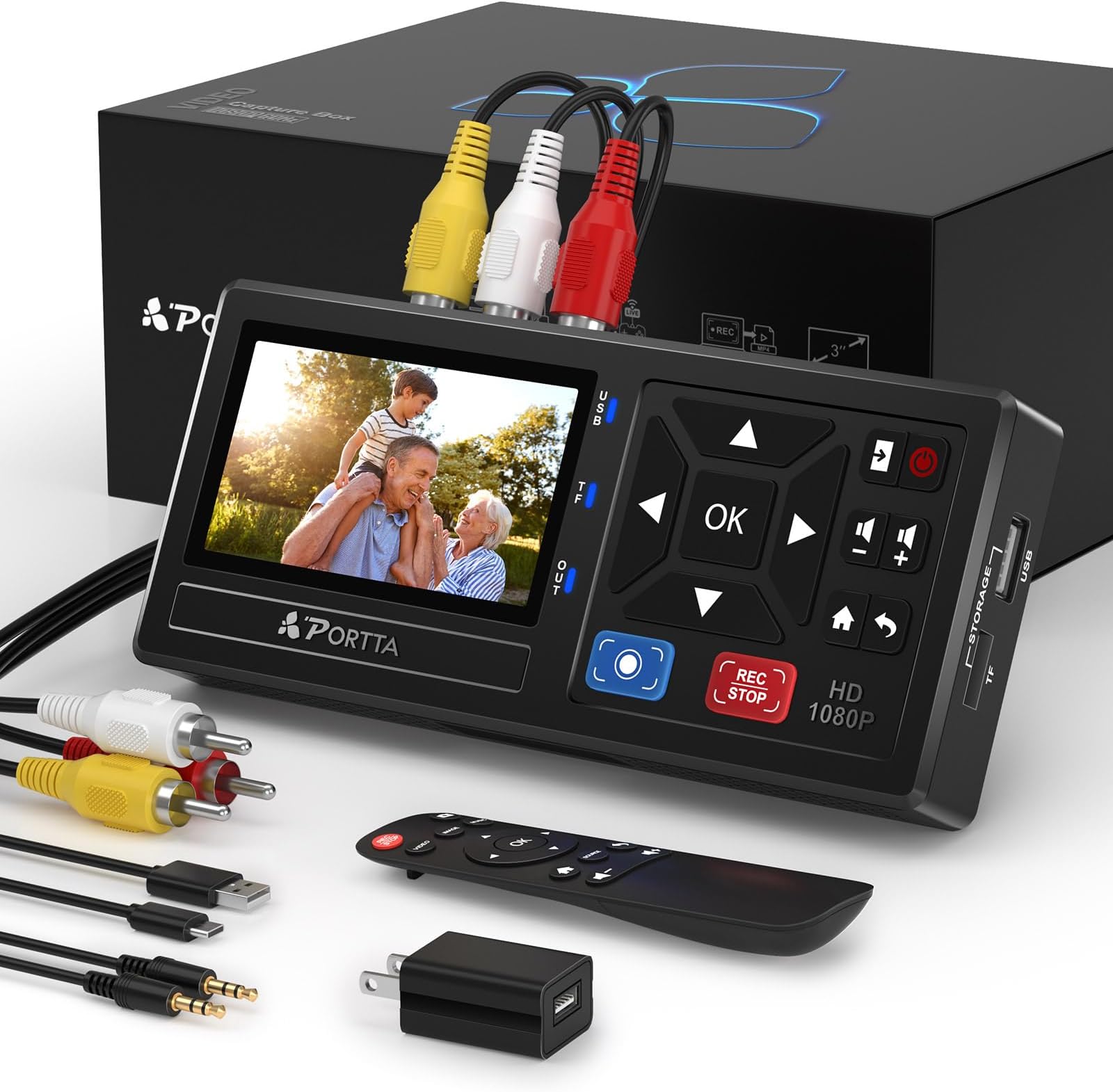
The Portta VHS to Digital Converter is a compact, user-friendly device that converts analog video sources into crisp 1080P digital files. Compatible with a wide range of legacy devices including VHS, camcorders, and gaming consoles, it requires no PC or software, offering plug-and-play convenience with remote control functionality. Backed by a 2-year warranty and highly rated by over 1,500 users, it’s the ultimate tool for preserving your cherished moments in modern digital format.


| ASIN | B0D8XGYZ8L |
| Amazon Bestseller | #11,822 in Electronics ( See Top 100 in Electronics ) #2 in Video Converters |
| Brand | Portta |
| Connector Type | HDMI, RCA |
| Country of Origin | China |
| Customer Reviews | 4.5 4.5 out of 5 stars (1,629) |
| Item Dimensions | 15.8 x 7.5 x 2.7 cm |
| Item Weight | 183 Grams |
| Manufacturer | Portta |
| Model Number | VD10 |
| Number of Items | 1 |
| Number of Ports | 3 |
| Package Quantity | 1 |
| Warranty Description | 2 years |
角**ブ
1時間のハイエイト動画を4mbps 128kHzで録画すると、2ギガくらいのファイルになりました。オフタイマーでセットし、ビデオを見ていなくても録画が自動で終わるので、楽ちんです。買って良かったです。
マ**ン
8ミリビデオ用ヘッドクリーニングカセットがあると、ハンディカムでの再生時に影像の乱れを取り除けます。
A**ー
簡単操作で、思い出のビデオをデジタル化できる優れもの!
F**I
データ化するのに簡単でした。但し、2時間以上の映像をデータ化するとファイルが2つになってしまいました。予想ですが、2時間分で1つのファイルになるようです。他は特に問題無かったです。
A**R
保有しているVHSビデオとレーザーディスクのバックアップ用に購入。 再生機器がS端子対応なので、S端子入力に対応しているのが選択の決め手だった。 使い勝手 解像度は自動にしておけばよい。4:3画像も自動で720-480の4:3で保管される。 手動で1080Pにしても画質はそのままでデータ量が増えるだけなので意味はない。 ビデオレートは標準の8Mbpsでは過剰。VHSなら4Mbpsでよかった。 ソースによっては雲などが白飛び気味の画像になることがあった。ダイナミックレンジかAD変換時の問題か? 耐久性 約1か月でVTR90本、レーザーディスク80枚程度をデジタル化したが、加熱したりハングアップすることなく安定して動作した。 中にはVHSテープは劣化しているものもあったが仕方がない。 結論 VHSテープや再生機器の寿命が来る前にデジタル化できた。 取り込み時に映像の棚卸ができたので終活にもなった。不要なVHSテープは整理できた。 十分に元は取れたと思われる。
ご**ょ
昔撮影した大量のアナログテープ。ミニDVテープやVHSテープ。約20年前のものばかり。 この機器とテープを再生できる機器さえあれば、簡単にデジタル変換、同時にMP4形式でUSBメモリーに保存できました。 ポイントは.ミニDVテープを再生できることと、なんらかの方法で出力できる端子があること。昔の多くの出力端子は、赤白黄色のRCA端子だと思いますが、問題なくいけます。 すごい感動です!
A**ー
簡単操作でできました。
き**ろ
録画開始しても5分や10分で勝手に終了してしまい、何度やってもだめ。原因もわからず。 I-Oデータ製の別の商品を買いました。そっちはそっちで画面がついていないのでテレビに接続する手間が増えましたが、無事に録画できました。
N**Y
Easy to set up and use
E**S
Bra kvalitet, enkel att hantera och att överföra video till usb minne .Jättenöjd
A**L
It is very good device. I recorded 5 old DV cassette. Then I had a problem with my old camera . Then I fixed my camera. It is working now. The manual is difficult to read . It needs much better explanation as I spent one day to make porta to work again after fixing my camera .
A**W
The device is doing what it is supposed to. Convenient and simple. It failed after a few weeks of intense work, but - the best part - after a few e-mails the vendor just sent a new device. So - a good device and a good service. Recommended!
J**M
Je suis d'accord avec la majorité des commentaires : cette machine est incroyable ! De l'électronique comme on en rêve : on branche et ça fonctionne ! J'ai d'abord relié le boitier au secteur avec l'adaptateur fourni. On peut alors accèder à un menu simple facile à mettre en français. Le menu permet de faire quelques réglages : j'ai tout mis en qualité maximum, je ne sais pas si c'est totalement nécessaire. Ensuite, d'un côté avec les prises RCA j'ai branché mon camescope acheté il y a 30 ans, de l'autre une clé USB formatée en NTSC. J'ai appuyé sur "PLAY" du caméscope puis sur "REC STOP" du boîtier. Une fois la lecture de la cassette terminée, j'ai réappuyé sur "REC STOP" pour arrêter l'enregistrement : et c'est tout ! J'ai obtenu instantanément un fichier mp4 (environ 4,5 Go pour une heure en qualité maxi) directement lisible sur la télévision. Alors, on peut peut être obtenir des images de meilleure qualité en utilisant un autre système ou en passant par un professionnel. Pour moi, les images obtenues sont vraiment correctes et de qualité nettement suffisante (vidéos de famille) et surtout c'est tellement simple. Le mini écran et le haut-parleur sont vraiment qualitatifs. Si on veut plus grand pour visionner les images (à plusieurs par exemple), avec ou sans enregistrement, on branche tout simplement le boîtier avec un câble HDMI sur un téléviseur. Sur le site internet de PORTTA on trouve un fichier de mise à jour système (une archive zip) que j'ai téléchargé mais que je n'ai pas réussi à installer sur le boîtier. J'ai copié les fichiers à la racine d'une clé USB et j'ai utilisé le menu de mise à jour. Je n'ai pas trouvé comment faire dans la notice jointe ni sur internet. Si quelqu'un a fait cette mise à jour pourrait-il partager la procédure à suivre ? Merci d'avance.
Trustpilot
2 days ago
1 week ago