


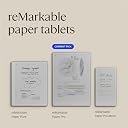

リマーカブル ペーパー プロ バンドル – 11.8インチのリマーカブル ペーパータブレットとマーカープラスペン(消しゴム付き)が含まれています
Product ID: 725138013
Details
- ディスプレイ最大解像度2160 x 1620
- ブランドreMarkable
- メモリストレージ容量64 GB
- モデル名RM81C-1000NW
- 画面サイズ11.8 インチ
📏11.8インチ大画面
🔋2週間バッテリー持続
🖊️内蔵消しゴム付きMarker Plus
Desertcart purchases this item on your behalf and handles shipping, customs, and support to USA.
📝 デジタル×紙の最先端体験、あなたの思考を鮮やかに彩る
reMarkable Paper Proは11.8インチのカラー電子インクディスプレイを搭載し、紙のような書き心地と調整可能な読書灯で昼夜問わず快適に使用可能。内蔵消しゴム付きのMarker Plusペンと6本の予備チップが付属し、2週間持続のバッテリーで長時間の作業をサポート。手書きメモのテキスト変換やクラウド連携機能も備え、プロフェッショナルなデジタルノート体験を提供します。


| ASIN | B0DG9ZXWMK |
| OS1 | Linux |
| USBポート数 | 1 |
| おすすめ度 | 4.1 5つ星のうち4.1 (1,059) var |
| お客様の年齢層 | 大人 |
| アスペクト比 | 4:3 |
| カラー | グレー |
| グラフィックの説明 | 一体型 |
| コンピュータCPU製造会社 | ARM |
| コンピュータメモリサイズ | 2 GB |
| サイズ | reMarkable Paper Proバンドル |
| スタイル名 | モダン |
| セット名 | リマーカブル ペーパー プロ バンドル |
| タッチスクリーン、声認識、他の有無 | スタイラスのサポート付きタッチスクリーン |
| ディスプレイの種類 | 電子インク |
| ディスプレイ最大解像度 | 2160 x 1620 ピクセル |
| ネイティブ解像度 | 1872x1404。 |
| ハードウェアインターフェイス | USB-C |
| バッテリーセルタイプ | リチウムイオン |
| バッテリ平均持続時間 | 2 weeks |
| パック数 | 1 |
| ブランド名 | reMarkable |
| メモリースロット数とタイプ | 1 |
| メーカー名 | reMarkable |
| メーカー型番 | RM81C-1000NW |
| モデルシリーズ | ペーパープロ |
| ユニット数 | 1.0 個 |
| リチウム電池梱包形態 | 19.25 ワット時 |
| ワイヤレス通信規格 | ブルートゥース |
| 世代 | 第1世代 |
| 互換デバイス | マーカープラスペン |
| 付属品総数 | 1 |
| 保証タイプ | 限定保証 |
| 内蔵メモリー容量 | 64 GB |
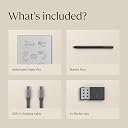
| 同梱コンポーネント | reMarkable Paper Pro、Marker Plus、スペアマーカーチップ6個、USB-Cケーブル。 |
| 品目の寸法(長さ x 幅x 厚さ) | 38.2長さ x 23.7幅 x 2.9厚み cm |
| 商品の用途 | オンライン教育;リモートワーク;お絵かき;ゲーム;書く;教える;絵画;アニメーション;編集;デザイン;;Eシグネチャー |
| 商品の追加説明1 | カラーディスプレイ;紙のような書き心地;調節可能な読書灯;内蔵消しゴムペン;スペアマーカーチップ;USB-C接続;低グレアディスプレイ;屋外で読める;夜間読書能力;ウルトラスリムデザイン;ポータブル |
| 商品の重量 | 1.16 ポンド |
| 型番 | RM81C-1000NW |
| 最大メモリ容量(GB) | 64 GB |
| 現在までサポートされているソフトウェアアップデート | 不明 |
| 画面サイズの単位 | 11.8 インチ |
| 発売年・モデルイヤー | 2024 |
| 通信・接続インターフェース | USB |
R**J
人を選ぶ商品
メモに特化した商品。高いし、英語表記だし、バッテリーも思ったより持たない。スマホよりは長持ちかな?だけど描きごこちや気軽に書けるささ、書いたものによって簡単に分類できるしとても気に入ってます。すぐに劣化しないことを願ってます
あ**ん
落下に注意
日本語対応無し(インストール可能)、処理速度は他の商品と遜色なし、アプリを使ったデータ共有も直ぐに反映、使い勝手は満足です。 データをメールで送る際も、アドレス履歴が表示されるので、いちいち入力しなくても、すぐに関係者への送信が可能。 バックライトをONにしておくと、4日ぐらいで電池がなくなります。 あとは、落下に要注意。カーペットのフロアに落としてしまい、拾い上げて画面を見たら、見事に一筋の線(画面の割れ)が。。。表示やメモ書きに支障はきてしていませんが、画面の強度は弱そうです。
M**G
A Premium Paper-Like Tablet That Redefines Digital Note-Taking
The reMarkable Paper Pro delivers an exceptional writing and reading experience that truly lives up to its reputation as a “paper tablet.” The large 11.8-inch colour display feels natural on the eyes, and the integrated reading light makes it comfortable to use in any environment, day or night. Writing with the included Marker Plus pen is smooth and highly responsive, closely mimicking the feel of pen on paper, which makes note-taking, sketching, and annotating documents genuinely enjoyable. What sets the reMarkable Paper Pro apart is its focus and simplicity. Free from distractions, it’s ideal for professionals, students, and creatives who want to think, read, and write more clearly. The colour display adds real value for highlighting, diagrams, and PDFs, while the premium build quality makes it feel like a serious productivity tool rather than just another tablet. If you’re looking for a refined, purpose-built device that replaces notebooks and paper clutter, this is a standout choice.
Y**X
Juste exceptionnel
Cet outil exceptionnel a révolutionné ma façon de travailler. Habituellement en prise de note sur des calepins en a5, je commence à stocker un grand nombre de ces calepins et retrouver des données devient compliqué, malgré l’archivage chronologique. Sur cette tablette, tout est logique et l’écriture est parfaite, le carnet entièrement paramètrable…. Je trouve cela génial, en quelque touche sur ce bel écran, on fait une Check list ou une partition de musique, en passant par des feuilles petits carreaux ou des lignes…. Génial
J**F
I Wish I Bought It Sooner!
I am someone who takes a lot of notes and makes a lot of lists. I have pads of paper and scraps of paper everywhere, both at home and in my office. I liked the idea of this electric notepad to always have a place to take as many notes as I want and to have plenty of room to make the list as long as it needs to be. I also like having them all in the same place as I won't lose them. I love being able to have a hand written list converted to text, though I believe you have to have a subscription to the reMarkable app for this to work. You get a short free trial, though I went ahead and committed to a year long subscription at a reduced cost (versus monthly) as I like the idea of being able to transfer my notes between my reMarkable and both my personal laptop and my business laptop (you are required to download the desk top app to do this).. Yes, this electronic notebook is expensive, especially for my primary use. But I have found it to be very worthwhile in the two weeks that I have had it. I am less concerned with the feel of the pen on the screen. That isn't a sensation that I necessarily needed to have. It feels fine but isn't why I purchased this. To me, there is no real noticeable lag in writing and the text appearing on the screen. If you erase something, yes, the screen refreshes but I don't find that to be a hindrance and it really only takes a moment for the page to refresh. Some of the features I absolutely love are illustrated in the short video I am posting with this review. The eraser is great to have for small changes. Being able to select a section and erase that larger area is fantastic. Then, being able to select a section and move it around the page is great, too. I have downloaded a couple of the templates, specifically the calendar templates but I have not yet explored other templates that may be helpful. I also have not yet imported a PDF to edit and look forward to trying that out. I haven't even read the getting started guide yet. As soon as I received it, I started playing around with it and I find it to be pretty intuitive to use. I will eventually read it. I chose to go with the color version because I wanted to have the option to use additional colors or highlighting. However, this is probably the one negative I will note with this in that the colors are not vibrant at all. This is a function of the type of screen that it has. You can barely tell the difference between black and blue or between red and magenta font colors. The highlighting feature does work when putting a brighter color over a dark font (magenta highlighting black, for example). So it is functional but have low expectations here. While it is more expensive than only the B&W reMarkable, I am glad I have the color options. It came with extra pen tips though I have not had to change one out yet so can't comment on how long they last. The battery life is OK. I use it a lot so I suppose I should not be surprised that I may have to charge it more often than others do. I also tend to keep it on, or forget to turn it off. Or, really, put it into "sleep" mode rather than turning it off altogether. But it isn't that hard to charge as it uses a USB-C charger, and I have plenty of those around. In short, yes, this is an extraordinarily expensive electronic notebook but I do find good value in having it. After reading the reviews and considering the potential of having problems, I chose to purchase Amazon's extended warranty. And while this is not an element of the reMarkable product, I have a Prime credit card and appreciated the option of amortizing the cost of this item over a longer period of time to help defray the cost somewhat. I do recommend purchasing a protective case for it. I thought the ones sold in bundles with the reMarkable were way too expensive (I don't need a leather case and their non-leather case was still a bit pricey) and purchased a CoBak case for it, especially to be able to protect the screen when the notebook is in my briefcase or backpack. I had good experiences with CoBak cases with my Kindles previously. I heartily recommend this product!
P**O
Super producto
increíble producto antes escribir en Goodnotes en el iPad y la verdad es que no tiene punto de comparación, es como escribir en papel increíble producto
S**.
A very professional device that is what it is designed for without all the bells and whistles.
The reMarkable Paper Pro is a wonderful device and thus far I am loving using it. I love the size of the device, one of the main reasons I opted for the reMarkable Paper Pro and that it is dedicated for note taking and organising into individual folders, tagging pages, etc. Although you need to download and install an individual app on the computer for reMarkable, it's fairly straight forward, and adding PDF files if you have any eBooks in that format or ePub you can easily drag and drop across. For that, it is pretty decent compatibility with eBooks, just not for many of the other formats, unfortunately, but I'm not overly fussed on that as I use my Kindle Paperwhite for reading use. You'll find that if you use the device on full brightness, it's a pretty decent amount of light, you'd see that in person rather than from videos. However, intensive use that I use it for taking down a lot of notes from videos for my language learning, the battery will go down over the course of a day. I've used it just using a normal light and the backlight of it set to zero and it worked great. I had also done research and you can use the device whilst plugged into the laptop whilst it charges, it doesn't have any effect on the life of the battery. So long as you use it from time to time mostly away from charging to allow the battery to recycle, you're fine. The device for functionality is straightforward; learning to draw straight lines you just draw a line and if you hold it, it'll do it automatically, same for circles. Learning the menus are pretty straightforward, and creating a new notebook, don't confuse it as a page, you can create pages within notebooks, check the three dots menu and you'll find it there. I've found the quality of the screen to be fantastic, the device is very professional looking, I haven't had any issue with the light bleeding as some may have complained, I think it looks fantastic, it's a very textured feeling with writing and drawing anything. Whilst it is not going to be exactly like paper, it's good enough and feels great to write with. The refreshing of the screen happens a lot, but you get used to it. As for the weight of the device, I've found it's fairly light, I haven't had any major issues, it fits nicely alongside my Macbook Pro 16" and is nice and thin, I certainly have no issues regarding weight and is very portable, it just requires the right bag for it. All in all, this device is targeted for note taking and is not for all the bells and whistles of other uses like some of the other devices. I love the size and ability to use colour for highlighting which I do a lot and looks very professional. When connected to the computer you can use the app you download and install to export to PDF which I love. I'm very pleased with the device.
Trustpilot
2 months ago
3 weeks ago