Description
🔥 Cut, engrave, and create at the speed of innovation!
- BUILT TO ENDURE - Aerospace-grade aluminum frame and 71,830+ hours of rigorous testing ensure durability that keeps pace with your ambition.
- PLUG PLAY CREATIVITY - Out-of-the-box ready with AI-powered xTool Creative Space software—no design skills needed to start crafting instantly.
- POWER THROUGH PROJECTS - Cut 10mm cherry wood in a single pass with 20,000mW laser power—unmatched efficiency for your creative hustle.
- SAFETY WITHOUT COMPROMISE - Class 1 laser safety with 99% light filtration, flame sensors, and emergency stops keep your workspace secure and stress-free.
- PRECISION MEETS INNOVATION - Patented Pin-point Positioning and AutoPassthrough tech deliver flawless 3D engravings on curved surfaces and extended materials up to 118 inches.
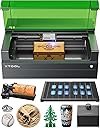
The xTool S1 is a professional-grade 20W laser cutter and engraver featuring a spacious 23.93" x 15.16" bed and blazing 600mm/s speed. Designed for precision with patented positioning and AutoPassthrough technology, it effortlessly handles wood, metal, glass, and curved surfaces. Ready to use out of the box with AI-powered software and built with aerospace-grade materials, it offers unmatched safety and durability for ambitious creators and managers seeking to elevate their projects.