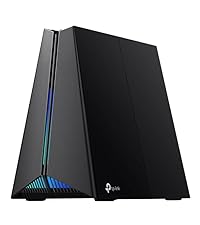
🎯 Dominate your digital domain with Archer GE650 — where speed meets style and every millisecond counts!
The TP-Link Archer GE650 is a cutting-edge tri-band Wi-Fi 7 gaming router delivering up to 11 Gbps combined wireless speeds, powered by a 1.5 GHz quad-core CPU. It features multi-gigabit 5G and 2.5G Ethernet ports, WTFast game acceleration, and a dedicated gaming panel for traffic prioritization. Designed with customizable RGB lighting and robust HomeShield security, it supports up to 100 devices and integrates easily with mesh networks for expansive, lag-free coverage.


| ASIN | B0DVV9KJSN |
| Antenna Location | Gaming, Home |
| Antenna Type | Fixed |
| Best Sellers Rank | #6,147 in Electronics ( See Top 100 in Electronics ) #44 in Computer Routers |
| Brand | TP-Link |
| Built-In Media | 1 * Archer GE650, 1 * Power Adapter, 1 * QIG, 1 * RJ45 Ethernet Cable |
| Color | Black |
| Compatible Devices | Gaming Console, Personal Computer, Security Camera, Smart Television, Smartphone |
| Connectivity Technology | Ethernet, USB, Wi-Fi |
| Control Method | App, Touch |
| Controller Type | App Control |
| Coverage | 2000 Square Feet |
| Customer Reviews | 4.4 out of 5 stars 6,396 Reviews |
| Data Transfer Rate | 11 Gigabits Per Second |
| Frequency | 6 GHz |
| Frequency Band Class | Tri-Band |
| Has Internet Connectivity | Yes |
| Has Security Updates | Yes |
| Is Modem Compatible | No |
| Item Weight | 2.45 Pounds |
| LAN Port Bandwidth | 5/2.5 Gbps |
| Manufacturer | TP-Link |
| Maximum Upstream Data Transfer Rate | 10661 Megabits Per Second |
| Model Name | Archer GE650 |
| Model Number | Archer GE650 |
| Number of Antennas | 3 |
| Number of Ports | 5 |
| Operating System | Linux |
| Other Special Features of the Product | Internet Security, LED Indicator, Parental Control, QoS |
| Router Firewall Security Level | Basic |
| Router Network Type | Wired/Wireless |
| Security Protocol | WPA2-Enterprise, WPA2-PSK, WPA3 |
| Special Feature | Internet Security, LED Indicator, Parental Control, QoS |
| UPC | 810142823432 |
| Warranty Description | 2 Year Manufacturer |
| Wireless Communication Standard | 802.11.be, 802.11ac, 802.11ax |
| Wireless Compability | 802.11.be, 802.11ac, 802.11ax |
M**T
An Excellent Router; Highly Configurable
After two months of use, I have come to the conclusion that this is an excellent router. A couple of months ago, I placed the order to upgrade our home internet to AT&T gigabit fiber and knew that I wanted a solid, configurable WIFI router as the only device plugged into the AT&T equipment. This way, I could setup a Raspberry Pi as Pihole to block ads on my entire network and use MAC IDs to allow/deny access to any devices that tried to connect. There are videos on YouTube that review this router and give you a view into the the setup/config screens so, I won’t go into describing all of that. However, I will say that I feel the setup screens are intuitive and even if I did not have 20+ years’ experience in IT (programming, DBA, sys admin, etc.) I believe I could figure out how to make this router fit my needs. Whether you have that kind of background or not, the YouTube videos can be very helpful. Wired Connections The previous owner of my house had it wired with CAT6 cable (thank you!) and I added a couple of CAT8 cable runs so, I am currently using 6 of this routers’ 8 gigabit ports. Those cables give me wired connections to multiple gigabit switches throughout the house (bedroom, office, man cave, living room, etc.) where I have wired connections to multiple computers or smart TVs or gaming systems, etc. I could bore you with upload/download numbers but, instead, I will just say that everything runs faster or better now than it did before all my upgrades. My smart TV connects to YouTube (Pihole blocks the ads) and videos play smoothly. My PS4 used to take an hour to download free games and now takes a couple of minutes and my Xbox is the same. System patches take a minute to download. Online streaming services run smoothly and I have yet to see any “spinning wheels” as a video buffers in the middle of an action scene. WIFI Before AT&T fiber, I had an AT&T Airties 4921 WIFI booster that did a great job improving the signal to a “dead spot” in the back of the house. I tried and failed to get the 4921 to work on my new equipment then realized the AX6000 had already solved the dead spot problem. I have WIFI cameras pointing towards the woods behind my house or from the woods back to the house and am getting a strong signal to all devices. The router is capable of WIFI 6 but currently none of our iPhones, iPads, MacBooks or laptops can use it. Nevertheless, I have not noticed any connectivity issues with any of our wireless devices. I do have one wireless, multifunction HP printer that will go to “sleep” after several hours of inactivity and may not wake up when I send a document to it from my smart phone. All I do is punch a button on it, it wakes up, accepts the document and everything is fine. This is probably a setup issue within the printer, and certainly not a WIFI problem, but has not been a big enough hassle for me to worry about it. Network Monitoring One of the major things I wanted from this router is the ability to easily block devices on my network. I have a teenager who only needs occasional Internet access and I used both of the MAC IDs from their laptop (wired and wireless) to setup a weekly schedule for when it could/could not reach the Internet. I can see all wired/wireless devices on my network in the routers’ Basic or Advanced screens and this allows me to keep an eye on who is in my network. Overall, I have been very pleased with this router and highly recommend it.
M**A
Terrific performance at a very reasonable price
With the TP-Link AX6000 WiFi 6 Router(Archer) router I have finally found the “sweet spot” for my home needs. I generally have 50 active devices in my smart home and this router has horsepower to spare. I built a new home with a centrally located fiber access point, to which I have a Bitdefender box 2 installed, followed by this TP Link router (placed in access point operating mode). My home is not overly large (about 2000 square feet) and this router was my my third try for the desired security and signal strength needed to obtain high speeds throughout the house and yard. My first try, with a 3+ year old google WiFi setup was remarkably slow and insufficient. More surprisingly, my second try to obtain the levels of consistent quality WiFi needed failed while using the ( far more expensive) ASUS Zenwifi 6000AX. The ASUS setup utilized two nodes, the base and a secondary node. It was very fast if you were close to the primary unit, but performance fell off dramatically, even a room away. The secondary node seemed to be less effective than an old school WiFi extender/repeater. I was very disappointed. But Amazon graciously accepted my return of that unit. Trying this TP Link AX 6000, I was hopeful , but was also prepared to be again disappointed. Happily, this router far exceeds my performance and reliability expectations. As you can see from one of the photos I attached, I routinely get download speeds in excess of 500Mbps. Nearly the same on upload speed. I have done Speedtest from all locations in my home and garage and have never get less than 150Mbps speed: and this is in a distant corner while two teens are gaming with out of state friends. The teens love their new connection speed. The TP link phone app gives good information, but minimal control of advanced router features. The web interface control panel is much more extensive and meets all of my needs, but I will concede that the ASUS GUI web controls were more extensive, more than I need, but perhaps essential to other users. To conclude this overly long review I will sum up by summarizing: this TPLink AX 6000 router will meet and likely exceed the needs of 90%+ of users. I highly recommend.
A**M
Outstanding router, tiny/small power button, beam forming WiFi has an amazing range!
Update, I have always needed a WiFi extender for a Nest outdoor camera in the front of my home, it is 17' up in an eve. Routers were always in the back of the house at least 50' away. BUT with this Archer AX6000 router the 2.4G works great with the Nest camera in the front of the house!, and the 5G works with another Nest camera 17' up in an eve but only 35'' away. The beam forming WiFi really works great. And I can also go down to the lake-bank and get good WiFi there too!, first time. Though it may help that the router is mounted on a stand 7' off of the floor. FIRST, THERE IS A SMALL POWER BUTTON ON ROUTER. The quick start guide does not mention it, and so at first I thought router was DOA. Outstanding One Mesh router! I had an ERRO 6+ router that was connected to a TP-link extender for an outdoor security camera, and would get intermittent drop outs of camera. Decided to try the TP-link AX6000 router, and no more drop outs! Also router works with the extender to give a One Mesh network, so great WiFi anywhere I go inside, or outside, my house! And TP-link has great phone support 24/7. And unlike ERRO 6+ with only one available ethernet port, the AX6000 has 8 so I can keep computer and music streamer plugged in all the time.
C**3
So far so good.
Had this router (ax6000) for just over 5 days now. Set up was straight forward through the app other than the bluetooth kept disconnecting in the middle of it. I would suggest setting it up using the IP address in your browser instead. Signal has been good. I still have one place in my basement with good signal instead of very good, but a change of placement would probably fix it. Everything has been quick and seamless other than the slightly buggy app. All my devices have connected, there seems to be no communication bottleneck. I have been able to tweak a few settings such as changing my DNS, setting static IP's, updating the firmware, and prioritizing gaming services without issues. The internal settings customization are good, but I expected a little more from a router of this price. I expect they prioritized accessibility over deep customization. So if you absolutely must control all aspects of your network, this isn't going to be for you. My wife and I both have wifi 6 enabled phones and those have recognized it without any extra effort. I do not have the most demanding house, but i feel like i have enough connected devices to give it a good run through. I have seen reports of firmware issues but have currently not experienced any myself. However i would suggest doing a weekly auto reboot on any router that supports the function, which this does. PS. the app only has basic settings and controls. If you want access to more advanced settings, login with the IP address. PPS. The password for the app and the password for the in browser access will be different.... for some reason.
E**N
Outstanding value for an excellent product
I purchased this router because I needed something that could handle 5Gbps that the fiber terminal was delivering to my home, and boy did it not disappoint. If you have need for wired and wireless multi-gig ethernet - even if you're not a gamer - this is one of the best options out there right now. It also has a very intuitive and easy to follow web UI for configuration. YOU DO NOT have to download an app just to manage your router like on other devices. Just good old login and configure. Additionally, the recent firmware update included many great features like DNS over TLS and others. Best home router I have owned in 30 years.
T**T
It's not just the router that's awesome, the company is too.
I bought this router around June 2020. I Have a family of six total, 2 toddlers and 4 in the household old enough to use electronics independently. This router handled every device we have. Even when guests come over I don't even blink if they ask for the wifi password. The router is far and away a top-notch impressive machine. It works day and night with no servicing past the original setup. The original setup is a breeze as well, just an app on your phone and plugging the router into a modem. It took maybe ten minutes to setup. Anyways, I bought the product last year it worked like a champ for over a year and then i had an unfortunate incident. During a firmware update i had a power outage. Totally bricked up my router, legit bad timing. Get this though i called the company dead of night 4:00 in the morning. I was on the phone with a person in less than 2 minutes (cannot stress how awesome that was) after the initial troubleshooting the representative i talked to went out of their way to ask the supervisor if there was anything else that could be done. After determining that a reset or full power break wasn't bringing it back, the company then asked for a picture of the back of the router and the receipt. Then they replaced it, it was amazing. A power surge that wasn't their fault and they still offered to replace the device. I was on the phone for maybe 15 minutes and they helped me out so quickly and efficiently that i couldn't help but be impressed. I don't know what more to say about the router because when something works so well and for so long without maintenance you kind of forget about it. If you want a hassle-free product that works as well as advertised you've found the router that would accommodate anyone and does it to perfection. I mean this router has been around for almost 3 years, and it still tops the charts of most top 10 router lists for 2019, 2020 and 2021. I have to say though that now that I know how awesome the company behind the product is as well, good luck to any other router manufacturers out there, cause TP-Link has found a loyal customer in me. Not only for the absolutely fantastic product, but the equally fantastic customer service. I'm genuinely impressed and grateful that this company (as big as it is) appears to be cutting no corners and delivering on their word. It's a rare find these days
M**Y
Pass it up, Buggy. Maybe I'll get a AX router in a few years
I was super excited to get this router, though hesitant. I have bought 1 other TP-Link product, and the quality on that was really lacking I felt. But I figured its been a few years, and this is their HIGH end gear. I love the router I have, but I have a galaxy s10+ and would love to be an early adopter of Wi-Fi 6 and get the full potential speeds of my Gigabit Fiber internet. Well, sadly that didn't work out Quick rundown Pros; The most simple and flawless setup I've ever had with a router. The Teather app is super easy to use. I had it up and running the latest firmware in 5 minutes. Wi-Fi Range and speeds are phenomenal on my Gigabit connection* Web interface is very expansive, with lots of options under advanced for those who care. Cons; **please note all of these issues never happened on my other router (Linksys EA9300 Max-Stream) So it is not a hardware issue or issue with my internet service** VERY unstable performance. Works good for 5 minutes then starts to get unstable. If I reboot it works ok again for a bit, etc. Wired connections don't run as well as you'd think File transfers were all over the place, and not consistent. Ping was not as stable as id like, lots of jitter too. Web-pages loaded quickly, but strangely streaming videos I had issues. They buffered a lot, and lots of frames were dropped. Some would glitch out and I'd have to restart the page. Wi-Fi had good speeds but videos also took slightly longer to buffer vs my old router. I dropped frames, which never happened before either. I even had issues when streaming 4k, like some how the packets my phone received were corrupt somehow. (which went away when I switched back to my other router) Like others, my apple products preformed much slower on this router. My iPad mini use to get 550+mbps with my Linksys, with this router it dropped down to 150mbps, and preformed noticeably slower. The backwards comparability was not an improvement or the same as AC routers, but a step back. NO WAY TO DISABLE QOS settings, which I have theorize may be a big cause of the issues. (ever router I've Tried QOS on made performance buggy and unstable. If you know what I mean, you'll totally get it) So all in all, I'm going to have to return this, which is a shame. IDK if its that Wi-Fi 6 needs some more time to mature, If this is a low quality product, or if TP-Link is not a good company (maybe a little of each)... But it appears I should have went with my gut and waited for a brand I trusted more to release gear. But the deal they were running was too tempting... So folks, I would steer clear of this one, even for a good deal, and go with a more stable router.
M**N
Good feature set for the money
My last 2 home WiFi routers have been TP-Link and so far I'm very happy. Before this unit I had their tri-band model and was very happy with the performance and feature set in my apartment. I teach I.T. courses from home and have moved most of my network over to wired instead of wireless for security and that wired still offers the best overall performance. So when my last unit took a direct lightning strike (gotta love Florida even when you have UPS and surge protectors) I decided to look for something with more switch ports. Before I'd connected a couple of 5-port switches into a couple of the 4 ports on the old SOHO unit. But this is never as good as going direct to your main switch. I LOVE the 8 ports on this new unit. I was concerned that the antenna could only be pointed in one direction but that hasn't been a problem and the coverage is very good for my needs. I have the unit wall mounted since I was concerned about a cat trying to sleep on the warm top of the unit, which is covered with vent holes. It still runs nice and cool with about 10-12 devices connected via a mix of wired and wireless. The administrative setup is best done via a web browser (but they do offer a phone app) and I can do things like MAC reservations in DHCP, and a few features that most home users probably never think about. Its not a managed switch so I didn't expect high-end security and features, but it is perfect for my home setup.
Trustpilot
3 weeks ago
2 months ago