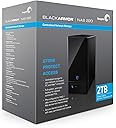
๐ผ Secure your data fortress โ because your business deserves zero downtime.
The Seagate BlackArmor NAS 220 is a professional-grade 2-bay network attached storage solution offering 2TB of total capacity with RAID 1 mirroring for data redundancy. Designed for small businesses and tech-savvy users, it features gigabit Ethernet connectivity, hardware encryption, and comprehensive backup options including bare metal recovery. It supports cross-platform file sharing and media streaming, with advanced user access controls and a web-based management interface, making it a reliable centralized storage hub for up to 20 PCs.
| ASIN | B002HKCVVW |
| Additional Features | Portable |
| Brand | Seagate |
| Cache Memory Installed Size | 2 |
| Color | Black |
| Compatible Devices | Desktop |
| Connectivity Technology | Ethernet, SATA, USB |
| Customer Reviews | 3.7 out of 5 stars 153 Reviews |
| Digital Storage Capacity | 2 TB |
| Global Trade Identification Number | 00763649016510 |
| Hard Disk Description | Desktop |
| Hard Disk Form Factor | 3.5 Inches |
| Hard Disk Rotational Speed | 7200 RPM |
| Hard-Drive Size | 2 TB |
| Hardware Connectivity | Ethernet, USB 2.0 |
| Hardware Platform | Mac, PC |
| Installation Type | Internal Hard Drive |
| Item Weight | 8.1 Pounds |
| Manufacturer | Seagate |
| Mfr Part Number | ST320005LSA10G-RK |
| Model Number | ST320005LSA10G-RK |
| Number of Items | 1 |
| Special Feature | Portable |
| Specific Uses For Product | Personal |
| UPC | 763615737692 111790909012 151902959405 763649016510 100177271705 |
I**!
More space than I will ever need??
I've worked in IT since 1983. I've had lots of units (Western Digital - UGH!) and this Seagate unit has been the best of it's kind, though it's not for the technologically challenged. If you are looking for a drive you can plug in and use, you'll need to do a bit of work to get this up and running, but once configured - it's hands off for everything else. I would not recommend this to someone who doesn't have a good understanding of setting up disk shares/users/groups or isn't willing to read up on these subjects to configure the device. It's relatively easy to setup for the technically savvy but not so easy to setup if you're a computer novice. The machine plugs directly on your home network (router/hub) and can be accessed by any device that will connect to a 'shared' drive. It does not have wireless connectivity, but if you connect it into a wireless hub, you can access it via a wireless device (e.g. a wireless laptop running iTunes or Windows Media or just as a shared drive). This unit has a 'media service' that lets you publish a share as a music source and access it from iTunes on other computers. It can be accessed via a variety of file sharing protocols so if you've got a mixed environment at home (Windows, MAC, Linux), this machine is great. It also has a wiki feature - though I can't find a use for it at home but might work in a small office environment or if you keep track of things (recipes??) and need a storage mechanism. This unit also can be configured to send e-mail alerts for various events (reboot, shutdown) and has a web interface for configuration. It comes with a utility for Windows PCs to detect the unit on the network - but the web interface must be used to configure the device so if you're using MAC/LINUX, you'll need to know how to look at your router to figure out what IP address the machine got, if you have automatic IP addressing (DHCP) on your router/hub. From there you use the IP address to get to the device via a web browser. The Windows utility does this easily, but it's not too difficult if you know how to do the above. For those who are not technologically savvy (I'm trying to leave out most of the technobabble here), some of the settings may be a bit daunting (NFS, CIFS, FTP) and the concept of creating 'shares' and setting access levels and creating user accounts. However, if you are using this in a family setting and you want to setup separate areas for each member of the family (or create a 'private' area only accessible to a select group) then this unit can do this - but you need to know what you are doing. This unit comes with two-2 terabyte drives which can used separately or be configured in a mirror formation (a.k.a. RAID 1). If you don't use mirroring, you get 4 terabytes of space but if you lose a drive due to failure, you lose the data on that drive. By using mirroring, both disks have exactly the same information on them which will always give you a backup if one of the drives fails. The only downside of mirroring is that you lose half of the space since both drives 'mirror' each other and contain exactly the same information. I highly recommend using mirroring - This way, if either one of the drives fails, you can replace it and not lose your data. This was an important feature for me - I rely on it to store the bulk of my data without having to do regular backups (who does those at home??). Compared to Western Digital, Seagate (in my opinion and experience) has much more reliable disk drives. I've bought and lost two Western Digital units (USB/Firewire) and will never buy another. If you want to have a unit that you can use for all of your data and store your iTunes on it (and access it from MAC and Windows and Linux as I do), then this unit is an excellent option. If you have someone in your family who's good with computers, ask for assistance to set it up - it's worth getting this unit especially in a multi-user environment. If you're by yourself and/or know very little about computers and don't need the device to be accessible by any other than one PC, consider something you can connect directly to your PC instead.
C**I
Solid piece of hardware
I've been using a 220 for the best part of year now and I'm reasonably happy with it. To start at the beginning... I originally opted for the Seagate from the local electronics store. I figured it was a name brand and I could slowly get more as required. Boy did I get that wrong! About 3 months after I purchased my one, they stopped importing them into the country. This was both a good and a bad thing as I was having issues with the 220. What was happening was that there seemed to be an inordinate amount of disk reading and writing. After a bit, one of the LEDs started coming up red - obviously not a good sign. What passes for a manual was absolutely useless but I managed to work out that one of the drives had failed. So I transferred my data back off the unit and took it back to the store. They hadn't run out of stock yet so they kindly replaced the unit for me. That was about 6 months ago. I've had absolutely no issues with the replacement since. I did however have a need for a second drive and there being no 220s available, I opted for a QNAP212. In honesty I'm not impressed. The QNAP goes to sleep after a period of inactivity (there's probably a setting that I could use to stop that). My main gripe is that it takes ages for it to boot up and just as long to switch off whereas the 220 is a mere 20-30 seconds. Although it irks me that the cruddy 220 manual doesn't tell you how to switch it off. The 220 that I'm currently ordering is a replacement for the QNAP (turns out the QNAP has a few other features that I can use elsewhere). That I can now order a 220 from Amazon pleases me (I couldn't when I was looking for a new one as the available Amazon retailers wouldn't ship to here at the time). The only concern I have is with the power pack. In this country, we use 3 pin with the top two canted outward. My original drive came with a number of adaptors to fit the country that your in so I hope that this will be the same for the Amazon units. I'll risk one and see how it turns out... In summary, I have no issues with the unit, it was a breeze to set up, works flawlessly (other than that bad drive i had but a few teething issues are expected). Perhaps my only complaint is that these units aren't as plentiful as they should be. It makes me wonder if Seagate is phasing them out or something? Update Okay so I got the unit that ordered from Amazon. Thankfully it was in all major respects exactly the same as my previous unit that i got locally. I was betting on it having the same universal power supply and it did. There was however one slight difference in that it didn't come with the packet of "overseas" adaptors. With the application of a little heat, I was able to alter the pinning so that it fits our mains sockets however I would prefer a proper solution. My next task was to upgrade the drives. Physically swapping the 2T sata drives for 3T drives wasn't hard. What proved to be a challenge was configuring the nas to talk to them. I'm not an IT guru but I had enough knowledge to get it done although at points I struggled. It seems to me that these Seagate units are more oriented towards the heavy end of IT savvy people. To date things are doing okay and I've no complaints.
J**N
Great for backing up.
I purchased this NAS box because of the RAID 1 and Media Server cababilities. I haven't had any trouble with the hard drives and in RAID 1 there is 1 TB of space, which is plenty for now. I purchased this product from Amazon for $229, which is an excellent price considering it came with 2x1 TB drives. My PS3 kept getting DLNA errors when attempting to read from the NAS device for pictures, music and video. I haven't tried it with any other DLNA compatible devices though. Copying files to and from the device wirelessly is pretty slow (2-3 MB/sec) same on a Gigabit wired connection. I ended up turning off the media server on the NAS box because it slowed down even more when it was turned on. I would recommend this product for its price and backup capabilites, however, not for the media server or its speed. Also the Seagate Global Access for remote access is too slow to use. I have a 6Mb/sec Internet connection at home and it takes about 5 minutes just to load the file lists on the NAS box when accessing remotely through Global Access.
C**R
Solid. Works well.
I admit I was hesitant to order the BlackArmor 220, based on all the negative reviews and reported problems. I did end up ordering it since I needed a NAS and the competing systems were equally poorly reviewed. The differentiator was the print server, which I wanted. After only a few hours, I had it up and running, and had accomplished the following: Hardware installation and configuration. DONE Wired Windows Vista client configured. Music and pictures uploaded. DONE. Wireless Windows 7 client configured. One-click full backup of PC. DONE. Accessed shares from web. Uploaded and downloaded files. DONE. Invited friend to access a folder. He set up an account and got his files. DONE. I have not yet set up the printer server or media streaming, but I am confident those will also work as advertised. The key is to follow the instructions. The manual is almost 60 pages and there is just no way around reading it. I am convinced that many of the reported problems come from not following the instructions. One key is that you have to set up an admin account, but that account cannot access files. At a minimum, you must create a second account to access files. This is well documented, if somewhat counter-intuitive to some people. The included Acronis software is excellent. I have used Acronis before and was able to re-image a POS system in less than an hour. The BlackArmor comes with 5 licenses (which sell for $31 each on Amazon). The BlackArmor version is truly one-click. It finds the NAS and creates the image in the background with very low CPU usage. The final image is suprisingly smaller than the disk usage. Fantastic, and a great included bonus. I had no trouble with the defaults, NTP is running and not interfering. DHCP works fine. If the drive isn't found right away, try closing and re-opening the Discovery program. If applications don't see the share, reboot and try again. These simple steps were all the "debugging" I had to do. That said, this is not a thumb drive, and some knowledge of networks will be required to make sense of the NAS and configure it correctly. As far as performance, I would say it is noticeably slower than a local hard drive, but acceptable. The web access is significantly slower, but still usable. My wish list is for an Android and iPod client, although the web client does work on these platforms, it is not formatted for the small screens so it is somewhat clumsy. One minor suggestion -- have the discovery program open the default browser for administration, instead of seeking out IE. Firefox and Chrome work fine. If in the future I have a disastrous failure caused by the Seagate, or can't get the other features working, I will revise this review. However, out of the box, I'm breathing a big sigh of relief. Everything is working and doing what I bought the unit to do. UPDATE 7/19/14: I set up print and media server services and used them with no problem. After almost 3 years of running, one of the drives died. The unit wouldn't boot up and made a clicking noise. I bought a replacement drive (from the recommended list, same size, but a different model number than the original), followed the on-line tutorials to replace the drive and rebuild the RAID. Everything worked fine and the unit came back up with no data loss.
C**E
Media Server stops working after 1 week or update
So after returning my WD NAS to go with a more respectable company like Seagate, I quickly regret it. I intended to store all my files and media on this NAS and stream to my PS3. Out of the box it worked perfect, media server found all my files and played them flawlessly on my PS3. After about 3 days of the initial setup, I added more video files to play on my PS3. The media server would not recognize that I added new files and would not display them. I thought it might take an hour or two for it to update, but nope. I contacted Seagate Support, and they suggested I manually update the firmware. After doing so, the media server would not recognize any of my files new or old. The media player shows that the BlackArmor is available as a media server, but no files show. I contacted Seagate again, and they suggested I just return the product. I told them I am not the only one with this problem from what I read in reviews and forums, and asked when or if they will fix the problem. They flat out called me a liar and told me to just return the product. Well I guess after I submit this review I will initiate a return. Does anyone know of any NAS out there that will work good as a Media Server? Please anyone, I don't know what else to try.
P**T
The Seagate NAS220 is DLNA Compatible and works as a media server
I have seen people complain that this devicse is not DLNA compatible, however, it is. It working great as a media server to my Sony Blu Ray drives and Samsung TV that are all DLNA compatible. It is important that you only include DLNA compatible files in your media server share. For instance, I originally had a .mts (AVCHD) file in my video folder and my DLNA compatible television could not find my media server at all. It did not say that there was an unreadable file, it simply would not find the server (so no music, no photos, no videos). I deleted the .mts file and my server was found and all my media files were accessible. I don't think this is a NAS problem but a problem with my TV software and DLNA compatibility. Directions: 1. Open BlackArmor Discovery; Select the Device that you would like to set up as a Media Servier and Select View Drive Details 2. Then Select the Share that you want to use as your Media Server. If you have not yet created this share, you can do that on a future screen. Just select any share and then Select Manage 3. Select Media / Media Service 4. Select Enable by Service. This enables this device to be a media server. Select Submit. 5. Then select Access 6. From this menu select Global access to and then select enable to make this device available to all on the network. Submit 7. Then Select Storage / Shares 8. If you have not created the share that you want to be your media server, this is the screen to do that. Click on the plus sign at the bottom right hand corder of the screen 9. You will then have a screen that enables you to provide the share name, description, etc. Select Media Service - Enable and submit 10. Then return to the following screen: 11. On this screen you can edit shares with the pencil to the right of each share. Make sure that you have only designated one of your shares as a media server - MS. So only one share should have a checkmark under MS. 12. Logout of your Black Armor Software 13. Either go to you media server share shown on your "my computer screen" or you can view it with the Black Armor Software. With the Black Armor Software Select View when you have your media server share selected. 14. When viewing your media server share, create 3 folders, one called "Our Music", one called "Our Pictures" and one called "Our Videos" 15. Move your media files into the appropriate folders. It is important that you only put files that are DLNA compatible in these folders. Jpegs for photos, mp3 for audio and the following for video. See: [...] Good Luck
J**2
Works well if you have the right switch/router--later started misbehaving
I feel like I'm in a good place to review this item because I own both the Seagate 220 and also the Western Digital MyBook World Edition, and they are competitors. Both are inexpensive network attached storage appropriate for a home office or for home use. For both machines the only feature I use is reading and writing to the hard drive through windows sharing (from either a windows computer or a linux computer). For that reason I will not comment too much on some of the features like automatic backups, media sharing, etc. For the most part on machines of this level those features are gimmicks. They don't work very well and they degrade overall performance of the NAS, as you will be able to read from other people's reviews. When I want to play media from my NAS, I just mount the drive through windows sharing and play what I want. When I want to back up my computer, I copy stuff myself. For the reason I have a generally more favourable view of both of these machines than other people. Anyway, on with the review. First I will mention two issues I had to overcome before this NAS was reasonably functional for me. 1. This is the big issue I had to fix: This Seagate NAS does not work well with just any gigabit switch. I originally had it plugged in to a TP-Link switch. I could write to the NAS at full speed, but when I wanted to read from it, the speed was horrible. Maybe 1/20th the speed at which I could write to the NAS. After spending a good deal of time researching the issue online I found out the NAS doesn't play well with some routers and switches. Notably it does not work with D-Link switches. Well, I will add TP-Link to the list it doesn't work with. If I plugged the NAS directly into my Linksys router, the problem went away, but that's only a 100-megabit connection. The funny thing is that the traffic still had to go through the TP-Link switch. In other words, the device this is directly plugged into matters, the rest of the network really doesn't. Anyway I tried various solutions (changing the frame size and so forth). They don't work. The only solution was to buy a netgear switch. If your network has a TP-Link or D-Link switch or router that you'd like to plug this into, budget for a netgear gigabit switch. They aren't real expensive, but I was very annoyed at this problem. 2. This is a small issue, and partly windows' fault: If you create a shortcut to this shared drive in windows and then play a movie from the NAS, it will disconnect 20 minutes into the movie. I originally thought this had to do with the NAS going into sleep mode, but I disabled that feature and it didn't change anything. I didn't notice the problem when playing from my linux machine, and the WD NAS doesn't do this. Anyway, the solution is to actually map the drive in "My Computer" instead of just using a shortcut to get to it. You'd think there would be no difference between those two, but the former works and the latter disconnects after 20 minutes. Having overcome those two problems, the NAS now functions very nicely for me. The main thing I use this NAS for is to play movies that I have ripped from my DVD collection. They play perfectly on any computer in the house and I can even play two movies on two different computers. Actually I'm not sure how many movies I can play at a time. Nor have I tried playing any HD movies yet, so I can't comment on that, but the speed over my gigabit network seems more than adequate for that. A couple of comparisons with the Western Digital: 1. This machine is significantly faster than the Western Digital. When I upload to this machine from my Linux box I sustain about 18 or 19 megabytes per second. On the Western Digital I get about 11. This may not sound like a big difference here, but when copying a large file or backing up a whole computer, it makes a very noticeable difference. I don't pay a lot of attention to my download copy speed, but it is above 30 MB per second, whereas I get more like 19 from the Western Digital. I am running this in a RAID 0 configuration. However, I also did a speed test using JBOD and the speeds were exactly the same, so the gain is not really from the RAID (the WD I use has only one HD in it, so there's no RAID option). 2. The Seagate is significantly louder than the Western Digital. It's not loud compared to most hardware, but you can hear the drives spinning if you get close and listen, and when they start up or go to sleep you can hear a click that is pretty noticeable. Sometimes it clicks when no one is using it and you would think it would just be sleeping peacefully. At first I thought this was a hardware problem but it turns out that my NAS is fine. It's just louder than expected. Of course, WD sets the bar high for silence. It is almost impossible to tell if the WD machine is on or doing anything if you ignore the lights on the front (or disable them, as I have). 3. The Seagate is much larger physically. It's not big on an absolute scale, and I don't keep it on my desktop, so it's not a problem, but it's much larger than the WD. The WD is just a hair larger than the actual drive inside it. The Seagate looks like a UPS or something. Anyway I think it looks nice, but one should be aware that it's not as minimalist as some others. 4. The Seagate doesn't try to accommodate tweaks from expert users as much, and it has a much smaller and less active user base. Both machines run Linux under the hood, so if there's a problem with them an experienced user could get in and change things up. On the Western Digital you can enable ssh access through the web interface. And there are bunches of tutorials online about how to fix the technical glitches this comes with and even install new hardware on it. Personally I went in and disabled their media playing software and the software that runs an apple network. Apparently on the WD these things run even though you disabled them and they mess the machine up. Anyway, there is no ssh option on the seagate, so in principle you can't go in and change things. There aren't really help pages for experts. However, recently a user did figure out a way to enable ssh. He wrote an update to the firmware. I used it and it works great, but I can see how some users may not feel comfortable upgrading their firmware in order to get ssh access. Anyway after ssh'ing in, I found that there is one windows bug that the NAS wasn't dealing with well. That is, windows clients delete the last character of the share when they are reading and it causes a bunch of errors to the log, though it still seems to work ok. The workaround is to create another share on the NAS that is not visible, called "Publi", which refers to the same directory. So I'm glad to be ssh'ing in now. Still, for tweaking, it's a better bet to go with the WD. It's been vetted by more linux people. Anyway, this drive works very well for me. It's my larger and higher performance network attached storage and it is quite reliable for me. When I purchased it, this was cheaper than the equivalent capacity in WD (I use the 4 TB version). In part I believe I'm happy with it because I don't try and use the features that get touted in ads. I just use it as network attached storage. That's true of both drives, and it's what I recommend. The forums for both these machines are full of people ranting about how their device doesn't do what they want and that no one at the company seems to care about them---that's why I say just use it as a remote hard drive. Based on my perusal of the forums, Seagate seems to support their NAS customers less (at least on the forums), though neither company is real great in that respect. I love both of my network storage devices and I use them both all the time. This seagate is a great buy. When I bought it, at least, it was the cheapest NAS available with this capacity and it turns out to be a very good performer. It's really nice to be able to back things up or store all my large files in one place and be able to access them from any computer in my house. If I were to buy a third NAS, it would probably be another Seagate, just because it's cheaper and faster than the competition. But make sure you plug it into a NETGEAR device, not a TP-Link or D-Link. I'm not sure about other brands. ======================= Edit Oct 2011 =========================== Well I've had this for almost a year now and about a month ago it stopped behaving well. Specifically it started reading from the disk all the time. It's caught in some kind of infinite loop and I can hear it ticking away all day long. It no longer goes to sleep. Also, when I play movies from it there is jitter every time it multitasks from doing what I asked it to do to whatever it is stuck doing. It's not being used by anything, I've rebooted about a million times, and I even installed a firmware update to no avail (it is using the latest firmware as of Oct 2011). I even installed the ssh hack and tried really hard to identify what process is causing this effect using linux tools--in vain. These days I have to physically turn it off to keep it from constantly reading and rereading from the disk. I'm thinking about copying everything off of it and reimaging the whole thing--starting from scratch. Unfortunately I now have so much stuff on it that it won't fit on any other hard drives I own. So anyway, there's some bug in the software that doesn't come up for almost a year but then becomes really annoying. It's been an OK NAS for some time, but I think the several issues I've had, combined with the louder noise and the slower speed relative to the new Western Digital offering make Western Digital a much better alternative. Go for the WD MyBook Live (the black one...not the white one) if you can fit all your stuff on 3 TB instead of 4. ==================================== Edit 2: Later in October 2011 ============================ I went to copy everything off this drive last week so I could reinstall to factory settings, but one of the drives had failed. It's got a 3-year warranty, so Seagate replaced it quickly and easily at no cost to me--but I did lose all my data. That kind of stunk! I think this constant griding killed the drive (either that or it was a symptom of a failing drive...but I didn't get any warning before the failure). Thumbs up for Seagate's warranty service, by the way. Super quick, no hidden costs, and they didn't even ask for a receipt.
B**N
Good Solution
I ordered this to allow for a home media server and for data backup as well. I have had this for several months and it has performed well in this regard. It connects well with my older Western Digital Media Player and to my windows 8 and linux (dual-boot) laptop. My biggest complaint, however, is that this requires software to be installed on the windows or mac computer to enable it to see the server. Linux had no problem finding the server. My wife and I both have work laptops without administrative privileges for installing sotware. Mine is a windows 7 machine and my wife's is a mac. While the user manual shows it will work with both OS, you will need to have administrative privileges. This is not a huge deal for us, however. As a media server, it works excellently. I put the server on a UPS in the basement and everything connects well through either wireless or wired network. It is only slightly slower than pulling off the computer hard drive. We stream video and pictures off of the server and there is no delay or skipping in the video. In the future, I intend to obtain a separate external hard drive to connect through USB for data retention and switch this server to a RAID 0 configuration. However, I do not need more than the 1TB available in RAID 1, so I have delayed this switch until the time that I need the 2TB storage space. The transfer speed is acceptable as is and I do not require the extra speed gain from switching RAID configurations.
Trustpilot
1 week ago
1 month ago