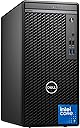
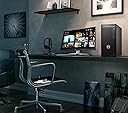
🚀 Power your productivity with the Dell Optiplex 7010 — where speed meets sleek.
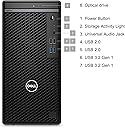
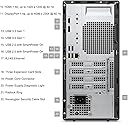
The Dell Optiplex 7010 Tower is a powerhouse business desktop featuring a cutting-edge 13th Gen Intel Core i7-13700 processor with 16 cores and 24 threads, paired with up to 64GB DDR4 RAM and a lightning-fast 2TB PCIe NVMe SSD. Its compact design houses versatile connectivity options including 8 USB ports, HDMI, DisplayPort, Bluetooth, and Wi-Fi, all running on Windows 11 Pro for a seamless professional experience. Ideal for managers and professionals demanding speed, reliability, and a clutter-free workspace.
| ASIN | B0DTB7DFJ3 |
| Aspect Ratio | 16:9 |
| Best Sellers Rank | #36,346 in Computers & Accessories ( See Top 100 in Computers & Accessories ) #1,209 in Tower Computers |
| Brand | Dell |
| Built-In Media | Mouse |
| CPU Model | Core i7 |
| CPU Model Number | i7-13700 |
| CPU Model Speed Maximum | 5.2 GHz |
| CPU Speed | 2.1 GHz |
| Cache Memory Installed Size | 30 MB |
| Cache Size | 30 MB |
| Color | Black |
| Compatible Devices | Keyboard, Mouse |
| Connectivity Technology | Wi-Fi |
| Cooling Method | Air |
| Customer Reviews | 4.3 out of 5 stars 10 Reviews |
| Display Resolution Maximum | 3840x2160 |
| Graphics Card Description | Integrated |
| Graphics Card Interface | Integrated |
| Graphics Coprocessor | Intel UHD 770 Graphics |
| Graphics Description | Integrated |
| Graphics Ram Type | Shared |
| Hard Disk Description | SSD |
| Hard Disk Interface | PCIE x 4 |
| Hardware Interface | PCIE x 4 |
| Human-Interface Input | Keyboard |
| Item Dimensions | 11.7 x 6.1 x 12.8 inches |
| Keyboard Description | US |
| Keyboard Layout | QWERTY |
| Manufacturer | Dell Computers |
| Memory Clock Speed | 3200 MHz |
| Memory Slots Available | 2 |
| Memory Speed | 3200 MHz |
| Memory Storage Capacity | 16 GB |
| Model Name | OptiPlex |
| Model Number | 7010 |
| Model Year | 2025 |
| Native Resolution | 3840 x 2160 |
| Number of Component Outputs | 2 |
| Operating System | Windows 11 Pro |
| Optical Storage Device | DVD-RW |
| Personal Computer Design Type | Computer Tower |
| Power Consumption | 180 Watts |
| Power Plug Type | Type B - 3 pin (North American) |
| Processor Brand | Intel |
| Processor Count | 16 |
| Processor Series | Core i7 |
| Processor Socket | FCLGA1700 |
| Processor Speed | 2.1 GHz |
| RAM Memory Installed | 16 GB |
| RAM Memory Technology | DDR4 |
| RAM Type | DDR4 SDRAM |
| Ram Memory Maximum Size | 64 GB |
| Resolution | 3840 x 2160 |
| Specific Uses For Product | Business |
| Style Name | Intel i7-13700 |
| Total Number of HDMI Ports | 1 |
| Total Usb Ports | 8 |
| Video Output | DisplayPort, HDMI |
| Video Output Interface | DisplayPort, HDMI |
| Video Processor | Intel |
| Warranty Description | 1 |
| Wireless Compability | Bluetooth |
| Wireless Technology | Wi-Fi |
M**R
Compact - fast- quiet - small footprint. Perfect for my uses.
Was not at all happy that the Wi-Fi stopped working after one month of use - just as I needed to download a file to fix a website. (EDIT: I concluded that the Wi-Fi is susceptible to interference, but from what has not been discerned. Pehaps it was proximity to the Wi-Fi in the nearby old PC that has since been turned off. The new Wi-Fi is working once more.) The cabinet size is terrific compared to the Corsair 500R ATX Mid Tower case for the PC I assembled a dozen years ago. I did not see a Wi-Fi card where I expected it to be, so I dug out an Ethernet cable and got the Internet connection back. Unlike the Corsair cabinet with all its fans and associated noise, this cabinet has a single fan directed over the top of the CPU. The cabinet is wonderfully quiet. I have no idea why, but I inadvertently tagged the caps button more times on the wired keyboard than I have in all my years of keyboard use. I replaced the keyboard with a wireless. Same with the mouse. The PC does not have audio ports that would support my old Bose Companion 3 speakers, so I am looking for a 3.5mm to USB adapter. That is not a ding on Dell, just an observation. The speaker in the Dell PC is not high quality - since the case is under the desk and sound is muffled. More to follow - I need to research the audio cable and Wi-Fi card.... (Edit: once the Internet connection returned with the Ethernet cable, I leaned what the WLAN card looks like. And I purchased a nifty 5" patch cord that took longer to get out of the packaging than it did to insert inline. The Old Bose speakers are far superior to the thing in the case - and they are stereo with woofer. OK, fair enough, the speakers add a little to desk clutter, but I chose sound quality as the key factor. Remember, I got rid of the wires for the keyboard and mouse - less clutter.) I added a star back now that I have a more clear understanding of the Wi-Fi card issue.
J**Y
Small but very fast
CONS: Arrived in a very small but well packed box. No instructions or owner's manual. Had to go to the DELL website to download the manual. Half the size of my previous tower. No front 3.5 or 5.25 bays. No option to read chips from camera or other storage devices, no options to read temp inside the computer. Not enough USB ports to compensate for the shortfalls. You must manually install other USB port options. Concerned about the power fan as it makes very little noise and goes up and down as power is applied. Could be a good tech improvement. PROS: Lightening fast with the 64-memory option. Boots up extremely fast compared to my older WIN10 computer. Was able to easily find all of my previous computer software to include website addresses, software links and most passwords. Re-installation of older Windows programs was relatively easy to do. It takes a few days to understand and tweak Windows 11, but once you do it is fine. I was easily able to add a new 1TB SATA drive inside of the computer to add more storage space. This new computer was actually already pre-wired to do this, and it only took a few moments. Mount second hard drive, connect data and power wires, reboot and you are done. You need to go to Settings and then Storage to activate your newly added hard drive. It is a bit cumbersome but doable, and it is now working fine as a second hard drive. There are many options on the Motherboard that they do not point out for whatever reason. BLUF: Very satisfied. Very fast, very smart, very workable. Graphics are fantastic. Do your research on this computer and the options are endless.
Trustpilot
2 months ago
3 weeks ago