Buy anything from 5,000+ international stores. One checkout price. No surprise fees. Join 2M+ shoppers on Desertcart.
Desertcart purchases this item on your behalf and handles shipping, customs, and support to USA.
🚀 One Dock to Rule Your Desk — Power, Ports & Productivity Unleashed!
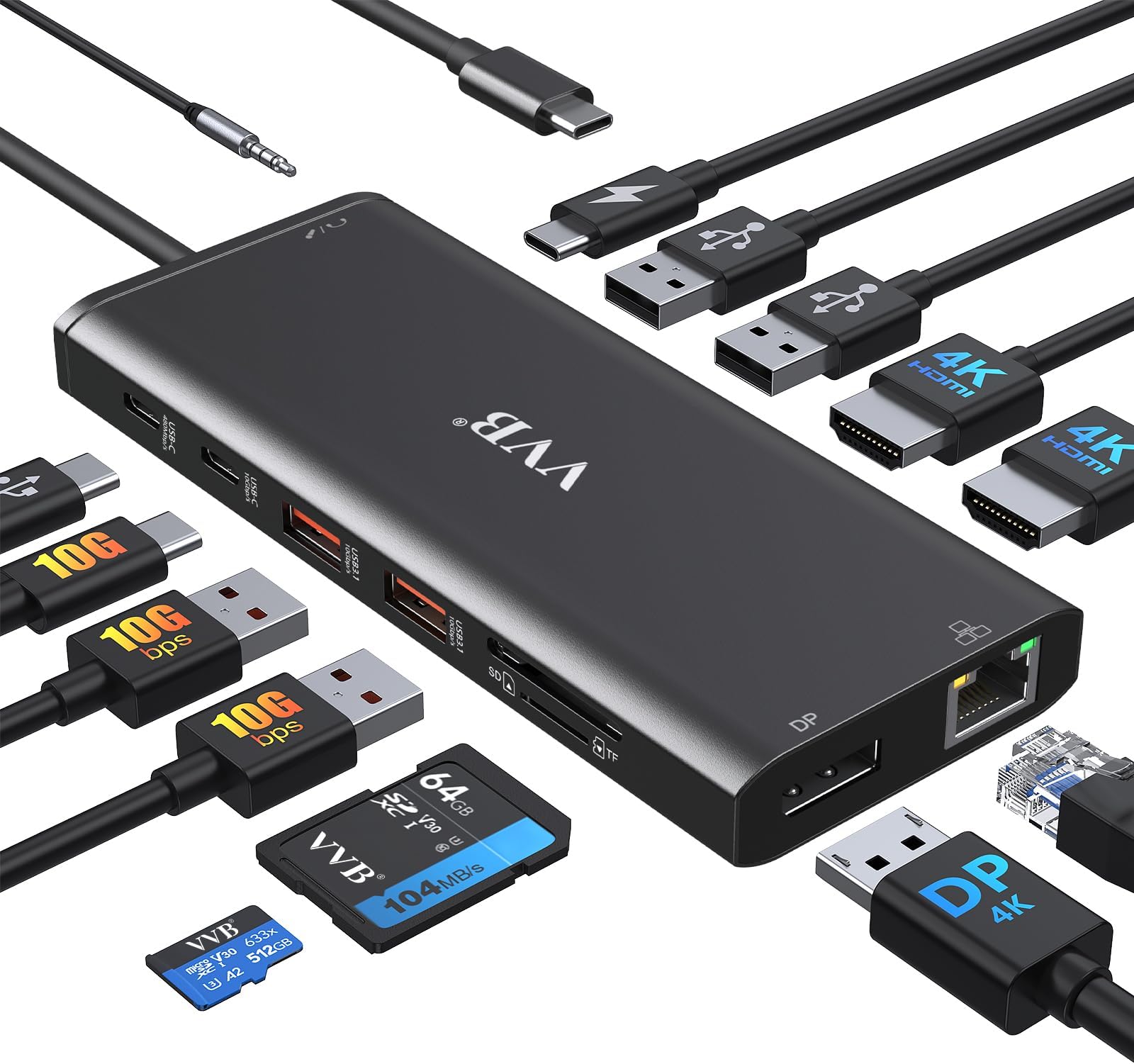
This 14-in-1 USB-C Docking Station is designed for professionals seeking a clutter-free, high-performance workspace. Compatible with major laptop brands like Dell, Lenovo, and HP, it supports dual 4K monitors, ultra-fast data transfer up to 10Gbps, and 100W power delivery charging. With Ethernet, SD card readers, and multiple USB ports, it consolidates all essential connections into a single sleek hub, perfect for multitasking millennials who demand efficiency and style.


| ASIN | B0DJ6YJSDJ |
| Additional Features | Fast Charging, Powered |
| Best Sellers Rank | #1,189 in Electronics ( See Top 100 in Electronics ) #11 in Laptop Docking Stations |
| Brand | VVB |
| Color | Black |
| Compatible Devices | All Laptops and Phones with a Full-featured USB Type-C port (support DisplayPort,charging,data transfer protocol), such as iPhone 15 Series,Dell latitude 5530/5430/5431/5420/7390/5540/5420/5500/7490;XPS 9380/13/15/17;Dell Inspiron 5420/7420/7425;Dell Precision 5470/77680/7780;Dell Vostro 5410/5620; Lenovo T14/s/T480/T490s/ThinkPad X1 Carbon/Yoga Gen6/7/8; HP Elitebook 630/640/645/650/655 G9; Elitebook 840/850 G6/G7/G8/G9;Elitebook 845/Elitebook 830 G7/G8/G9/G10; EliteBook x360 830 G9/G10; EliteBook x360 1030 G2/G3/G4/G7/G8; HP EliteBook x360 1040 G5/G6/G7/G8/G9/G10; Elitebook X2; HP Probook 440 G6;445 G7;450 G5/6/7/9/10;455 G9/10;650 G8/HP Zbook Firefly 14/15 G7/G8/Zbook 15 G3/HP Spectre x360; Surface Pro X/9/8/7,Surface Laptop 3/4/5,etc; Mouse/Keyboards,Smartphones Compatible Devices All Laptops and Phones with a Full-featured USB Type-C port (support DisplayPort,charging,data transfer protocol), such as iPhone 15 Series,Dell latitude 5530/5430/5431/5420/7390/5540/5420/5500/7490;XPS 9380/13/15/17;Dell Inspiron 5420/7420/7425;Dell Precision 5470/77680/7780;Dell Vostro 5410/5620; Lenovo T14/s/T480/T490s/ThinkPad X1 Carbon/Yoga Gen6/7/8; HP Elitebook 630/640/645/650/655 G9; Elitebook 840/850 G6/G7/G8/G9;Elitebook 845/Elitebook 830 G7/G8/G9/G10; EliteBook x360 830 G9/G10; EliteBook x360 1030 G2/G3/G4/G7/G8; HP EliteBook x360 1040 G5/G6/G7/G8/G9/G10; Elitebook X2; HP Probook 440 G6;445 G7;450 G5/6/7/9/10;455 G9/10;650 G8/HP Zbook Firefly 14/15 G7/G8/Zbook 15 G3/HP Spectre x360; Surface Pro X/9/8/7,Surface Laptop 3/4/5,etc; Mouse/Keyboards,Smartphones See more |
| Customer Reviews | 4.4 out of 5 stars 779 Reviews |
| Data Transfer Rate | 10 Gigabits Per Second |
| Enclosure Material | Plastic |
| Hardware Interface | DisplayPort , HDMI , USB 2.0 Type A, USB 3.0 Type A, USB 3.1 Type A, USB Type C |
| Manufacturer | VVB |
| Number of Ports | 14 |
| Operating System | Windows |
| Special Feature | Fast Charging, Powered |
| Total USB Ports | 4 |
| Total Usb Ports | 4 |
| Warranty Description | 1 Year |
S**S
One Plug to Rule Them All (and Finally Clean Up My Desk)
I finally got tired of playing "musical chairs" with the two USB ports on my laptop every time I sat down to work. I picked up this 14-in-1 USB-C Docking Station, and it has completely transformed my workspace from a tangled mess of wires into something that actually looks like a functional office. The "Everything Everywhere All at Once" Port Selection The sheer number of ports on this thing is impressive. I have two monitors hooked up via HDMI, my keyboard, mouse, a backup hard drive, and an Ethernet cable for a stable connection—all running through a single USB-C cable into my laptop. It even has SD card slots, which is a lifesaver for quickly moving photos and videos without hunting for a separate dongle. Performance & Setup Setup was about as "plug-and-play" as it gets. My laptop recognized both external monitors immediately, and the picture quality is crisp with no noticeable lag. The 100W Power Delivery (PD) is a huge win, too—it charges my laptop while I work, so I can leave my actual power brick tucked away in my travel bag. A Few "Pro-Tips" from My Setup: Check Your Port: Before you buy, make sure your laptop's USB-C port actually supports "DisplayPort Alt Mode" or video output. If it’s just a basic data port, the HDMI won’t work, and you’ll be left wondering why your monitors are dark. Heat: Like most high-powered hubs, it can get a little warm when you have ten things plugged in at once. It’s nothing alarming, but I’d recommend keeping it in a spot with a little airflow rather than burying it under a stack of papers. The "Screw" Factor (Again): While there aren't literal screws here, the connection is snug. Just be gentle with the main cable; since everything relies on that one plug, you want to treat it with a bit of respect. The Verdict If you’re looking to turn a single laptop into a full-blown desktop workstation with dual monitors, this is a fantastic value. It’s sturdy, reliable, and has enough ports to satisfy even the most gadget-heavy setup. My desk is finally organized, and I only have to plug in one cable to get to work.
Y**D
easy to connect
I bought this USB-C docking station to connect multiple devices to my laptop, and it works perfectly. The dual HDMI and DisplayPort support makes it easy to run multiple monitors, and the 4K resolution looks sharp and clear. I also like having extra USB ports, Ethernet, and SD card slots all in one device. Setup was simple, and the 100W PD charging keeps my laptop powered without issues. Great value for the price.
M**R
Perfect docking station for a Lenovo ThinkPad
It worked without issues out of the box on a Lenovo ThinkPad running Windows 11 and Ubuntu Linux (dual boot). I've been using for more than a week, and everything is working - including Ethernet, Displays, Audio, SD card reader, USB ports, USB charging. My only remark (not a criticism) is that the audio output is NOT amplified, so I needed to upgrade my speakers, no big deal - and also doesn't come with power supply, but works with a generic USB-C PSU with enough power. I would definitely recommend!
M**D
Value versus longevity.
This is the third dock I have purchased in the last 3 years or so (different brands). The previous one lasted a little over 2 years. So, I am not setting my expectations high, thus the 4-star rating. It performs as expected and the setup is easy (HP ENVY Laptop); it fits my needs. Now longevity will be the bigger issue. Price wise it's decent and if I can get 2 or more years' worth of use out of it, then I am ok with that.
A**R
Easy set up
Bought this to replace my old hub that quit working. Wasn’t sure if it would work. I am very happy to say that it works great and was easy to set up my two screens, computer, keyboard, mouse, and speakers. It is half the size of my old hub. Everything works great at a great price.
K**H
Greate product
Works great. Heavier than expected. Better quality item than I expected.
S**D
As Expected and Advertised Out of the box
This docking station is exactly what it says it is. I plugged it into my laptop right out of the box, added 2 HDMIs, 4 USBs right away. It has been running well. It does get a bit warm - after 3hrs of constant use in a generally warm bedroom, it is measuring a 90° F surface tempurature*. The size and weight are exactly as expected. This review was written with only same-day use, therefore I cannot determine durability over time. *Measured with a ThermPro infrared thermometer. By comparison, my laptop's warmest spot was 81°, my monitor screen 82° - warmer than other ambient tech, but not burning.
B**.
Make sure your pc has usb c with display port.
Works good. Make sure your computer has a display usb c port or the HDMI will not work.
Trustpilot
1 month ago
2 weeks ago