Desertcart purchases this item on your behalf and handles shipping, customs, and support to USA.
๐ Elevate Your Home Network to WiFi 7 Supremacy
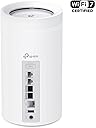
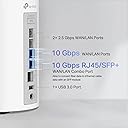
The TP-Link Deco BE85 is a cutting-edge tri-band WiFi 7 mesh system delivering up to 22 Gbps speeds with 8 high-gain antennas covering 9,600 sq.ft. Equipped with dual 10G WAN/LAN ports and additional 2.5G ports, it supports simultaneous wired and wireless backhaul for unmatched performance. AI-driven seamless roaming and robust HomeShield security make it ideal for smart homes with 200+ devices. Easy app setup and voice control complete this future-ready networking powerhouse.


| ASIN | B0C4W31L4N |
| Antenna Location | Home |
| Antenna Type | Fixed |
| Best Sellers Rank | #5,886 in Computers ( See Top 100 in Computers ) #21 in Whole Home & Mesh Wi-Fi Systems |
| Brand | TP-Link |
| Built-In Media | 1 RJ45 Ethernet cable, 3 Power adapters, 3 x Deco BE85 unit, Quick Installation Guide |
| Color | White |
| Compatible Devices | Smartphone, Tablet |
| Compatible devices | Smartphone, Tablet |
| Connectivity Protocol | Wi-Fi 7, Ethernet, USB |
| Connectivity Technology | Wi-Fi 7, Ethernet, USB |
| Control Method | App |
| Controller Type | App Control |
| Coverage | Up to 9,600 Sq.Ft. |
| Customer Reviews | 4.0 out of 5 stars 109 Reviews |
| Data Transfer Rate | 22000 Megabits Per Second |
| Frequency | 6 GHz |
| Frequency Band Class | Tri-Band |
| Frequency band class | Tri-Band |
| Global Trade Identification Number | 00840030706905 |
| Has Internet Connectivity | Yes |
| Has Security Updates | Yes |
| Is Modem Compatible | No |
| Item Dimensions L x W x H | 12.8L x 12.8W x 23.6H centimeters |
| Item Type Name | Mesh WiFi |
| Item Weight | 9.66 Pounds |
| LAN Port Bandwidth | 10000 Mbps |
| Manufacturer | TP-Link |
| Maximum Upstream Data Transfer Rate | 10000 Megabits Per Second |
| Mfr Part Number | Deco BE85(3-pack) |
| Model Name | Deco BE85(3-pack) |
| Model Number | Deco BE85(3-pack) |
| Model name | Deco BE85(3-pack) |
| Number of Antennas | 8 |
| Number of Items | 1 |
| Number of Packs | 3 |
| Number of Ports | 4 |
| Operating System | RouterOS |
| Other Special Features of the Product | Access Point Mode, QoS |
| Router Firewall Security Level | Basic |
| Router Network Type | hybrid |
| Security Protocol | WPA2-PSK, WPA2-Enterprise, WPA3 |
| Special features | Access Point Mode, QoS |
| UPC | 840030706905 |
| Unit Count | 3 Count |
| Wi-Fi Generation | Wi-Fi 7 |
| Wireless Compability | 802.11.be, 802.11ac, 802.11ax, 802.11g, 802.11n |
| Wireless communication standard | 802.11.be, 802.11ac, 802.11ax, 802.11g, 802.11n |
M**F
Velocidad garantizada
Este fue el primer set de routers que me permitiรณ tener internet de alta velocidad en mi casa de 2 pisos. Probรฉ otros routers de la misma marca y no tienen la misma potencia que este. Excelente producto!
B**M
Best choice for my upgraded network
TP-Link Tri-Band, Deco BE85, WiFi 7 BE22000 Whole Home Mesh System was a purchase that I debated about and researched well. I am happy with it but will mention one picky issue. Once I upgraded from 1.2 Gbps Xfinity cable internet to 8 Gig fiber optic, I also wanted to upgrade my mesh router. I was using the Google Nest Pro WIFI 6e mesh router and was happy with it but the ethernet ports on it were only 1GB and I wanted to take advantage of my newer higher speeds. I knew that I wanted another mesh system and definitely a WIFI 7 one. There were several options but, years ago, I had the TP-link OnHub router which was the first router that never gave me any problems. I decided to stick with the tried and true and then debated between this system and the BE95. Although I have a phone and a laptop that are WIFI 7, most of my other devices are WIFI 6e or lower so I realized that the BE95 would exceed my needs for many years. I got the three pack of the BE85 since I have a large two story home with smart devices in the front and back yards as well as the garage. Iโm glad that I did because the three units give me complete coverage everywhere. Each of the three routers are the same so any of them can be selected to be the main router. I like this because it means that if the main one ever malfunctions, I can easily switch and not be without internet. They all have 4 multi-gigabit ethernet ports. I have three of my older devices on ethernet and the speed up and down is over a gigabit on each. The WIFI 7 phone and laptop routinely have over 1.5 Gb up and down wireless speeds. The installation was as easy as expected with the Deco app. The app was updated a couple of weeks after I got this system and version 3.7.14 works very well. I have a SmartHome with a lot of different devices and this app makes it so easy with a menu option to set up an IOT (Internet of Things) for those devices that work exclusively on the 2.4ghz network. It also features a network optimization selection which scans the network looking for any areas of interference. One can give a device priority and even choose a dedicated band and router for connection. I get all the information that I need easily without any monthly fee. The only bit of complaint that I have is the power plugs. At first I thought that I might have a defective router until I noticed that the power plug green light was not on. Maybe it had to do with how tightly they were wrapped but, at first, all the power plugs were so touchy that a slight bump could turn off the green light and power. Iโm not taking any stars off for that since they are working well now but also they are not in an area where they get bumped very often. I am very happy with this purchase. The system is stable and connections hold well. The speeds compared to my old WIFI 6e system are so much better. I do recommend this to anyone who has a multi-gigabit internet service.
S**D
Big wifi improvement
I had a Telus router and booster with my 3gb fibre connection and Iโd still get weak coverage. Streaming would go grainy. I decided to get these after doing some research. They cost a few bucks but I have no issues anymore. Set up was easy. Biggest thing was changing my Telus hub from the router to a bridge. My security cameras also run a lot smoother than they did before. Worth it.
R**D
I implore you, don't buy a TP-Link Mesh System
As a current owner of a 2nd-generation Eero mesh system, I have been very happy with the brand. It has consistently delivered reliable wireless internet across my home with no issues whatsoever. However, the WiFi 5 technology is now 6 years old and I had set my sights on upgrading and future-proofing my wireless mesh network. For months, I waited for the TP-LINK BE85 or BE95 to go on sale. Despite the mixed reviews these mesh units have received online, I thought it would be worth the gamble to see if it improved my home network. On Amazon Prime Day, the price of the BE85 3-pack dropped to $799, which was the perfect opportunity for me to finally grab these. Within 10 hours, I set up and then returned the TP-LINK BE85 mesh system THE GOOD Installation was a breeze and took under 15 minutes for all three units. The app does a great job of guiding you through the setup. As soon as you have the main unit connected, the other two are already programmed to connect. Essentially, they become plug-and-play. Each Deco unit is rock solid in construction. It has 2x10Gbps and 2x2.5Gbps ports. This is great to have should I ever consider upgrading to a 2GB Internet service, which is not likely, but still futureproofing. The Decos also has a USB port to connect and network an external drive, which I found to be one of the most compelling features. After installation and network connection, I put the mesh unit in AP mode as two of the units had backhaul ethernet connections. I have a 1GB Internet feed I was elated to see significant wireless speed increases across my entire home with no dead spots. My speed increased to an average of 200mbps per location I tested. When I was within 6 feet of one of the wired Decos I would get a 600mbps connection (compared to 312mbps with the Eero). Further away from the nodes, I would see wireless speeds of 250mbps (compared to 54mbps with the Eero). I should note here that, according to the Deco app, I believe everything was connected to the 2.4Ghz/5 Ghz network so I don't even know if my devices were taking advantage of WiFi 6 or WiFi 7. Since I used the same SSID and password of my Eero mesh, almost everything immediately connected to the new network. THE BAD My five Nest cameras disconnected. Surprisingly, my Ring cameras remained connected. I am pretty confident I could have manually removed and then added each of the Nest cameras to the new mesh network, but that is a huge hassle given the fact it can't be done through the Nest app. I have to get up on a ladder and rescan the QR code on each camera which is a major, major hassle. I would have done it, however, if not for the next issue... My devices were constantly disconnecting and then reconnecting to the network for 10 hours post-installation. This included my iPhone, my laptops, and my Amazon devices. I did extensive Google research and played around with some recommended changes in the Deco app. This included turning off roaming and manually telling each connected client to disconnect from the mesh network, none of which helped. Mind you, these were all TP-LINK support recommendations. I even updated the firmware, which did nothing. I did come across something that made me decide I needed to return this Deco mesh system... Countless -- and I mean countless complaints on Reddit and other message boards about network instability with many of the TP-LINK Deco mesh systems. Don't believe me? Google, "TP-LINK DECO DISCONNECTS" and you will be horrified with the results that you find. These things are essentially trash. For so many people to have the same mesh network instability that I am currently experiencing, tells me that this is a highly unreliable brand. And, sure, there are many positive reviews on Amazon (as well as bad ones), and generally only people who have issues with their products end up posting a bad review --- but it's still very obvious to me that this is not a reliable product. Many posts I read indicated that customers who returned their TP-LINK looked to move to Eero. CONCLUSION I am back on my old Eero system. Everything is working fine, albeit I'm back to slower wireless speeds, which for the moment, is okay. I would consider upgrading to the Eero Pro 6+ mesh units (at around $300 for a 3-pack on sale), but I am not certain they will give me significant gains as the more powerful Deco units did. Then there's the Eero Pro 7 Max. It will probably come down to $1k for a 3-pack soon, but it's not getting very good reviews. I may just have to suck it up and remain with my 2nd generation Eero mesh system until better hardware gets released.

V**E
Blazing fast with 6 10gb ports on the three BE85 units
The BE85 is only a tri-band which I approached with a degree of caution, but this purchase has (so far) be absolutely delightful. In 2020 I purchased a set of three Wifi 6 mesh nodes (RBK853) from Netgear for $999.99 and its lasted me for 4 ยฝ years (though the first year or so was pretty rocky). My office iMac would get 6-700 mbps on a satellite LAN port or Wifi, but I knew that I'd been lucky with no real hardware issues for that entire period. Meanwhile, my internet service has increased in speed to 2 gbps/350 mbps and I've only been able to use that speed as a network aggregate - so I decided to get a three pack of BE85s to try them as a possible replacement. I was able to drop a 10gb private network I needed for high speed NAS access and fold the NAS units into my normal network, and the speed at my office iMac has changed like night and day. The iMac runs like it was hooked up directly to the cable modem getting 2200-2300 mbps/350 mbps off a 10gb LAN port on my office satellite. And this for the exact same price as I paid for the RBK853 mesh in February of 2020. (So cheaper if you factor in inflation.) I love this thing (so far) and it's nicely designed with a real inline AC power supply and plain plug so it fits on my UPS without blocking other sockets. Each node comes with two RJ-45 10gb ports and two RJ-45 2.5gb ports and a SFP+ slot which can substitute fibre for one of the RJ-45 10gb ports. So no 1 gbps bottlenecks anywhere in the network. I don't have ethernet cable running through my house, so I'm getting these speeds using a wifi backhaul. Edit: I was experiencing internet failure, and decided to replace my Deco BE85 mesh with BE95s in case the Decos were the point of failure - I always regretted getting the BE85s rather than the BE95s because quite frankly at the time I thought that the BE85s were the top of the line, as all the Deco models at the time were sold as seperate Amazon products. Anyway, the problem did not turn out to be the BE85s but rather the Xfinity modem's WAN port - which I fixed with a cable modem swap, thought the migration to be BE95s proved to be problematic because I eventually found that swapping an Xfinity modem required the modem to be activated, and for some reason the Xfinity system would not accept a QR code scan or manual CM MAC entry of the new modem and an agent had to handle the activation manually. So anyway, I upgraded the Deco Wifi 7 system to BE95/BE33000 and the increase in speed has not really been noticable because the BE85/BE22000 was not saturated due to insufficient internet offerings from Xfinity and because my backup NAS in the family room is powered by a puny Intel Atom CPU limiting internal NAS backup throughput. The BE95 offers an additional 6 ghz radio which should pretty much future proof my home network, and for $1,099 which is just slightly more than I paid for the BE85s (there's a sale on now on Amazon that is $400 off a set of 3). l've reconfigured my local LAN from 192.168.1.0/24 to 192.168.0.0/22 so I won't run out of addresses, so I should pretty much be set until Xfinity starts offing > 4 gbps service (after which I'll have to see if I can find someone to wire my house for 10 gbps ethernet).
Trustpilot
3 weeks ago
1 month ago