


🚀 Triple your productivity, not your clutter!
The ANYOYO 14-in-1 USB-C Docking Station is a powerhouse multiport adapter designed for professionals seeking ultimate connectivity. Supporting up to three 4K monitors via dual HDMI and USB-C video outputs, it delivers ultra-fast 10Gbps data transfer, 100W power delivery, and gigabit Ethernet. Compatible with major laptop brands, this carbon-free certified hub streamlines your workspace with SD/TF card readers and audio ports, making it the perfect all-in-one solution for modern multitasking.


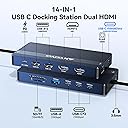

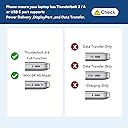
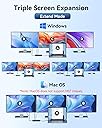
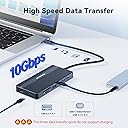


| ASIN | B0DHN9RLZM |
| Best Sellers Rank | #79,672 in Electronics ( See Top 100 in Electronics ) #906 in Laptop Docking Stations |
| Brand | ANYOYO |
| Color | Gray |
| Compatible Devices | MacBook Pro |
| Customer Reviews | 4.3 out of 5 stars 180 Reviews |
| Hardware Interface | Ethernet, HDMI , USB 3.1 Type A, USB 3.1 Type C |
| Item Dimensions L x W x H | 5.12"L x 2.4"W x 0.61"H |
| Manufacturer | ANYOYO |
| Mfr Part Number | DS0203-SL |
| Number of Ports | 14 |
| Product Dimensions | 5.12"L x 2.4"W x 0.61"H |
| Smart Home Compatibility | Not Smart Home Compatible |
| Total Number of HDMI Ports | 2 |
| Total USB Ports | 7 |
| Total Usb Ports | 7 |
| Unit Count | 1.0 Count |
| Warranty Description | 1 Year Manufacturer |
| Wattage | 100 watts |
D**L
My desktop is more functional and efficient
I recently picked up an HP Envy x360 laptop, and decided it would be a great time to change the setup on my desk to take advantage of the new hardware. I use the laptop both at and away from my desk, and I didn't want to mess with USB, power, and video cables every time I change locations. I also wanted support for multiple 4k@60 monitors, ethernet connectivity, and lots of USB-C ports. This docking station has been a perfect solution that has met all of my needs. With everything plugged into the docking station, I only need to unplug one cable when I go on the road. I added a 300w charging brick on my desk to power the dock and several other device chargers. That way, I can leave the original HP power supply in my laptop bag instead of having to pack it up every time. I really like the layout of this docking station, with ports on all four sides of the unit. I have most of the ports in use, and it's nice to have more room to route the cables. The laptop cable extending from the docking station is only about 11in (28cm) long, so I also added a short Thunderbolt extension cable so I can keep the docking station and cables out of the way. I have monitors, external hard drives, and other peripherals attached to the docking station and everything is working great. I did run into one odd situation that took some troubleshooting. When I first set things up, it would occasionally "forget" my HDMI monitors and the only way to get them back was by power cycling the docking station. After some Googling, I discovered an issue with the USB configuration in Windows 11. USB controllers can be configured to power down after a certain amount of time to save power. I disabled that feature in Device Manager (in the Power Management tab under each USB controller's properties), rebooted the computer, and everything has been fine since! All that to say that I am really happy with this docking station. My desktop is neater since all of the cables are out of the way, and transitioning to and from working at my desk is much quicker and easier. If this dock has the right assortment of ports for your application, I would highly recommend it!
A**O
Compact, usefull and great value
Works without problems. High transfer speed with my external SSD drive. PD port helps charging my laptop while allowing use of other peripherals. Feels well built and the different connector sockets work with a good snap. Has a short connecting cable so, working on a cramped or small desktop can pose some inconvenience. Overall, a great value for the money
R**O
Very good and runs cool
Works great and very versatile for connection. It doesn't heat up as much as my older one.
S**O
That's what I needed, almost...
More/better video outputs, more USB-C ports. A few weeks of use later, Thoughts... I had bought a 7-in-1 hub to start, and it did the job, if I wanted everything right at my desk. But, I wanted some at my desk and most inside my rack. So, I looked around awhile and decided on this hub, correctly. You can daisy-chain another USB-C hub to this: keyboard/mouse/audio/ethernet/thumb-drive will work, but video-out through the tail-hub will not. USB to Display Port– That was why I went with this hub: one (shielded) USB-C cable to the monitor, (one HDMI to the tv, one to the amp, one shielded USB-C extension to the desk-hub,) perfect. Picked up a (shielded/slim) 3.3-foot USB-C to DP cable which better fit the cable-management tracks on my articulating monitor arm. [I did previously buy a long, fat DP cable, but that immediately seemed archaic when I found there was such a thing as USB-DP hub-output. That now-irrelevant (two weeks too late to return) cable's neatly tied up in a bag, with all the other cables I don't (but maybe someone I know will eventually) need/use.] Headset/Audio– Herein is where it lost half-a-star... There is a significant hum on the lower-end of the audio spectrum, using the headset-jack. That wasn't going to work for me, nor my desktop-speakers, nor my amp-speakers. My 7-in-1 has significantly less noise, so it was affixed to my desk to provide sound to my (under $100) nearfield monitors. Good enough. I had used the second HDMI-out to send digital audio to the amp, but Windows was getting ‘fussy,’ flickering/reassigning(/losing my individual-backgrounds of) all the (dominant-)displays every time I powered-on/off the amp or changed inputs... [I don't always have the tv on (it is on a rack-mount power-switch bank, flipped on only while being watched; my sound/video typically goes through the amp, to act as a switch for video-out, but that would then require the amp being ‘on’ (conservation of energy) to pass the video to the tv, even if I'm listening on the desk, rather than): listening instead through the amp, when bigger/better sound is desired.] That wasn't going to work. So, for the rack/amp: I picked up a USB-C to optical adapter: perfect, all ‘distortion’ eradicated. [Wound up buying another for the mini-hub to the desktop-speakers: all ‘noise’ cancelled.] I couldn't(/didn't think to) find a hub that offered optical-out + USB-DP. Suggestion: offer that, next time, save us the $35 (2x) add-on dongle(s)-cost. Video Quality– My monitor is dinky (having bought it before my eyes went to hell), my tv was dump-salvaged: I cannot speak as to how ‘good’ the video is. Others have, (lightly) take their word for it. I found it good enough that I have no complaints, on a 1080p rig. I chose this hub such that when I can ‘dumpster-dive’ myself a 4K tv/monitor, I'll be ready. [Oh, wait, that'd require a 4K computer, too... Fingers crossed.] USB-A– Herein is where it lost another half-star. [Others might have rated harsher, but it turns out I don't need the USB-A's anymore, what with the three USB-C's converting to whatever dongle I may need.] The slightest tug on a cable and they pop out of the hub. They wiggle (and waggle) within the casing. Poor Form. Try again, please. Power– The 100-watt power-brick that came with my PC laptop is plugged directly into the hub (on its own rack power-switch; turned off when not in use). The laptop stays fully charged and can draw its power directly when the processor is humming along (playing my kid's ‘light’ games) while sending out two video/audio, plus incoming keyboard/mouse/IR, and external(ly powered) ESATA-USB multi-drive enclosure. Does not overheat, gets a bit warm, but it is kept cooled by my rack-fans, just in case. Etcetera– I haven't tried the media-card readers, having little/no use for them myself, I can not speak to that. The color is pleasant. Um, the aluminum feels nice/durable... Running out of things to say here. Overall– Four Stars. It gets the job done, for that I do not fault them: near-excellent work, point in fact. However, let me run this thing haggard for a few months and then I'll get back to you regarding Longevity. ps. this was a ‘thumbed’ first draft.
D**Y
Perfect
Works great
R**K
Can't Recommend
It had issues. Major issues. I tried it two different ways. One with power routed through it. One where it was just a dongle hub. I used both PC laptops and Apple MacBooks. It had the same issues in both. The same issues regardless of whether power went through it or not. It would work for a time while using the HDMI ports. It wouldn't allow me to use both at the same time. However, once I was using one of them, it would lose sync with the Roland V160 switcher I was using after awhile. I would have other items plugged into the USB ports. Both USB A and/or USB C. USB A to a Perfect Cue slide advancer. USB C to a Streamdeck used to trigger events like Video PlayBack using the Mitti app. Those two would lose sync as well. Sometimes the only way to fix it would be to unplug the device and then plug it back in. When you are the graphics and/or video playback operator working backstage during a conference where the client is paying several hundred thousand dollars for a flawless event, the time to re-seat and then re-sync all the various connections can be catastrophic to the smooth flowing of the event itself. Questions get raised. Equipment malfunctions are not a good or plausible excuse to the client. I gave up. Now it sits on my counter. Gathering dust. I can't seem to be able to force myself to just throw it away. Fifty bucks gone that I'll never see again. Personal funds, not corporate. Not reliable. I can't recommend this device to anyone. Hope this helps.
M**S
overall great product! plug and play ease of use!
Bought the 1st one for home, then had to buy another one for work! This works great, has all the ports I needed, plug and play, sturdy build, I also like the color. overall great product.
L**R
Pleased with versatility
Useful. Compact way to connect a variety of peripherals. Even handles SD cards. Especially helpful with my mini-computer which doesn't have nearly enough ports. So far it's worked just fine, and it's proved its value. It's taken the place of a smaller product I now carry in my travel bag. Pleased with the purchase.
K**G
Top Dock
wer ein MacBook hat, wird um ein Dock nicht hinwegkommen. Nach langer Recherche habe ich mich für ANYONO USB-C Dock entschieden, da es die aktuellsten Anschlüsse zu einen guten Preis und vor allem Mac kompatibel ist. Es unterstützt Thunderbold4, welches beim Laden hohe Geschwindigkeit leistet. ich selbst verwende es zur Zeit für einen 24 Zoll Monitor und einer externen Festplatte. Beim ersten Anstecken erkannte mein Mac sofort das Dock, nach Eingabe den Monitor und die Festplatte sowieso. Fazit: Sehr schönes, handlicheres Dock mit schnellen USB-Anschlüssen, in Betrieb handwarm und ein fairer Preis. Was will man mehr.
D**N
Schön klein mit vielen Anschlüssen, super Preis, keine Beanstandungen bisher
Funktioniert einwandfrei, wie beschrieben. Nutze zusätzlich 2 WQHD Monitore über HDMI als erweiterte Bildschirme. Alle Monitore in voller Auflösung. Einrichtung unkompliziert und wie gewünscht.
A**R
Fast perfekt
Bislang absolut zufrieden. Ein zweiter USB3 statt 2er USB2-Ports wäre zwar wünschenswert, ansonsten bietet das Anyoyo aber praktisch alles, was man von einem Dock erwartet zu einem akzeptablen Preis. Wird im Betrieb mit knapp 40° mitunter zwar etwas heiss, bislang aber absolut einwandfreie Funktion, erreicht auch die versprochenen 10Gbps an allen Ports. Keine Kompatibilitätsprobleme, Verbindungsabbrüche o.Ä., was bei Docks sonst nicht selten auftritt.
R**F
Alles bestens! Danke!! Das Produkt entspricht meinen Erwartungen.
A**2
HUB wird recht Warm, Anschlusskabel ist zu kurz. Saugt den Akku vom MacBook leer!
Der Hub ist ja soweit nicht schlecht, aber durch Anschlüsse von beiden Seiten und dem extrem kurzen Anschlusskabel bringt es mehr Unordnung als Ordnung auf dem Tisch. Ferner wird das Teil recht warm. Aufgrund des viel zu kurzen Kabels werde ich den Artikel wohl zurückschicken. Schade Update: Nachdem mir der HUB den ganzen Akku vom MacBook leer gesaugt hat, geht das Teil zurück. Keine Kaufempfehlung! Wenn Thunderbolt 4 dann kann man auch die Stromversorgung, Daten, Video über einen Anschluss laufen lassen. Zusätzliche Netzteile brauchen Strom und zusätzliche Kabel. Aber das der HUB in Bereitschaft bleibt und dafür den Akku leer saugt geht gar nicht.
Trustpilot
2 days ago
5 days ago