Desertcart purchases this item on your behalf and handles shipping, customs, and support to USA.
🔥 Compact power, next-gen speed — the Mini-ITX motherboard that means business!
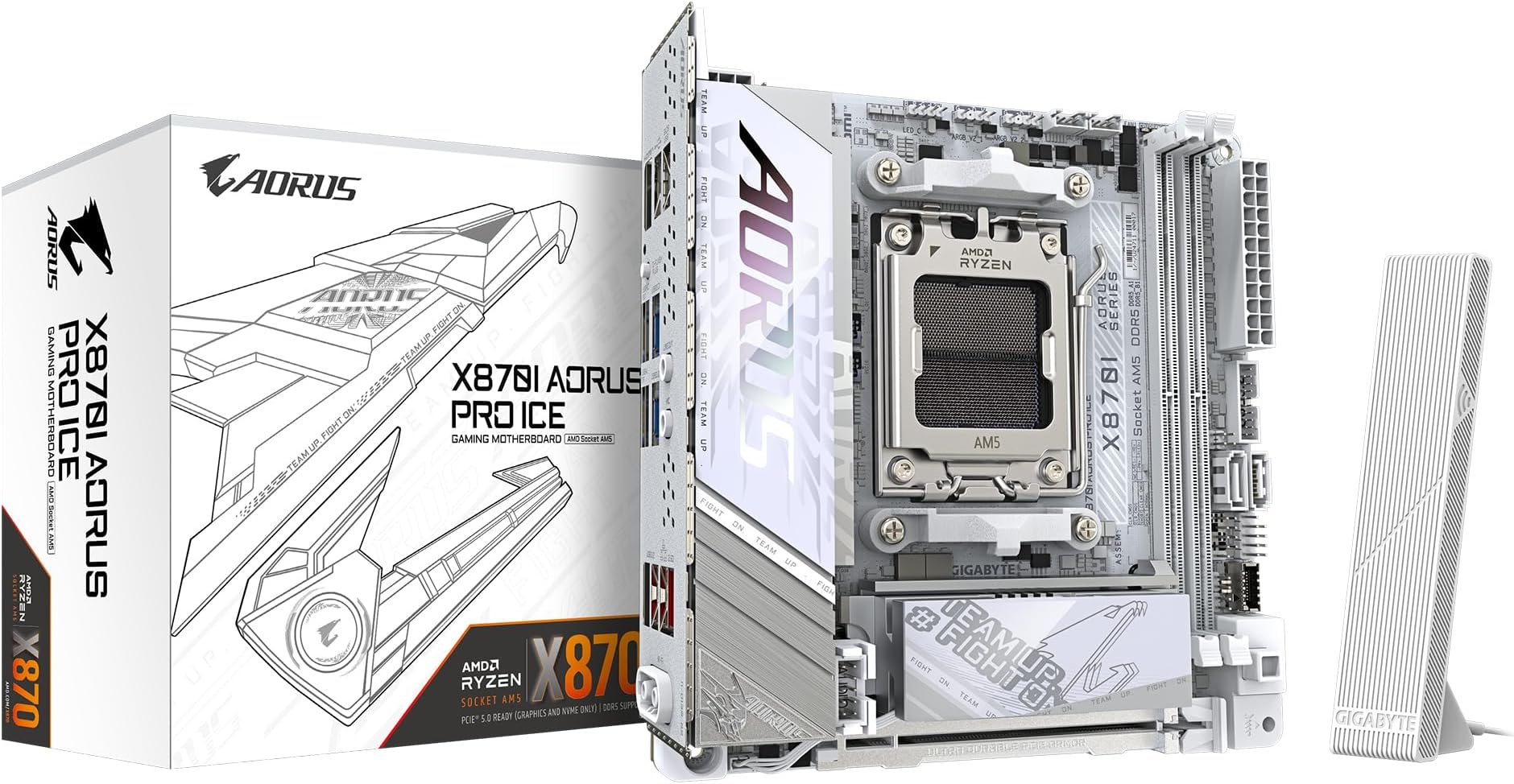
The GIGABYTE X870I AORUS PRO ICE is a premium Mini-ITX motherboard designed for AMD Ryzen 7000, 8000, and 9000 series CPUs. It features an advanced 8+2+1 phase VRM for stable power delivery, supports blazing-fast DDR5 memory up to 8400MHz (OC) with up to 128GB capacity, and offers PCIe 5.0 slots for cutting-edge GPU and storage performance. With USB4 Type-C, Wi-Fi 7, and 2.5GbE LAN, it ensures ultra-fast connectivity. Its compact form factor is paired with efficient thermal management and a stylish white ICE design, making it ideal for professionals and enthusiasts building powerful, space-saving systems.
| ASIN | B0DN6PTRQS |
| Available Memory Slots | 2 |
| Best Sellers Rank | 3,993 in Computers & Accessories ( See Top 100 in Computers & Accessories ) 19 in Motherboards |
| Brand | Gigabyte |
| Brand Name | Gigabyte |
| CPU Model | Ryzen 7 |
| CPU socket | Socket AM5 |
| Chipset Type | AMD X670 |
| Chipset type | AMD X670 |
| Compatible Devices | Personal Computer |
| Compatible Processors | AMD Ryzen 7000 Series,AMD Ryzen 8000 Series,AMD Ryzen 9000 Series |
| Compatible devices | Personal Computer |
| Compatible processors | AMD Ryzen 7000 Series , AMD Ryzen 8000 Series, AMD Ryzen 9000 Series |
| Country of Origin | Taiwan |
| Customer Reviews | 4.0 out of 5 stars 37 Reviews |
| Graphics Card Interface | PCI Express |
| Item Dimensions L x W x H | 17L x 17W x 3.5H centimetres |
| Item Weight | 1200 Grams |
| Main Power Connector Type | 24-Pin |
| Manufacturer | Gigabyte |
| Manufacturer Part Number | X870I AORUS PRO ICE |
| Memory Clock Speed | 8400 MHz |
| Model Name | X870I AORUS PRO ICE |
| Model Number | X870I AORUS PRO ICE |
| Number of Ethernet Ports | 1 |
| Number of Ports | 13 |
| Platform | Windows 11 |
| Processor Socket | Socket AM5 |
| Product Warranty | 3 years |
| RAM Memory Technology | DDR5 |
| RAM memory technology | DDR5 |
| Ram Memory Maximum Size | 128 GB |
| System Bus Standard Supported | PCIe |
| Total HDMI Port | 1 |
| Total PCIe Ports | 1 |
| Total USB Ports | 8 |
| Unit Count | 1.0 count |
D**R
Exceptional Mini-ITX Board That Delivers Stability & High-End Features for Ryzen 9 Builds 🔥
As someone who runs demanding workloads, I installed the Gigabyte X870I AORUS PRO ICE (ASIN B0DN6PTRQS) in a compact system featuring my AMD Ryzen 9 7900X with 96 GB of DDR5 RAM (and yes—it supports the full pool of memory very reliably). Right out of the box this board hit all the major marks: What I love: • The dual-DIMM layout didn’t hold me back; I’m running 96 GB without compromise. • USB4 support with DisplayPort alternate mode gives me modern connectivity for external docks and monitors—solid future-proofing. • The mini-ITX form factor is packed with full-featured specs: PCIe 5.0, a strong VRM (8+2+1 phases) and good thermal management—ideal for high-end CPUs like the 7900X. • Stable in heavy workloads like video editing and advanced number-crunching (which I personally appreciate as an accountant doing content creation and programming). • Networking is top notch (2.5 GbE & WiFi 7), which helps when transferring large files or working off my NAS. A few caveats to know: • Being mini-ITX, the layout is tighter—cable routing needs a little more planning than typical ATX boards. • If you’re doing ultra-high overclocks or pushing beyond 96 GB, you’ll want to double check your RAM kit’s velocity and compatibility (but for most users this board handles it). • As always with compact builds, airflow matters—make sure your case can handle M.2s, VRMs and the GPU without thermal throttling. Conclusion: I paired the Gigabyte X870I AORUS PRO ICE with my Ryzen 9 7900X and 96 GB of RAM (yes, fully supported) and I have to say: this board punches well above its size. Performance & Features • With an 8+2+1 digital VRM design and premium build (10-layer PCB, 2× copper) the board handled my 7900X flawlessly under mixed workloads (content creation, programming, heavy multitasking).  • Dual DDR5 slots … yet I’m running 96 GB (2 × 48GB) with no hiccups—plenty of headroom for 128 GB too. • It has USB4 Type-C with DisplayPort Alt mode, giving excellent connectivity for docks, high-speed external storage or monitors. • Compact Mini-ITX form factor means great if you want a powerful build but still a clean, smaller footprint. Looks, Value & Noise • Aesthetically, the “ICE” variant has a refined white/off-white scheme which looks sharp in clean builds. One reviewer pointed out: “…it’s quite the looker.” • From a value perspective: at roughly ~£280 in the UK (see scan listing) for everything it offers, it’s a strong buy for high-end AM5 + Mini-ITX. • On noise: I’ve had absolutely no board-coil-whine or unexpected fan noise. One user on Reddit noted: “No MB coil whine. I just checked on idle … All I hear is AIO pump and fans.” The board’s Smart Fan 6 & Thermal Armor features suggest that the board is designed with quiet operation in mind. Minor considerations • Since it’s Mini-ITX, you’ll still need to be mindful of airflow and case cooling (especially with a high-end GPU and 96 GB RAM setup). • As one community member noted: “a few things are a little weird… but still usable”. • If you were expecting ultra-premium ATX board features (lots of SATA ports, extra M.2, extra USB4 ports), you’ll need to check your expansion needs vs what this board offers. Conclusion For my workflow—heavy multitasking, content creation, programming, large memory usage—this board ticks the boxes: full 96 GB RAM support, USB4, top-tier power delivery, quiet performance, and strong value for money. If you’re building a compact but powerful AM5 system and want a real “do-everything” board, this is one I’d confidently recommend.
A**N
Good Capabilities but has proprietary hardware
Has good capabilities but has proprietary screws and hardware which reduces it's rating on me. Double check the compatibility of your case with the mobo as the audio jack has proprietary hardware for it.
S**S
Poor connector placement bad design choices
After reading all the reviews I was excited but honestly gigabyte made some really stupid choices with connector placement. The IO panel is also one of the stupidest things I've ever witnessed, it's secured to the motherboardboard but there is a ridge along the bottom on the IO plate that stops it sitting flush against the case :'''') so none of the screw holes line up, so so dumb. There are 3 fan headers but 2 of them are smart fan 6 which needs ugly extension cables to fit normal pwm fan connections, another stupid design choice, just include normal headers for god sake. Avoid this board, it sucks!
B**B
Defective
Gigabyte has no QC. Defective motherboards out of the box. Wasted so much time trouble shooting this, when older ASUS motherboard works without issue.
D**S
5 Sterne sind mE verdient
13.04: Verpackung und Versand top. Scheinbar habe ich einen Artikel bekommen, der zurückgegeben wurde. Es gab keine Banderole am Karton. Der Inhalt war zwar original verpackt, es fehlten aber 3 der 4 benötigten Schrauben um das MB am Gehäuse befestigen zu können. Außerdem lag eine falsche Schraube bei. Auf dem MB waren Fingerabdrücke sichtbar. Die Folienverpackung des MB war ebenfalls nicht zugeklebt, es waren aber keine Rückstände von Klebeband oder Knitterstellen sichtbar. Ich denke das ist Werkseitig so gewollt. Ich habe absolut kein Problem damit zurückgegebene Ware zu kaufen, ärgerlich nur, wenn dann etwas fehlt. Gigabyte schreibt dazu, dass man in so einem Fall einfach den Support kontaktieren soll und fehlende Teile nachgeliefert werden. Da ich noch Schrauben liegen hatte, habe ich das ohne Support gelöst. Wie dem auch sei: + Verarbeitung des MB ist super, wirkt alles sehr hochwertig und stabil. + PC läuft stabil mit Ryzen 7 9800x3d und DDR5 Kingston Fury Beast 6400 unter Win11. -> ~ Da der Prozessor init. nicht erkannt wurde, war erst ein Update des BIOS notwendig. Installation via USB-Stick ohne Probleme. --> + Board erkannte nach BIOS-Update automatisch, dass es sich um einen x3d handelt und fragt, ob man 3D V-Cache nutzen möchte. + Profile für AMD Expo und Intel XMP sind im UEFI/BIOS hinterlegt und können einfach aktiviert werden. + Die Soundqualität ist sowohl über Klinke zu Bose PC-Lautsprechern, als auch via USB zum Beyerdynamic Fox/Tygr300 viel besser als bei meinem ASUS ROG Z590F! Ich habe viel klareren Sound und tiefere Bässe *.* ~ Weiter verbaut: Gigabyte RTX5070ti Windforce OC SFF und M.2 Samsung 9100pro -> Keinerlei Probleme. ~ Das Werkseitige Layout des MB ist englisch. Beim Booten von USB/DVD daher bedenken, dass das englische Tastaturlayout QWERTY ist. Bootvorgang bei einer deutschen Tastatur muss also mit "Z" bestätigt werden. Möglicherweise hat mich das Finden dieser Erkenntnis eine Stunde Lebenszeit gekostet XD Hinweise: > Audio-Treiber muss eigenständig von der Gigabyte Website runtergeladen werden. > Grafiktreiber ebenfalls -> Ich nutze sowieso seit Jahren die Software von Nvidia. Darüber wurde der Grafiktreiber automatisch bezogen (in einer aktuelleren Version als die, die bei Gigabyte vorlag). Wo ich nichts zu sagen kann: ~ WLAN wird aktuell nicht genutzt. Da das MB über Wifi7 verfügt KÖNNTE es laut einigen Artikeln und Foren zu Verbindungsproblemen mit dem WLAN kommen. Sollte man vor dem Kauf selber schauen, ob man das riskieren möchte, oder sowieso über LAN anschließt bzw der Router über Wifi7 verfügt. ~ Das Kabel für die WLAN-Antenne ist m.E. etwas kurz. Da ich ein mITX-Tower nutze, welcher auf dem Schreibtisch steht, spielt mir das allerdings in die Karten. ~ Ich übertakte weder Prozessor noch RAM. Insbesondere die aktuellen Informationen über abgebrannte AMD CPU und Nvidia GPU halten mich davon ab. Edit 22.04: Mein System lief eine Woche lang stabil. EXPO-Profil und 3d V-Cache waren aktiviert. Dann plötzlich Lags, wenige Lags ohne geöffnete Tabs, viele Lags in Spielen und in Anwendungen wie Browser, MS Word usw. - die Lags traten aber auch nicht immer auf, weder Ram noch Prozessor waren auch nur annährend ausgelastet. Einzige Änderung vor Auftreten der Lags war ein Update des Grafiktreibers für die RTX 5070ti. Rückkehr auf eine ältere Version vom Treiber hat das Problem für ganze 5min "behoben". Eine Woche der Recherchen in vielen Foren hat die unterschiedlichsten Möglichkeiten aufgezeigt, wie man dieses Problem - welches wohl seit Jahren häufig bei AMD Prozessoren auftritt - beheben könne. Hat alles nichts gebracht. Nach einem BIOS-Reset mit anschließend ohne Aktivierung von 3d V-Cache und ohne aktiviertes EXPO-Profil läuft mein System jetzt erstmal wieder flüssig. Ich vermute der Auslöser ist ein Schnittstellenproblem zwischen CPU und RAM bei aktivem V-Cache/EXPO. Fraglich, ob es am MB, an CPU oder am RAM liegt. Laut Herstellerwebsites sollen die von mir verbauten Komponenten kompatibel sein.
S**L
Buena placa en tamaño mini
Buena placa, muy compacta. De momento montada en un Ryzen 9800x3d y sin problemas.
K**N
It’s gigabyte 10/10 as always
It’s gigabyte 10/10 as always, control center installed automatically and installed all drivers, bios updates automatically
N**S
Belle carte dans l’ensemble mais le ventilo des ssd c’est une m…
La carte est superbe mais le ventilo des ssd est infect même en le réglant dans le bios. Le petit bruit persistant est immonde. On l’enlève et hop le ssd a 85 degrés et plus. Sinon carte très belle et bien finie et performante avec 9800X3D. Méfiez vous en itx les cartes en X ou B sont souvent quitte ou double. Les Asus coil whine ou les header pump sont bridés et vous ne pouvez pas descendre en dessous de 60 %
Trustpilot
5 days ago
2 weeks ago