🚀 Elevate Your Workspace, Anywhere, Anytime!
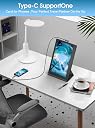
The Maxfree F1 is a sleek 14-inch portable laptop monitor extender featuring a 1920x1080 IPS display with 360° rotation. Designed for professionals and gamers alike, it boosts productivity by up to 200% through versatile dual-screen setups. Compatible with a wide range of devices and operating systems, it offers effortless plug-and-play connectivity via USB-C and HDMI, making it the ultimate companion for mobile multitasking and immersive visuals.


| ASIN | B0CRL2YNKR |
| Adaptive Sync | G-Sync Compatible |
| Aspect Ratio | 16:9 |
| Aspect ratio | 16:9 |
| Brand | Maxfree |
| Brand Name | Maxfree |
| Colour | Black |
| Compatible Devices | [Multiple Devices & Systems] |
| Contrast Ratio | 1000:1 |
| Customer Reviews | 4.1 out of 5 stars 1,045 Reviews |
| Display Technology | LCD |
| Display Type | LCD |
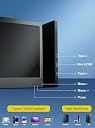
| Hardware Connectivity | USB Type C, mini HDMI |
| Has Color Screen | Yes |
| Image Brightness | 300 nit |
| Image contrast ratio | 1000:1 |
| Item Dimensions D x W x H | 18.3D x 29.3W x 1.3H centimetres |
| Item Weight | 1.3 Pounds |
| Manufacturer | Maxfree |
| Maximum Display Resolution | 1366 x 768 Lines Per Inch |
| Model Name | S2 |
| Model Number | P1S |
| Mounting Type | Desk Mount |
| Native Resolution | 1366x768 |
| Network Connectivity Technology | HDMI |
| Picture Quality Enhancement Technology | blue light protection, g_sync_compatible, IPS panel |
| Pixel Pitch | 0.18 |
| Product Features | Portable |
| Refresh Rate | 60 hertz |
| Resolution | XGA Wide |
| Response Time | 1 Milliseconds |
| Screen Finish Type | Glossy |
| Screen Size | 12 Inches |
| Screen size | 12 Inches |
| Screen surface description | Glossy |
| Shape | Rectangular |
| Specific Uses For Product | Multimedia |
| Total HDMI Port | 5 |
| Total USB 3.0 Ports | 2 |
| Total USB Ports | 2 |
| Total Video Out Ports | 2 |
| Unit Count | 1.0 count |
| Viewing Angle | 178 Degrees |
G**.
Easy install.
Easy to install, works beautifully.
A**A
Buena calidad
Tiene buena resolución y ayuda a ser más hábil durante tu día laboral
M**I
Terrible picture quality
Good design and easy connection yet picture quality and resolution is very bad
K**K
Good for multiple monitors
The Maxfree S2 Laptop Screen Extender is an innovative product for anyone needing a multi-monitor setup on the go. Here’s a closer look at how it performs in terms of design, functionality, and value for money: Design and Build Quality The Maxfree S2 features two 14-inch Full HD (1080p) IPS displays that attach to your laptop, transforming it into a triple-monitor setup. The screens are housed in a sturdy frame with an adjustable hinge, making it easy to position the monitors at various angles. The build quality is solid and durable, though the extender adds noticeable weight and bulk to your laptop, which could impact portability. The foldable design, however, makes it easy to carry in a laptop bag or backpack. Display Quality The screen quality is impressive, offering a clear and crisp 1920x1080 resolution. Colors are vibrant, and the brightness level is sufficient for most environments, even in well-lit areas. The screens handle multi-tasking efficiently, allowing you to keep several applications open side-by-side. This is especially beneficial for professionals who work with spreadsheets, designers, and coders who require extended screen space. Compatibility and Setup One of the standout features of the Maxfree S2 is its plug-and-play functionality. Compatible with Windows, macOS, Surface, Android, and even Nintendo Switch, it requires no driver installation, which simplifies the setup process. The extender uses USB-C and Mini HDMI ports, so ensure your laptop has these ports (or adapters) for seamless connectivity. The included kickstand provides added stability, which helps keep your laptop steady during use. Performance Performance-wise, the Maxfree S2 does exactly what it promises. Users report smooth multitasking without significant lag, even when running multiple screens. However, with extended use, you may notice your laptop battery draining faster, especially if it’s not connected to a power source, as powering two additional screens consumes extra energy. Pros: • High-quality 1080p displays with good color accuracy • Easy to set up with plug-and-play functionality • Adjustable viewing angles for ergonomic setup • Compatible with multiple devices, making it versatile • Sturdy kickstand for added stability Cons: • Adds weight and bulk to your laptop, reducing portability • Increased power consumption could be a concern for longer use • Limited to USB-C and Mini HDMI connectivity (may need adapters) Overall Verdict The Maxfree S2 is a solid choice for users who need a portable multi-monitor solution. It’s ideal for traveling professionals, remote workers, and students looking for a productivity boost. While the added weight might be a drawback for some, the extender’s ease of use, high-quality display, and versatility make it a worthwhile investment for anyone who regularly multitasks.
C**Y
Gerat monitor extender for my Laptop
I recently purchased the Maxfree S1 Laptop Screen Extender, and it has been a game-changer for my productivity! The 14'' dual screen setup is perfect for multitasking, allowing me to have multiple windows open simultaneously without constantly switching tabs. The 1080P FHD display is crisp and clear, making it a pleasure to use for both work and entertainment. Setting it up was incredibly easy with the plug-and-play feature. It worked seamlessly with my laptop, and I didn't need any additional software or complicated instructions. The extender is also lightweight and portable, making it convenient to carry around for on-the-go use. The price on the single extender and the doublel extender was far enough apart that I decided to go with the single extender. If the price were a bit lower, I might have gone with the double screen extender. One minor improvement I would suggest is the packaging. While the product itself is fantastic, the packaging could be more robust to ensure it arrives in perfect condition. I had to return the first monitor extender due to a pen mark on the screen. Customer service was awesome as they accepted my return and immediately replaced it. Also, it would be very helpful if there was an instruction sheet that help you match the content size to be the same on both the main laptop screen and the extender, but I ended up figuring it out but it took some time. Despite this, I am extremely satisfied with my purchase and highly recommend the Maxfree S1 Laptop Screen Extender to anyone looking to boost their productivity with a dual-screen setup.
Trustpilot
1 month ago
2 weeks ago