Buy anything from 5,000+ international stores. One checkout price. No surprise fees. Join 2M+ shoppers on Desertcart.
Desertcart purchases this item on your behalf and handles shipping, customs, and support to USA.
⌨️ Elevate your command center with silent precision and vibrant style!
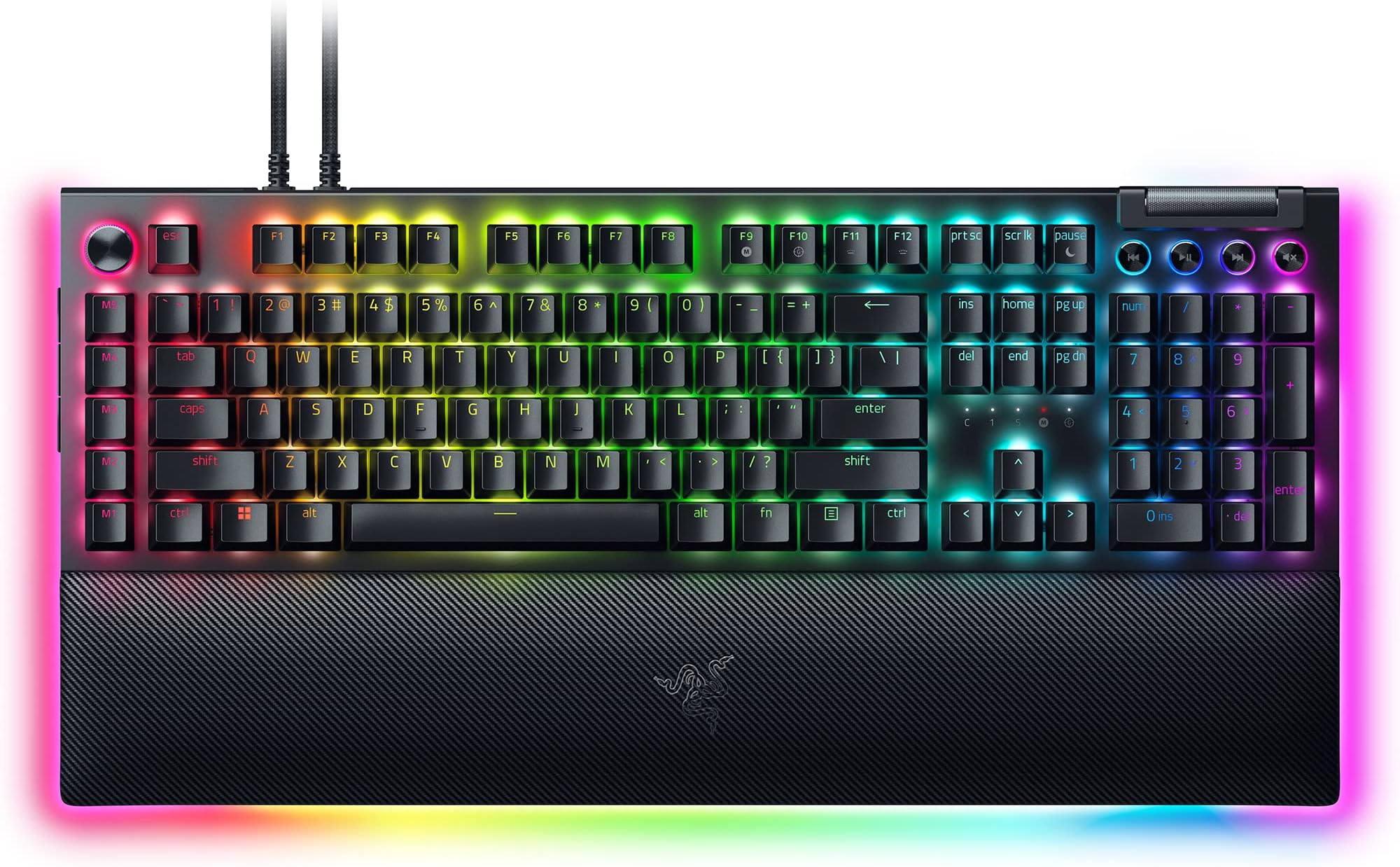
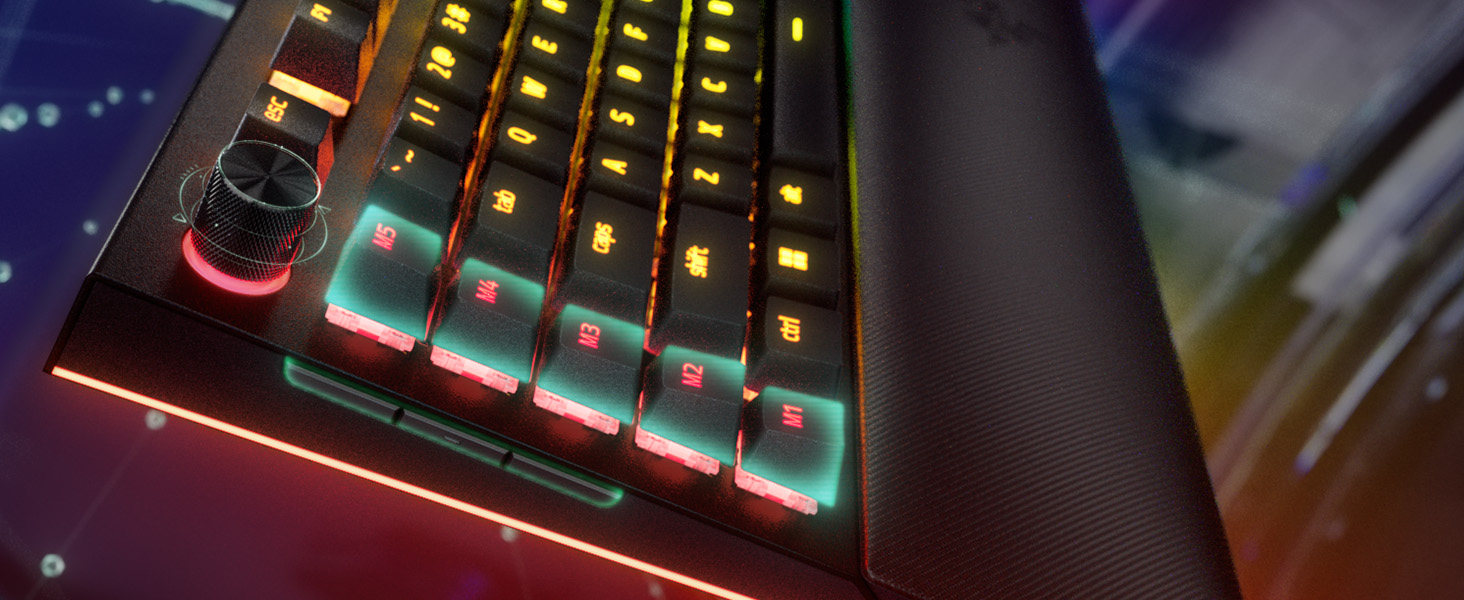
The Razer BlackWidow V4 Pro is a premium wired mechanical keyboard featuring 104 tactile yet quiet Orange switches, a programmable command dial with 8 macro keys, and customizable per-key Chroma RGB lighting with immersive underglow. Built with doubleshot ABS keycaps and a sturdy aluminum frame, it offers long-lasting durability. The magnetic plush leatherette wrist rest enhances comfort for extended use, making it ideal for professionals and gamers seeking high performance and style in one sleek package.


| ASIN | B0D4NMMFXB |
| Additional Features | Chroma RGB, Command Dial - 8 Dedicated Macro Keys, Doubleshot ABS Keycaps, Orange Switches Tactile & Quiet, Wrist Rest |
| Antenna Location | Business, Everyday Use, Gaming |
| Best Sellers Rank | #984 in Video Games ( See Top 100 in Video Games ) #92 in PC Gaming Keyboards |
| Brand | Razer |
| Built-In Media | Wrist Rest |
| Button Quantity | 19 |
| Color | Black |
| Compatible Devices | Laptop, PC |
| Compatible Operating System Family | Android, Linux, Windows |
| Connectivity Technology | USB-A |
| Customer Reviews | 3.8 out of 5 stars 213 Reviews |
| Enclosure Material | 5052 Aluminum Alloy Top Case, Case foam & PCB foam included, Lubricated stabilizers, Magnetic plush leatherette wrist rest |
| Generation | BlackWidow V4 Pro |
| Hand Orientation | Ambidextrous |
| Item Dimensions L x W x H | 17.52"L x 6.54"W x 1.54"H |
| Item Weight | 5 Pounds |
| Keyboard Backlighting Color Support | RGB |
| Keyboard Description | Gaming |
| Keyboard Layout | QWERTY |
| Language | English |
| Manufacturer | Razer |
| Mechanical Keyboard Switch Model | razer_orange |
| Mfr Part Number | RZ03-04683500-R3M1 |
| Minimum Required Operating System Version | Android 3.0 Honeycomb |
| Model Name | BlackWidow V4 Pro |
| Model Number | RZ03-04683500-R3M1 |
| Number of Keys | 104 |
| Number of Sections | 1 |
| Power Source | Corded Electric |
| Recommended Uses For Product | Business, Everyday Use, Gaming |
| Series Number | 4683500 |
| Special Feature | Chroma RGB, Command Dial - 8 Dedicated Macro Keys, Doubleshot ABS Keycaps, Orange Switches Tactile & Quiet, Wrist Rest Special Feature Chroma RGB, Command Dial - 8 Dedicated Macro Keys, Doubleshot ABS Keycaps, Orange Switches Tactile & Quiet, Wrist Rest See more |
| Style Name | BlackWidow V4 Pro |
| Switch Type | Tactile |
| Theme | Gaming |
| UPC | 840272907313 |
| Unit Count | 1.0 Count |
| Warranty Description | 2 Year Manufacturer |
| Water Resistance Level | Not Water Resistant |
S**N
Razer BlackWidow V4 75% - Updated After 9 Months: Software Fixed, Hardware Delivers
Original Concerns Resolved - This Board Now Lives Up to Its Premium Promise I purchased this keyboard in January 2025 and initially struggled with serious Synapse software issues that made basic functions unreliable. Nine months later, I'm updating this review because Razer has genuinely addressed most of my concerns, transforming this from a frustrating experience into an excellent premium keyboard. What Hasn't Changed: Exceptional Hardware The build quality remains outstanding after nine months of daily use. The aluminum top plate still exhibits zero flex, the doubleshot ABS keycaps show no shine or wear despite hundreds of hours of gaming and typing, and the pre-lubed stabilizers remain smooth and rattle-free. The magnetic wrist rest is still plush and comfortable, and the textured volume wheel feels premium every time I adjust audio. The hot-swap sockets have been reliable—I haven't needed to swap switches yet, but the option is reassuring. The typing experience continues to impress. Whether I'm writing code, gaming through intense Call of Duty sessions, or typing long documents, the Orange Tactile switches (in my case) deliver consistent, satisfying feedback. This keyboard still feels as solid as custom boards costing significantly more. What Has Changed: Synapse Software Improvements Here's the big update: Razer has substantially improved Synapse through multiple updates over these nine months. The command wheel now reliably controls what it's assigned to—no more random zoom behavior. The F1-F12 function keys work consistently. Volume control actually controls volume. These seem like basic expectations, and they now work as intended. The software still has one minor quirk: about once a week, I need to toggle the keyboard's power to resync RGB lighting across my Razer ecosystem (I also have the Basilisk V3 Pro mouse and Mouse Dock Pro). It's a 5-second fix, not the dealbreaker the original bugs were. I'm planning to integrate everything with my upcoming Philips Hue bridge for unified home lighting. Long-Term Durability After nine months of heavy use across gaming, work, and everything in between, this keyboard shows zero signs of degradation. No key wobble, no stabilizer rattle developing, no wireless connectivity issues, and battery life remains excellent. The wireless performance is flawless—no lag, no dropped inputs. Updated Verdict This is now the premium keyboard Razer promised at launch. The hardware was always excellent; the software has caught up. At its price point, you're getting custom-keyboard build quality with mainstream convenience and ecosystem integration. The occasional RGB sync quirk is minor compared to the original functionality-breaking bugs. Recommended for: Anyone wanting a premium 75% with excellent build quality and reliable wireless performance Skip if: You absolutely need zero software maintenance or want the most budget-friendly option If you passed on this keyboard due to early Synapse issues, it's worth reconsidering now.
R**M
High Quality
This keyboard is worth every penny you'll drop on it. The soft sound is nice and quiet and you can feel every click cleanly. The lights are gorgeous and the amount of customization available is awesome. 3 buttons on the side, media buttons with a scroll wheel for volume. Button next to escape key has 4 swapable modes optimizing the ability to work quickly and efficiently, or for gaming purposes, and even a nice zoom feature for artists. M1-M5 for customizable macro... this keyboard has it ALL. It also includes a soft wrist rest that connects magnetically and also lights up. Easy to take off or put on. I replaced most of the keys with some custom ones and they fit like a glove. Easy to swap keycaps or even the key switches if you are a keyboard enthusiast. It containes a usb slot on the back as well which makes it easy to integrate my razer mouse with the keyboard freeing up a usb port on my computer. Razer keeps it all together making life nice and simple. So once again... worth EVERY penny.
C**W
Keys Malfunctioning Too Early On
When I first got this keyboard, it felt sleek and high quality... until a few months in, one of the keys started not always registering when typing. Then over the course of a couple months, another key, and then another, and so on. I determined that it was not a software issue with the Razer app and instead something to do with the build quality? I have never owned a keyboard that has had this issue, let alone one that costs $230. When I tried using the warranty contacting Razer themselves, I found that someone had scratched off the serial number on the back... and I had had the keyboard for too long that I couldn't return it through Amazon (this is more on me for taking too long to contact Amazon, because their return policies are already pretty generous. I just thought to mention it). I do not recommend this keyboard.
T**G
A Masterpiece of Art, Comfort, Control, and Creativity – My Setup Will Never Be the Same
There’s something truly special about the Razer BlackWidow V4 Pro—it doesn’t just sit on your desk, it transforms it. As someone who balances gaming marathons with hours of digital creativity, this keyboard feels like it was made with both in mind. The plush wrist rest with its radiant wraparound RGB lighting instantly drew me in. It’s not just about aesthetics (though, let’s be honest, it looks incredible)—it’s also one of the most comfortable typing experiences I’ve ever had. Whether I’m deep into editing a design or in the heat of a battle, the support and feel are flawless. What’s blown me away even more is how thoughtfully designed this board is. The command dial quickly became my favorite feature—what started as a curiosity is now something I rely on daily to scroll timelines, adjust brush sizes, or control volume with the smoothest twist. And the three hidden macro keys on the left side? Pure genius. Subtle, out of the way, but once discovered, they unlocked a whole new level of control I didn’t know I needed. I’ve bound them to game commands, workflow shortcuts, even lighting presets—it’s incredibly versatile. Add to that the sleek media buttons and the satisfying resistance of the volume roller, and you’ve got a piece of hardware that’s as elegant as it is powerful. This isn’t just a keyboard. It’s the centerpiece of my creative and gaming space—and honestly, I don’t know how I ever lived without it.
D**N
It didn't last a year under moderate use. But it looks nice.
9 Months into owning this keyboard and the tab key started working intermittently. Sometimes it won't register a press, sometimes it registers it as a double press. That's a big issue for me because I do a lot of spreadsheet work as well as alt-tabbing while gaming. Turns out the keys on this keyboard are soldered, I wish I would have reserached that before buying it, I wouldn't have bought it. Sometimes the RGB lighting resets to the default rainbow effect, I have to restart the software to fix it. The software is also just obtrusive and obnoxious generally speaking. They keys do feel really nice while they work though, and the media controls are handy! I have a razer headset as well that I bought around the same time, that is giving me a whole other set of issues. I'm about done with razer, going to try to get a warranty repair on this and sell it to some poor soul on marketplace. I've already bought a new keyboard.
K**Y
Great keyboard, watch the side buttons.
I didn't know about the side buttons on the left hand side till I accidently hit then and my computer changed screens on me. It was a laughable moment, but this has been a fantastic keyboard. I love the tactile feel of the keys, though thise side buttons unless you disable them will get you into trouble while gaming if you have a cat.
H**Y
Randomly switches modes and battery life is not as great as promised.
If it ever goes into "Demo Mode" or a mode where every keybind does a shortcut instead of typing, you have to unplug it, and as you plug it back in hold the reset keys. I dont remember what the 3 keys are. And you have to release them like 2 seconds after plugging it in, and it will fix it. Other than it randomly doing that and the battery life being shorter than stated, works great!
W**S
I like the key feel, love the lighting.
I like the look. I like the key feel, I like the lights. I don't like whatsoever that the media keys don't work. This problem has existed for more than one version, possibly back to v2 (from their support web site). That's tough to stomach and the problem with the Razer software suggests incompetence in their engineering department (I am a software engineer). If you have the problem, you fix it. I do know mine worked until I installed the razer software (it is needed by several devices including the custom Basilisk mouse settings). So get with it, Razer and fix this. I want to pause or silence music when a call comes in, I don't want to screw around answering the call, then going to the media player to pause it. It's a ridiculous thing to have to do. No excuse at all for it. I'm paying for it to work, I expect it to work. Mapping those keys doesn't work either, readers need to know that. I need functional media keys much more than I need macro keys. I don't use this for games, I use it as an engineering workstation. The lighting is much better (no half lit keys) than my older Cherry MX Brown one from Corsair - that is a limit of those switches. The similar (typist stile) orange keys on this keyboard have all keys fully lit up across the characters, period. Once you get into this price range it seems like that should be expected but these orange keys are better than the Cherry ones for lighting (the MX keys are a decent feel, it's that the symbols are not evenly and completely lit, they fade about 75% of the way across the symbol/letter). I have some silicone O rings I will be installing to make things a little quieter when the key is completely pressed - I've done this before and it's worth the few dollars it costs for a kit with O Rings and a key puller (just always pull straight up, not at an angle). I like to listen to classical music while a work so quieter keys are nice, but I like the tactile keys that aren't totally silent (Orange for Razor, Brown for Cherry). The O rings don't make them totally silent but most of the noise is gone. I use a big 43" 4K Dell IPS monitor so the work environment is "see everything" at once and a nice keyboard goes a long way. Install the Synapse SW after you have your critical stuff installed (Office, browsers, basic utilities and media stuff), and I'd say don't bother with the Axon and other things - just install Synapse (which controls the 5 mouse speeds and any key mapping, which doesn't apply to me) and let it install Chroma (the RGB color part for mouse and keyboard). The install is pretty easy and if you set up an account to store your profile, even if you have to uninstall the SW or replace a critical component like a motherboard, the Razor cloud will save your settings and everything comes back quickly on re-install. I've had a Samsung NVMe drive fail and take all that with it, so getting these small settings saved is nice. Most software will not export the settings (I'm thinking of MS Office). This does. Another FWIW is that you can get, for about $10 each, RGB USB cables, but they are only USB 2 (480 Mbps) speed - but it is a nice adjunct to RGB human interface devices since they don't need bandwith (likewise Levethian and the mouse pad). I use an affordable mouse hub for that, under my big monitor to save all the cables being run all the way to the computer (a full tower Phanteks NV9 on top of the desk area). For all the wires, the color is nice and it's still tidy if you have a kit of colored small zip ties. I originally got the zip ties to attach security badges at the gov places where I've worked, but found the small zip ties (finger length) to have other nice uses. Small diagonal cutter snips off the excess.
C**S
Worth every penny.
Amazing keyboard, I've had it for over 4 months now and if you want me to be honest, I have yet to use a bad razer product. Everything in my setup is razer, and its just phenomenal.
D**E
Amazing! Totally worth it.
Very pricey keyboard, but worth every penny. Synapse 4 still has software issues and I experience the odd random problem but honestly hasn't been as bad as it was in the past with Synapse 3. Typing works great. I've upgraded the switches inside to baby kangaroos and they feel and sound amazing on this board. RGB lights are bright and super customizable. If you're on the fence about buying this thing... Do it.... Do itttt...
V**T
Bon clavier en général
Bon produit mais la batterie se vide rapidement. Sinon toutes est parfait
W**T
Do not buy
I don't even care if the keyboard is the best on the market, the software that it uses is absolute garbage. This keyboard is not compatible with Synapse 3, so you have to use Synapse 4, which is beyond bad. Synapse 4 does not seem to want to detect ANY of my devices besides this keyboard. All of the reviewers that you see online don't seem to ever talk about what hot garbage Razer Synapse 4 is, trust me, it's terrible. The only workaround I found was to install Synapse 3 so that it can recognize most of your Razer devices, and then install Synapse 4 on top of it and it seems to work. However, Razer had the brilliant idea of not letting you have Synapse 3 and 4 installed at the same time. This keyboard is also not worth the hassle. As a bonus, one of my keys started double tapping, so that's still an issue.
G**L
Parfait sauf batterie
Après quelques mois d'utilisation, j'ai acheté ce modèle car le Blackwidow V4 Pro j'avais des problème de double-touche, aucun problème avec celui-ci pour le moment. Seul défaut est la batterie en mode sans fil, ne dure vraiment pas longtemps, mais je n'avais pas vraiment dattente a ce sujet car il est branché en permanence pour moi. Si vous pensez seulement l'utiliser sans fil, vous devrez selon moi éteindre toute les lumières pour avoir une autonomie décente.
Trustpilot
3 weeks ago
2 weeks ago