


Desertcart purchases this item on your behalf and handles shipping, customs, and support to USA.
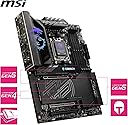
From the manufacturer MPG X870E CARBON WIFI MSI: For Gamers & Creators MSI is one of the most trusted names in gaming and esports with countless hours and significant resources invested into premier esports leagues and tier-1 gaming teams. By supporting and working with the best of the best, MSI is able to integrate competitive gaming knowledge and aspirations with technological innovation to create new products that shatter today's performance limits. Perform in Style The MPG X870E CARBON WIFI is a gaming oriented ATX motherboard with an 18 Duet Rail Power System, constructed around the latest AMD X870E chipset which supports AMD Ryzen 9000 / 8000 / 7000 series desktop processors, featuring PCIe 5.0, 5G LAN, Wi-Fi 7, DDR5 and premium Frozr design that delivers both performance and style. Supports AMD Ryzen 9000 / 8000 / 7000 Series Desktop Processors (Zen 5, Zen 4, AM5) Ultra Power: 18 Duet Rail Power System with 110A SPS, 8-layer PCB, Server Grade PCB material 4 x DDR5 DIMMs with Memory Boost: Dual Channel (256GB Max. / 8400MT/s OC) 2 x PCIe 5.0 x16, 1 x PCIe 4.0 x16 Lightning Gen5 & Gen4 M.2 slots with double-sided M.2 Shield Frozr Ultra Connect: USB4 Type-C (40Gbps), Realtek 5G & 2.5G LAN, Full-speed Wi-Fi 7 solution, Bluetooth 5.4 8-Channel (7.1) USB High Performance Audio with Audio Boost 5 EZ DIY: EZ M.2 Shield Frozr II, EZ M.2 Clip II, EZ PCIe Release, EZ Antenna, Smart Button Supports AMD Ryzen 9000 / 8000 / 7000 Series Desktop Processors The MPG X870E CARBON WIFI motherboard supports AMD Ryzen 9000 / 8000 / 7000 Series processors. Form Factor: ATX Socket Type: AM5 Chipset: AMD X870E Ultra Power - 18 Duet Rail Power System with 110A Smart Power Stage With exclusive Core Boost technology and EZ OC Tuning functions, the MPG X870E CARBON WIFI is able to sustain heavy CPU power loads to support system-demanding game settings Digital PWM IC 18 Duet Rail Power System (110A / SPS) 2 Phase SOC Power 1 Phase MISC Power Frozr Design Frozr Guard: Extended Heatsink design, Heat-pipe, 7W/mK MOSFET thermal pads, extra choke thermal pads and EZ M.2 Shield Frozr II for improved thermal dissipation. Frozr Sync: Connect and synchronize cooling with strategically placed pin-headers - including CPU fan header (2A), Combo fan (3A, supports both pump fan and system fan) and system fans. Frozr Control: Manage speeds and temperature for all fans of your system in MSI Center with Cooling Wizard and Frozr AI Cooling. 4 x DDR5 Dual Channel (8400+ MT/s OC)* Memory Boost: A fully-isolated DDR circuit delivers pure data signals for optimal gaming and overclocking performance. High-Efficiency Mode: Enabling High-Efficiency-Mode in the MSI BIOS increases memory bandwidth and reduces latency. Four different modes allow users to find out the optimal configuration based on the quality of their memory modules. EXPO Profiles in the MSI BIOS are MSI OC LAB optimized and can be easily enabled with auto power settings for optimized memory speed and stability. *1DPC 1R Max. overclocking frequency 8400+ MT/s, supports AMD EXPO. Fortified PCIe 5.0 x16 Slot The MSI PCI Express Steel Armor II slot is reinforced with additional solder points on the motherboard, supporting 21% more graphics card weight compared to 1st Gen Steel Armor. 2 x PCIe 5.0/4.0/3.0 x16 slots* (one with Steel Armor II** and EZ PCIe Release) 1 x PCIe 4.0/3.0 x16 slot* *Supports x16x0x4 / x8x8x4 **MSI Surface Mount Technology (SMT) solder welding improves signal clarity. Gen5 M.2 Connector The MPG X870E CARBON WIFI motherboard features MSI's M.2 slots 2 x Gen5 x4 128Gbps slots (with double-sided M.2 Shield Frozr) 2 x Gen4 x4 64Gbps slots (with double-sided M.2 Shield Frozr) EZ DIY The DIY Friendly designs optimize the assemble process and experience. EZ M.2 Shield Frozr II: MSI patented Shield Frozr cover features a tool-free design so users don't have to worry about lost screws or overtightening. EZ M.2 Clip II: Install or remove the SSD with a simple push of the latch, without using any screws. EZ PCIe Release: With just one press of a button, users can easily install or remove the graphics card with one hand. EZ Antenna: MSI's latest Wi-Fi antenna not only boasts a beautiful appearance but also features a magnetic design, making it easier to adjust the antenna's placement. Smart Button: By simply pressing the Smart Button, users can reset the system or turn Mystic Light on/off without entering the BIOS. Ultra Connect 5G LAN + 2.5G LAN: A Realtek 5Gbps LAN & Realtek 2.5Gbps LAN controller delivers a premium network gaming experience. Wi-Fi 7: Features the full-speed Wi-Fi 7 solution (ultra-low latency, high-bandwidth) & Bluetooth 5.4 technology. USB4 Type-C: Connect to devices and transfer files at high bandwidth rates: 40Gbps, with 8K display support. Review: A Feature-Rich, Easy-to-Use Motherboard with Great Aesthetics - This is a fantastic motherboard with excellent aesthetics and a solid set of features. I paired it with a 9800X3D and an RTX 3080, and the whole setup has been running flawlessly so far. Installing M.2 SSDs was a breeze thanks to the EZ DIY feature—no screws or hassle, which made the process super convenient. Installing the GPU was equally easy, and I really appreciate the EZ Release button positioned to the right of the motherboard. It securely locks the GPU in place and makes removal far less stressful. The inclusion of two LAN ports is a big plus for me, as it allows a direct connection to my NAS while still maintaining my internet connection through the second port. There are plenty of USB ports on the rear I/O, which is great if you use a number of devices. I’ve had no trouble connecting everything I need without juggling cables or using hubs. The BIOS interface has been completely overhauled compared to my previous MSI board, and it's much more intuitive now. Overclocking the RAM using the EXPO profile was straightforward—literally just one click and done. One important tip: don’t forget to update the BIOS once everything is set up. MSI provides all the drivers and updates directly on their website, which made setup even smoother. Overall, I’m really impressed. The build quality, features, and ease of use make this a great choice for any AM5 build. No issues encountered so far—highly recommended. Review: A solid X870E motherboard with good features at a decent price - This is definitely one of the better X870E motherboards both in terms of price, aesthetics and feature set. Pros: The build quality is solid, with tasteful RGB (which can be disabled if you prefer) and a design that isn't over the top "gamer" like some motherboards. The main reason I purchased it was the connectivity. The rear panel alone has 13 high-speed USB ports (9 USB A, 4 USB C) which makes it a good option for anyone like myself who requires significant I/O. I use a VR headset, external drives and multiple other peripherals so this was a must. The WiFi 7 and Bluetooth connectivity is also good, but I primarily use LAN (the board has both 5G and 2.5G LAN ports). On top of this, the clear CMOS and BIOS flash buttons are good features to have, and the debug LED reads CPU temperature when the system has booted - which I quite like. The BIOS has been updated compared to older MSI boards and is a lot nicer to use. The tool-less M2 drive installation and integrated heat sinks are nice, and it also comes with a USB stick that contains software drivers for the motherboard. Cons: My only real complaint is that the PCIE slot lock/unlock button is a bit temperamental on my board, however coming from a motherboard that didn't have this, I can overlook needing to press it twice some of the time. TLDR: Overall I'd definitely recommend




| ASIN | B0DCZXJ32B |
| Available Memory Slots | 4 |
| Best Sellers Rank | 2,054 in Computers & Accessories ( See Top 100 in Computers & Accessories ) 6 in Motherboards |
| Brand | MSI |
| Brand Name | MSI |
| CPU Model | A-Series |
| CPU socket | Socket AM5 |
| Chipset Family | AMD |
| Chipset Type | X870E |
| Chipset type | X870E |
| Compatible Devices | Personal Computer |
| Compatible Processors | AMD Ryzen 9000, AMD Ryzen 8000, AMD Ryzen 7000 |
| Compatible devices | Personal Computer |
| Compatible processors | AMD Ryzen 9000, AMD Ryzen 8000, AMD Ryzen 7000 |
| Customer Reviews | 4.3 out of 5 stars 396 Reviews |
| Global Trade Identification Number | 04711377253536 |
| Graphics Card Interface | PCI-Express x16 |
| Item Dimensions L x W x H | 30.2L x 29.2W x 14.1H centimetres |
| Item Weight | 1500 Grams |
| Main Power Connector Type | 8-pin |
| Manufacturer | MSI |
| Manufacturer Part Number | 7E49-001R |
| Memory Clock Speed | 4800 MHz |
| Memory Storage Capacity | 256 GB |
| Model Name | 7E49-001R |
| Model Number | 7E49-001R |
| Number of Ethernet Ports | 2 |
| Number of Ports | 13 |
| Platform | Windows |
| Processor Socket | Socket AM5 |
| Product Warranty | 3 year manufacturer |
| RAM Memory Technology | DDR5 |
| RAM memory technology | DDR5 |
| Ram Memory Maximum Size | 256 GB |
| System Bus Standard Supported | PCIe 5.0 |
| Total HDMI Port | 1 |
| Total PCIe Ports | 13 |
| Total SATA Ports | 6 |
| Total USB Ports | 13 |
| Unit Count | 1.0 count |
H**N
A Feature-Rich, Easy-to-Use Motherboard with Great Aesthetics
This is a fantastic motherboard with excellent aesthetics and a solid set of features. I paired it with a 9800X3D and an RTX 3080, and the whole setup has been running flawlessly so far. Installing M.2 SSDs was a breeze thanks to the EZ DIY feature—no screws or hassle, which made the process super convenient. Installing the GPU was equally easy, and I really appreciate the EZ Release button positioned to the right of the motherboard. It securely locks the GPU in place and makes removal far less stressful. The inclusion of two LAN ports is a big plus for me, as it allows a direct connection to my NAS while still maintaining my internet connection through the second port. There are plenty of USB ports on the rear I/O, which is great if you use a number of devices. I’ve had no trouble connecting everything I need without juggling cables or using hubs. The BIOS interface has been completely overhauled compared to my previous MSI board, and it's much more intuitive now. Overclocking the RAM using the EXPO profile was straightforward—literally just one click and done. One important tip: don’t forget to update the BIOS once everything is set up. MSI provides all the drivers and updates directly on their website, which made setup even smoother. Overall, I’m really impressed. The build quality, features, and ease of use make this a great choice for any AM5 build. No issues encountered so far—highly recommended.
J**F
A solid X870E motherboard with good features at a decent price
This is definitely one of the better X870E motherboards both in terms of price, aesthetics and feature set. Pros: The build quality is solid, with tasteful RGB (which can be disabled if you prefer) and a design that isn't over the top "gamer" like some motherboards. The main reason I purchased it was the connectivity. The rear panel alone has 13 high-speed USB ports (9 USB A, 4 USB C) which makes it a good option for anyone like myself who requires significant I/O. I use a VR headset, external drives and multiple other peripherals so this was a must. The WiFi 7 and Bluetooth connectivity is also good, but I primarily use LAN (the board has both 5G and 2.5G LAN ports). On top of this, the clear CMOS and BIOS flash buttons are good features to have, and the debug LED reads CPU temperature when the system has booted - which I quite like. The BIOS has been updated compared to older MSI boards and is a lot nicer to use. The tool-less M2 drive installation and integrated heat sinks are nice, and it also comes with a USB stick that contains software drivers for the motherboard. Cons: My only real complaint is that the PCIE slot lock/unlock button is a bit temperamental on my board, however coming from a motherboard that didn't have this, I can overlook needing to press it twice some of the time. TLDR: Overall I'd definitely recommend
A**.
A great, fully featured motherboard with well made ease of installation features at a decent price
Building a new PC with this motherboard was great. This fits right into the Corsair 4000D Airflow with no issues, and has many "EZ" branded features that really are quite handy, my favourite being the adapter which puts all those tiny pesky front panel header plugs into one piece that you can just plug into the motherboard itself. That's not to say that the tool-less M.2 installation and PCIE x16 release aren't great either; both are certainly well made, and it is clear a good amount of thought has gone into making these. Other features include a dedicated flash bios button, clear CMOS button and dedicated power on and reset buttons at the bottom. These are all great troubleshooting and updating features that I would've loved to have on a previous PC build. The build quality of the motherboard is solid, and the large heatsinks that cover the VRMs are suitably thick. The motherboard has reduced flexion when installing power cables and RAM compared to other motherboards I've used, and the pre-installed thermal pads for the M.2 slots as well as their heatsinks are of good quality and quantity. All these pieces certainly feel quite a bit heavier than other motherboards I've used. The design is, of course, down to being subjective, but the carbon fiber accents pair well with the overall black look of the rest of the motherboard. The RGB is not overdone, which I consider a plus. It is possible to still appreciate the look of the motherboard itself without the RGB detracting from the overall feel. Debug LEDs and digit code displays are present and clear. No problems here. You get loads of I/O ports, and a dedicated Wi-Fi antenna. If there is one complaint here, the antenna is it's own piece and quite large making it distinctly different to the "stick" kind of antenna you might get otherwise. If you don't have much space it can be quite hard to find a place to put it, but to be honest you could just leave it behind the desk and forget about it. The Wi-Fi still works without it though so if you really hate it you don't have to use it. It comes with a USB which I think is intended for you to install things with, but MSI utility runs when you do the first Windows Update so it's not really needed. The manual available online is comprehensive, detailed, and well written. Other motherboard manuals would have you scour for build videos with that specific motherboard, but the combination of EZ features and a good manual makes installing this much less stressful that it could be. The BIOS is clean and easy to navigate, but there are some options here which apply some somewhat unsafe settings. For example, the EZ game boost or whatever for CPU increases voltage quite a bit. If you really wanted to tweak everything then of course all the options are there, but from an ease-of-use standpoint some of these EZ overclocking settings would not be things I recommend to the average user. Setup is as easy as any other PC from fresh, although be aware that it has to be Windows 11 otherwise you won't be able to install the Wi-Fi drivers as the module only works with Windows 11. With all this being said, I do think that the price is quite high but you are getting a quality product that does demand a higher price point (but perhaps not so high). Certain M.2 slots and PCI-E slots share lanes, so you do have to make sure you are using the right ones (along with not using all the slots, as some slots take bandwidth away from your graphics card if used). This isn't a huge deal breaker, but it is certainly something to keep in mind if you plan on putting in more M.2 drives in the future. A final, albeit very nitpicky, drawback would be the design and removal process of plastic wrap specifically around the large heatsink in the top left and the M.2 drives. The design of the M.2 wrap has "remove" written all over it, but this design actually makes it hard to read what it says. I can very easily see this being a potential issue for less experienced builders. The large wrap has a plastic cover over it (which may make you think you need to remove it first, but if you tried you'd likely snap it off). The process of removing this involves taking both pull tabs and shimmying them under the plastic cover until you can remove the whole piece when they meet in the middle. Again, I am aware this is really nitpicking, but it is something to consider for the DIY experience. Overall, the motherboard is of very good build quality, includes more than enough I/O for the vast majority of users, and has many well thought out ease-of-use, updating, and troubleshooting features. It has great performance and an easy to navigate BIOS. Potential drawbacks include shared bandwidth between slots that may limit future expansion, a rather large antenna, potentially unsafe EZ BIOS options, and some plastic wrap issues. The price is also quite high, although you do get a quality product in return. All in all, very good, would recommend.
D**L
Great X870E Motherboard
I bought this motherboard to pair it with the 9800X3D processor and it's a beast. I was looking for an ATX motherboard that would fit in a Fractal North case and this ticked all the boxes. Installation was surprisingly simple thanks to the tool-less design and EZ connectors. The BIOS is very sharp and clean looking and it's easy to enable all of the OC, EXPO and X3D enhancements from the home page. Very impressed with the temperatures - the RAM and 3x NVME drives don't exceed 30C. Pros - Blazing fast USB 4 / WiFi 7 / 5G LAN. - Tool-less installation for M.2 SSDs and GPUs. - Cool temperatures. - Essential drivers auto-install after OS is installed. - Visually appealing BIOS. - Board is heavy and feels premium. - Excellent for gaming. Cons - Expensive. - PCI-E slots 1 + 2 and M2 slot 2 share the bandwidth, so adding an SSD to slot 2 will reduce the speeds of the PCI-E slots.
K**D
Amazing features and aesthetics
The MSI MPG X870E CARBON WIFI is a fantastic motherboard with standout aesthetics. The carbon themed design and RGB accents look premium without being over the top. Everything I needed came neatly packaged in the box and setup was straightforward. The BIOS is incredibly easy to use, which made the whole build process smooth and stress free. The inclusion of WiFi 7 is a great bonus for future proof connectivity, and having two Gen 5 M2 NVMe slots is a massive plus for anyone wanting top tier storage performance. Overall, it is a great choice for a powerful and modern AMD system.
R**A
Great board so far for 9800X3D and RTX 5080
While looking for a motherboard for my first PC build (with an AMD Ryzen 7 9800X3D and RTX 5080), I came across many different options with varying prices and features. MSI's Carbon turned out to be a great choice. The number of ports in the back is excellent, with more than 10 USB ports. The design is very elegant and everything was quite easy to plug into it. The BIOS is easy to navigate and looks very stylish. There is a short quick start guide that comes in the box, but I strongly recommend scanning the QR code to get the full digital manual instead. It covers important details like how to avoid PCIe lane sharing between an SSD and the GPU, and the ideal position for RAM sticks depending on how many you're installing. The box also includes a pretty sleek-looking 30GB USB Flash Drive for BIOS updates and drivers. Mine didn't come preloaded with any updates, so I had to install Windows first so I could get the update from the web and into the drive. But the default BIOS settings were already perfectly fine, so it wasn't a big deal.
R**9
Amazing Motherboard. Shocking MSI support
Positive: 5 Stars for Carbon MB. An amazing premium build motherboard. Installation was a breeze and performance exceptional. Negative: After install noticed the Carbon logo on the heatsink would not light up. Only lights up if you press on it therefore a faulty MB. Raised a ticket with MSI support who stated the obvious contact issue between heatsink and Mb but provided no fix hence had to sadly return it. It’s common issue reported on forums. Support is bad from MSI. Amazon or MSI Didn’t offer a replacement and the MB has shot up in price leaving me to find another MB. Hence the 1 star for the review
N***
Perfection, Quality and Pure Performance
Hi. After many hours looking at key features of my next Motherboard i was so impressed by the workmanship and performance of this Motherboard. This is my second motherboard from MSI and the performance, Thermals and rich features give this Motherboard my big thumbs up. I don't give stars for nothing and i wanted to let everyone know that this product is better than the other venders out there for the things i am going to use it for. The price is expensive, but the quality and performance is really impressive. Weighing up the other Motherboards out there i found this one the best of all of them and unless you are going to use the features incorporated in the other boards, then it would be a waste of your money. Overall this Motherboard is perfect for everyday use including programming, Gaming and all the things we do on our computers. As an enthusiast in Tech i love this motherboard combined with my new AMD Ryzen 9950X. I was using another brand with my previous X670E range, but i was having strange issues with black screens after logging into windows 11 and i think it was related to the new processor. This was soon fixed after using this new board. I do recommend a complete format and fresh install of Windows 11 24H2 and you will soon be running up to speed. Cheers Everyone
Z**Y
Estética impecable, con cantidad de conexiones y una calidad de materiales excelente.
Lo que más me gusta de la MSI MPG X870E Carbon Wifi es su impresionante estética y la enorme cantidad de conexiones que trae, tiene un diseño elegante y moderno, y los LEDs RGB personalizables añaden un toque de estilo único. La instalación de los componentes sin necesidad de destornilladores parece tecnología del futuro y es lo mejor que he experimentado. Elegí este producto por dos razones principales: 1. La conectividad Wifi 7 (para crear un punto hospot para conectarlo directamente a las META QUEST3), lo cual es perfecto para la calidad y la estabilidad del streaming en las VR. 2. La placa madre cuenta con todo lo último que cabe esperar de dicha gama y a un precio mejor que algunas placas de la competencia, proporcionando una gran flexibilidad para futuras actualizaciones y expansiones. Este producto satisface todas mis necesidades, por su estética, el poder instalar todo sin destornilladores, calidad de los componentes y acabados, y tiene para hacer OC sencillo y estable, manteniendo buenas temperaturas, y que sea sencillo lo facilita mucho para personas que no tengan mucho conocimiento. (me ha dejado unas memorias en CL36 -38-38 a CL30 36-36) ¿Qué puedo decir? 10/10, ha superado todas mis expectativas. Puntos fuertes: • Estética impecable y calidad de materiales. • Conectividad Wifi 7 y dos tomas de ethernet de alta velocidad. • Múltiples puertos USB y ranuras PCIe para futuras actualizaciones. • Perfiles de OC sencillos y estables. (OC en RAM de CL36 -38-38 a CL30 36-36). Puntos débiles: • Me gustaría que hubiera tenido un backplate (una lámina protectora en la parte trasera)
M**E
More then I needed at a good price
Great product. More then I need for my build Big stepup after many years of Asus gog products
A**S
Une très bonne carte mère haut de gamme
J'ai installer cette carte pour un usage pro et gaming, et ça marche plutot bien meme si le BIOS met du temps a se charger. Les connectiques sont nombreuses, ce qui me change la vie, mais le bluetooth me joue parfois des tours en plein jeu. Le montage reste simple grâce a quelques petits aides au niveau des vis, c'est rassurant quand on debute. J'attend cependant un correctif pour les soucis d'audio qui m'arrivent de temps en temps, mais globalement c'est un bon produit. Les ✅ de l'article : 📗 L’agencement thermique semble vraiment bien pensé, j’ai pas remarqué de surchauffe même en usage intensif. 📗 Le support des memoires plus modernes accelere grandement mes taches de montage. 📗 Les differents slots de stockage rapides simplifient l’ajout de SSD sans prise de tete. 📗 Le Wi-Fi et le reseau filaire integré offrent un super debit, pratique pour telecharger ou jouer en ligne. 📗 Les materiaux de fabrication ont l’air costauds et donne confiance sur la duree. Les ⛔ de l'article : 📕 Le tarif peut faire grincer les dents quand on a un budget plus limite. 📕 Le mode d’emploi est un peu confus pour qui veut configurer les reglages complexes. 👉 Conclusion : 🎌Au final, le materiel solide, la bonne gestion thermique et la connectivitée aident vraiment au quotidien, meme si le prix reste un peu élevé.
U**R
Brilliant
Awesome motherboard
Y**R
Optisch ein Traum und technisch ein Overkill – perfekt für die Zukunft
Ich habe mir das MSI MPG X870E Carbon WIFI gekauft und bin rundum begeistert. Schon beim Auspacken merkt man: optisch einfach der Hammer. Das schwarze PCB mit den Carbon-Akzenten und den massiven Kühlkörpern wirkt extrem hochwertig und passt perfekt zu einem cleanen High-End-Build. Technisch ist das Board eigentlich kompletter Overkill, aber genau das macht es so stark. Mit PCIe 5.0, DDR5-Support, Wi-Fi 7, Bluetooth 5.4 und einer robusten 16+2+1-Phasen-VRM ist man langfristig bestens gerüstet. Besonders praktisch finde ich die zwei LAN-Ports (2,5 Gbit/s + 5 Gbit/s) – ideal, wenn man mehrere Netzwerke oder VLANs nutzt. Auch die werkzeuglosen M.2-Abdeckungen und der PCIe-Release-Button sind echte Quality-of-Life-Features, die den Ein- und Ausbau enorm erleichtern. Das Debug-Display ist ebenfalls genial – nach dem POST-Prozess zeigt es unter Windows dauerhaft die Temperaturen von CPU, Chipsatz (1/2), PCB und Spannungswandlern an, was super für Monitoring ist. Abgerundet wird das Ganze durch ein aufgeräumtes, intuitives BIOS, in dem man schnell alle wichtigen Einstellungen findet. Insgesamt ein Premium-Mainboard, das in Design, Ausstattung und Zukunftssicherheit voll überzeugt – für mich aktuell eines der besten AM5-Boards auf dem Markt.
Trustpilot
4 days ago
3 weeks ago