Buy anything from 5,000+ international stores. One checkout price. No surprise fees. Join 2M+ shoppers on Desertcart.
Desertcart purchases this item on your behalf and handles shipping, customs, and support to USA.
🎨 Elevate your creative game with precision and style — don’t just work, MX-press your potential!
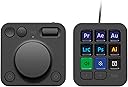
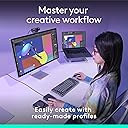
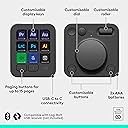
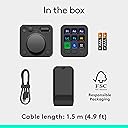
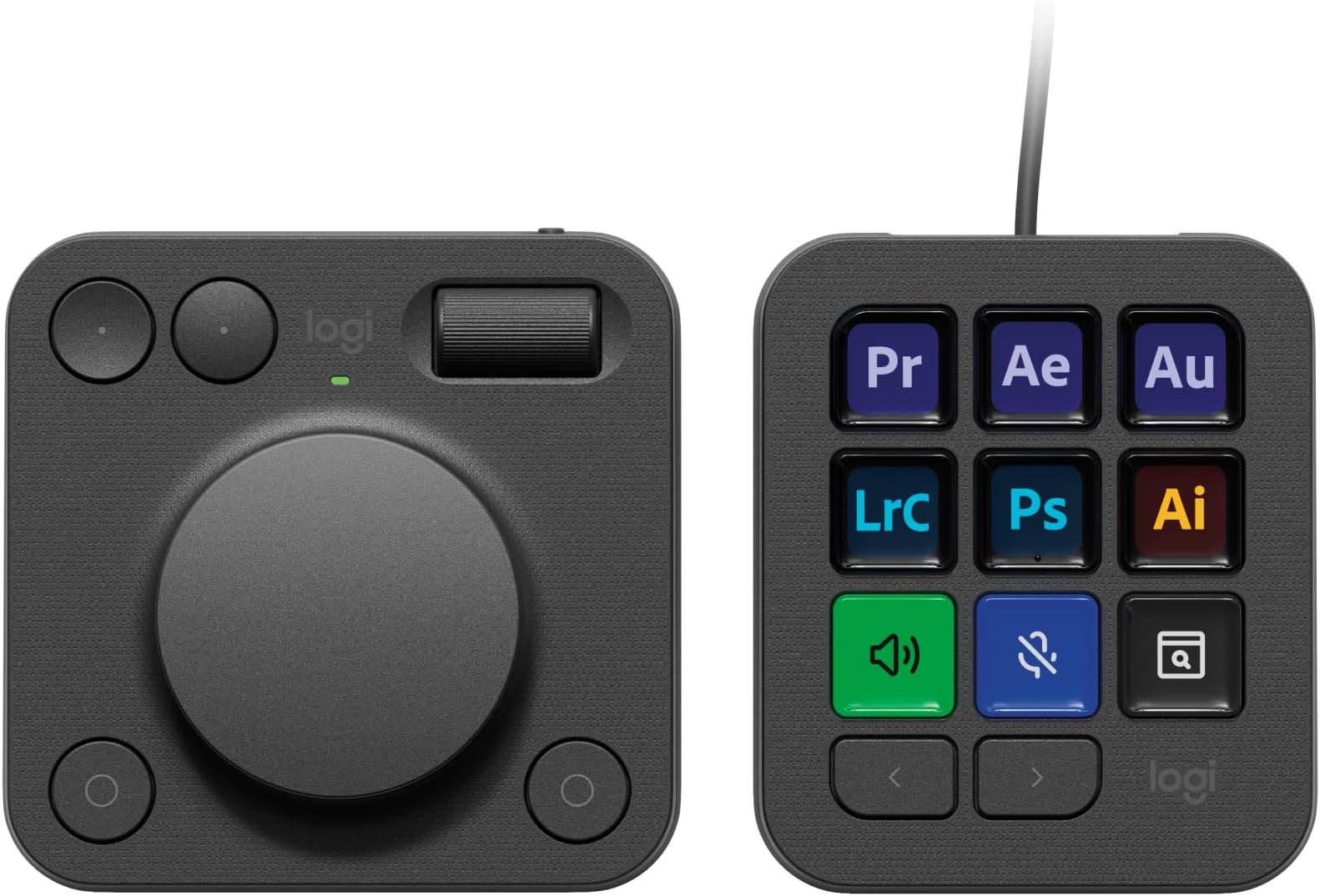
The Logitech MX Creative Console is a programmable keypad designed for creative professionals, featuring 9 customizable full-color LCD keys and a premium aluminium dial for precise control. It offers native integration with popular apps like Adobe Photoshop, Premiere Pro, Lightroom, Zoom, and Spotify, enabling streamlined workflows. Users can customize up to 15 keypad pages, create Smart Actions, and personalize icons. The console is built with eco-friendly materials, including up to 72% post-consumer recycled plastic, and includes a 3-month Adobe Creative Cloud All Apps membership.


| ASIN | B0DDPZK8SV |
| Best Sellers Rank | 12,283 in Computers & Accessories ( See Top 100 in Computers & Accessories ) 174 in Keyboards (Computers & Accessories) |
| Customer reviews | 3.6 3.6 out of 5 stars (206) |
| Delivery information | We cannot deliver certain products outside mainland UK ( Details ). We will only be able to confirm if this product can be delivered to your chosen address when you enter your delivery address at checkout. |
| Item model number | 920-012931 |
| Language | English |
| Product Dimensions | 6.9 x 13.5 x 27.5 cm; 580 g |
| Rated | Unknown |
| Release date | 5 Nov. 2024 |
P**R
Excellent product
Excellent time saving console, just with a few buttons, your well in on your work. Settings for Lightroom classic & Photoshop are a great help & save time with a fine control with the dial making it much easier to fine adjust your edits.
A**R
Good build quality but not for me
Didn’t really work for me. Build quality and operating system fine. But fit into my workflow
K**N
Useful for creative editing applications
I've read many reviews and seen people savagely criticising this; I have no idea why. Yes, they are plastic, but they are well-made and work well. The Options+ software supports them like the other, more modern versions of Logitech's devices. I'd love more out-of-the-box support for apps (hence the lost star), but it supports office and creative apps (Lightroom in my case) pretty well. Is it as universal as my Stream Decks? No. Does it fulfil needs that the Stream Decks can't? Yes, the dial and roller are very useful indeed.
T**R
Buggy and or Faulty
I think Logitech has rushed this product out given the lack of support for a lot of common software packages people in the creative industries might use in addition to Adobe Creative Suite. I spent a good bit of time setting up three pages on my button unit with the 1st being most common used stuff like play, mute, vol down, vol up, etc and then created custom icons for each button and it seemed to work ok for a few minutes with the other two pages being one for application launching and the other for web shortcuts. The first page just started acting up doing weird stuff such as only illuminating one button at a time and if I pressed on a unilluminated button it would then turn on but if I switched pages and came back to the first one again the fault / bug reappeared again. I tried setting up new profiles and re-doing my setup but the 1st page still remained super buggy (2nd and 3rd pages operated perfectly). The firmware and software are all up to date as it everything software wise on the computer it's connected to. In regards to the dial I found it way too sensitive and not precise at all and Logitech missed a trick by not having it "click" in degrees instead of what it's like now. I use Photoshop everyday and I found the dial honestly to be a waste of time and no faster than my usual workflow... perhaps overtime I could get used to it but honestly I can never see it being faster than using keyboard shortcuts and the mouse especially with my MX Master mouse scroll wheel. In combination of the dial and keypad the keypad was also a bit buggy by not always being that repsonsive if at all at opening the right button set for whatever application was open or holding open Photoshop button set sometimes when I was flicking over to Illustrator or back to Windows etc. Don't like the stand / angle the buttons sit at. I am a massive Logitech fan and I am onto my 4th MX Master mouse for example but I feel they really dropped the ball on this product and it's with disapointment as I was excited about this product that it's going back to Amazon tomorrow for a refund.
M**N
highly recomended for use with Premiere
Had to eventually bin my Loupedeck and bought this, I think I like it more than the loupedeck, I use it along with a contour shuttle , perfect video editing setup for Premiers
A**R
An extremely useful work in progress
There is massive buzz about this device on YouTube which I'm sure Logitech paid a high price for but after using this device for the last few days I am starting to love it, currently there are no profiles for alot of the software I use (C4D, Resolve) however make your own is not hard. I've only scratched the surface of what it can do and its bring a nice satisfaction to my work. I think its definitely worth the price.
R**H
Wake up issues
Still undecided on this long-term user of the MX keys and the MX mouse I was really hoping this would be fantastic functionality is there as he is of use but for some reason the keypad does not wake up with the computer. I don’t know why I have to disconnect the USB and reconnect it every time on my Mac M4 pro mini.
V**V
It's good value for money, if you use it enough
The Logitech MX Creative Console is a great device. I mostly use it for editing in Lightroom and DaVinci Resolve. In Lightroom it makes me work faster and easier, but in DaVinci it does not help all that much. Maybe because they have to integrate the device into the program a little bit better. The 9 buttons are easy to customize and the software is intuitive. It's lightweight, so you can bring it with you wherever you go. Long story short if you use creative apps on your PC or laptop it's a great value for money and can save you a lot of time and hassle.
T**I
Geweldige tol en extensie for creators
Wat een super handige toevoeging voor iedere creator! Er zijn zoveel mogelijkheden dat ik soms door de boom het bos niet meer zie. Niet dat dit nou echt een minpunt is per se. Een enig "issue" is wel (mogelijk omdat het product vrij nieuw is) dat het console af en toe uitroeptekens aangeeft en daarbij niet goed werkt met sommige programma’s waarbij die daarvoor wel werkte, maar dat kan een softwarematig dingetje zijn waarbij simpelweg een update nodig is..
D**K
Brak precyzji, kołyszące się klawisze, brak odbiornika BT w komplecie - nie polecam.
Po pierwsze - założenie, że każdy użytkownik ma zintegrowany moduł BT w komputerze, i w efekcie konieczność dokupienia odbiornika kosztującego ~70 zł do urządzenia kosztującego ponad 700 zł, to skrajna bezczelność ze strony Logitecha. Po drugie - klawiatura ma beznadziejne klawisze. Nie mają wyraźnego, liniowego skoku, mocno się kołyszą, wymagają mocnego wciśnięcia dokładnie na środku, inaczej po prostu się przechylają, nie zawsze rejestrując wciśnięcie. Scroll i pokrętło mają tak precyzyjnie dobrany opór, by nie być ani szybkie, ani precyzyjne. Konsolę kupiłem do edycji w Davinci Resolve, ale po prostu się do tego nie nadaje. Pomysł jest spoko, materiały też ujdą, ale wykonanie całości niestety ssie. Osobiście swoją konsolę zwróciłem i niestety polecić nie mogę.
R**L
Logitech MX Creative Console - not develop well
I received it today and tried to install it, but unfortunately, the application switches to the web browser, and I wait forever. I can't install it and use it properly. I found a lot of people on the forums with similar problems. Well, I'll try it on a different computer, maybe sometime. I logged into the Logitech website and asked for help using the chat, and they suggested I return the product – lol. Apparently, they don't care.
S**N
Excellent produit
Fonctionne très bien ! L'installation du Logitech - MX Creative Console, keypad Programmable avec 9 Touches demande de lire les consignes afin de l'exploiter au mieux
S**.
100 von 10
mich haben Streaming Decks schon immer fasziniert, doch waren mir alle bisher bekannten Produkte zu unproduktiv. Ich habe mir dieses Produkt NICHT für Foto Shop, sondern zur Steigerung meiner Produktivität. Sei es Excel, PowerPoint, Word, 3D Druck oder technische Zeichnungen. Sprich ich habe das GEN 1 Produkt abseits seines Hauptzwecks gekauft und ich wurde absolut nicht enttäuscht. Es hat allein jetzt kurz nach Release mehr Funktionen und Möglichkeiten, als ich vermutet habe. Das Produkt hat auch seine negativen Seiten, welche ich nicht außer Acht lassen möchte. Nachdem es ein Logitech untypisches Produkt und dann noch in der ersten Generation ist abzusehen, dass viele Funktionen nicht oder nur eingeschränkt funktionieren (So wie es bei fast allen GEN 1 Produkten im aktuellen Zeitalter der Fall ist). MX Creative Keypad: Pro: - Displays sind schärfer als angenommen - aktuelle Werte wie Lautstärke, Uhrzeit, Kalenderwoche sind sichtbar - Farben (Hintergrund, Text, Symbole) und Abbildungen sind frei wählbar Einstellung und Hinterlegung der Befehle: Es gibt weit aus mehr Einstellungen als gedacht. von Mediasteuerung bis hin zur Eingabe vorgefertigte Texte. Alle Grundeinstellungen habe ich euch in die Abbildungen eingefügt. Es sind so viele, dass ich die nicht alle abtippe 😂. Was mich am meisten überrascht hat, war die unnormal einfache Einstellung und die fast Intuitive Einfügung meines Philips Hue Zuhauses. Negatives: - Die meisten meiner Abbildungen habe ich selber machen müssen, da diese meist grafisch in unterirdischer Qualität erstellt worden sind. Dennoch erstellt Logitech die Abbildungen der Programme, was ein unglaublich hilfreicher Schritt sein kann. Ich wollte dennoch eine scharfe Abbildung und habe daher aus Google Abbildungen heruntergeladen oder diese selber erstellt und auf die Tasten gelegt. Wolla, geile Taste. - Zeitaufwand ist super hoch. Für meinen Prusa Slicer habe ich 2 Seiten a 9 Tasten belegt. Die Shortcuts zu erstellen dauerte nicht lange, dafür habe ich die Abbildungen der Tasten alle selber erstellt und daher 3-4 Stunden gebraucht um alle 18 Tasten so einzustellen wie ich es haben möchte. MX Creative Dialpad: ich habe mich Stunden / Tage / wochenlang über dieses Produkt informiert und empfand das Dialpad als weniger interessant. Doch weiiiiiiit gefehlt. Das Ding ist unnormal praktisch. Pro: - zwei Drehregler, die super steuerbar sind. - konvexe und konkave Tasten sind super bedienbar. - jede der Tasten ( auch die unten Rechts) sind frei wählbar - egal wo ich mich befinde, ich habe Zugriff auf den Action Ring und kann alles damit regeln. Con: - Technisch wäre der große Drehregler auch als Drehknopf möglich. Damit könnte man den Action Ring ( in der Theorie) öffnen, mit dem Drehregler auswählen und auch bestätigen. Solch eine Funktion würde ich mir bei einer GEN 2 wünschen Meine Meinung: Ich finde das Produkt für diesen Preis unglaublich gerechtfertigt. Ich würde es auch für mehr kaufen, da es meine Produktivität erheblich steigert. Ich liebe es mich damit zu beschäftigen. In Zukunft werde ich meine Tastatur nur noch zum Tippen nutzen. Kein copy and paste mehr, keine Duplizierung. Ab sofort nur noch mit der MX Creative weil es einfach schneller und flüssiger in den Flow passt. Zoom, scrolle werde ich nur noch mit dem Dialpad machen und habe dazu noch viel mehr Regelungen, welche unglaublich schnell und einfach zur Verfügung stehen. Es ist das beste Produkt in meinem Homeoffice!!!! Hier noch ein paar Einfügungen: - GRÖßTES CON: bei der Keypad ist es nicht möglich einzelne Tasten auf andere Seiten zu Projektieren. - Beide Geräte sind frei einstellbar, ob Funktionen in einer Applikation oder überall anders gleich sein sollen - Man kann, wie andere das Gegenteil behaupten, schrittweise Zoomen. Hierfür muss man sich nur reinfuchsen und die passenden Einstellungen finden 😉 OS > Mausscrollen > Control horizontal and vertical mouse > auf und ab > haken bei: Beim Scrollen Modifikator hinzufügen > CTRL > Speichern. Anderenfalls kann man ihn auch als teuren Briefbeschwerer nutzen 😉 - Es ist und bleibt ein GEN 1 Produkt. Daher gibt es nicht viele Einbindungen für Standardprogramme wie Excel, word, Pptx und co. Aber diese währen eh auf den Workflow anderer angesetzt. Daher macht die Einstellungen selber. Investiert ein Wochenende damit, somit habt ihr es perfekt auf euch zugeschnitten. - Bitte Keine Beschwerden über 2024 und Kabelbindung und Batterien. Logitech hat euch damit einen super großen Gefallen getan. Schaut euch doch mal die Technik an. Das Keypad hat 9 helle Tasten. Mit einem Akku würde es jeden dritten Tag geladen werden müssen und das würde mich persönlich super Stören, auch wenn sonst auch alles in meinem Homeoffice kabellos ist. Was ist nun der Unterschied vom einem Akku und Batterien? - Ich bin kein Fachmann, aber ich weiß, dass Akkus bei Produkten, welche Sleep Modes haben deutlich länger halten. Daher müssen wir diesen ebenfalls nicht all zu oft welchseln. NACHTRAG: ich wollte heute eine Arbeitsumgebung für Fusion 360 erstellen. Doch die Mx Creative erkennt das Programm nicht. Meine Vermutung: wenn das Programm geöffnet ist, steht im Menü unten (Maus liegt auf dem Programm und drückt nicht auf das Programm) und da steht nicht der Programmname. Dennoch arbeite ich viel mit Fusion und muss eine Lösung finden. Dennoch ist das Gerät super
Trustpilot
1 month ago
2 weeks ago