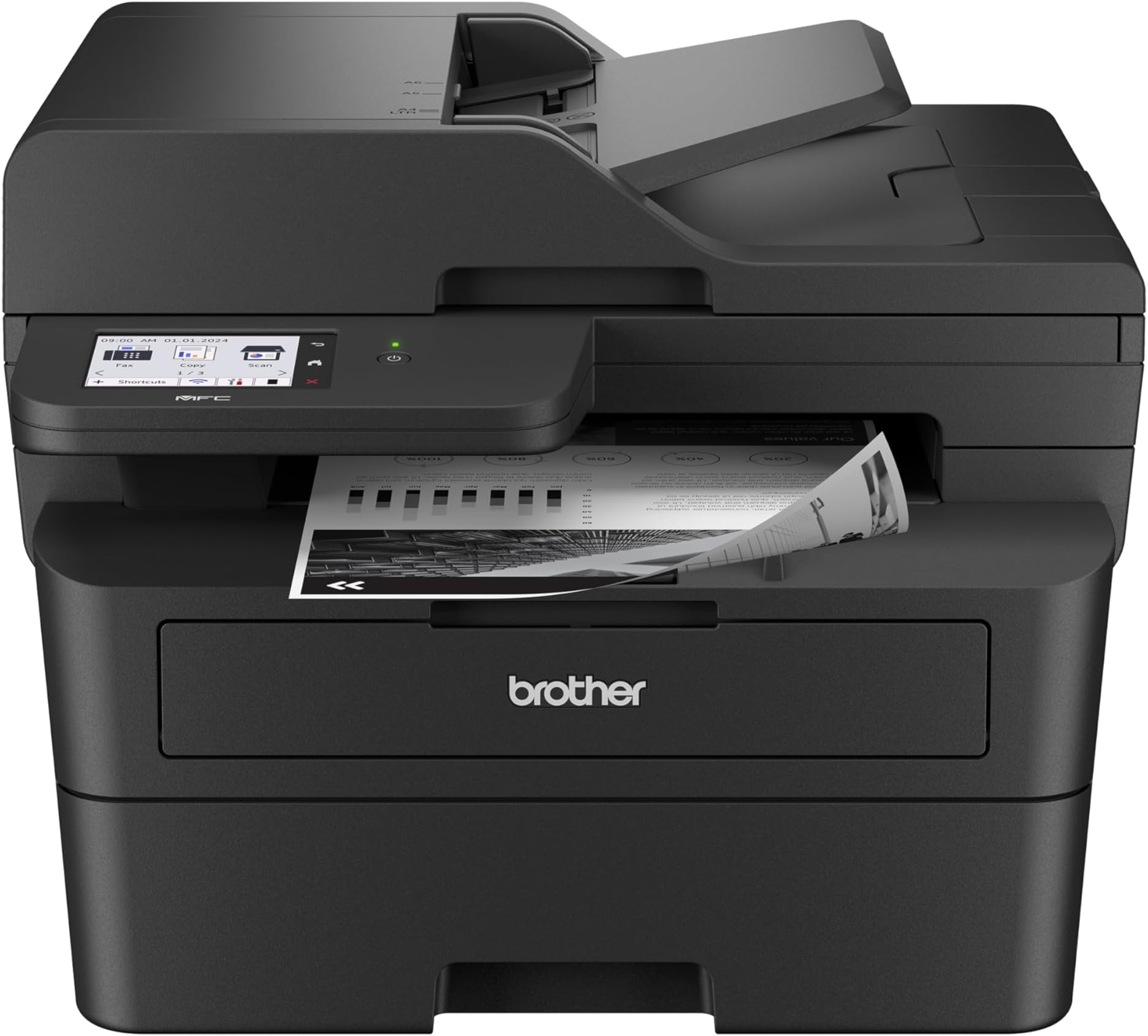
⚡ Print smarter, connect faster, save greener — the ultimate all-in-one for the modern workspace.
The Brother MFC-L2900DW is a compact, professional-grade monochrome laser printer designed for small businesses. It delivers high-speed printing at 36 pages per minute, supports automatic duplex printing and scanning, and offers versatile connectivity options including dual-band wireless, Ethernet, and USB. Featuring a 3.5-inch touchscreen and cloud integration, it streamlines document workflows while reducing energy consumption by 22%. This all-in-one device combines printing, scanning, copying, and faxing in a durable, easy-to-use package backed by Brother’s reliable support.


| ASIN | B0D9ZMLK67 |
| Additional Printer functions | All In One, Copy, Scan |
| Best Sellers Rank | #9,745 in Office Products ( See Top 100 in Office Products ) #137 in Computer Printers |
| Color Depth | 1 bpp |
| Compatible Cartridge | TN830, TN830XL, TN830V |
| Compatible Devices | IPhone, Laptops, PC, Smartphones, Tablets |
| Control Method | Touch |
| Controller Type | Android |
| Customer Reviews | 4.3 4.3 out of 5 stars (381) |
| Date First Available | September 12, 2024 |
| Dual-sided printing | Yes |
| Duplex | Automatic |
| Global Trade Identification Number | 00012502674085 |
| Hardware Interface | Ethernet, USB 2.0 |
| Included Components | AC Power Cord and Telephone Line Cord, DR830 Drum Unit (15,000 pages), MFC-L2900DW Printer, Product Safety Guide, Reference Guide, Warranty Card, Quick Setup Guide, Starter Black Toner Cartridge (700 pages) |
| Initial page print time | 6.9 Seconds |
| Ink Color | Black |
| Item Weight | 26 pounds |
| Item model number | MFCL2900DW |
| Manufacturer | Brother |
| Max Input Sheet Capacity | 250 |
| Max copy resolution black-white | 600 x 600 dpi |
| Max copy resolution color | 600 x 600 dpi |
| Maximum Black and White Print Resolution | 1200 x 1200 dpi Dots Per Inch |
| Maximum Color Print Resolution | 1200 x 1200 dpi Dots Per Inch |
| Maximum Media Size | 8.5 x 14 inch |
| Maximum copies per run | 250 |
| Memory Storage Capacity | 256 MB |
| Model Series | MFC-L |
| Number of Trays | 1 |
| Number of USB 2 Ports | 1 |
| Print media | Paper (plain) |
| Printer Ink Type | Laser Toner |
| Processor Count | 1 |
| Product Dimensions | 16.1"D x 12.5"W x 16.6"H |
| Scanner Type | Flatbed |
| Series Number | 2900 |
| Sheet Size | 8.5X14 Inches |
| Total Ethernet Ports | 1 |
| Total USB Ports | 1 |
| UPC | 012502674085 |
| Warranty Type | Limited |
J**W
Amazing Laser Printer, Flawless Wireless Setup
An amazingly simple, flawless installation. I hate installing my printers because they usually require a lot of time and effort to get the wireless printer recognized by all devices , to get the scan feature properly set up and all the other things that most people are tortured with when setting up a new printer. The Air Print feature works flawlessly with my Windows notebook, my iPhone and my iPad. This is a quality made, durable printer that Brother is known for but this models particularly effortless setup , sharp printing quality with crisp, clear B&W copies is the best that I have seen in laser printers at this affordable price. I spent hours researching the different Brother printers and decided this model was the best based on ratings, reviews and online professionals. I love this printer and it’s so quiet when printing or scanning that I can’t even hear it printing out the document. I strongly recommend this model for those who are looking for a quality laser printer, scanner, fax, all in one machine. This model works better than more expensive laser machines and you will enjoy the simplicity of its wireless setup and never need to think about having quality printer performance ever again. There is no mandatory toner subscription plan which is a plus as you can buy Brother OEM toner or off brand compatible toner whenever you want to purchase them. It comes with a starter OEM toner that does 700 pages and there are high performance 3000 page toner’s that are available to buy once the starter cartridge is used up. Great high quality product in a world of other manufacturers garbage printers.
S**G
Very user friendly!
Just set this printer up, a little concerned as reviewers had some issues, plus I have only had HP printers my entire life! But I will no longer tolerate the HP ink bullying! My 25 yo hp laser just wouldn't do wifi printing so I chose this Bro...$50 more for the 3.5" display but the generic toner cartridge covered it. Had no connection issues at all, didn't download any apps, I just hooked it to my wifi and it showed up on my phone printer list and printed fine without any new apps . Used a USB to the HP Windows 11 computer for the registration etc, opted out of all the marketing and sharing bs, which they weren't happy about..just added new device, made it default and away we went, printing fine. It is a really big footprint but worth it, very pleased with this first run, seems like a workhorse and so happy I won't have to worry about dried up cartridges and the HP ink police looking over my shoulder. Hopefully no future connection etc issues but will update.
A**R
Trust Your Brother (MFC-L2900DW Printer that is)!
Wonderful monochrome laser printer that scans, prints, and faxes documents two-sided! It is very quiet once you put it in Eco mode (otherwise it sounds like a truck). It prints fast with one-sided documents and is totally reliable! The only flaw is that the fax is set for one-sided faxing as the default and I often print two-sided documents so if I forget to switch to 2-sided before faxing, I have to re-fax. It is definitely an upgrade from the Brother MFC 7860DW I came from (it was ghost printing, and I wasn't able to clean it to remove the ghost printing even after changing the drum and toner). I recommend this printer as it is reliable as with most Brother products I have used. It was roughly the same price as the Brother MFC 7860DW I purchased more than 8 years ago, with a little bit pricier due to the extra toner that came with it, but it is worth it considering the cost of Brother toner these days.
M**P
Hardware is great. Operation is OK. Support is great, if you can get a good person.
The hardware is solid, but there are some quirks. Like there at 3 buttons that operate the display touch screen that are buttons and not part of the screen and are not lit. The NIC does NOT have a physical light to know if it is operational... Quirky, but solid printing and scanning. The still is still too complicated in 2026. Brother spends more time marketing products during the install than focusing on what you really need. This is a network printer and yet I still had to manually install the Ethernet drivers and reinstall the WiFi drivers. in 2026, the printer should be able to easily change from WiFi to Ethernet. But alas, NO. This is a budget network printer so there is that. You get what you pay for. Solid printing and scanning. Spotty setup and support. Good luck.
C**S
Buggy. Low Quality.
This printer was relatively easy to set up and printed one and two sided jobs OK. I have it connected via wired Ethernet. Note that it's plugged in directly to an AC outlet with no DC adapter. All of a sudden the printer voice is warning about a "battery low" condition. Huh? What battery? No help from the Brother website about this nonsense. I'll donate this junk to charity after finding a quality replacement.
J**O
Great Printer and Scanner
I had a hard time getting it to work with Windows 11. It turns out the printer was not connected to the Wifi and I had to turn it on and off. Once that initial difficulty was taken care of, it has been smooth sailing. I have the printer connected cordless to my computer and it conveniently prints and scans for me. Very happy with the Brother printer and would recommend it!
R**S
The Brother MFC-L2900DW has exceeded my expectations! It’s a compact, yet powerful all-in-one printer that handles printing, scanning, copying, and faxing effortlessly. The print quality is sharp and professional, and the speed is perfect for my home office needs. I really appreciate the wireless connectivity—it works flawlessly with both my laptop and phone. Setting it up on Wi-Fi was simple and quick. The automatic duplex printing is a nice bonus and saves paper without extra effort. Overall, this printer is fast, quiet, and very reliable. If you’re looking for a cost-effective all-in-one laser printer with dependable performance, the MFC-L2900DW is a great choice. Highly recommended!
D**Z
Really good printer. Print quality is excellent and printer is very quiet compared to what I'm used to. My main reason for getting this printer was the fact it has duplex scanning from the feeder. Also scanning in color could come in handy for any scans I need to keep in digital format. Setup of the printer was fairly straight forward although was a little confusing when setting the app on a 2nd phone. You just need an option to register printer rather than install it again. Printing from the phone is great as well.. very quick.
T**N
I paired this printer with my Apple Mac Studio. The set up was seamless and the instructions were easy to follow. Unboxing to printing took approximately 10 minutes. I was hesitant about purchasing a brother printer for some reason but I am impressed with the quality, the intuitive setup and functionality. I’m a fan!
S**A
So far, it works really well and meet my expectation for sure! I like the fact that it can scan in colour and scan in duplex (double-sided) too! Really convenient and easy to use.
J**V
I like this printer because it's Coste effective for a student that need to print a lot of papers. Also because it's a Lazer printer when you highlight, it's doesn't smear
Trustpilot
1 month ago
2 weeks ago